
XIAOMI AI Translator
Instrukcja obsługi tłumacza AI Xiaomi
Model: AI Translator
1. Wprowadzenie
This manual provides comprehensive instructions for the setup, operation, maintenance, and troubleshooting of your Xiaomi AI Translator. Please read this manual carefully before using the device to ensure optimal performance and longevity.

Rysunek 1: Xiaomi AI Translator device. This image shows the front of the translator, highlighting its minimalist design, central control buttons, and speaker grille at the bottom.
2. Funkcje produktu
- Obsługa wielu języków: Translates between 14 languages, covering over 170 countries and districts. Supported languages include Chinese, English, Japanese, Korean, French, German, Spanish, Russian, Portuguese, Italian, Dutch, Danish, Finnish, and Swedish.
- Zaawansowana technologia sztucznej inteligencji: Utilizes Microsoft voice technology for natural language understanding and accurate mechanical translation, with self-correction capabilities.
- Versatile Assistant Functions: Beyond translation, it acts as a personal assistant for tasks such as music playback, weather updates, time checks, news broadcasts, calculator functions, voice reading, item explanations, story telling, exchange rate conversions, encryption, and relative salutations.
- Redukcja hałasu: Equipped with technology for clearer audio reception and more precise voice recognition in various environments.
- Przenośna konstrukcja: Features a pocket-sized, lightweight (approximately 63g), and durable aluminum alloy body with a curved design.

Rysunek 2: Language coverage map. This image illustrates the global reach of the 14 supported languages, indicating the extensive usability of the translator across various regions.

Rysunek 3: AI Translator technology. This image highlights the core technologies, including Microsoft voice and translation services, that power the device's accurate translation capabilities.

Rysunek 4: Assistant functions. This image displays a range of additional features, demonstrating the device's utility beyond simple translation, acting as a comprehensive personal assistant.
3. Części i elementy sterujące
Familiarize yourself with the various parts and controls of your Xiaomi AI Translator:
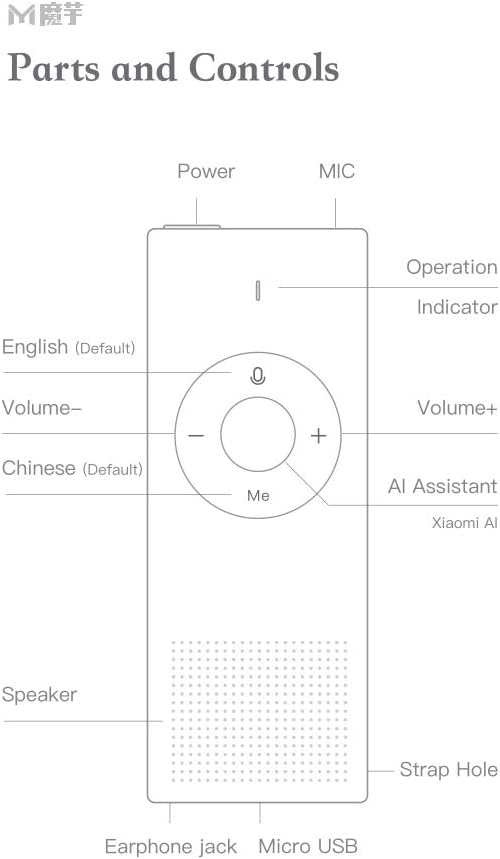
Rysunek 5: Parts and Controls. This diagram labels all external components and buttons of the Xiaomi AI Translator, essential for understanding its operation.
- Przycisk zasilania: Located at the top, used to turn the device on/off and for screen wake/sleep.
- MIC (Mikrofon): Located at the top, for voice input.
- Wskaźnik działania: Light indicator for device status.
- English (Default) Button: Press and hold to speak in English (or the currently selected left-side language).
- Głośność - Przycisk: Zmniejsza głośność.
- Chinese (Default) Button: Press and hold to speak in Chinese (or the currently selected right-side language).
- Głośność + przycisk: Zwiększa głośność.
- AI Assistant (Xiaomi AI) Button: Activates the AI assistant for various functions.
- Głośnik: Located at the bottom, for audio output.
- Otwór na pasek: Do przymocowania paska na nadgarstek lub smyczy.
- Gniazdo słuchawkowe: Do podłączenia słuchawek.
- Port micro USB: Do ładowania urządzenia.
4. Konfiguracja
4.1 Pierwsze ładowanie
Before first use, fully charge the Xiaomi AI Translator. Connect the device to a power source using the provided Micro USB cable. The operation indicator will show charging status.
4.2 Włączanie/wyłączanie
- Włączanie: Naciśnij i przytrzymaj przycisk zasilania, aż urządzenie się włączy.
- Aby wyłączyć: Naciśnij i przytrzymaj przycisk zasilania, aż pojawi się monit o wyłączenie zasilania, a następnie potwierdź.
- Wybudzanie/uśpienie ekranu: Briefly press the Power button to wake or put the screen to sleep.
4.3 Language Selection and Network Connection
Upon first power-on, you may be prompted to select your preferred interface language and connect to a Wi-Fi network. A stable internet connection is required for translation functions.
- Follow the on-screen instructions to select the device's operating language.
- Navigate to the Wi-Fi settings and connect to an available network.
- Ensure the device's firmware is up to date for optimal performance. Check for updates in the settings menu.
5. Instrukcja obsługi
5.1 Basic Translation
The Xiaomi AI Translator supports two-way translation between selected languages.
- Wybierz języki: On the device screen, select the two languages you wish to translate between. For example, set the left-side language to English and the right-side language to Chinese.
- Speak in Left-Side Language: Naciśnij i przytrzymaj angielski (domyślny) button (left button on the control panel) and speak clearly into the MIC. Release the button when you finish speaking. The device will translate and speak the text in the right-side language.
- Speak in Right-Side Language: Naciśnij i przytrzymaj Chinese (Default) button (right button on the control panel) and speak clearly into the MIC. Release the button when you finish speaking. The device will translate and speak the text in the left-side language.
5.2 Using the AI Assistant
Naciśnij AI Assistant (Xiaomi AI) button (central button labeled "Me") to activate the AI assistant. You can then ask questions or issue commands for various functions:
- "Odtwórz muzykę."
- "What's the weather like today?"
- "Tell me the time."
- "Read the news."
- "Open calculator."
- "Explain [item name]."
- "Tell me a story."
- "What's the exchange rate for USD to EUR?"
5.3 Regulacja głośności
Użyj Volume + I Tom - buttons on the control panel to adjust the playback volume.
5.4 Scenariusze użycia
The Xiaomi AI Translator is designed for various situations:

Rysunek 6: Multiple usage purposes. This image illustrates diverse applications of the translator, from travel and business to academic use and daily interactions like ordering food or checking into a hotel.
6. Konserwacja
- Czyszczenie: Przetrzyj urządzenie miękką, suchą ściereczką. Nie używaj płynnych środków czyszczących ani materiałów ściernych.
- Składowanie: Przechowuj tłumacz w chłodnym, suchym miejscu, z dala od bezpośredniego światła słonecznego i ekstremalnych temperatur.
- Pielęgnacja baterii: Aby przedłużyć żywotność baterii, unikaj częstego całkowitego rozładowywania urządzenia. Ładuj je regularnie, nawet jeśli nie jest używane przez dłuższy czas.
- Aktualizacje oprogramowania: Periodically check for and install software updates to ensure optimal performance, new features, and security enhancements.
7. Rozwiązywanie Problemów
| Problem | Możliwa przyczyna | Rozwiązanie |
|---|---|---|
| Urządzenie nie włącza się. | Niski poziom naładowania baterii lub awaria urządzenia. | Charge the device for at least 30 minutes. If it still doesn't power on, contact customer support. |
| Tłumaczenie jest niedokładne lub powolne. | Poor internet connection, unclear speech, or outdated software. | Ensure a stable Wi-Fi connection. Speak clearly and at a moderate pace. Check for and install software updates. |
| Brak dźwięku z głośnika. | Volume too low or speaker malfunction. | Increase the volume using the Volume + button. Ensure no headphones are connected if you expect sound from the speaker. |
| Urządzenie zawiesza się lub przestaje reagować. | Błąd oprogramowania. | Perform a forced restart by pressing and holding the Power button for approximately 10-15 seconds until the device restarts. |
8. Specyfikacje
| Marka | XIAOMI |
| Model | Tłumacz AI |
| Numer części | ART4847267255513BP |
| Typ produktu | Elektronika |
| Obsługiwane języki | 14 (Chinese, English, Japanese, Korean, French, German, Spanish, Russian, Portuguese, Italian, Dutch, Danish, Finnish, Swedish) |
| Waga | Około 63 g (2.22 uncji) |
| Wymiary (dł. x szer. x wys.) | Około 150 mm x 40 mm x 10 mm (5.91 cala x 1.57 cala x 0.39 cala) |
| Łączność | Wi-Fi (for translation), Micro USB (for charging) |
| Tworzywo | Aluminum Alloy Cover |

Rysunek 7: Portable design and dimensions. This image demonstrates the compact size of the translator, fitting easily into a pocket, and provides key physical specifications.
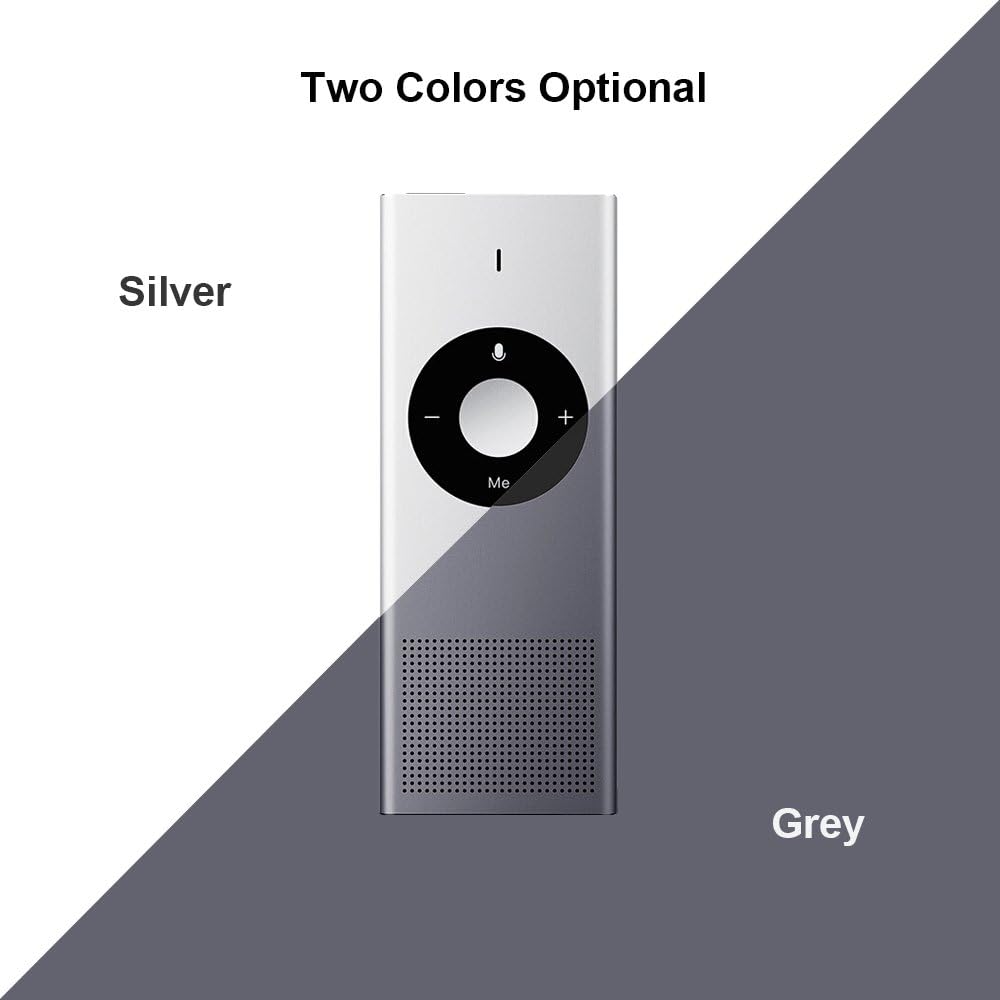
Rysunek 8: Available colors. This image displays the two color options for the Xiaomi AI Translator: Silver and Grey.
9. Gwarancja i wsparcie
Aby uzyskać informacje dotyczące gwarancji, pomocy technicznej lub zapytań serwisowych, zapoznaj się z oficjalną stroną Xiaomi webOdwiedź witrynę lub skontaktuj się z lokalnym autoryzowanym dealerem. Zachowaj paragon jako dowód zakupu na wypadek roszczeń gwarancyjnych.
Producent: Xiaomi
ASIN: B07FX88LFZ
Available for purchase since: 20 sierpnia 2018 r.
Ask a question about this manual
Ask about setup, troubleshooting, compatibility, parts, safety, or missing instructions. Manuals+ will review the question and use this page’s manual context to help answer it.