
1. Wprowadzenie
Dziękujemy za zakupasing the sainlogic GBlife PT3378 Wireless Weather Forecast Station. This device provides accurate indoor and outdoor temperature and humidity readings, weather forecasts, moon phases, and atmospheric pressure. It features a clear display, a wireless outdoor sensor, and a convenient USB charging port. Please read this manual carefully to ensure proper setup and operation.
2. Zawartość opakowania i opis produktuview
2.1 Zawartość opakowania
- GBlife PT3378 Main Unit (Weather Station Display)
- Bezprzewodowy czujnik zewnętrzny
- Zasilacz do jednostki głównej
- Instrukcja obsługi
2.2 Produkt powyżejview
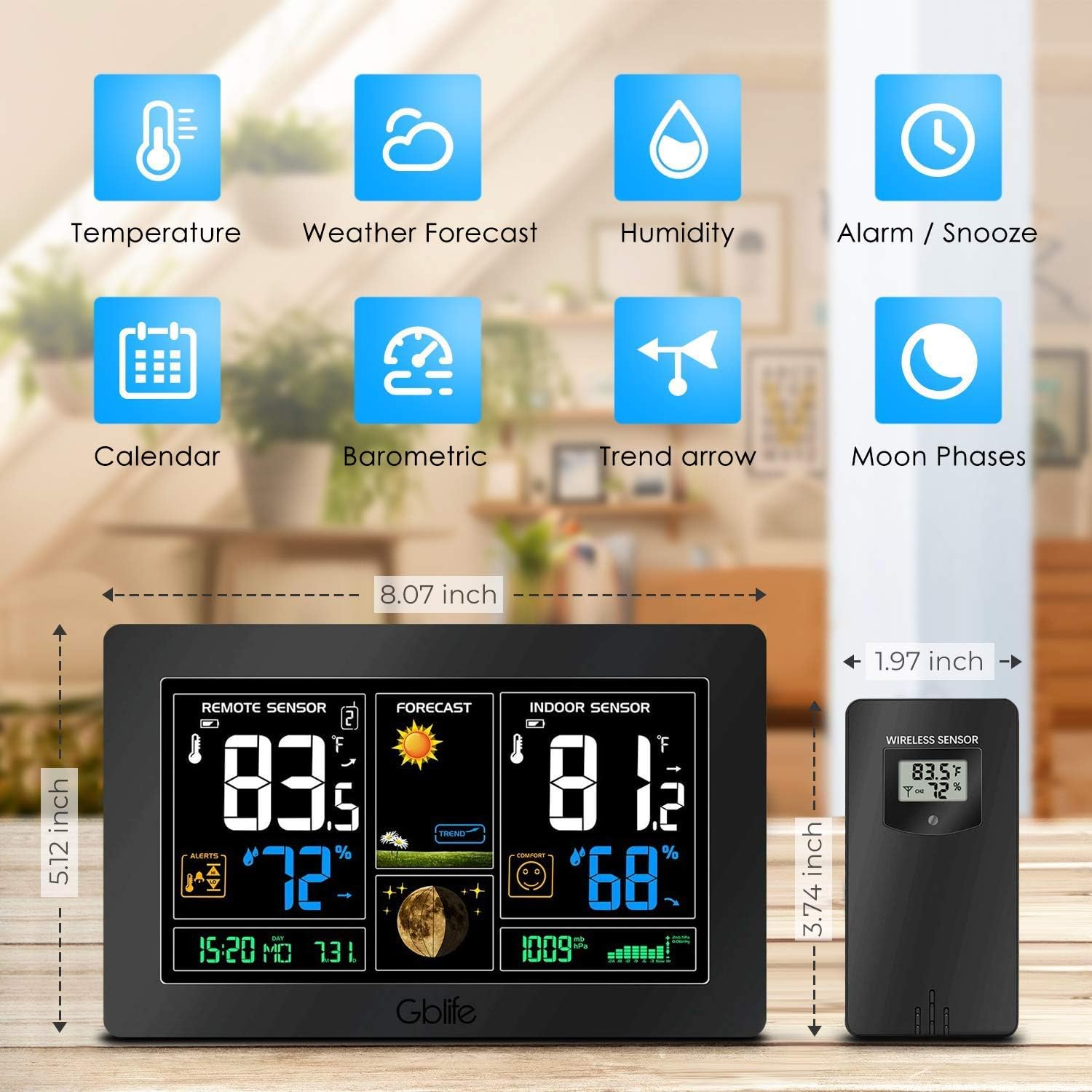
Obraz 2.1: Nadview of the GBlife PT3378 Weather Station highlighting its main features including temperature, weather forecast, humidity, alarm/snooze, calendar, barometric pressure, trend arrow, and moon phases.

Obraz 2.2: Szczegółowy view of the GBlife PT3378 display showing remote temperature, remote humidity, time/date, weather forecast, weather trend, moon phase, indoor temperature, indoor humidity, comfort level, and atmospheric pressure. The image also labels the side buttons for time setting, alarm clock, up/down, alert setting, brightness adjustment, max/min value, and mute.
3. Przewodnik konfiguracji
3.1 Włączanie jednostki głównej
- Podłącz dołączony zasilacz do portu DC 5 V z tyłu jednostki głównej.
- Podłącz adapter do standardowego gniazdka ściennego. Wyświetlacz się zaświeci.
- Optionally, insert 3 x AAA batteries (not included) into the battery compartment for backup power in case of power outage.
3.2 Installing Batteries in the Wireless Outdoor Sensor
- Otwórz komorę baterii z tyłu czujnika bezprzewodowego.
- Włóż 2 baterie AA (nie ma ich w zestawie), zwracając uwagę na prawidłową biegunowość (+/-).
- Dokładnie zamknij komorę baterii.
3.3 Parowanie czujnika
The main unit and wireless sensor should automatically pair upon initial power-up. If pairing does not occur:
- Ensure both the main unit and sensor have power.
- Press and hold the 'CH' button on the main unit for 3 seconds to initiate a search for the outdoor sensor.
- The outdoor temperature and humidity should appear on the main unit's display.
3.4 Umiejscowienie czujnika

Obraz 3.1: Illustration of wireless data transmission between the indoor receiver (main unit) and the remote outdoor sensor. The sensor should be placed outdoors within range of the main unit.

Obraz 3.2: The main unit can be placed on a table or mounted on a wall. The outdoor sensor is shown mounted on an exterior wall, indicating suitable placement for outdoor readings.
Place the wireless outdoor sensor in a dry, shaded location away from direct sunlight and precipitation to ensure accurate readings. The transmission range is up to 50 meters (150 feet) in an open area. The main unit can be placed on a tabletop using its integrated stand or mounted on a wall.
4. Instrukcja obsługi
4.1 Wyświetlanie informacji
Wyświetlacz jednostki głównej zapewnia kompleksowy przeglądview of weather conditions:
- Czujnik zdalny: Wyświetla temperaturę i wilgotność na zewnątrz.
- Prognoza: Shows weather forecast icons (sunny, cloudy, rainy, etc.) and weather trend.
- Czujnik wewnętrzny: Displays indoor temperature and humidity, along with a comfort level indicator.
- Data i godzina: Aktualny czas i data.
- Faza Księżyca: Aktualna faza księżyca.
- Ciśnienie atmosferyczne: Aktualny odczyt ciśnienia atmosferycznego.
Wideo 4.1: A short demonstration of the GBlife PT3378 Weather Station's display features, including outdoor temperature/humidity, weather forecasts, moon phase, comfort level, and atmospheric pressure. This video provides a visual guide to the station's various readings.
4.2 Ustawianie czasu i daty
Refer to the 'Time Setting' button (labeled '1' in Image 2.2) on the side of the main unit. Press this button to enter time/date setting mode. Use the 'Up' and 'Down' buttons to adjust values and the 'Time Setting' button again to confirm and move to the next setting.
4.3 Funkcja budzika
Use the 'Alarm Clock' button (labeled '2' in Image 2.2) to set and activate alarms. Follow similar steps as time setting to adjust alarm time.
4.4 Regulacja jasności

Obraz 4.1: The weather station display showing adjustable backlight brightness. High brightness is suitable for daytime viewing, while low brightness is ideal for night to avoid dazzling.
The display features adjustable backlight brightness. Use the 'Brightness Adjustment' button (labeled '6' in Image 2.2) to cycle through different brightness levels to suit your environment, from bright daytime viewing to a dimmer setting for night.
4.5 porty USB do ładowania

Obraz 4.2: The GBlife PT3378 weather station with a smartphone connected to its USB output port for charging. The station provides 5V, 1A output for charging compatible devices.
The main unit includes a USB output port (5V, 1A) for charging compatible devices such as smartphones. Connect your device's USB charging cable to this port.
5. Specyfikacje
| Funkcja | Szczegół |
|---|---|
| Wymiary produktu | Wymiary 20.5 x 13 x 3 cm |
| Waga | 600 gramów |
| Źródło zasilania (jednostka główna) | AC Adapter (included), 3x AAA batteries (backup, not included) |
| Źródło zasilania (czujnik zewnętrzny) | 2x baterie AA (brak w zestawie) |
| Zakres temperatury wewnętrznej | Temperatura od 0°C do 60°C |
| Zakres temperatury zewnętrznej | -40°C – 60°C |
| Dokładność temperatury | ± 1°C |
| Zasięg transmisji bezprzewodowej | Do 50 metrów (150 stóp) w terenie otwartym |
| Technologia łączności | USB, Bezprzewodowy |
| Cechy specjalne | Indoor/Outdoor Sensor, Waterproof (sensor), USB Charging Port |
6. Konserwacja
- Czyść wyświetlacz i urządzenie miękką, suchą ściereczką. Nie używaj środków czyszczących ani rozpuszczalników o działaniu ściernym.
- Ensure the outdoor sensor is kept in a dry, shaded location to prolong its lifespan and maintain accuracy.
- Replace batteries in the outdoor sensor and main unit (if using backup) when the low battery indicator appears on the display.
7. Rozwiązywanie Problemów
- Brak odczytu temperatury/wilgotności zewnętrznej:
- Ensure the outdoor sensor has fresh batteries and is within range of the main unit.
- Press and hold the 'CH' button on the main unit to re-establish connection.
- Check for any obstructions between the sensor and the main unit.
- Niedokładne odczyty temperatury:
- Ensure the outdoor sensor is not in direct sunlight or exposed to extreme weather conditions.
- Verify that the main unit is not placed near heat sources or air conditioning vents.
- Wyświetlacz jest przyciemniony lub pusty:
- Check if the power adapter is securely connected.
- If using backup batteries, ensure they are fresh.
- Adjust the backlight brightness using the dedicated button.
8. Gwarancja i wsparcie
The sainlogic GBlife PT3378 Wireless Weather Forecast Station includes a 45-day money-back guarantee and an 18-month customer service warranty. For any questions or support needs, please contact sainlogic customer service.