
LAUNCH LAUNCH CRP919X
Instrukcja obsługi skanera samochodowego LAUNCH X431 CRP919X
Model: LAUNCH CRP919X
Wstęp
The LAUNCH X431 CRP919X is an advanced automotive diagnostic tool designed for comprehensive vehicle system analysis and maintenance. This device offers a wide range of functions, including ECU coding, bi-directional control, and over 35 reset services, making it suitable for both professional technicians and advanced DIY enthusiasts. It supports a vast array of vehicle models from 1996 to 2025, incorporating modern protocols like CAN FD and DoIP, and providing access to FCA SGW.

Co jest w pudełku
Upon unboxing your LAUNCH X431 CRP919X, verify that all components are present:
- 2025 LAUNCH ELITE CRP919X OBD2 Scanner x 1
- OBD2 Diagnostic Cable x 1
- DC 5V Charging Cable x 1
- US/UK/EU Plug Adapter x 1
- Wielojęzyczny przewodnik szybkiego startu x 1

Konfiguracja i początkowe użycie
- Ładowanie urządzenia: Connect the DC 5V Charging Cable to the scanner and a power outlet using the provided adapter. Ensure the device is fully charged before first use.
- Włączanie: Naciśnij i przytrzymaj przycisk zasilania, aby włączyć skaner.
- Połączenie Wi-Fi: Navigate to the settings menu and connect the device to a stable Wi-Fi network. This is crucial for software updates and online functions.
- Aktualizacje oprogramowania: After connecting to Wi-Fi, check for and install any available software updates to ensure optimal performance and access to the latest features and vehicle coverage.
- Łączenie z pojazdem: Locate the vehicle's OBD2 port (usually under the dashboard). Connect the OBD2 Diagnostic Cable from the scanner to the vehicle's OBD2 port.
Instrukcja obsługi
1. Pełna diagnostyka systemu
The CRP919X provides OE-level full system diagnostics, allowing you to scan all available electronic control units (ECUs) in the vehicle. This includes systems such as Engine, ABS, Airbag, Transmission, TPMS, and more. The tool can read and clear Diagnostic Trouble Codes (DTCs), display live data streams, and access ECU information.
- Automatyczne skanowanie numeru VIN: This feature automatically identifies the vehicle's VIN (Vehicle Identification Number) for quick and accurate vehicle identification. For older models without Auto VIN capability, manual selection is available.
- Przeczytaj kody: Pobierz aktualne, oczekujące i stałe kody błędów diagnostycznych.
- Wyczyść kody: Po zakończeniu napraw usuń kody DTC z pamięci pojazdu.
- Transmisja danych na żywo: View real-time data parameters from various sensors and components. The 8-in-1 graphing feature allows for simultaneous display of multiple data streams for detailed analysis.


2. Kodowanie ECU
The CRP919X supports advanced ECU coding, a feature typically found in professional OEM scanners. This allows for customization and modification of pre-programmed options within the vehicle's ECUs. Functions include:
- Uncovering Hidden Features: Activate features not enabled at the factory.
- Disabling Unwanted Functions: Turn off features like seatbelt reminder chimes or daytime running lights.
- Coding Retrofitted Components: Integrate new components into the vehicle's system.
- Variant Coding (Offline Programming): Program specific variants or options in ECUs.
- Adaptive Data Resets: Reset learned values for various components.
- Dopasowywanie komponentów: Match new modules (e.g., ECM, TCM) to the vehicle.
Caution: Always back up the ECU data before performing any coding operations.


3. Sterowanie dwukierunkowe (testy aktywne)
This function allows the scanner to send commands to vehicle ECUs to perform specific tests and verify component functionality. This significantly reduces diagnostic time by pinpointing faulty components without disassembly.
Do typowych testów aktywnych zalicza się:
- Adaptacyjny Headlamp Modyfikacja
- A/C Configuration
- Window Wipers operation
- Doors and Sunroof operation
- Mirrors and Interior Lights control
- Wheel Heating activation
- Ocena Horn
- ABS Pump Motor activation
- Modulating Throttle
- Test brzęczenia wtryskiwacza
- Aktywacja wentylatora chłodnicy


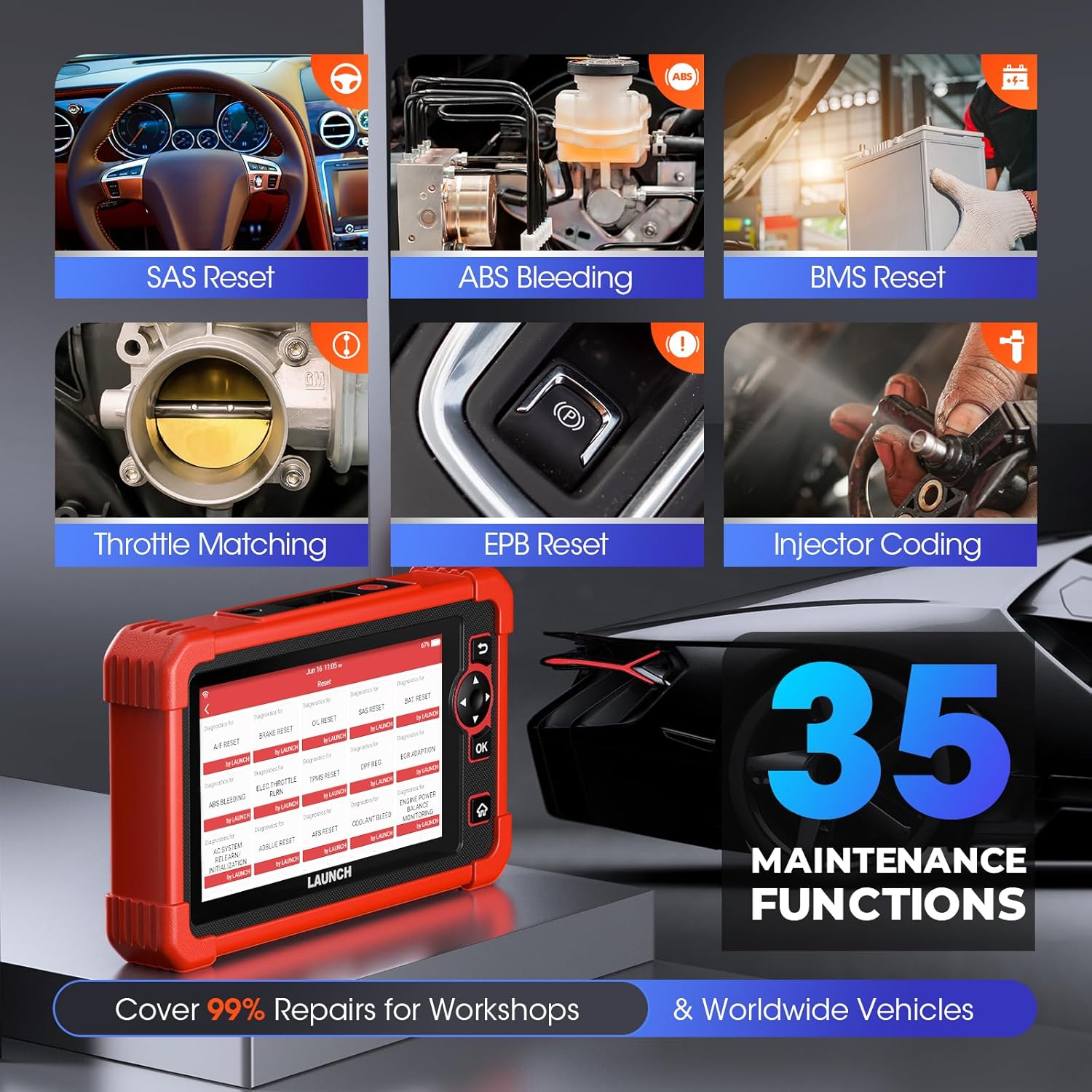
4 Funkcje specjalne (ponad 35 usługi resetowania)
The CRP919X provides access to over 35 commonly used maintenance and reset functions, covering a wide range of vehicle services:
- Resetowanie konserwacji oleju
- Kodowanie wtryskiwaczy
- Resetowanie EPB (elektronicznego hamulca postojowego)
- Krwawienie z ABS
- Kalibracja SAS (czujnika kąta skrętu)
- Ponowna nauka przepustnicy
- Reset BMS (systemu zarządzania baterią)
- Regeneracja DPF (filtra cząstek stałych)
- Naprawa poduszki powietrznej
- Resetowanie TPMS (systemu monitorowania ciśnienia w oponach)
- Reset powietrza/paliwa
- Resetowanie AdBlue
- Reset AFS (system adaptacyjnego oświetlenia przedniego)
- Reset czujnika NOX
- Resetowanie opon
- Tryb transportu
- Kalibracja poziomu powietrza
- Kalibracja Windows
- Kalibracja CCS (systemu kontroli prędkości)
- Kalibracja zajętości miejsc siedzących
- Inicjalizacja szyberdachu
- Inicjalizacja AC
- Adaptacyjne uczenie czujnika położenia wału korbowego
- Dopasowanie skrzyni biegów
- Równowaga mocy
- Wysoka głośnośćtagWykrywanie baterii
- Zmiana języka
- Resetowanie FRM
- Test EVAP
- Standaryzacja miejsc siedzących
- A/T Code Reset
- Rejestracja VIN (zapis)
- Zresetuj jednostkę sterującą
- EGR Adaptation (New)
- GPF (Gas Particular Filter) Regeneration (New)
- Cylinder Power Balance Test (New)

5. Advanced Protocol Support
- CAN FD: Supports GM models from 2019 and later, eliminating the need for separate CAN FD adapters and offering 6X faster data transfer rates.
- DoIP: Integrates with BMW (F&G chassis), Volvo (2018+), Land Rover, and Jaguar (2017+) models, enabling higher data rates via UDS over TCP/IP and Ethernet.
- FCA AutoAuth SGW: Provides access to FCA vehicles (Chrysler, Jeep, Dodge, Fiat, etc.) produced after 2017 for code clearance, bi-directional control, and special functions. Note: An AutoAuth account must be procured independently.

6. Moduły rozszerzone (opcjonalne)
The CRP919X can be expanded with optional modules for enhanced diagnostic capabilities:
- Tester baterii (BST360): For efficient battery and electrical system health assessments.
- TPMS (X431 TSGUN): For sensor activation, programming, and relearning.
Note: These add-on tools (BST360/X431 TSGUN) are available for separate purchase.
7. Diagnostic Report Sharing & Printing
Upon completion of a scan, the CRP919X generates a comprehensive diagnostic report in PDF format. This report can be easily shared via email or printed, facilitating communication between mechanics and clients.

Konserwacja
- Aktualizacje oprogramowania: Regularly connect the device to Wi-Fi and check for software updates. These updates provide new features, expanded vehicle coverage, and performance improvements.
- Czyszczenie: Użyj miękkiego, damp Do czyszczenia urządzenia należy używać ściereczki. Unikać środków czyszczących o działaniu ściernym i rozpuszczalników.
- Składowanie: Przechowuj skaner w chłodnym i suchym miejscu, z dala od bezpośredniego światła słonecznego i ekstremalnych temperatur.
- Pielęgnacja baterii: Aby zapewnić optymalną żywotność baterii, unikaj częstego całkowitego rozładowywania baterii. Regularnie ładuj urządzenie, zwłaszcza jeśli będzie przechowywane przez dłuższy czas.
Rozwiązywanie problemów
This section addresses common issues you might encounter with your LAUNCH X431 CRP919X.
| Problem | Możliwa przyczyna | Rozwiązanie |
|---|---|---|
| Urządzenie nie włącza się. | Niski poziom naładowania baterii; Przycisk zasilania nie został przytrzymany wystarczająco długo; Awaria urządzenia. | Charge the device for at least 30 minutes. Press and hold the power button for 3-5 seconds. If issue persists, contact customer support. |
| Nie można połączyć się z pojazdem. | OBD2 cable not securely connected; Vehicle ignition off; Vehicle not supported; Faulty OBD2 port. | Ensure cable is firmly connected. Turn vehicle ignition to ON position (engine off). Verify vehicle compatibility. Test with another vehicle if possible. |
| Aktualizacja oprogramowania nie powiodła się. | Unstable Wi-Fi connection; Insufficient storage; Server issues. | Ensure strong Wi-Fi signal. Clear some data/apps if storage is low. Try updating again later. |
| Specific function not working (e.g., ECU Coding). | Vehicle not supported for that function; Software not updated; Incorrect procedure. | Verify vehicle compatibility for the specific function. Ensure software is up to date. Refer to the on-screen instructions or contact support for detailed procedures. |
W przypadku problemów nieujętych w tym miejscu lub gdy podane rozwiązania nie rozwiążą problemu, zapoznaj się z sekcją pomocy.
Specyfikacje
| Funkcja | Szczegół |
|---|---|
| Marka | POCZĄTEK |
| Model | WYPUSZCZENIE CRP919X |
| System operacyjny | Android 10.0 |
| Rozdzielczość wyświetlacza | 1024x600 |
| Waga przedmiotu | 6.27 funta |
| Wymiary produktu | 12.8 x 11.14 x 5.31 cala |
| Pojemność baterii | 6100mAh (approx. 12 hours continuous operation) |
| BARAN | 4 GB |
| ROM | 64 GB |
| Łączność | Dual 2.4G & 5GHz WiFi, 5G WiFi communication |
| Obsługiwane protokoły | CAN FD, DoIP, OBD2 (all 10 modes) |
| Pokrycie pojazdu | Ponad 150 marek, ponad 100 000 modeli (1996-2025) |
Gwarancja i wsparcie
LAUNCH is committed to providing high-quality products and excellent customer service.
- Bezpłatne aktualizacje: Benefit from 2 years of free software updates from the date of purchase (since September 2022).
- Quality Undertaking: The product comes with a 5-Year Quality Undertaking.
- Zwrot i wymiana: A 60-Day Return & Replacement policy is available.
- Post-sale Service: 24/7 post-sale service is provided.
- Opinie online: You can submit diagnostic queries online to LAUNCH for expert analysis and troubleshooting.
- Pomoc zdalna: The device supports remote assistance via TeamViewer for swift issue resolution.
For further assistance, please refer to the official LAUNCH support channels or the contact information provided in your quick start guide.