
Wstęp
This manual provides detailed instructions for the MONODEAL MD-ANC5 Active Noise Cancelling Headphones. Please read this manual thoroughly before using the product to ensure proper operation and to maximize your listening experience. This document covers setup, operation, maintenance, troubleshooting, and product specifications.
Zawartość opakowania
- MONODEAL MD-ANC5 Active Noise Cancelling Headphones
- Kabel ładujący USB
- Torba transportowa
- Airplane Adapter (two-pin)
- Instrukcja obsługi (ten dokument)
Produkt ponadview
The MONODEAL MD-ANC5 headphones are designed for comfort and effective noise reduction, making them suitable for travel and daily use. They feature active noise cancelling technology, a built-in microphone, and a foldable design for portability.
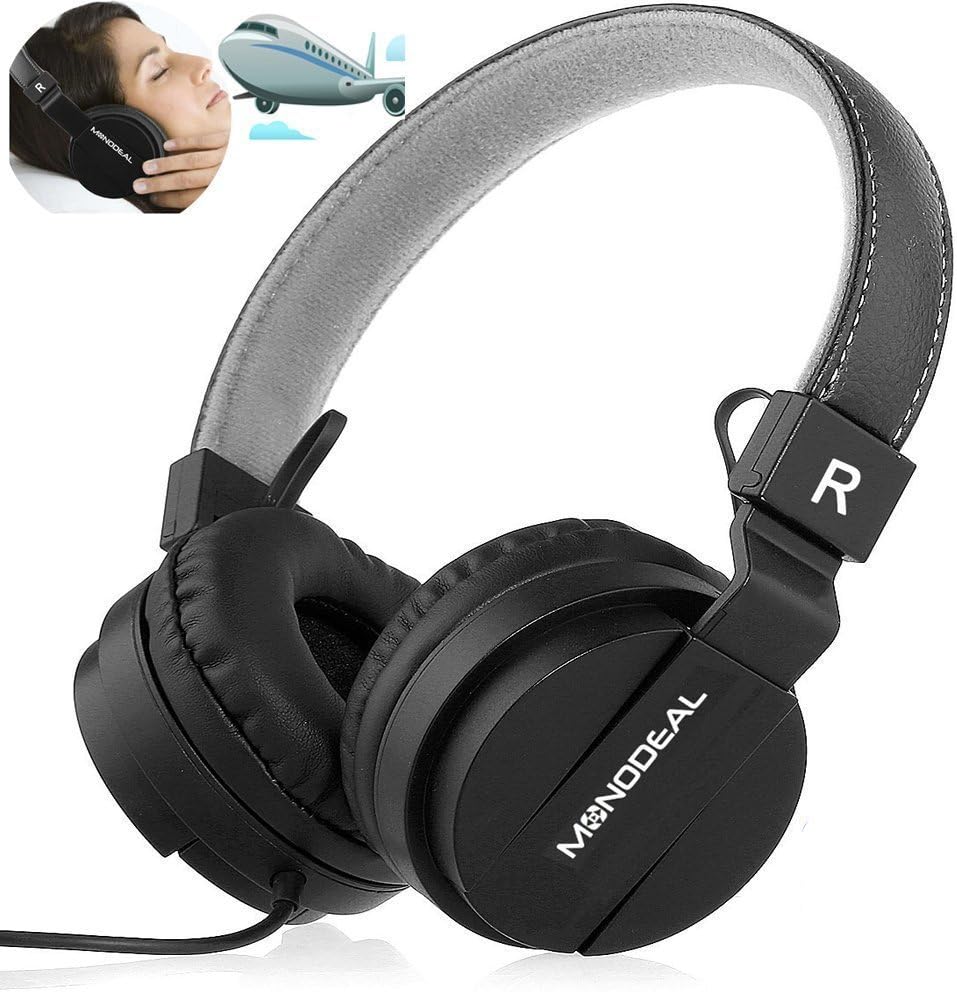
A pair of black MONODEAL MD-ANC5 on-ear headphones, showcasing their design and the brand logo on the earcups. An inset image shows a person wearing headphones on an airplane, illustrating their use for travel and noise reduction.
Główne cechy
- Aktywna redukcja szumów (ANC): Reduces ambient noise by up to 85%, ideal for environments with low-frequency sounds like airplane engines or traffic.
- Wbudowany mikrofon: Enables hands-free phone calls.
- Składana konstrukcja: Allows for compact storage and portability, accompanied by a carrying bag.
- Adjustable Headband & Comfortable Ear Cushions: Ensures a snug and comfortable fit for various head shapes.
- Długa żywotność baterii: Up to 20 hours of playtime per charge for ANC function.
- Łączność przewodowa: Standard 3.5mm audio jack for wide compatibility.
- Airplane Adapter: Included for in-flight entertainment systems.

The MONODEAL MD-ANC5 headphones are shown in a folded configuration, highlighting their space-saving design for easy portability. An inset image shows a person resting with headphones on an airplane, demonstrating their suitability for travel.

An illustration detailing the battery life of the MONODEAL MD-ANC5 headphones, indicating up to 20 hours for music playback, 20 hours for phone calls, and 250 hours of standby time.
Organizować coś
Początkowe ładowanie
Przed pierwszym użyciem należy całkowicie naładować słuchawki.
- Connect the small end of the provided USB charging cable to the USB Charging Port on the headphone's inline controller.
- Podłącz większy koniec kabla USB do zasilanego portu USB (np. w komputerze, zasilaczu ściennym USB).
- The Noise Cancelling Indicator Light will illuminate during charging.
- Charging typically takes approximately 2 hours for a full charge. The indicator light may change or turn off when fully charged.
Podłączanie do źródła dźwięku
- Insert the 3.5mm Audio Plug into the audio jack of your device (smartphone, tablet, computer, MP3 player, etc.).
- The headphones are wired and do not require Bluetooth pairing for audio playback.
Instrukcja obsługi
Aktywne usuwanie hałasu (ANC)
To activate the Active Noise Cancellation feature:
- Locate the "Noise Cancelling On/Off" switch on the inline controller.
- Przesuń przełącznik do pozycji „ON”.
- The Noise Cancelling Indicator Light will illuminate, indicating ANC is active.
- To deactivate ANC, slide the switch to the "OFF" position.
Notatka: ANC primarily reduces low-frequency ambient noise. It may not completely eliminate human voices or sudden high-frequency sounds. The ANC function requires battery power. If the battery is depleted, the headphones can still be used for audio playback without ANC.
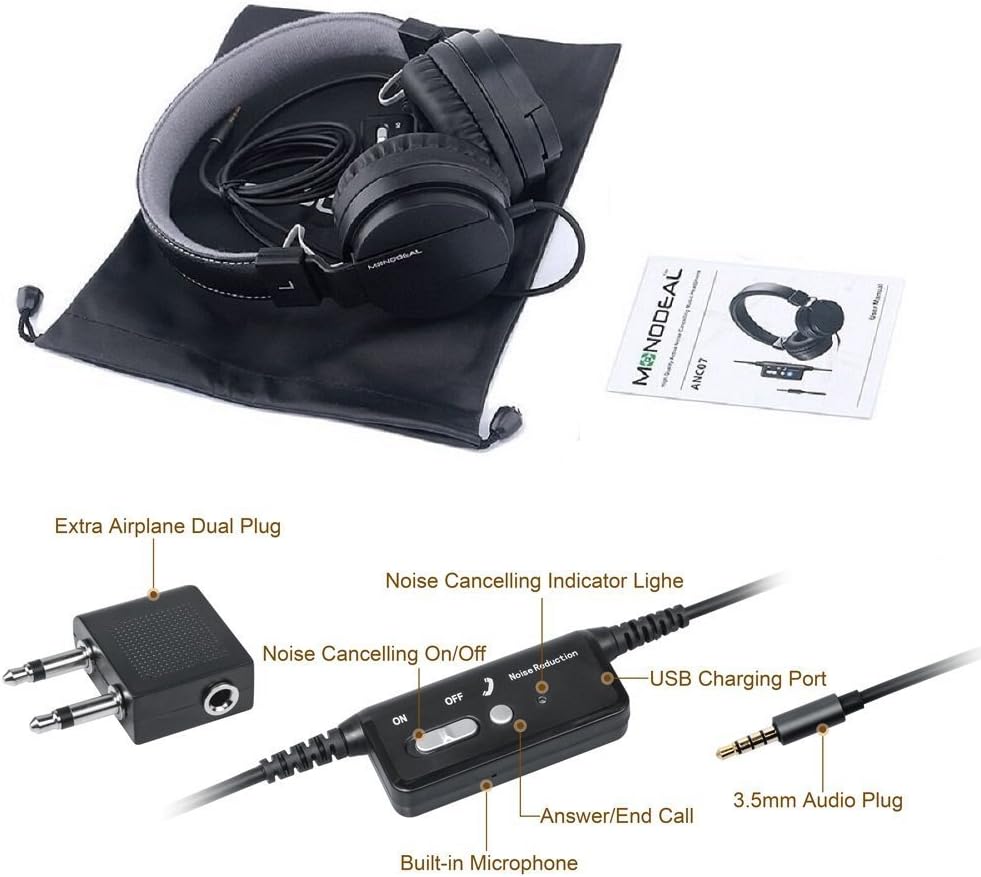
Zbliżenie view of the inline controller for the MONODEAL MD-ANC5 headphones, showing the Noise Cancelling On/Off switch, the Noise Cancelling Indicator Light, the USB Charging Port, the Built-in Microphone, and the 3.5mm Audio Plug. An 'Extra Airplane Dual Plug' adapter is also visible.
Using the Microphone/Controller
The inline controller includes a built-in microphone and an "Answer/End Call" button.
- Odbieranie / kończenie połączeń: Press the "Answer/End Call" button once to answer an incoming call. Press it again to end an active call.
- Sterowanie odtwarzaniem muzyki: This model primarily focuses on ANC and basic call functions. For music control (play/pause, track skip), use your connected device.
Using the Airplane Adapter
For in-flight entertainment systems that use a dual-pin audio jack:
- Connect the 3.5mm Audio Plug of your headphones into the single input of the Airplane Adapter.
- Insert the dual pins of the Airplane Adapter into the corresponding jacks on the airplane's armrest.
Konserwacja
- Czyszczenie: Do czyszczenia słuchawek używaj miękkiej, suchej ściereczki. Nie używaj płynnych środków czyszczących ani rozpuszczalników.
- Składowanie: When not in use, fold the headphones and store them in the provided carrying bag to protect them from dust and damage.
- Pielęgnacja baterii: Aby przedłużyć żywotność baterii, unikaj częstego całkowitego rozładowywania baterii. Regularnie ładuj słuchawki, nawet jeśli nie są używane przez dłuższy czas.
- Unikaj ekstremalnych warunków: Nie wystawiaj słuchawek na działanie ekstremalnych temperatur, wilgoci ani bezpośredniego światła słonecznego.
- Wodoodporność: Słuchawki nie są wodoodporne. Unikać kontaktu z płynami.
Rozwiązywanie problemów
| Problem | Możliwa przyczyna | Rozwiązanie |
|---|---|---|
| Brak dźwięku | Wtyczka słuchawek nie jest całkowicie włożona. | Ensure the 3.5mm audio plug is securely inserted into both the headphones and the audio source. |
| Brak dźwięku | Głośność źródła dźwięku jest zbyt niska lub wyciszona. | Zwiększ głośność w podłączonym urządzeniu. Sprawdź, czy urządzenie jest wyciszone. |
| ANC nie działa | ANC switch is off. | Slide the "Noise Cancelling On/Off" switch to the "ON" position. |
| ANC nie działa | Headphone battery is low or depleted. | Ładuj słuchawki przez około 2 godziny. |
| Mikrofon nie działa | Microphone port blocked or damaged. | Ensure the microphone is not obstructed. Test with another device if possible. |
| Poor sound quality with ANC on | ANC can sometimes alter sound profile. | If preferred, turn off ANC for music listening, especially if sound quality is a priority over noise reduction. |
| Słuchawki są niewygodne | Headband or earcups not adjusted. | Adjust the headband for a comfortable fit. Ensure ear cushions sit properly on the ears. |
Aby uzyskać dalszą pomoc, zapoznaj się z sekcją Gwarancja i wsparcie.
Specyfikacje
| Funkcja | Szczegół |
|---|---|
| Numer modelu | MD-ANC5 |
| Marka | MONODEAL |
| Technologia łączności | Przewodowy (gniazdo 3.5 mm) |
| Kontrola hałasu | Aktywna redukcja szumów |
| Umieszczenie ucha | Na ucho |
| Współczynnik kształtu | Na ucho |
| Battery Life (ANC) | Do 20 godzin |
| Czas ładowania | Około 2 godzin |
| Odpowiedź częstotliwościowa | 20 Hz - 20 000 Hz |
| Waga przedmiotu | 6.5 uncji (184 grama) |
| Wymiary produktu | 7.87 x 6.3 x 2.36 cala |
| Tworzywo | Skóra syntetyczna |
| Funkcja specjalna | Foldable, Rechargeable, Built-in Microphone |
| Kompatybilne urządzenia | Smartphones, Tablets, Laptops, MP3/MP4 Players |
| Zawarte komponenty | Carrying Bag, USB Charging Cable, Airplane Adapter |
Gwarancja i wsparcie
The MONODEAL MD-ANC5 headphones come with an 18-month warranty.
For any questions, issues, or warranty claims, please contact MONODEAL customer support.
Adres e-mail kontaktowy: amzus@monodeal.net
Important Warning: Prolonged listening at high volume levels may cause hearing damage. It is recommended to take breaks every 1-2 hours to relax your ears and ensure a better listening experience.