
1. Wprowadzenie
This manual provides instructions for the ECONTROLLY RM-ADP069 replacement remote control. This remote is designed to function as a direct replacement for the original Sony RM-ADP069 remote, compatible with various Sony AV (Audio/Video) systems. No programming is required; simply install batteries to begin operation.
Compatible Sony AV System Models include:
- BDV-N890W/Z, BDV-T57, BDV-F7, HBD-F7, BDV-E280, HBD-T58, BDV-T58, BDV-E580, BDV-E380, HBD-E280
- BDV-N790, BDVN790W, BDV-N790W, BDVT39, BDV-T39, BDVT79, BDV-T79
- HBDE190, HBD-E190, HBDE385, HBD-E385, HBDE390, HBD-E390, HBDN790W, HBD-N790W, HBDT39, HBD-T39, HBDT79
- BDV-T28, BDV-N790W, BDV-N890W, BDV-N990W, BDV-T57, BDV-T58
- HBDE280, HBD-E280, HBD-E3100, HB-DE3100, HBDE580, HBD-E580, HBD-F7, HBDT79, HBD-T79
- BDVE190, BDV-E190, BDVE385, BDV-E385, BDVE390, BDV-E390, BDVE490, BDV-E490, BDVN790
2. Konfiguracja i instalacja baterii
The RM-ADP069 remote control requires two AAA alkaline batteries (not included). Follow these steps to install the batteries:
- Znajdź komorę baterii z tyłu pilota.
- Naciśnij zakładkę i przesuń pokrywę baterii w dół, aby ją otworzyć.
- Insert two new AAA alkaline batteries, ensuring the positive (+) and negative (-) terminals match the diagrams inside the compartment.
- Wsuń pokrywę baterii z powrotem na miejsce, aż zaskoczy.
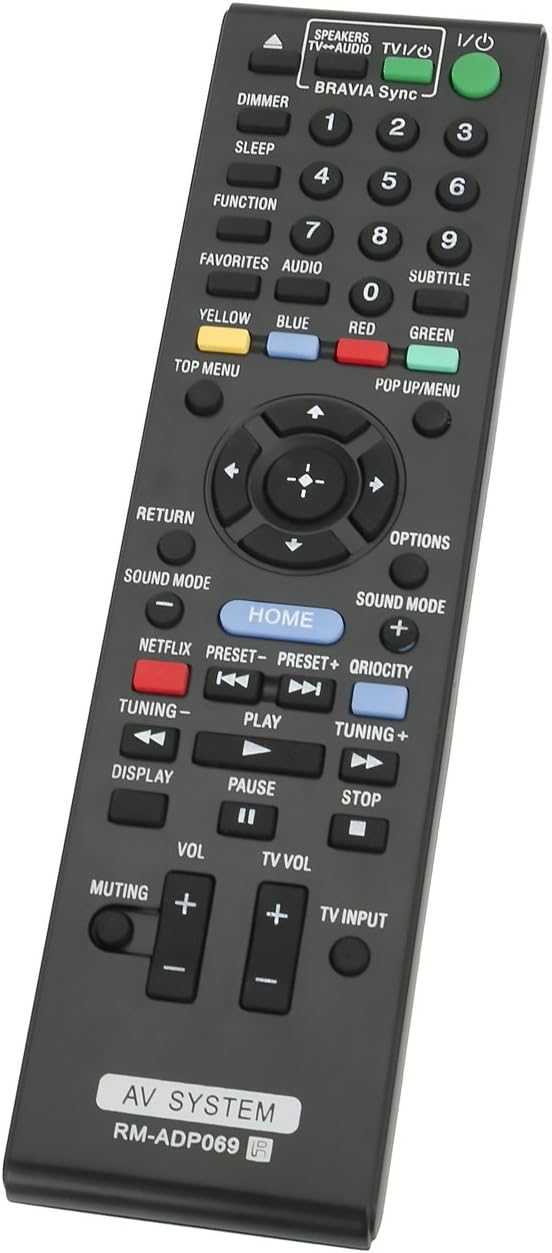
Image: Back of the remote control with the battery compartment open, illustrating correct battery placement.
Once batteries are installed, the remote is ready for immediate use with your compatible Sony AV system. No additional programming or setup is required.
3. Instrukcja obsługi
Point the remote control directly at your Sony AV system's infrared receiver. Ensure there are no obstructions between the remote and the system. The remote operates using infrared technology with a maximum range of 33 feet (10 meters).

Obraz: Przód view of the RM-ADP069 remote control, displaying all functional buttons.
The remote features standard controls for your AV system. Refer to the image above for button layout. Key functions include:
- Zasilanie (wejście/wyjście): Turns the AV system on or off.
- Przyciski numeryczne (0-9): Do bezpośredniego wprowadzania danych lub wyboru kanału.
- Panel nawigacyjny (góra, dół, lewo, prawo, Enter): Do nawigacji po menu i dokonywania wyborów.
- Głośność (+/-): Reguluje główną głośność.
- TV Vol (+/-): Adjusts the television volume (if connected and supported).
- Wyciszanie: Wycisza lub włącza dźwięk.
- Play, Pause, Stop, Fast Forward, Rewind: Sterowanie odtwarzaniem multimediów.
- Dom: Accesses the main menu of the AV system.
- Netflix, Qriocity: Dedicated buttons for streaming services (functionality depends on AV system model).
- Tryb dźwięku: Cycles through available sound modes.
- Wyświetlacz: Wyświetla informacje na ekranie.
- Powrót: Wraca do poprzedniego ekranu lub menu.
- Opcje: Dostęp do opcji zależnych od kontekstu.
- Color Buttons (Yellow, Blue, Red, Green): For specific functions within menus or applications.
- Top Menu / Pop Up/Menu: Dostęp do menu dysku.
- Wejście TV: Changes the input source on the television.
4. Konserwacja
Aby zapewnić długowieczność i prawidłowe działanie pilota, należy przestrzegać poniższych wskazówek dotyczących konserwacji:
- Wymiana baterii: Replace batteries when the remote's response becomes sluggish or stops working. Always use new AAA alkaline batteries. Do not mix old and new batteries, or different types of batteries.
- Czyszczenie: Przetrzyj pilota miękką, suchą ściereczką. W przypadku uporczywych zabrudzeń delikatnie przetrzyj.ampen the cloth with water or a mild cleaning solution, then wipe dry immediately. Do not use abrasive cleaners, alcohol, or solvents.
- Składowanie: Store the remote in a cool, dry place away from direct sunlight and extreme temperatures. If the remote will not be used for an extended period, remove the batteries to prevent leakage.
- Unikaj uszkodzeń: Do not drop the remote, expose it to water, or place heavy objects on it.
5. Rozwiązywanie Problemów
If you experience issues with your RM-ADP069 remote control, refer to the following common problems and solutions:
| Problem | Rozwiązanie |
|---|---|
| Pilot nie odpowiada. |
|
| Niektóre przyciski nie działają. |
|
| Remote has a short operating range. |
|
6. Specyfikacje
| Funkcja | Szczegół |
|---|---|
| Marka | KONTROLNIE |
| Nazwa modelu | RM-ADP069 |
| Technologia łączności | Podczerwony |
| Kompatybilne urządzenia | Sony DVD/Blu-ray Player AV Systems (specific models listed in Introduction) |
| Typ baterii | AAA Alkaliczny |
| Liczba wymaganych baterii | 2 |
| Maksymalny zasięg | 33 stóp (ok. 10 metrów) |
| Ilość przycisków | 20 |
| Kolor | Czarny |
| Tworzywo | ABS Environmental protection material |
| Waga przedmiotu | 1 Ounce (approx. 28 grams) |
| Pozycja Wymiary (dł. x szer. x wys.) | 5" dł. x 1" szer. x 0.25" wys. (ok. 12.7 cm x 2.54 cm x 0.64 cm) |
7. Gwarancja i wsparcie
For warranty information or technical support regarding your ECONTROLLY RM-ADP069 remote control, please refer to the documentation provided at the time of purchase or contact the seller directly. Specific warranty terms and support channels may vary depending on your region and point of purchase.