
1. Wprowadzenie
This manual provides detailed instructions for the installation, operation, and maintenance of your iRV Technologies iRV35 Car Stereo Receiver. Please read this manual thoroughly before using the product to ensure proper function and to prevent damage.

Rycina 1: Przód view of the iRV35 Car Stereo Receiver, showing the control panel, volume knob, and display.
2. Co znajduje się w pudełku
Po rozpakowaniu sprawdź, czy wszystkie wymienione poniżej przedmioty znajdują się na miejscu i są w dobrym stanie:
- iRV35 Car Stereo Receiver Unit
- Instrukcja obsługi (ten dokument)
- Podłączenie wiązki
- Zdalne sterowanie

Figure 2: Package contents of the iRV35, including the main unit, remote control, wiring harness, and user manual.
3. Specyfikacje produktu
| Funkcja | Specyfikacja |
|---|---|
| Wymiary produktu | 16.9 x 6.5 x 3.9 cala |
| Waga przedmiotu | 4.59 funta |
| Numer modelu | iRV35 |
| Technologie łączności | Bluetooth, USB |
| Komunikacja bezprzewodowa | AM/FM, Bluetooth, IR |
| Cechy specjalne | Built-in clock, Zone 3 speaker independent control, CEC, HDMI ARC |
| Wszystkie porty HDMI | 1 |
| Tryb wyjścia audio | Otaczać |
| Konfiguracja kanału dźwięku przestrzennego | 2.1 |
| Kolor | Czarny |
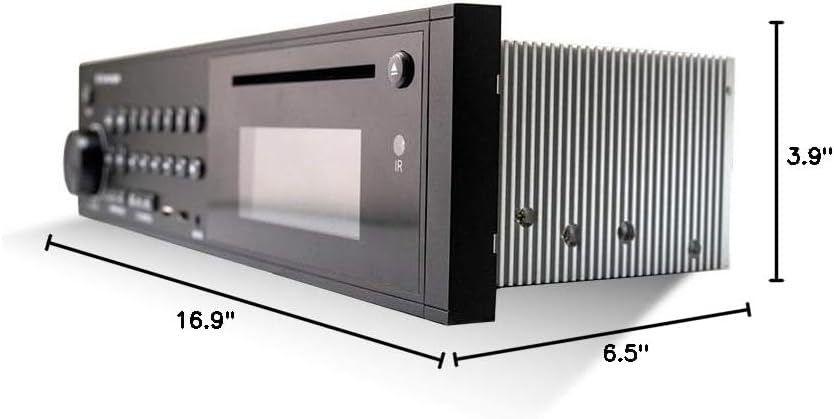
Figure 3: Dimensions of the iRV35 Car Stereo Receiver.
4. Instalacja
4.1 Montaż
The iRV35 is designed for wall-mount installation, typically in RVs or similar vehicles. Ensure adequate space and ventilation around the unit to prevent overheating. Refer to the dimensions provided in Section 3 for precise measurements.
4.2 połączeń przewodów
Connect the provided wiring harness to the corresponding ports on the rear of the iRV35 unit and to your vehicle's electrical system and speakers. Ensure all connections are secure and correctly matched to avoid damage or malfunction. Consult a professional if you are unsure about the wiring process.

Rysunek 4: Tył view of the iRV35 unit, displaying the various connection ports for power, speakers, and external devices.
4.3 Początkowe włączenie zasilania
After all connections are made, apply power to the unit. The display should illuminate. If not, recheck all power connections and fuses.
5. Instrukcja obsługi
5.1 Podstawowe sterowanie
The front panel features a volume knob, mode selection buttons, and playback controls. The included remote control provides full functionality from a distance.
5.2 parowanie Bluetooth
Aby sparować urządzenie Bluetooth:
- Naciśnij Bluetooth przycisk na urządzeniu lub pilocie.
- Upewnij się, że w urządzeniu inteligentnym jest włączony Bluetooth.
- Szukaj available devices and select "iRV35" from the list.
- Potwierdź parowanie na swoim urządzeniu.
Note: Some functions may require the dedicated iRV Technologies app, available for Android and Apple devices, which turns your smartphone into a wireless remote control.
Funkcjonalność HDMI ARC 5.3
The iRV35 features an HDMI output with Audio Return Channel (ARC) functionality. This allows audio from your TV to be streamed directly to the stereo's speakers, enhancing your entertainment experience. Connect your TV's HDMI ARC port to the HDMI ARC port on the iRV35.
5.4 Independent Zone 3 Control
The iRV35 offers independent control for three audio zones. Use the dedicated Zone 1, 2, and 3 buttons on the front panel to manage audio output to different speaker areas independently.
5.5 Ustawianie zegara
To set the built-in clock:
- Naciśnij i przytrzymaj ZEGAR button until the clock display flashes.
- Włącz TOM pokrętło do regulacji godziny.
- Naciśnij TOM knob to advance to the minutes setting.
- Włącz TOM pokrętło do ustawiania minut.
- Naciśnij ZEGAR ponownie, aby zapisać ustawienia.
5.6 Media Playback (DVD/CD/USB)
Insert a DVD or CD into the disc slot for playback. For USB media, insert a USB drive into the designated USB port. The unit supports various audio and video formats including MP3 and MP4.
Wideo 1: Produkt w całościview of the iRV35 Car Stereo Receiver, demonstrating its features and connectivity options.
6. Konserwacja
6.1 Czyszczenie
Wipe the unit's exterior with a soft, dry cloth. Do not use abrasive cleaners or solvents. Keep the disc slot and USB port free of dust and debris.
6.2 Wentylacja
Ensure the unit has proper ventilation to prevent overheating, especially during extended use. Do not block any ventilation openings.
7. Rozwiązywanie Problemów
7.1 Brak zasilania
- Sprawdź wszystkie połączenia zasilania, aby upewnić się, że są bezpieczne.
- Sprawdź skrzynkę bezpieczników pojazdu pod kątem przepalonych bezpieczników związanych z radiem.
- Ensure the unit's power button is pressed.
7.2 Problemy z łącznością Bluetooth
- Ensure the iRV35 is in Bluetooth mode.
- Confirm Bluetooth is enabled on your smart device and it is within range.
- Spróbuj rozparować i ponownie sparować urządzenie.
- If using the app, ensure it is correctly installed and updated.
7.3 Brak wyjścia audio
- Check speaker connections at the unit and at the speakers.
- Ensure the correct audio source is selected (e.g., DVD, USB, Bluetooth).
- Sprawdź, czy głośność nie jest wyciszona lub ustawiona zbyt nisko.
- Check the Zone 3 controls to ensure audio is enabled for the desired zone.
7.4 Unit Overheating
- Ensure there is sufficient airflow around the unit.
- Do not block ventilation grilles.
- Jeśli problem będzie się powtarzał, skontaktuj się z obsługą klienta.
8. Gwarancja i wsparcie
iRV Technologies products are manufactured to high-quality standards. For warranty information, please refer to the warranty card included with your product or visit the official iRV Technologies website. If you encounter any issues not covered in this manual, or require further assistance, please contact iRV Technologies customer support.
Informacje kontaktowe można zazwyczaj znaleźć na stronie producenta webmiejscu lub na opakowaniu produktu.