
Ważne instrukcje bezpieczeństwa
Przed użyciem urządzenia prosimy o uważne przeczytanie niniejszej instrukcji. Zachowaj instrukcję do wykorzystania w przyszłości.
- Nie blokuj żadnych otworów wentylacyjnych.
- Nie instalować w pobliżu źródeł ciepła.
- Chroń przewód zasilający przed deptaniem i przytrzaśnięciem.
- Stosować wyłącznie dodatki/akcesoria wskazane przez producenta.
- Odłączaj urządzenie od zasilania podczas burzy z piorunami lub jeśli nie używasz go przez dłuższy czas.
- Wszelkie prace serwisowe należy powierzać wykwalifikowanemu personelowi.
- OSTRZEŻENIE: Aby ograniczyć ryzyko pożaru lub porażenia prądem, nie należy narażać urządzenia na działanie deszczu i wilgoci.
Produkt ponadview
The Victrola VS-120 is a versatile microsystem offering multiple audio playback options. It includes Bluetooth connectivity, a CD player, USB playback, an Aux-in port, and an FM radio.
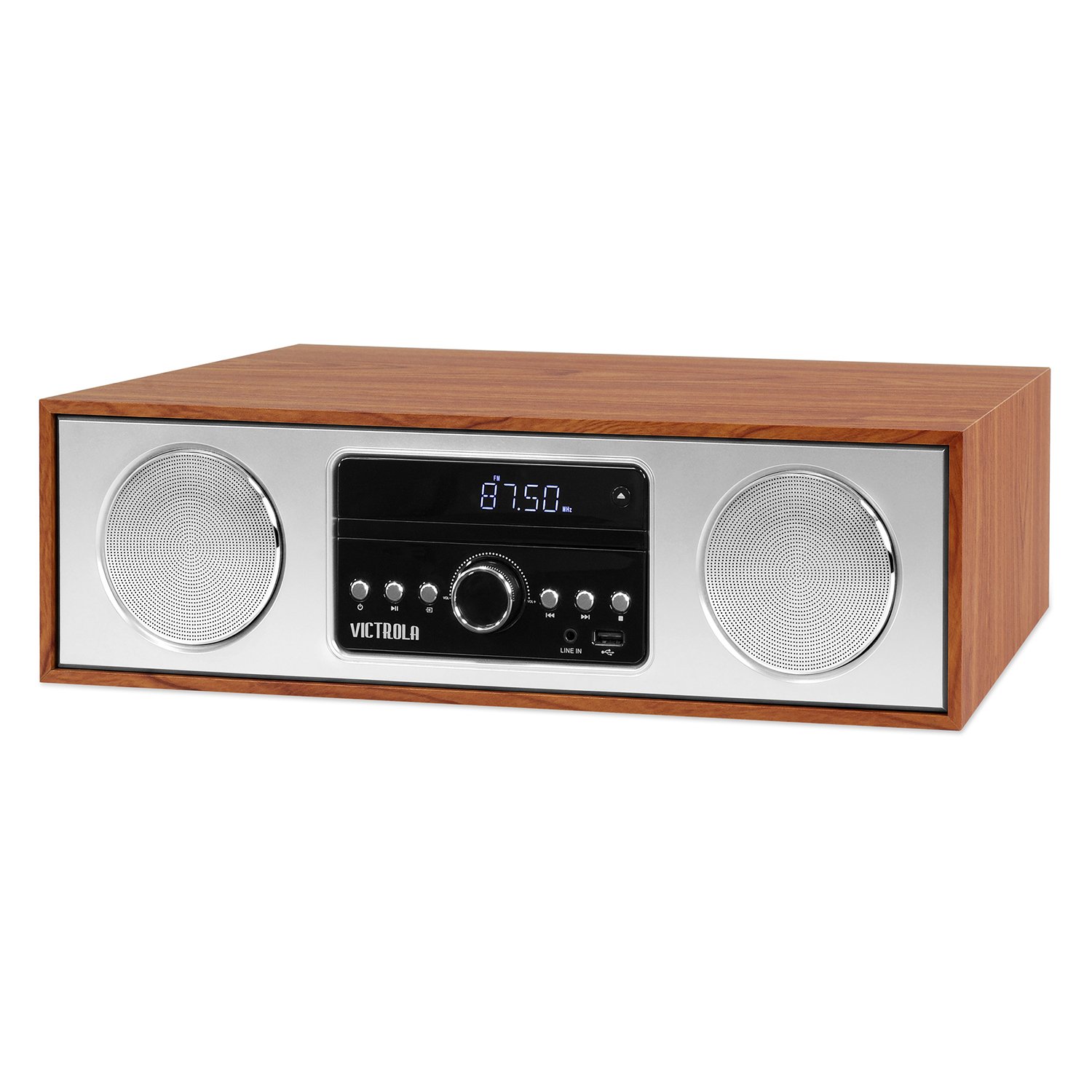
Przód view of the Victrola VS-120 Bluetooth Microsystem, showing the speaker, display, and control panel.

The Victrola VS-120 microsystem with its CD tray open, revealing a disc, and the included remote control positioned in the foreground.
Przewodnik po konfiguracji
Rozpakowywanie
Carefully remove the unit from its packaging. Ensure all accessories are present:
- Victrola VS-120 Microsystem
- Zdalne sterowanie
- Zasilacz
- Instrukcja obsługi (ten dokument)
Podłączenie zasilania
- Insert the small end of the power adapter into the DC IN jack on the rear of the unit.
- Plug the other end of the power adapter into a standard wall outlet (AC 100-240V, 50/60Hz).
- The unit will enter standby mode, and the LED clock display will illuminate.
Podłączenie anteny (radio FM)
For optimal FM radio reception, extend the FM wire antenna fully. Adjust its position for the best signal.
Instrukcja obsługi
Włączanie/wyłączanie zasilania
Naciśnij MOC przycisk na urządzeniu lub pilocie, aby włączyć lub wyłączyć system (tryb czuwania).
Wybór trybu
Naciśnij TRYB button on the unit or remote control repeatedly to cycle through available functions: Bluetooth, CD, USB, AUX, I Radio FM.
Działanie Bluetooth
- Wybierać Bluetooth mode. The display will show "BT" and flash, indicating pairing mode.
- On your Bluetooth-enabled device (smartphone, tablet, etc.), enable Bluetooth and search for "Victrola VS-120".
- Select "Victrola VS-120" to pair. Once connected, the "BT" indicator will stop flashing and a confirmation tone will sound.
- You can now stream audio from your device to the microsystem.
- Use your device or the microsystem's controls (PLAY/PAUSE, NEXT, PREVIOUS) to manage playback.
Odtwarzanie CD
- Wybierać CD tryb.
- Naciśnij OTWÓRZ/ZAMKNIJ przycisk otwierający szufladę na płytę CD.
- Umieść płytę CD (płytę audio CD lub płytę CD z plikami MP3) etykietą skierowaną do góry w podajniku.
- Naciskać OTWÓRZ/ZAMKNIJ again to close the tray. The unit will read the disc and begin playback automatically.
- Używać ODTWÓRZ/PAUZA, NASTĘPNY, I POPRZEDNI przyciski do sterowania odtwarzaniem.
Odtwarzanie USB
- Insert a USB flash drive (FAT32 format, containing MP3 files) do portu USB.
- Wybierać USB Tryb. Urządzenie automatycznie wykryje i rozpocznie odtwarzanie plików MP3 files z napędu.
- Używać ODTWÓRZ/PAUZA, NASTĘPNY, I POPRZEDNI przyciski do sterowania odtwarzaniem.
Obsługa radia FM
- Wybierać Radio FM tryb.
- Naciśnij i przytrzymaj DOSTOSUJ +/- przyciski umożliwiające automatyczne skanowanie następnej dostępnej stacji.
- Naciśnij DOSTOSUJ +/- buttons briefly to manually adjust the frequency in small increments.
- To save a station as a preset, press the MEM przycisk, a następnie użyj USTAWIENIA PRESET +/- aby wybrać numer ustawienia wstępnego i nacisnąć MEM jeszcze raz, aby potwierdzić.
- Aby przywołać zaprogramowaną stację, użyj USTAWIENIA PRESET +/- pikolak.
Połączenie AUX
- Podłącz zewnętrzne urządzenie audio (np. odtwarzacz MP3, smartfon) do AUX IN gniazdo za pomocą kabla audio 3.5 mm (brak w zestawie).
- Wybierać AUX tryb.
- Steruj odtwarzaniem i głośnością z urządzenia zewnętrznego.
Funkcje pilota zdalnego sterowania
The included remote control provides full functionality. Ensure batteries are correctly inserted. Key functions include:
- MOC: Turn unit on/off.
- Sposób użycia: Wybierz źródło dźwięku.
- GŁOŚNOŚĆ +/-: Dostosuj głośność.
- PLAY/PAUSE, NEXT, PREVIOUS: Control playback for CD, USB, and Bluetooth.
- DOSTOSUJ +/-: Tune FM radio stations.
- PAMIĘĆ: Store FM presets.
- USTAWIENIA PRESET +/-: Select FM presets.
- EQ: Cycle through equalizer settings (Flat, Rock, Pop, Jazz, Classic).
- ZEGAR: Ustaw zegar.
- OPORNIK: Dostosuj jasność wyświetlacza.
Regulacja ustawień korektora
Naciśnij EQ button on the remote control to cycle through preset equalizer modes: Flat, Rock, Pop, Jazz, and Classic. Select the mode that best suits your audio preference.
Ustawianie zegara
Aby ustawić zegar, naciśnij ZEGAR button on the remote control. Use the DOSTOSUJ +/- buttons to adjust the hour and minute, and press ZEGAR ponownie, aby potwierdzić każde ustawienie.
Konserwacja
Czyszczenie urządzenia
To clean the exterior of the unit, use a soft, dry cloth. Do not use abrasive cleaners, waxes, or solvents as these may damage the surface. Ensure the unit is unplugged before cleaning.
Pielęgnacja odtwarzacza CD
Handle CDs by their edges. Keep them clean and free of scratches. If a CD is dirty, wipe it gently with a soft, lint-free cloth from the center outwards. Do not use solvents or abrasive cleaners on CDs.
Rozwiązywanie problemów
| Problem | Możliwa przyczyna | Rozwiązanie |
|---|---|---|
| Brak zasilania | Przewód zasilający nie jest podłączony; gniazdko elektryczne nie jest aktywne. | Sprawdź, czy przewód zasilający jest prawidłowo podłączony. Spróbuj użyć innego gniazdka. |
| Brak dźwięku | Volume too low; Incorrect mode selected; External device not playing. | Increase volume; Select correct mode (BT, CD, USB, AUX, FM); Ensure external device is playing and its volume is up. |
| Płyta CD nie odtwarza się | Płyta CD włożona nieprawidłowo; płyta CD jest brudna lub porysowana; format płyty nie jest obsługiwany. | Insert CD with label side up; Clean or replace CD; Ensure it's an audio CD or MP3 CD. |
| Parowanie Bluetooth nie powiodło się | Unit not in pairing mode; Device too far; Device already paired to another unit. | Ensure unit is in BT mode and "BT" is flashing; Move device closer; Disconnect from other devices. |
| Słaby odbiór FM | Antena nie jest wysunięta lub nie jest prawidłowo ustawiona. | Całkowicie rozłóż i ponownie ustaw antenę przewodową FM. |
| Pilot nie działa | Batteries dead or inserted incorrectly; Obstruction between remote and unit. | Replace batteries; Ensure correct polarity; Remove obstructions; Point remote directly at the unit's sensor. |
Specyfikacje
- Marka: Witrola
- Model: VS-120
- Łączność: Bluetooth, USB, AUX (3.5 mm)
- Źródła audio: CD Player, USB Player, FM Radio, Bluetooth, Aux-in
- Moc wyjściowa: 30 watów
- Obsługiwane formaty audio: CD, MP3
- Wymiary (dł. x szer. x wys.): 15.97 x 4.69 x 10.83 cala (40.56 x 11.91 x 27.51 cm)
- Waga: 10.76 funtów (4.88 kg)
- Pobór mocy: Prąd zmienny 100-240 V, 50/60 Hz
- Kolor: Klon
Gwarancja i wsparcie
Victrola products are designed with quality and performance in mind. For detailed warranty information, please refer to the warranty card included with your product or visit the official Victrola website. For technical support or customer service inquiries, please contact Victrola customer support through their official channels.
Webstrona: www.victrola.com