
1. Wprowadzenie
This manual provides instructions for the setup, operation, and maintenance of the Avaya 1616 IP Telephone (Model 700450190). The Avaya 1616 is designed for users who require a robust and feature-rich communication device, supporting 16 line appearances and a high-quality speakerphone. This guide will help you maximize the functionality of your IP telephone.
2. Konfiguracja
Follow these steps to properly set up your Avaya 1616 IP Telephone.
2.1 Rozpakowanie i identyfikacja komponentów
Carefully remove all components from the packaging. Ensure all parts are present before proceeding with the setup.
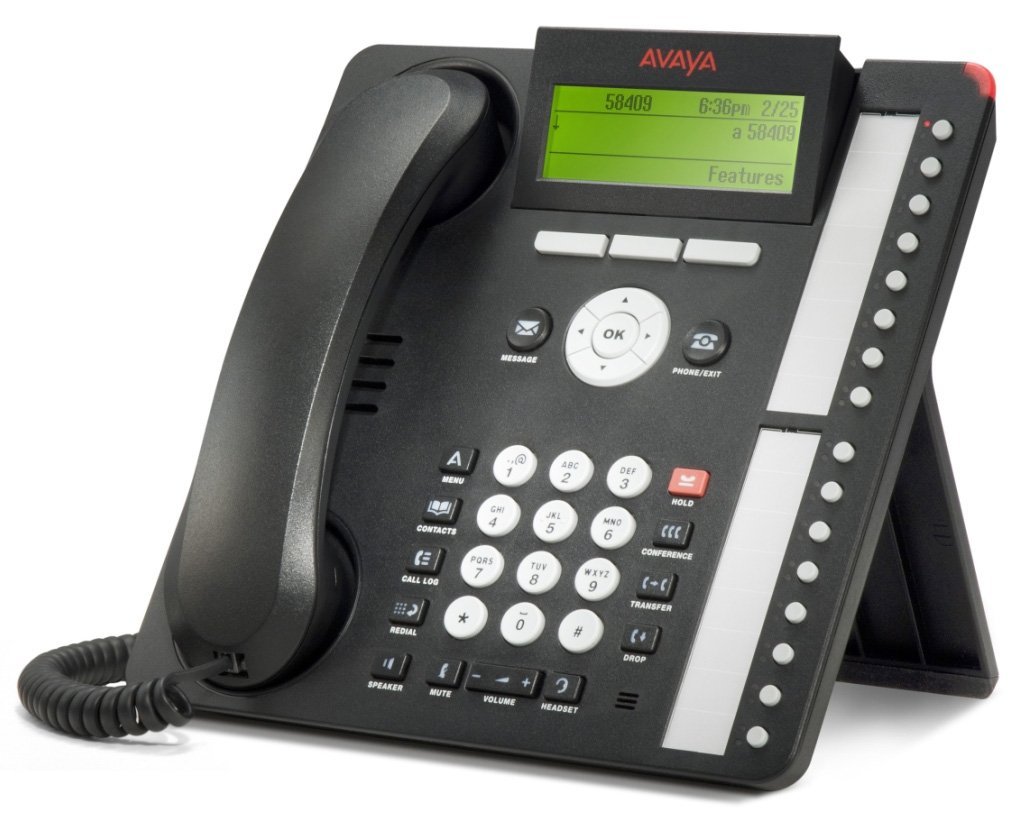
Rysunek 1: Avaya 1616 IP Telephone components. This image displays the main telephone unit, the handset, the coiled handset cord, an Ethernet cable, and the desk stand. The main unit features a display screen, a numeric keypad, and various function buttons. The desk stand is designed to elevate the phone for easier viewing i działanie.
- Telephone Base Unit: The main body of the phone with keypad, display, and function buttons.
- Słuchawka: The receiver for voice communication.
- Przewód słuchawki: Coiled cord connecting the handset to the base unit.
- Kabel Ethernet: Do połączenia sieciowego.
- Stojak na biurko: For positioning the phone on a desk.
- Power Adapter (Sold Separately): A 5V local power supply may be required if Power over Ethernet (PoE) is not available.
2.2 Połączenia fizyczne
- Zamontuj podstawkę na biurko: Securely attach the desk stand to the bottom of the telephone base unit.
- Podłącz słuchawkę: Plug one end of the coiled handset cord into the handset and the other end into the designated handset port on the side or back of the telephone base unit.
- Połącz z siecią: Insert one end of the Ethernet cable into the "LAN" port on the back of the telephone and the other end into a network switch or router. The phone supports dual Ethernet ports for connection of the phone and a collocated PC with VLAN separation.
- Podłącz zasilanie:
- Zasilanie przez Ethernet (PoE): If your network switch supports 802.3af PoE, the phone will receive power through the Ethernet cable. No separate power adapter is needed.
- Local Power Supply: If PoE is not available, connect a 5V local power supply (sold separately) to the power port on the back of the telephone and then to an electrical outlet.
Once connected, the phone will power on and begin its boot sequence. This may take a few moments.
3. Instrukcja obsługi
This section covers the basic operation of your Avaya 1616 IP Telephone.
3.1 Główne cechy
- 16 Line Appearances/Feature Keys: Programmable buttons with dual LEDs for line status and feature access.
- High-Quality 2-Way Speakerphone: Do komunikacji bez użycia rąk.
- Identyfikator dzwoniącego: Displays incoming caller information.
- Operacja wieloliniowa: Supports multiple active lines.
- Możliwość połączeń konferencyjnych: Basic conferencing features.
3.2 Podstawowe funkcje wywołań
- Nawiązywanie połączenia:
- Podnieś słuchawkę lub naciśnij przycisk Głośnik.
- Wybierz żądany numer za pomocą klawiatury.
- Press the "Call" or "Dial" softkey, or wait for automatic dialing.
- Odbieranie połączenia:
- Lift the handset, or press the Speaker button, or press the flashing line appearance button.
- Zakończenie połączenia:
- Replace the handset, or press the Speaker button again if using speakerphone, or press the "End Call" softkey.
- Wstrzymanie połączenia:
- During an active call, press the "Hold" button. The line appearance LED will flash.
- To retrieve the call, press the flashing line appearance button.
- Przekazywanie połączenia:
- During an active call, press the "Transfer" button. The current call is put on hold.
- Dial the number of the party to whom you wish to transfer the call.
- Wait for the party to answer (consulted transfer) or press "Transfer" again to complete the transfer (blind transfer).
- Initiating a Conference Call:
- During an active call, press the "Conference" button. The current call is put on hold.
- Wybierz numer osoby trzeciej.
- Once the third party answers, press the "Conference" button again to join all parties.
4. Konserwacja
Proper maintenance ensures the longevity and optimal performance of your Avaya 1616 IP Telephone.
4.1 Czyszczenie
- Użyj miękkiego, lekko damp ściereczka do czyszczenia zewnętrznych powierzchni telefonu.
- Avoid using abrasive cleaners, solvents, or strong chemicals, as these can damage the finish and electronic components.
- Do not spray cleaning liquids directly onto the phone. Apply to the cloth first.
- Ensure the phone is disconnected from power before cleaning.
4.2 Ogólna opieka
- Trzymaj telefon z dala od nadmiernego ciepła, bezpośredniego światła słonecznego i wilgoci.
- Unikaj upuszczania telefonu i narażania go na silne uderzenia.
- Ensure cables are not pinched or strained.
5. Rozwiązywanie Problemów
This section provides solutions to common issues you might encounter with your Avaya 1616 IP Telephone.
| Problem | Możliwa przyczyna | Rozwiązanie |
|---|---|---|
| Telefon się nie włącza. | Brak zasilania lub wadliwe połączenie. |
|
| Brak sygnału wybierania. | Network connectivity issue or service problem. |
|
| Nie można wykonywać ani odbierać połączeń. | Network configuration, service issue, or phone registration problem. |
|
| Niska jakość dźwięku. | Network congestion, faulty cable, or handset issue. |
|
If the problem persists after attempting these solutions, please contact your IT department or Avaya support for further assistance.
6. Specyfikacje
Key technical specifications for the Avaya 1616 IP Telephone (700450190).
| Funkcja | Szczegół |
|---|---|
| Numer modelu | 700450190 |
| Line Appearances | 16 z podwójnymi diodami LED |
| Głośnik | High-quality 2-way |
| Opcje montażu | Desk or wall mountable (with optional adapter) |
| Porty Ethernet | Dual (for phone and collocated PC w/VLAN separation) |
| Źródło zasilania | 802.3af Power over Ethernet (PoE) or optional 5V local power supply |
| Typ dialera | Pojedyncza klawiatura |
| Typ systemu odbierającego | Cyfrowy |
| Kompatybilne urządzenia | Computers, Telephone Networks, VoIP Services |
| Możliwość prowadzenia rozmów konferencyjnych | Podstawowy |
| Operacja wieloliniowa | Operacja wieloliniowa |
| Identyfikator dzwoniącego | Tak |
| Kolor | Czarny |
| Wymiary produktu | 9.8 x 7.9 x 2.8 cale (w przybliżeniu) |
| Wymiary opakowania | 16.8 x 10 x 3.3 cala |
| Waga | 2.9 funta (waga paczki) |
7. Informacje o gwarancji
This Avaya 1616 IP Telephone (700450190) is typically offered with a 90-dniowa ograniczona gwarancja. This warranty covers defects in materials and workmanship under normal use. For specific terms and conditions, please refer to the warranty documentation provided at the time of purchase or contact your vendor.
Note: As a renewed product, warranty terms may vary from new products. Always confirm warranty details with your supplier.
8. Wsparcie
For technical assistance, further troubleshooting, or inquiries regarding your Avaya 1616 IP Telephone, please contact your system administrator or the vendor from whom you purchased the device. Avaya's official support channels can also provide resources and documentation for their products.
For general information about Avaya products, you may visit the official Avaya webstrona.