
1. Wprowadzenie
The DollaTek SOP8 to DIP8 IC Socket Programmer Adapter OTS-16-03 is designed to facilitate the programming of Surface Mount Device (SMD) SOP8 integrated circuits using standard DIP8 programmers. This adapter provides a reliable connection for various narrow SOP8 chips, making them compatible with programming devices that typically accept DIP packages. It is an essential tool for electronics enthusiasts, technicians, and engineers working with EEPROMs and other compatible ICs.
2. Koniec produktuview
This adapter converts the SOP8 package footprint to a DIP8 footprint, allowing for easy insertion into a ZIF (Zero Insertion Force) socket or standard DIP socket on a programmer. It is built for durability and reliable electrical contact.
Główne cechy:
- Universal SOIC, SOP8 (EZ) SO8 to DIP8 adapter for 150mil ICs.
- Compatible with programmers supporting 1.27mm pitch SOP8 narrow chips.
- Suitable for various programmer series including ALL-11, ALL-100GANG, LT-48, SuperPro, and TOP Series.
- Supports chip types such as 24Cxx, 93CXX, and other SOP8 narrow chips.

Rysunek 2.1: Widok z góry na dół view of the DollaTek SOP8 to DIP8 adapter, showing the SOP8 socket and DIP pins.
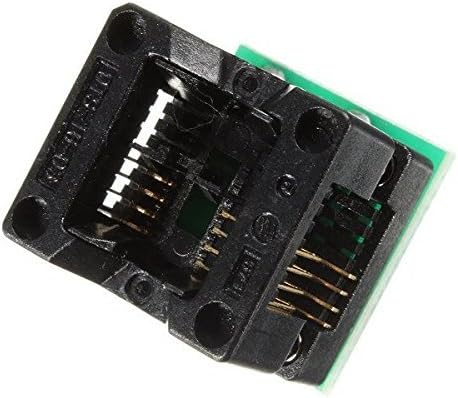
Rysunek 2.2: Strona view of the adapter, highlighting the DIP pins for insertion into a programmer.
3. Konfiguracja
Before using the adapter, ensure your programming environment is ready, including the programmer device and the target SOP8 IC.
3.1. Inserting the SOP8 IC into the Adapter
- Carefully open the ZIF socket on the SOP8 to DIP8 adapter.
- Align the SOP8 IC with the socket, ensuring Pin 1 of the IC matches the indicator on the adapter (usually a dot or notch).
- Gently place the SOP8 IC into the socket.
- Close the ZIF socket lever to secure the IC firmly in place. Do not force the lever if the IC is not properly seated.

Figure 3.1: Close-up of the SOP8 socket, showing the mechanism for securing the IC.
3.2. Inserting the Adapter into the Programmer
- Locate the DIP8 ZIF socket on your IC programmer.
- Open the ZIF socket lever on the programmer.
- Align the DIP pins of the SOP8 to DIP8 adapter with the corresponding holes in the programmer's DIP8 socket. Ensure Pin 1 of the adapter aligns with Pin 1 of the programmer's socket.
- Gently insert the adapter into the programmer's socket.
- Close the ZIF socket lever on the programmer to secure the adapter.

Figure 3.2: The adapter's DIP pins, ready to be inserted into a programmer's socket.
4. Instrukcja obsługi
Once the SOP8 IC is securely placed in the adapter and the adapter is connected to the programmer, you can proceed with the programming operations.
- Connect Programmer: Ensure your IC programmer is connected to your computer and powered on according to its specific instructions.
- Uruchom oprogramowanie: Open the programming software provided with your IC programmer.
- Select Chip Type: In the software, select the exact model of the SOP8 IC you are programming (e.g., 24C02, 93C46). This is crucial for correct operation.
- Wykonaj operację: Use the software to perform desired operations such as reading the IC's current data, erasing, writing new data, or verifying the programmed data.
- Remove IC: After programming is complete and verified, carefully open the programmer's ZIF socket lever, remove the adapter, then open the adapter's ZIF socket lever to remove the SOP8 IC.
Always refer to your specific IC programmer's manual for detailed software operation and safety guidelines.
5. Konserwacja
Proper care will extend the lifespan and ensure the reliability of your DollaTek SOP8 to DIP8 adapter.
- Czyszczenie: Keep the adapter clean and free from dust, debris, and solder flux. Use a soft, dry brush or compressed air to clean the socket contacts. Avoid using liquid cleaners that could leave residue.
- Obsługiwanie: Handle the adapter with care. Avoid dropping it or applying excessive force to the ZIF socket mechanism, as this can damage the delicate contacts.
- Składowanie: Store the adapter in a clean, dry, and anti-static environment when not in use to prevent damage from static discharge or environmental factors.
6. Rozwiązywanie Problemów
If you encounter issues while using the adapter, consider the following common problems and solutions:
6.1. IC Not Detected by Programmer
- Check IC Insertion: Ensure the SOP8 IC is correctly oriented (Pin 1 alignment) and fully seated in the adapter's ZIF socket, and the lever is closed.
- Sprawdź włożenie adaptera: Verify the adapter is correctly oriented and fully seated in the programmer's DIP8 ZIF socket, and its lever is closed.
- Ustawienia programisty: Confirm that the correct IC model is selected in your programmer's software. An incorrect selection can lead to detection failures.
- IC Condition: Ensure the SOP8 IC itself is functional and not damaged. Try with a known good IC if available.
6.2. Błędy programowania
- Zasilanie: Ensure the programmer has a stable power supply.
- Wersja oprogramowania: Update your programmer's software to the latest version, as compatibility issues can arise with older versions.
- Problemy z kontaktem: Inspect the adapter's contacts and the IC's pins for any dirt, corrosion, or bending that might prevent proper electrical connection.
7. Specyfikacje
| Funkcja | Szczegół |
|---|---|
| Model | OTS-16-03 |
| Typ adaptera | SOP8 (150mil) to DIP8 |
| Pitch Compatibility | 1.27mm (SOP8 narrow chips) |
| Supported ICs | 24Cxx, 93CXX, and other SOP8 narrow chips |
| Marka | DolaTek |
| UPC | 742548979133 |
| ASIN | B07DK12HMS |