
Wstęp
The Xiaomi Mi Selfie Stick Tripod is a versatile accessory designed for mobile photography and videography. It integrates both a monopod (selfie stick) and a tripod into a single, compact unit. This device features a detachable Bluetooth remote control for convenient photo capture and a phone holder that rotates 360 degrees to accommodate various shooting angles. Its grip extends to securely hold a wide range of smartphone sizes, with an adjustment range of 56-89mm.
Co jest w pudełku
- 1 x Xiaomi Mi Selfie Stick Tripod
- 1 x pilot zdalnego sterowania Bluetooth
- 1 x Instrukcja obsługi
Główne cechy
- Integrated Monopod and Tripod Design
- Odłączany pilot Bluetooth
- 360-Degree Rotatable Phone Holder
- Adjustable Phone Grip (56-89mm)
- Non-slip Pad for Stable Grip
Organizować coś
1. Unfolding the Device
To use the device, gently pull the top section upwards to extend the monopod. The tripod legs are folded into the handle. To deploy the tripod, firmly grasp the handle and pull the bottom section downwards. The three legs will unfold and lock into place, forming a stable base.

Image: The Xiaomi Mi Selfie Stick Tripod in its extended monopod configuration, ready to hold a smartphone.
2. Podłączanie smartfona
Locate the phone holder at the top of the device. Gently pull the spring-loaded clamp open and insert your smartphone. Ensure the phone is securely seated within the holder. The holder can rotate 360 degrees; adjust it to your desired orientation (portrait or landscape).
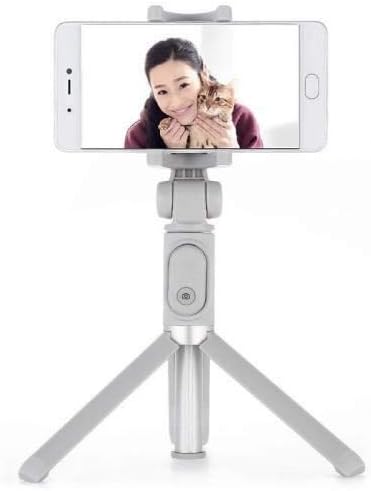
Image: The Xiaomi Mi Selfie Stick Tripod deployed as a tripod with a smartphone securely mounted, demonstrating its stability for hands-free use.
3. Parowanie pilota Bluetooth
- The Bluetooth remote control is integrated into the handle. To remove it, gently slide it out from its slot.
- Press and hold the button on the remote control until the indicator light begins to flash, indicating it is in pairing mode.
- Na swoim smartfonie przejdź do ustawień Bluetooth.
- Szukaj available devices and select "XMZPG" or a similar name.
- Once paired, the indicator light on the remote will stop flashing.

Obraz: Zbliżenie view of the Xiaomi Mi Selfie Stick Tripod in its compact, folded state, highlighting the detachable Bluetooth remote control embedded in the handle.
Instrukcja obsługi
Używanie jako kija do selfie
With your phone securely mounted and the device extended, hold the handle firmly. Use the Bluetooth remote control to trigger your phone's camera shutter. This allows for wider angle selfies and group photos.
Używanie jako statywu
Extend the tripod legs and place the device on a flat, stable surface. Adjust the height of the monopod and the angle of your phone holder as needed. Use the Bluetooth remote control to take photos or start/stop video recording from a distance, ideal for stable shots, time-lapses, or video calls.
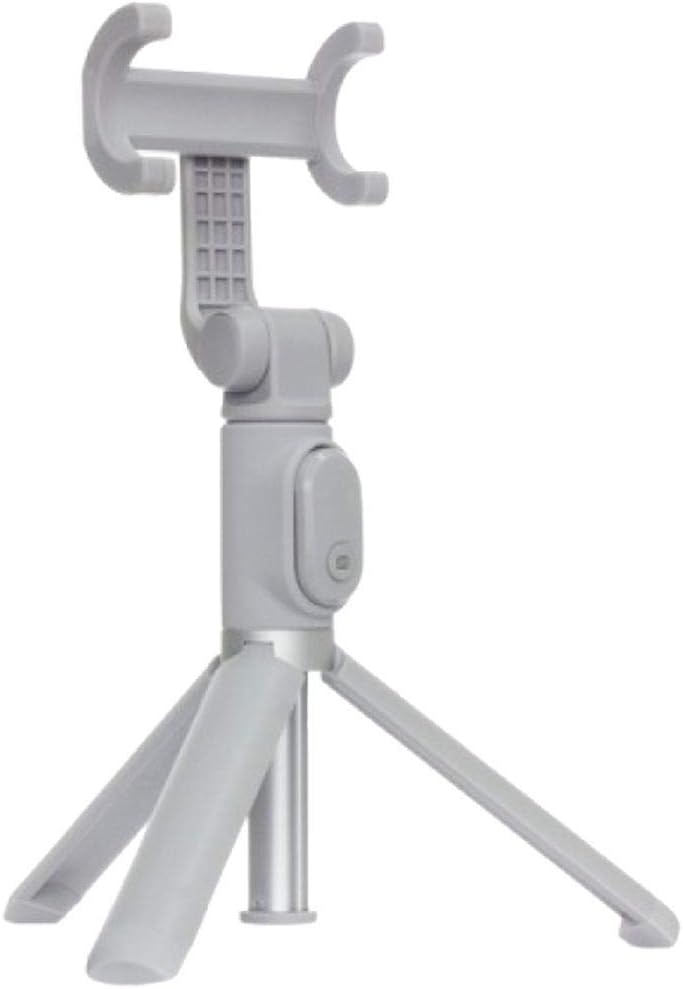
Image: The Xiaomi Mi Selfie Stick Tripod standing independently in tripod mode, demonstrating its stability and readiness for hands-free photography or videography.
Obrót uchwytu telefonu
The phone holder can be rotated 360 degrees. Gently twist the holder to switch between portrait and landscape orientations without needing to remount your phone.
Konserwacja
- Czyszczenie: Przetrzyj urządzenie miękką, suchą ściereczką. Unikaj stosowania silnych środków chemicznych i materiałów ściernych.
- Składowanie: When not in use, fold the selfie stick tripod to its compact size and store it in a cool, dry place away from direct sunlight and extreme temperatures.
- Wymiana baterii (pilot Bluetooth): The remote control uses a replaceable button cell battery (e.g., CR1632). To replace, locate the battery compartment on the side or back of the remote, open it, and insert a new battery with the correct polarity.
Rozwiązywanie problemów
- Remote Control Not Pairing/Working:
- Ensure the remote control battery is not depleted. Replace if necessary.
- Upewnij się, że Bluetooth jest włączony w Twoim smartfonie.
- Rozłącz i ponownie sparuj urządzenie w ustawieniach Bluetooth telefonu.
- Ensure the remote is fully charged if it's a rechargeable model (though this model uses a button cell).
- Telefon nie jest dobrze zamocowany:
- Verify your phone's width is within the 56-89mm adjustment range of the phone holder.
- Zdejmij wszelkie niewygodne etui na telefon, które mogą utrudniać jego bezpieczne zamocowanie.
- Niestabilność statywu:
- Ensure the tripod legs are fully extended and locked into place.
- Place the tripod on a flat, level, and stable surface.
- Avoid extending the monopod to its maximum length when using it as a tripod, especially with heavier phones, to maintain stability.
- Device Not Extending/Folding Smoothly:
- Check for any obstructions or debris in the extending mechanism.
- Do not force the mechanism; if it's stiff, try gently wiggling it while extending/folding.
Specyfikacje
| Funkcja | Specyfikacja |
|---|---|
| Wymiary produktu | 1.77 x 1.93 x 7.48 cala (po złożeniu) |
| Waga przedmiotu | 3.52 uncji (0.1 kilograma) |
| Numer modelu | FBA4071US |
| ASIN | B07DFBRTPV |
| Kolor | Szary |
| Kompatybilne urządzenia | Smartfon |
| Phone Grip Adjustment Range | 56-89 mm |
| Typ baterii (pilot) | 1 Lithium Ion battery required (typically CR1632) |
| Producent | Xiaomi |
Gwarancja i wsparcie
Aby uzyskać informacje o gwarancji i obsłudze klienta, zapoznaj się z oficjalną stroną Xiaomi website or contact your local authorized Xiaomi service center. Keep your purchase receipt as proof of purchase for any warranty claims.
Możesz również odwiedzić oficjalną stronę Sklep XIAOMI na Amazon Aby uzyskać więcej informacji o produkcie i zasobach pomocy.