
Produkt ponadview
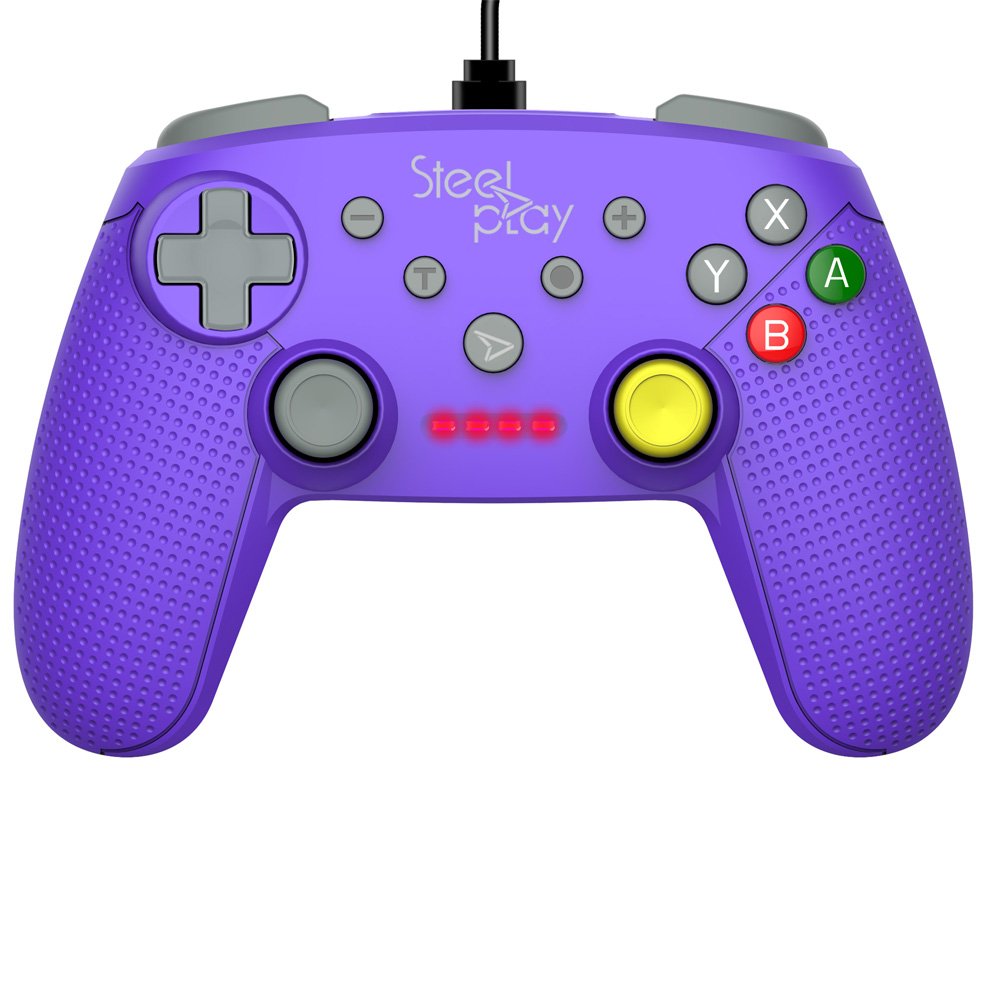
The Steelplay Wired Controller GCUBE (model ECO0622) is designed for use with the Nintendo Switch console, providing a reliable wired connection for uninterrupted gameplay. This controller features a comfortable ergonomic grip, a 2.5-meter USB cable, and includes advanced functionalities such as a gyro sensor, dual vibration feedback, and a turbo function button.
Instrukcje konfiguracji
- Podłącz kontroler: Insert the USB connector of the Steelplay Wired Controller GCUBE into an available USB port on your Nintendo Switch dock.
- Włącz konsolę: Ensure your Nintendo Switch console is powered on and connected to your TV or in handheld mode with the dock.
- Automatyczne rozpoznawanie: The console should automatically detect the controller. The player indicator lights on the controller will illuminate to show its assigned player number.
- Begin Gameplay: You can now use your Steelplay Wired Controller GCUBE for gaming.
Obsługa kontrolera
The Steelplay Wired Controller GCUBE features a standard layout for intuitive gameplay.
Funkcje przycisków:
- Lewy/prawy drążek analogowy: Do sterowania ruchem i kamerą.
- D-Pad (pad kierunkowy): Do precyzyjnego wprowadzania kierunku.
- Przyciski A/B/X/Y: Action buttons, typically used for jumping, attacking, interacting, etc.
- L/R Buttons (Shoulder Buttons): Often used for quick actions or menu navigation.
- ZL/ZR Buttons (Trigger Buttons): Analog or digital triggers for specific in-game actions.
- Przycisk Minus (-): Typically opens in-game menus or performs specific actions.
- Przycisk plus (+): Typically pauses the game or opens system menus.
- Przycisk Home: Returns to the Nintendo Switch HOME Menu.
- Przycisk przechwytywania: Takes screenshots of your gameplay.
Cechy szczególne:
- Gyro Function: The controller includes a built-in gyro sensor for motion control in compatible games. This allows for intuitive aiming or steering by tilting the controller.
- Podwójne sprzężenie zwrotne wibracji: Experience enhanced immersion with haptic feedback that responds to in-game events.
- Funkcja turbo: The turbo function allows for rapid, repeated input of a button press. To activate, press and hold the Turbo button, then press the desired action button (e.g., A, B, X, Y, L, R, ZL, ZR). To deactivate, repeat the process.
Konserwacja
Proper care ensures the longevity and optimal performance of your controller.
- Czyszczenie: Do wycierania kontrolera użyj miękkiej, suchej ściereczki. W przypadku uporczywych zabrudzeń delikatnie przetrzyjampPrzetrzyj szmatkę wodą. Unikaj stosowania silnych środków chemicznych, rozpuszczalników i ściernych środków czyszczących.
- Składowanie: Przechowuj kontroler w chłodnym, suchym miejscu, z dala od bezpośredniego światła słonecznego i ekstremalnych temperatur.
- Pielęgnacja kabli: Avoid bending or twisting the USB cable excessively. Do not pull the cable to disconnect the controller; always grasp the plug.
- Unikaj płynów: Trzymaj kontroler z dala od płynów, aby zapobiec uszkodzeniom wewnętrznym.
Rozwiązywanie problemów
- Kontroler nie odpowiada:
- Ensure the USB cable is securely connected to both the controller and the Nintendo Switch dock.
- Try connecting the controller to a different USB port on the dock.
- Uruchom ponownie konsolę Nintendo Switch.
- Przyciski lub joysticki nie działają prawidłowo:
- Sprawdź, czy wokół przycisków i joysticków nie znajdują się żadne przeszkody fizyczne lub zanieczyszczenia.
- Ensure the controller's firmware is up to date. Firmware updates may be necessary and typically require connection to a PC. Refer to the Steelplay official website for specific instructions and update tools.
- Wibracje nie działają:
- Sprawdź, czy w ustawieniach konsoli Nintendo Switch i w grze, w którą grasz, włączona jest funkcja wibracji.
- Sprawdź, czy kontroler jest podłączony prawidłowo.
Specyfikacje
| Funkcja | Szczegół |
|---|---|
| Numer modelu | ECO0622 |
| Zgodność | Nintendo Switch |
| Łączność | Przewodowy (USB) |
| Długość kabla | 2.5 metrów |
| Wymiary | Wymiary 17.2 x 7 x 20.3 cm |
| Waga | 360 gramów |
| Cechy specjalne | Gyro Function, Dual Vibration Feedback, Turbo Function Button, Rubberized Grip Surface, Ergonomic Grip |
Informacje o gwarancji
For detailed warranty information regarding your Steelplay Wired Controller GCUBE, please refer to the warranty card included with your product or visit the official Steelplay webWarunki gwarancji mogą się różnić w zależności od regionu i sprzedawcy.
Obsługa klienta
If you encounter any issues or have questions not covered in this manual, please contact Steelplay customer support. Contact information can typically be found on the official Steelplay webmiejscu lub na opakowaniu produktu.