
1. Wprowadzenie
Dziękujemy za zakupasing the Nobsound NS-01G Pro Bluetooth 5.0 Power Amplifier. Ten kompaktowy, a zarazem wydajny amplifier is designed to deliver high-fidelity audio for your speakers, offering versatile input options including Bluetooth 5.0, AUX, and USB. This manual provides detailed instructions for setup, operation, maintenance, and troubleshooting to ensure you get the best performance from your device.
2. Koniec produktuview
2.1 Główne cechy
- Projekt 2 w 1: Functions as both a Bluetooth receiver and a power ampliyfikator.
- Połączenie bezprzewodowe: Seamlessly connect to smartphones and other devices via Bluetooth 5.0.
- Wysoka moc wyjściowa: Despite its mini size, it delivers up to 100W output power.
- Wiele wejść: Supports AUX, USB, and Bluetooth audio inputs.
- Regulacja tonów: Features Bass, Middle, and Treble tone controls for sound customization.
2.2 Zawartość opakowania
- 1 × Nobsound NS-01G Pro Ampżywsze
- 1 × DC 19V Power Adapter
- Kabel 1 × USB
- 1 × kabel RCA
- 1 × 3.5 mm kabel audio
- 1 × Instrukcja obsługi

2.3 Układ panelu przedniego

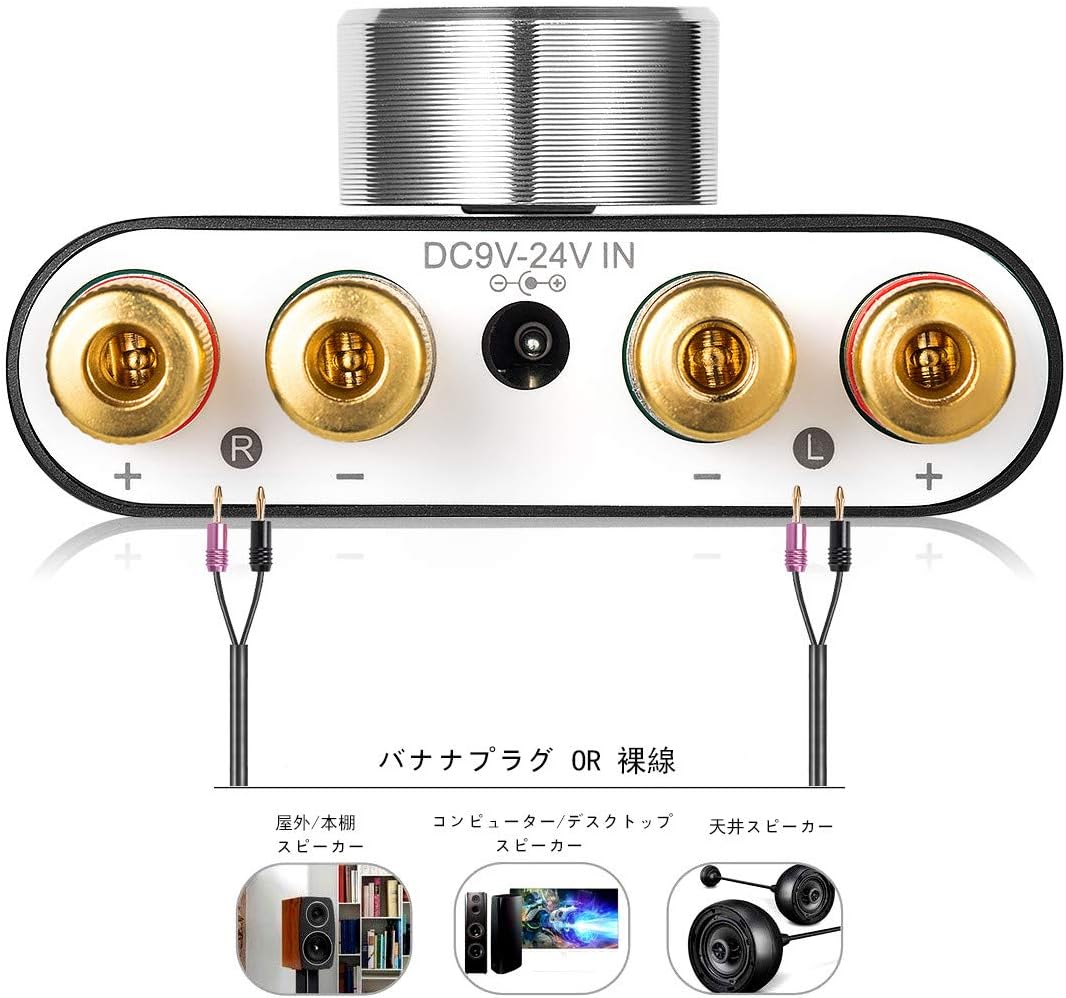
2.4 Układ panelu tylnego
3. Instrukcje konfiguracji
3.1 Podłączenie głośników
- Zapewnij ampLififier jest wyłączony.
- Connect your passive speakers to the speaker output terminals on the rear panel. Pay attention to polarity: connect the red (+) terminal on the ampprzewód zasilający do czerwonego zacisku (+) na głośniku i czarnego zacisku (-) na amplifier to the black (-) terminal on the speaker.
3.2 Podłączenie źródła wejściowego
The NS-01G Pro supports three input methods: AUX, USB, and Bluetooth.

3.2.1 Wejście AUX
- Connect your audio source (e.g., smartphone, CD player, TV) to the AUX input jack on the front panel using a 3.5mm audio cable.
3.2.2 Wejście USB
- Connect your computer to the USB sound input port on the front panel using a USB cable. No drivers are typically required for this plug-and-play connection.

3.2.3 Wejście Bluetooth
- Attach the Bluetooth antenna to the RF connector on the rear panel.
- Switch the input selector on the front panel to 'BT' mode.
- Na swoim urządzeniu mobilnym włącz Bluetooth i wyszukaj
Ask a question about this manual
Ask about setup, troubleshooting, compatibility, parts, safety, or missing instructions. Manuals+ will review the question and use this page’s manual context to help answer it.