
1. Wprowadzenie
The Ambient Weather WS-3000-X8 Thermo-Hygrometer Wireless Monitor is designed to provide accurate, real-time environmental data for your home or business. This system allows you to monitor temperature and humidity from up to eight remote locations simultaneously, helping you protect valuable assets, optimize conditions, and prevent potential issues. With its high-resolution display, advanced data logging capabilities, and programmable alarms, the WS-3000-X8 offers comprehensive environmental monitoring.

Figure 1.1: The Ambient Weather WS-3000-X8 console and eight included remote sensors.
2. Koniec produktuview i funkcje
The WS-3000-X8 system is engineered for precision and ease of use, offering a robust solution for multi-location environmental monitoring.
- Monitorowanie wieloczujnikowe: Graphs and displays data from up to eight wireless remote sensors simultaneously.
- High-Resolution TFT Display: Features a compact, high-resolution Thin-Film Transistor (TFT) display for clear, easy-to-read graphics, charts, and alarms.
- Data Logging and Analysis: Includes PC software for advanced data analysis, console programming, and easy data extraction from an optional micro-SD card. Data can be stored on an SD card or accessed via desktop software.
- Dane w czasie rzeczywistym: Track multiple data points at various locations in real-time.
- Kalibrowanie: All sensors can be calibrated for high accuracy, ensuring reliable readings.
- Zegar sterowany radiowo: An integrated radio-controlled clock keeps the entire station synchronized, providing accurate timekeeping.
- Programowalne alarmy: Set timers for automatic shutdowns and startups, and program alarms to notify you if a parameter exceeds a predefined threshold.
Video 2.1: An official product video from Ambient Weather demonstrating the features and benefits of the WS-3000 series weather station, including its ability to monitor various environmental parameters and provide real-time data.
3. Zawartość opakowania
Sprawdź, czy wszystkie elementy znajdują się w opakowaniu i są w dobrym stanie po jego otwarciu:
- WS-3000-X8 Main Console Unit
- 8 x Wireless Remote Thermo-Hygrometer Sensors
- AC Power Adapter for Main Console
- Instrukcja obsługi (ten dokument)
Note: 2 x AA batteries are required for each remote sensor and are NOT included. Please purchase 16 AA batteries separately.
4. Konfiguracja
4.1 Sensor Battery Installation
- Locate the battery compartment on the back of each wireless remote sensor.
- Otwórz pokrywę komory baterii.
- Insert 2 x AA batteries into each sensor, observing the correct polarity (+/-).
- Dokładnie zamknij pokrywę komory baterii.

Figure 4.1: A single wireless remote sensor displaying temperature and humidity.
4.2 Console Power
Connect the included AC power adapter to the main console unit and plug it into a standard electrical outlet. The console will power on automatically.
4.3 Synchronizacja czujników
Once the sensors are powered on and the console is active, the console will automatically begin searching for and synchronizing with the remote sensors. This process typically takes a few minutes. Ensure sensors are within range during initial setup.
4.4 Umiejscowienie czujnika
Place the remote sensors in the desired locations you wish to monitor. Consider the following for optimal performance:
- Avoid direct sunlight or heat sources for temperature accuracy.
- Ensure sensors are protected from direct rain or excessive moisture if placed outdoors.
- Maintain a clear line of sight between sensors and the console if possible, or minimize obstructions for best wireless signal.
4.5 Time Synchronization (Radio Controlled Clock)
The console features a radio-controlled clock that automatically synchronizes with the atomic clock signal. Allow some time for the unit to receive and set the correct time. Ensure the console is placed in an area where it can receive a clear signal.
4.6 Kalibracja czujnika
For enhanced accuracy, individual sensors can be calibrated. Refer to the console's menu options for calibration procedures. It is recommended to allow sensors to acclimate to their environment for at least 30 minutes before performing calibration.
5. Instrukcja obsługi
5.1 Zrozumienie wyświetlacza
The main console display provides a clear overview of temperature and humidity readings from all eight channels. Each channel displays its current temperature and humidity percentage.

Figure 5.1: The console display showing real-time temperature and humidity for eight channels.
5.2 Using Console Buttons
The console features several buttons for navigation and control:
- WYKRES: Access historical data graphs for each channel.
- MENU: Enter the main menu to configure settings, set alarms, and access advanced features.
- Strzałki w górę/w dół: Poruszaj się po opcjach menu i dostosuj wartości.
- OK/Wprowadź: Potwierdź wybór.
5.3 Ustawianie alarmów
You can set high and low alarms for temperature and humidity on each channel. If a reading exceeds or falls below the set threshold, the console will trigger an audible and/or visual alert.
- Naciśnij MENU przycisk.
- Navigate to the "Alarm Settings" option using the arrow buttons and press OK.
- Select the desired channel and parameter (Temperature High/Low, Humidity High/Low).
- Adjust the threshold value using the arrow buttons and confirm with OK.
5.4 timery
The console allows for setting timers for automatic shutdown and startup, which can be useful for power saving or specific monitoring schedules. Consult the menu for timer configuration options.
6. Rejestrowanie i analiza danych
The WS-3000-X8 offers robust data logging capabilities, allowing you to store and analyze historical environmental data.
6.1 Micro-SD Card Usage
Insert a micro-SD card (not included) into the designated slot on the console to enable continuous data logging. The console will automatically record readings at set intervals.
6.2 Oprogramowanie komputerowe
The included PC software (available for download from the Ambient Weather website) provides a comprehensive interface for viewing, analyzing, and exporting logged data. You can connect the console to your computer via USB or transfer data directly from the micro-SD card.
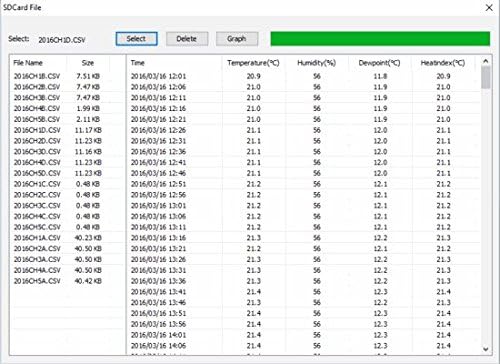
Figure 6.1: Screenshot of the PC software interface for data analysis and management.
6.3 Graphing Historical Data
Both the console's display and the PC software allow you to view historical trends of temperature and humidity in graphical format. This feature is crucial for identifying patterns, understanding environmental changes over time, and optimizing conditions.
7. Konserwacja
7.1 Wymiana baterii
Replace the AA batteries in the remote sensors when the low battery indicator appears on the console or sensor display. Use high-quality alkaline or lithium batteries for best performance, especially in cold environments.
7.2 Czyszczenie
Przetrzyj konsolę i czujniki miękką ściereczką.amp ściereczką. Nie używaj środków czyszczących ani rozpuszczalników o działaniu ściernym, ponieważ mogą one uszkodzić powierzchnie lub elementy elektroniczne.
7.3 Optymalne rozmieszczenie
Periodically check the placement of your sensors to ensure they are still in optimal positions for accurate readings and strong wireless signal transmission.
8. Rozwiązywanie Problemów
8.1 No Sensor Readings on Console
- Sprawdź baterie: Ensure batteries are correctly installed and not depleted in the remote sensors.
- Cykl zasilania: Remove and reinsert batteries in sensors, and power cycle the main console.
- Zakres: Move sensors closer to the main console to check if they are out of wireless range.
- Ingerencja: Avoid placing sensors near large metal objects or strong electromagnetic interference sources.
8.2 Niedokładne odczyty
- Rozmieszczenie czujnika: Ensure sensors are not in direct sunlight, near heat/cold sources, or in areas with poor air circulation.
- Kalibrowanie: Perform a calibration of the affected sensor(s) using the console's menu.
- Aklimatyzacja: Allow sensors sufficient time (at least 30 minutes) to acclimate to a new environment before taking critical readings.
8.3 Console Not Responding
- Zasilanie: Verify the AC adapter is securely connected and receiving power.
- Reset: If unresponsive, disconnect the AC adapter, wait 10 seconds, and reconnect it.
9. Specyfikacje
| Funkcja | Specyfikacja |
|---|---|
| Numer modelu | WS-3000-X8 |
| Marka | Pogoda otoczenia |
| Wymiary konsoli | 3.25"W x 4.5"H x 0.38"D (base 1.5") |
| Wymiary czujnika | 4.75" x 1.5" x 0.6" |
| Źródło zasilania (konsola) | Zasilacz sieciowy |
| Źródło zasilania (czujniki) | 2 baterie AA (brak w zestawie) |
| Technologia łączności | Radio Frequency (915 MHz) |
| Dokładność temperatury | ±1°C |
| Górna ocena temperatury | 140°F |
| Typ wyświetlacza | LCD / TFT |
| Waga przedmiotu | 1.68 funta |
| Kolor | Czarny |
10. Gwarancja i wsparcie
Ambient Weather products are designed for reliability and performance. For any technical assistance, troubleshooting, or warranty inquiries, please contact Ambient Weather customer support directly. Refer to the official Ambient Weather webwitryna zawierająca najnowsze informacje dotyczące pomocy technicznej i dane kontaktowe.
Zasoby internetowe: Visit the Ambient Weather website for FAQs, software downloads, and additional product information.
Skontaktuj się z pomocą techniczną: Details for phone and email support can be found on the Ambient Weather support page.