
Bytech BCAUBS134BK
Instrukcja obsługi głośnika Bytech Massive Bluetooth Long Bar Speaker-BK
Model: BCAUBS134BK
1. Wprowadzenie
Dziękujemy za zakupasing the Bytech Massive Bluetooth Long Bar Speaker-BK. This manual provides essential information for the proper setup, operation, and maintenance of your new speaker. Please read this manual thoroughly before using the product to ensure optimal performance and longevity.
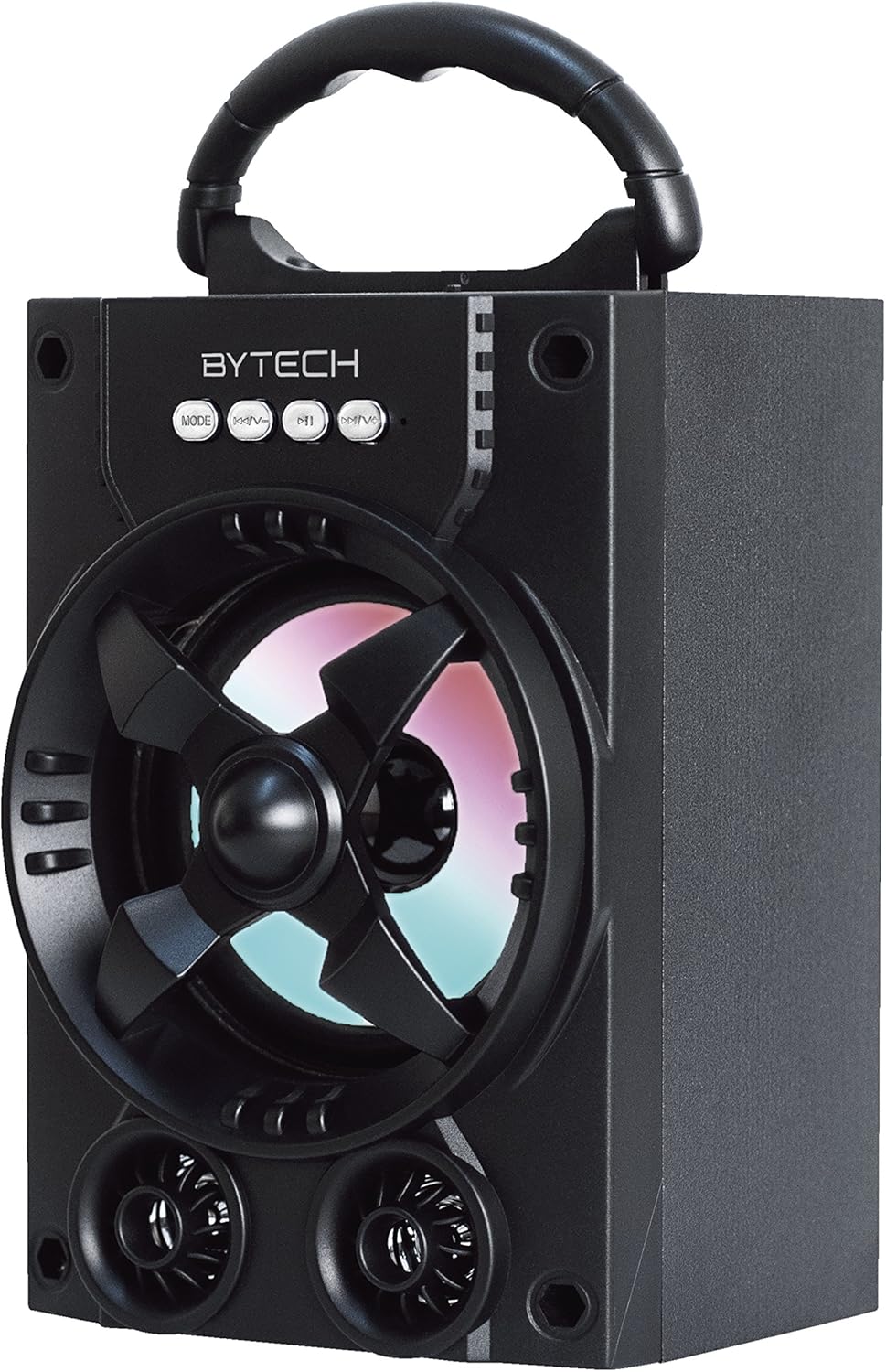
Rycina 1.1: Przód view of the Bytech Massive Bluetooth Long Bar Speaker-BK, showcasing its design, handle, and speaker grille with LED lights.
2. Zawartość opakowania
Proszę sprawdzić, czy w paczce znajdują się następujące elementy:
- Bytech Massive Bluetooth Long Bar Speaker-BK
- Kabel ładujący USB
- Instrukcja obsługi (ten dokument)
Jeśli brakuje jakichkolwiek elementów lub są one uszkodzone, prosimy o kontakt z obsługą klienta.
3. Funkcje produktu
- LED Performance Lights: Dynamic LED lights that synchronize with your music for an enhanced audio-visual experience.
- Convenient Carrying Handle: Integrated handle for easy portability, allowing you to take your music anywhere.
- Uniwersalna łączność Bluetooth: Seamlessly connect wirelessly to your smartphone, tablet, or other Bluetooth-enabled devices.
- Dźwięk przestrzenny: Designed to deliver a high-quality surround sound experience.
- Przenośna konstrukcja: Ideal for various settings, including parties, outdoor gatherings, and personal use.

Figure 1.2: The speaker shown with its retail packaging, illustrating its key features such as multi-color LED lights, Bluetooth connectivity, and surround sound capability.
4. Kontrolki i wskaźniki
The speaker features intuitive controls and indicators for easy operation:
- Przycisk TRYB: Press to switch between available input modes (e.g., Bluetooth).
- Przycisk V: Press to decrease volume. Long press to skip to the previous track.
- Przycisk V+: Press to increase volume. Long press to skip to the next track.
- Przycisk M: (Function not explicitly detailed, typically for mode or mute)
- Światła LED: Indicate power status, charging status, and provide dynamic light effects during audio playback.
5. Przewodnik konfiguracji
5.1 Ładowanie głośnika
- Podłącz mniejszy koniec kabla ładującego USB do portu ładowania w głośniku.
- Podłącz większy koniec kabla ładującego USB do zasilacza USB (brak w zestawie) lub do portu USB komputera.
- Wskaźnik LED będzie pokazywał stan ładowania (np. świeci na czerwono, gdy urządzenie jest ładowane, a nie świeci, gdy urządzenie jest w pełni naładowane).
- Przed pierwszym użyciem należy odczekać około 3–4 godzin, aby naładować urządzenie do pełna.
5.2 Włączanie/wyłączanie
- To power on, press and hold the Power button (location not specified, typically near charging port or on control panel) for a few seconds until you hear an audible prompt or see the LED lights activate.
- Aby wyłączyć głośnik, naciśnij i przytrzymaj przycisk zasilania, aż głośnik się wyłączy.
5.3 parowanie Bluetooth
- Ensure the speaker is powered on and in Bluetooth pairing mode (indicated by a flashing LED light or audible prompt).
- Na smartfonie lub tablecie przejdź do ustawień Bluetooth.
- Szukaj available devices. The speaker will appear as "BYTECH" or a similar name.
- Aby rozpocząć parowanie, wybierz głośnik z listy.
- Once successfully paired, the LED indicator will typically become solid, and you may hear a confirmation tone.
6. Instrukcja obsługi
6.1 Odtwarzanie dźwięku przez Bluetooth
- After successful Bluetooth pairing, open your preferred music application on your connected device.
- Select and play your desired audio. The sound will be streamed wirelessly to the speaker.
- Use the V+ and V- buttons on the speaker or your connected device to adjust the volume.
- Long press V+ or V- to skip tracks.
6.2 LED Performance Lights
The speaker features integrated LED lights that enhance your listening experience. These lights typically activate automatically when the speaker is powered on and playing audio. Specific controls for light modes are not detailed, but they are designed to provide dynamic visual effects.
6.3 Przełączanie trybów
Naciśnij TRYB button to cycle through available input modes. While Bluetooth is the primary connectivity, other modes (if available, such as FM radio or AUX input) can be accessed via this button.
7. Konserwacja i pielęgnacja
- Czyszczenie: Do czyszczenia obudowy głośnika należy używać miękkiej, suchej ściereczki. Nie należy używać środków ściernych, wosków ani rozpuszczalników.
- Składowanie: Jeśli głośnik nie będzie używany przez dłuższy czas, należy przechowywać go w chłodnym, suchym miejscu, z dala od bezpośredniego światła słonecznego i ekstremalnych temperatur.
- Pielęgnacja baterii: To prolong battery life, avoid fully discharging the battery frequently. Recharge the speaker regularly, even if not in use, to maintain battery health.
- Wodoodporność: Ten produkt jest NIE waterproof. Avoid exposure to water, rain, or excessive moisture to prevent damage.
8. Rozwiązywanie Problemów
Jeśli masz problemy z głośnikiem, zapoznaj się z poniższymi typowymi problemami i ich rozwiązaniami:
| Problem | Możliwa przyczyna | Rozwiązanie |
|---|---|---|
| Głośnik nie włącza się. | Niski poziom naładowania baterii. | Naładuj głośnik całkowicie. |
| Brak dźwięku z głośnika. | Zbyt niski poziom głośności; Nie sparowano; Nieprawidłowy tryb. | Increase volume on speaker and device; Ensure successful Bluetooth pairing; Press MODE button to select correct input. |
| Połączenie Bluetooth jest niestabilne lub nie działa. | Urządzenie znajduje się za daleko; Zakłócenia; Problem z parowaniem. | Move device closer to speaker (within 33 ft/10m); Avoid obstacles; Forget device on your phone and re-pair. |
| Oświetlenie LED nie działa. | Speaker not powered on or playing audio. | Ensure speaker is on and audio is playing. |
9. Specyfikacje
| Funkcja | Szczegół |
|---|---|
| Marka | Bytech |
| Nazwa modelu | BYTECH |
| Numer modelu przedmiotu | BCAUBS134BK |
| Typ głośnika | Dźwięk przestrzenny |
| Technologia łączności | Bluetooth |
| Technologia komunikacji bezprzewodowej | Bluetooth |
| Kompatybilne urządzenia | Smartfon |
| Maksymalna moc wyjściowa głośnika | 20 watów |
| Odpowiedź częstotliwościowa | 20 kHz |
| Impedancja | 1 omy |
| Rozmiar głośnika | 5 cali |
| Źródło zasilania | Elektryczny przewodowy (do ładowania) |
| Typ baterii | Wymagana 1 bateria litowo-jonowa |
| Kolor | Czarny |
| Wymiary produktu | 4.75 x 5.5 x 8.5 cala |
| Waga przedmiotu | 1.3 funta |
| jest wodoodporny | NIE |
| Kraj pochodzenia | Chiny |
| UPC | 805112038121 |
10. Informacje o gwarancji
Bytech products are manufactured to the highest quality standards. For specific warranty terms and conditions, please refer to the warranty card included with your purchase or visit the official Bytech webZachowaj dowód zakupu na wypadek roszczeń gwarancyjnych.
11. Obsługa klienta
For technical assistance, troubleshooting, or general inquiries, please contact Bytech customer support. Contact information can typically be found on the product packaging, the official Bytech webwitryny lub paragonu za zakup.
Uwaga: Na podstawie dostarczonych danych nie można było osadzić oficjalnych filmów produktu od sprzedawcy.
Ask a question about this manual
Ask about setup, troubleshooting, compatibility, parts, safety, or missing instructions. Manuals+ will review the question and use this page’s manual context to help answer it.