
1. Wprowadzenie
This manual provides essential information for the safe and efficient operation of your Digi International WR21-L52A-DE1-TB Cellular Wireless Router. Please read this manual thoroughly before installation and use, and retain it for future reference. This device is designed to provide reliable cellular connectivity for various applications.
2. Informacje dotyczące bezpieczeństwa
- Zasilanie: Use only the power adapter supplied with the device. Using an incorrect adapter may damage the device and void the warranty.
- Wentylacja: Ensure adequate ventilation around the router. Do not block ventilation openings.
- Środowisko: Avoid exposing the device to extreme temperatures, humidity, direct sunlight, or corrosive environments.
- Serwisowanie: Nie próbuj samodzielnie otwierać ani naprawiać urządzenia. Wszelkie prace serwisowe zleć wykwalifikowanemu personelowi.
- Anteny: Ensure antennas are securely connected before powering on the device.
3. Zawartość opakowania
Sprawdź, czy w opakowaniu znajdują się wszystkie elementy:
- Digi International WR21-L52A-DE1-TB Cellular Wireless Router
- Zasilacz
- Antennas (quantity may vary)
- Kabel Ethernet
- Szybki przewodnik (jeśli dołączony)
Jeśli brakuje któregokolwiek z elementów lub jest on uszkodzony, należy natychmiast skontaktować się ze sprzedawcą.
4. Koniec produktuview
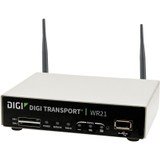
Obraz: Przód view of the Digi International WR21-L52A-DE1-TB Cellular Wireless Router. This image displays the compact form factor of the device, likely showing ports for antennas, power, and network connections.
The Digi International WR21-L52A-DE1-TB is a robust cellular wireless router designed for reliable and secure connectivity. It features multiple connectivity options and is suitable for various industrial and enterprise applications requiring remote access and data transfer over cellular networks.
5. Konfiguracja
5.1. Instalacja karty SIM
- Upewnij się, że router jest wyłączony i odłączony od źródła zasilania.
- Locate the SIM card slot(s) on the device. Refer to the device's physical markings for exact location.
- Insert the activated cellular SIM card into the slot with the gold contacts facing down and the notched corner oriented correctly. Push until it clicks into place.
- If applicable, secure the SIM card tray or cover.
5.2. Podłączenie anteny
- Identify the cellular antenna ports (typically labeled 'MAIN' and 'DIV' or similar).
- Screw the provided cellular antennas onto the corresponding ports until finger-tight. Do not overtighten.
- Ustaw anteny tak, aby uzyskać optymalny odbiór sygnału.
5.3. Podłączenie zasilania
- Podłącz zasilacz do portu zasilania routera.
- Podłącz zasilacz do odpowiedniego gniazdka elektrycznego.
- The router will power on automatically or may require pressing a power button. Observe the LED indicators for power status.
5.4. Połączenie sieciowe (opcjonalnie)
- To connect a device via Ethernet, plug one end of an Ethernet cable into an available LAN port on the router.
- Plug the other end of the Ethernet cable into the network port of your computer or other network device.
6. Instrukcja obsługi
6.1. Włączanie/wyłączanie zasilania
- Włączanie: Connect the power adapter. The device will typically power on automatically. Observe the power LED.
- Wyłączone: Disconnect the power adapter from the electrical outlet. For controlled shutdown, refer to the device's web interface or specific documentation for a software shutdown procedure if available.
6.2. Dostęp do Web Interfejs
- Ensure your computer is connected to the router via Ethernet or Wi-Fi (if enabled).
- Otwórz web przeglądarka (np. Chrome, Firefox, Edge).
- Wprowadź domyślny adres IP routera (np. 192.168.1.1 or 192.168.0.1) into the address bar and press Enter. Refer to the Quick Start Guide or device label for the exact default IP address.
- Enter the default username and password when prompted. These are typically found on a label on the device or in the Quick Start Guide.
- Upon successful login, you will access the router's configuration interface.
6.3. Podstawowa konfiguracja
W ramach web interfejs umożliwia konfigurację różnych ustawień:
- Ustawienia komórkowe: Verify APN settings, signal strength, and connection status.
- Ustawienia sieciowe: Configure LAN IP address, DHCP server, and port forwarding.
- Bezpieczeństwo: Change default login credentials, configure firewall rules, and VPN settings.
- Aktualizacja firmware: Check for and apply firmware updates to ensure optimal performance and security.
7. Konserwacja
- Czyszczenie: Do czyszczenia zewnętrznej części routera należy używać miękkiej, suchej ściereczki. Nie należy używać płynów czyszczących ani aerozoli.
- Aktualizacje oprogramowania układowego: Regularnie sprawdzaj producenta website for firmware updates. Keeping the firmware updated ensures the latest features, security patches, and performance improvements.
- Warunki środowiskowe: Ensure the router is operating within its specified temperature and humidity ranges to prevent overheating or damage.
8. Rozwiązywanie Problemów
8.1. No Cellular Connection
- Verify the SIM card is correctly inserted and activated with your cellular provider.
- Check antenna connections and ensure they are positioned for optimal signal.
- Zaloguj się do web interface to check cellular signal strength and connection status.
- Uruchom ponownie router.
8.2. Brak dostępu Web Interfejs
- Upewnij się, że komputer jest podłączony bezpośrednio do routera poprzez sieć Ethernet.
- Verify your computer's IP address is in the same subnet as the router (e.g., if router is 192.168.1.1, computer should be 192.168.1.x).
- Spróbuj wyczyścić pamięć podręczną przeglądarki lub użyć innej przeglądarki.
- If you forgot the password, a factory reset might be necessary (refer to specific device documentation for this procedure, as it will erase all configurations).
8.3. Niska prędkość połączenia
- Check cellular signal strength in the web interface. Weak signal can lead to slow speeds.
- Upewnij się, że anteny są prawidłowo ustawione i nie są zasłonięte.
- Verify your cellular data plan has not reached its data cap or is being throttled.
- Restart the router and connected devices.
9. Specyfikacje
| Funkcja | Opis |
|---|---|
| Model | WR21-L52A-DE1-TB |
| Marka | Międzynarodowy Digi |
| Protokół łączności | Komórkowy |
| Technologia łączności | USB |
| Metoda kontroli | Zdalny |
| Funkcja specjalna | WPS |
| Kompatybilne urządzenia | Komputer osobisty |
| Zalecane zastosowania | Dom |
| UPC | 747356312219 |
10. Gwarancja i wsparcie
For detailed warranty information, please refer to the warranty card included with your product or visit the official Digi International website. Technical support is available through the manufacturer's support channels. Please have your product model number (WR21-L52A-DE1-TB) and serial number ready when contacting support.