
SIGMA BC 23.16 STS Set
SIGMA BC 23.16 STS Set Wireless Cyclocomputer User Manual
Model: BC 23.16 STS Set | Brand: SIGMA
1. Wprowadzenie
The SIGMA BC 23.16 STS Set is a high-performance wireless cyclocomputer designed to provide comprehensive data for your cycling activities. This manual will guide you through the installation, setup, operation, and maintenance of your device to ensure optimal performance and longevity.
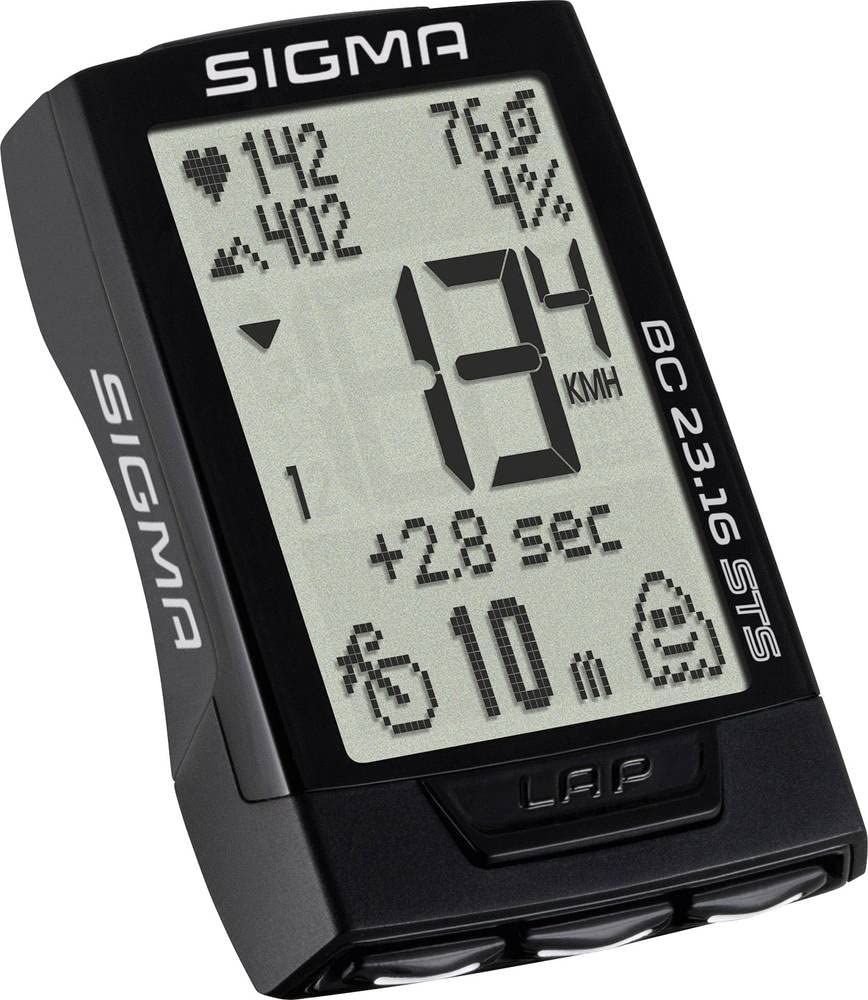
Image: The main unit of the SIGMA BC 23.16 STS Set cyclocomputer, displaying various metrics.
2. Zawartość opakowania
Before proceeding with the installation, please verify that all components are present in the package:
- SIGMA BC 23.16 STS Cyclocomputer Unit
- STS Speed Transmitter
- STS Cadence Transmitter (if included in set)
- R1 DUO Comfortex+ Heart Rate Transmitter (if included in set)
- Handlebar/Stem Mount
- Magnes na szprychy
- Cadence Magnet (if included in set)
- Mounting Material (O-rings, cable ties)
- Batteries (CR2032 for computer, CR2032 for speed/cadence transmitters, CR2032 for heart rate transmitter)
- Instrukcja obsługi (ten dokument)

Image: All components included in the SIGMA BC 23.16 STS Set package, laid out for inspection.
3. Konfiguracja i instalacja
3.1 Instalacja baterii
The cyclocomputer and transmitters come with pre-installed batteries. If replacement is needed, use CR2032 batteries. Ensure correct polarity when inserting new batteries.

Obraz: View of the battery compartment for the SIGMA BC 23.16 STS cyclocomputer, showing the CR2032 battery.
Notatka: An integrated memory chip saves all total values and settings when changing the battery, preventing data loss.
3.2 Mounting the Cyclocomputer and Transmitters
- Handlebar/Stem Mount: Secure the mount to your handlebar or stem using the provided O-rings or cable ties.
- Speed Transmitter: Attach the speed transmitter to the front fork, ensuring it aligns with the spoke magnet. The distance between the transmitter and magnet should be approximately 5-10 mm.
- Spoke Magnet: Fasten the magnet to a spoke on your front wheel.
- Cadence Transmitter (if applicable): Mount the cadence transmitter to the chainstay, aligning it with the cadence magnet on the crank arm.
- Heart Rate Transmitter (if applicable): Wear the heart rate chest strap directly on your skin, just below your chest muscles.
3.3 Ustawienia początkowe
Upon first use or after a battery change, you will need to configure basic settings:
- Język: Wybierz preferowany język.
- Jednostki: Choose between kilometers (km/h) or miles (mph) for speed and distance.
- Rozmiar koła: Accurately measure and input your wheel circumference for precise speed and distance readings. Refer to your bicycle tire for circumference values or measure manually.
- Format czasu: Set 12h or 24h format.
- Dane osobowe: Input age, weight, and gender for accurate calorie and heart rate zone calculations.

Image: Diagram illustrating the button layout and their primary functions on the SIGMA BC 23.16 STS cyclocomputer.
4. Instrukcja obsługi
The BC 23.16 STS features an intuitive interface with multiple functions accessible via its buttons.
4.1 Wyświetlacz i nawigacja
The cyclocomputer features a 2.1-inch display with a backlight function for visibility in various lighting conditions. Use the buttons on the device to navigate through different data screens and menus.

Image: The 2.1-inch screen of the SIGMA BC 23.16 STS cyclocomputer, highlighting its dimensions and backlight capability.
4.2 Kluczowe funkcje
The BC 23.16 STS offers over 23 functions, including:
- Current, Average, and Maximum Speed
- Distance (Trip, Total)
- Ride Time (Trip, Total)
- Zegar
- Temperatura
- Heart Rate (Current, Average, Maximum, Zones)
- Cadence (Current, Average, Maximum)
- Power (Current, Average, Maximum)
- Altitude Functions (Current, Ascent, Descent, Gradient)
- Lap Function
- Zużycie kalorii
4.3 Automatic Bike Recognition
The cyclocomputer supports automatic recognition for up to two different bikes. This allows you to use the same computer on multiple bicycles without manually changing settings. Ensure each bike has its own speed and cadence transmitters paired to the computer.

Image: Illustration of the automatic bike recognition feature, showing two different cyclists with their respective bikes (Bike 1 and Bike 2).
5. Konserwacja
Proper maintenance ensures the longevity and accuracy of your SIGMA BC 23.16 STS Set.
- Czyszczenie: Clean the cyclocomputer and transmitters with a soft, damp płótno. Nie używaj ostrych środków chemicznych ani ściernych środków czyszczących.
- Wymiana baterii: Replace batteries when the low battery indicator appears. Refer to section 3.1 for battery installation details.
- Składowanie: Jeśli urządzenie nie będzie używane przez dłuższy czas, należy je przechowywać w chłodnym i suchym miejscu, z dala od bezpośredniego światła słonecznego.
- Wodoodporność: Urządzenie jest wodoodporne, ale nie wodoszczelne. Unikaj zanurzania go w wodzie.
6. Rozwiązywanie Problemów
If you encounter issues with your cyclocomputer, refer to the following common problems and solutions:
| Problem | Możliwa przyczyna / rozwiązanie |
|---|---|
| No Speed Display |
|
| Nieprawidłowe odczyty |
|
| Wyświetlacz jest pusty |
|
| Heart Rate Not Displaying |
|
7. Specyfikacje
| Funkcja | Szczegół |
|---|---|
| Marka | SIGMA |
| Numer modelu | 2317 (BC 23.16 STS Set) |
| Typ wyświetlacza | LCD |
| Rozmiar ekranu | 2.1 cali (ok. 5.3 cm) |
| Typ czujnika | Speed Sensor (STS Wireless) |
| Skład baterii | Lit (CR2032) |
| Typ montażu | Uchwyt na kierownicę |
| User Interface Input | Pikolak |
| Kolor | Czarny |
| Funkcje | 23+ functions (Speed, Distance, Time, HR, Cadence, Power, Altitude, etc.) |
| Żywotność baterii | 2+ years (computer unit) |
8. Gwarancja i wsparcie
Gwarancja: The product information indicates "Nessuna" (None) for product warranty. Please refer to your point of purchase for any specific return or exchange policies.
Wsparcie: For further assistance, technical questions, or detailed information not covered in this manual, please visit the official SIGMA website or contact their customer support. You can find more information at the SIGMA Store on Amazon.
Ask a question about this manual
Ask about setup, troubleshooting, compatibility, parts, safety, or missing instructions. Manuals+ will review the question and use this page’s manual context to help answer it.