
Produkt ponadview
The iRV Technology IRV31 is a versatile and powerful entertainment system designed specifically for recreational vehicles. This unit integrates AM/FM radio, CD/DVD playback, and advanced connectivity options including Bluetooth, USB, and HDMI. It features a 2-zone audio output, allowing for flexible sound management within your RV. The IRV31 is engineered for easy installation and serves as an ideal upgrade or replacement for existing RV audio systems, including direct compatibility with Furrion DV3100, DV3200, and DV3300 models.

Konfiguracja i instalacja
Before beginning installation, ensure the RV's power supply is disconnected to prevent electrical hazards. The IRV31 is designed for wallmount installation and requires specific dimensions for proper fitting.
Zawartość opakowania
Sprawdź, czy w pudełku znajdują się wszystkie elementy:
- iRV31 RV Stereo Unit
- Left & Right Mounting End Caps
- Zdalne sterowanie
- Wiązka przewodów
- Instrukcja obsługi (ten dokument)

Wymiary montażowe
The unit's faceplate measures 7-4/5 inches in width, 5-1/2 inches in height, and 3/4 inches in depth. The mounting dimensions are 6-4/5 inches in width, 4-1/6 inches in height, and 7-1/4 inches in depth. Ensure your mounting location accommodates these measurements. If replacing a single DIN unit, cabinet modification may be necessary.

Połączenia okablowania
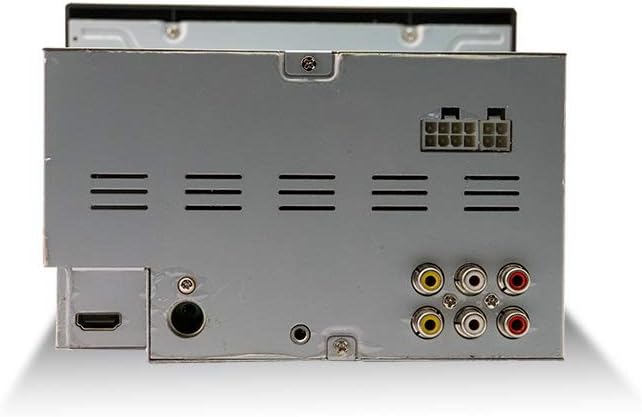
The IRV31 comes with a standard wiring harness. When replacing an existing unit, especially Furrion models, you will need to connect the new harness wire-for-wire to your RV's existing wiring. Refer to the wiring diagram provided with the unit for detailed connections. The unit requires two 12V power sources: one constant and one switched. For RV applications without an ignition switch, both can be connected to a constant 12V supply, or a separate switch can be installed for the switched power line for complete power off.
Instrukcja obsługi
Włączanie/wyłączanie zasilania
Naciśnij MOC przycisk na urządzeniu lub pilocie, aby włączyć lub wyłączyć system.
Wybór źródła
Naciśnij TRYB button to cycle through available sources: AM/FM, CD/DVD, USB, AUX IN, Bluetooth, and HDMI.
Obsługa radia (AM/FM)
- Naciskać AM/FM to select the radio band.
- Użyj DOSTOSUJ +/- buttons to manually tune or SZUKAĆ to automatically find stations.
- Press and hold preset buttons (1-6) to save a station, or briefly press to recall a saved station.
Odtwarzanie płyt CD/DVD
- Insert a CD or DVD into the disc slot. The unit will automatically switch to CD/DVD mode.
- Użyj ODTWÓRZ/PAUZA, ZATRZYMYWAĆ SIĘ, POMINĄĆ, I SZYBKIE DO PRZODU/WSTECZ przyciski do sterowania multimediami.
- The unit supports standard DVDs, not Blu-ray discs.
Łączność Bluetooth
The IRV31 features Bluetooth 2.1 for wireless audio streaming from your smartphone or other Bluetooth-enabled devices.
- Naciśnij BT/- przycisk, aby wejść w tryb parowania Bluetooth.
- On your device, search for "IRV31" and select to pair.
- For quick pairing, tap your NFC-enabled device to the NFC label on the unit.
USB and AUX IN
- Connect USB drives to the front USB port for MP3/MP4 playback. This port also provides 5V charging for Android and Apple devices.
- Use the front AUX IN port to connect external audio devices via a 3.5mm cable.
Łączność HDMI
The unit includes HDMI input and output ports.
- Wejście HDMI: Connect external devices such as Blu-ray players, Xbox, or PS4 consoles to the HDMI input for audio and video playback through the IRV31.
- Wyjście HDMI: Connect the HDMI output to your RV's TV for quick video display from the IRV31's media sources.
Strefy mówców
The IRV31 supports 2 independent speaker zones. Use the SPEAKER ZONE buttons (1 and 2) to control which speaker sets are active (e.g., indoor vs. outdoor speakers). This allows for separate audio control in different areas of your RV.
Zdalne sterowanie i kontrola aplikacji
- The included remote control provides full functionality for the unit. Ensure batteries are correctly installed.
- A dedicated app is available for free on Android and Apple devices, transforming your smartphone into a wireless remote control for the IRV31.
Konserwacja
To ensure optimal performance and longevity of your iRV31 unit, follow these maintenance guidelines:
- Czyszczenie: Use a soft, dry cloth to clean the unit's exterior. For stubborn marks, a slightly damp cloth can be used, followed by a dry one. Avoid abrasive cleaners, solvents, or strong detergents.
- Gniazdo na płytę: Keep the disc slot free of dust and debris. Do not insert foreign objects into the slot.
- Wentylacja: Ensure the unit has adequate ventilation. Do not block any ventilation openings on the sides or rear of the unit.
- Zasilanie: Periodically check the power connections for any loose wires or signs of corrosion.
Rozwiązywanie problemów
If you encounter issues with your iRV31 unit, refer to the following common problems and solutions:
| Problem | Możliwa przyczyna | Rozwiązanie |
|---|---|---|
| Urządzenie nie włącza się. | Brak zasilania; Przepalony bezpiecznik; Luźne okablowanie. | Check RV's power source. Inspect the unit's fuse and replace if necessary. Verify all wiring harness connections are secure. |
| Pilot nie działa. | Dead batteries; Obstruction; Remote not pointed at IR sensor. | Replace remote control batteries. Ensure no objects are blocking the line of sight between the remote and the unit's IR sensor. |
| Brak wyjścia audio. | Volume too low; Mute activated; Incorrect speaker zone selected; Loose speaker wires. | Increase volume. Deactivate mute. Ensure the correct speaker zone(s) are enabled. Check speaker wire connections at the unit and speakers. |
| Parowanie Bluetooth nie powiodło się. | Urządzenie nie jest w trybie parowania; Urządzenie jest za daleko; Zakłócenia. | Ensure the unit is in Bluetooth pairing mode. Move your device closer to the unit. Turn off other Bluetooth devices to reduce interference. |
| Disc playback issues (skipping, not reading). | Dirty or scratched disc; Incorrect disc type; Unit lens dirty. | Clean the disc or try a different disc. Ensure it is a standard CD/DVD (not Blu-ray). If issues persist, the unit may require servicing. |
Specyfikacje
- Numer modelu: IRV31
- Wymiary produktu: 7.8 x 5.5 x 7 cala
- Waga przedmiotu: 4.19 funta
- Częstotliwość: 108 MHz (FM)
- Technologie komunikacji bezprzewodowej: AM/FM, Bluetooth, IR
- Technologie łączności: Bluetooth, Auxiliary, IR
- Cechy szczególne: ARC (kanał zwrotny audio)
- Inne funkcje wyświetlacza: Bezprzewodowy
- Rodzaj kontrolera: Naciśnij przycisk
- Zgodne urządzenia: Game Console, Speaker
- Całkowita liczba portów HDMI: 2 (1 Input, 1 Output)
- Typ złącza: RCA, HDMI
- Kodowanie audio: Stereofoniczny
- Tryb wyjścia audio: Dźwięk przestrzenny, stereo
- Konfiguracja kanałów dźwięku przestrzennego: 2
Gwarancja i wsparcie
For warranty information and technical support, please contact the manufacturer, ATP Products, Inc. Refer to the contact details provided in your product packaging or visit the official iRV Technologies webwitryna zawierająca najbardziej aktualne informacje dotyczące pomocy technicznej.
Producent: ATP Products, Inc.
Data pierwszej dostępności: 8 kwietnia 2018 r.