
1. Koniec produktuview
The Maxwest Nitro 5N is an Android 7.0 smartphone designed for reliable communication and multimedia use. It features a 5-inch display, a Quad Core processor, and dual SIM capability, making it suitable for various global GSM networks.

Ilustracja 1.1: Przód i tył view of the Maxwest Nitro 5N smartphone, showcasing its sleek black design and display.
2. Co znajduje się w pudełku
Upon opening your Maxwest Nitro 5N package, please ensure all the following items are present:
- Maxwest Nitro 5N Smartphone
- Bateria (2000 mAh)
- Adapter ładowarki
- Kabel USB
- Protective Case Cover
3. Konfiguracja początkowa
3.1. Wkładanie karty(kart) SIM i baterii
- Wyłączone: Ensure your Maxwest Nitro 5N is powered off before proceeding.
- Zdejmij tylną okładkę: Ostrożnie zdejmij tylną obudowę telefonu.
- Włóż kartę(y) SIM: Locate the SIM card slots. This device supports dual SIM cards. Insert your GSM SIM card(s) into the designated slots with the gold contacts facing down. Ensure they are securely seated.
- Włóż baterię: Place the 2000 mAh battery into its compartment, aligning the gold contacts on the battery with those in the phone.
- Załóż tylną okładkę: Carefully reattach the back cover until it clicks into place.
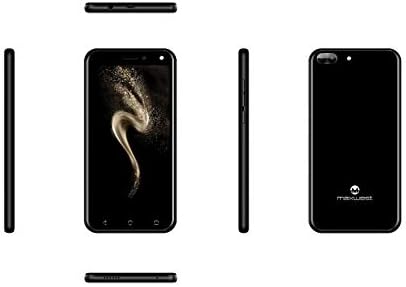
Obraz 3.1: Bok views of the Maxwest Nitro 5N, illustrating the location of buttons and ports for SIM/battery access.
3.2. Włączanie i konfiguracja początkowa
- Włączanie: Press and hold the Power button (usually on the side) until the Maxwest logo appears.
- Wybór języka: Aby wybrać preferowany język, postępuj zgodnie z instrukcjami wyświetlanymi na ekranie.
- Połączenie Wi-Fi: Connect to a Wi-Fi network to complete the setup process and download necessary updates.
- Konto Google: Zaloguj się na swoje konto Google lub utwórz nowe. Jest to niezbędne do uzyskania dostępu do Sklepu Google Play i innych usług Google.
- Data i godzina: Ustaw prawidłową datę i godzinę lub pozwól sieci ustawić je automatycznie.
- Bezpieczeństwo: Configure screen lock options such as PIN, pattern, or password for device security.
Ważna uwaga: This device is designed to work with GSM carriers such as AT&T, T-Mobile, and Metro PCS. It will NOT work with CDMA carriers like Verizon, Sprint, or Boost Mobile.
4. Operating Your Maxwest Nitro 5N
4.1. Podstawowa nawigacja
- Ekran dotykowy: Interact with the device by tapping, swiping, pinching, and spreading on the 5-inch LCD display.
- Ekran główny: Centralny punkt dostępu dla aplikacji i widżetów. Przesuń palcem w lewo lub w prawo, aby uzyskać dostęp do dodatkowych ekranów.
- Panel powiadomień: Przesuń palcem od góry ekranu w dół, aby uzyskać dostęp do powiadomień i szybkich ustawień.
- Przyciski nawigacyjne: Use the on-screen navigation buttons (Back, Home, Recent Apps) at the bottom of the display.
4.2. Wykonywanie połączeń i wysyłanie wiadomości
- Aplikacja na telefon: Tap the Phone icon to access the dialer, call logs, and contacts.
- Aplikacja Wiadomości: Tap the Messages icon to send and receive SMS/MMS messages.
4.3. Korzystanie z aparatu
Your Nitro 5N is equipped with 5MP front and rear cameras.
- Otwórz kamerę: Kliknij ikonę aparatu na ekranie głównym lub w szufladzie aplikacji.
- Zmień kamerę: Kliknij ikonę przełączania aparatu, aby przełączać się między przednim i tylnym aparatem.
- Zrób zdjęcie/nagraj wideo: Naciśnij przycisk migawki, aby zrobić zdjęcie lub rozpocząć/zatrzymać nagrywanie wideo.
4.4. Screen Pinning Feature
Screen Pinning allows you to lock your phone to a single application, preventing others from accessing other apps or settings. This is useful when sharing your phone temporarily.
- Enable Screen Pinning: Idź do Settings > Security > Screen pinning i włącz go.
- Pin an App: Open the app you wish to pin. Tap the Recent Apps button (square icon). Swipe up on the app's preview and tap the pin icon.
- Unpin an App: To unpin, simultaneously press and hold the Back and Recent Apps buttons. You may need to enter your PIN/pattern/password if required by your security settings.
5. Konserwacja i pielęgnacja
5.1. Pielęgnacja baterii
- Ładowanie: Use only the provided charger and USB cable. Avoid overcharging by disconnecting the charger once the battery is full.
- Temperatura: Avoid exposing the phone to extreme temperatures, as this can degrade battery life.
- Składowanie: If storing the phone for an extended period, ensure the battery is partially charged (around 50%).
5.2. Czyszczenie urządzenia
- Ekran: Użyj miękkiej, niepozostawiającej włókien ściereczki, lekkoampened with water or a screen cleaner, to gently wipe the display.
- Ciało: Use a soft, dry cloth to clean the phone's body. Avoid harsh chemicals or abrasive materials.
5.3. Aktualizacje oprogramowania
Regularnie sprawdzaj dostępność aktualizacji systemu, aby zapewnić optymalną wydajność i bezpieczeństwo. Przejdź do Ustawienia > Informacje o telefonie > Aktualizacje systemu aby sprawdzić i zainstalować dostępne aktualizacje.
6. Rozwiązywanie typowych problemów
| Problem | Możliwe rozwiązanie |
|---|---|
| Telefon się nie włącza. | Upewnij się, że bateria jest prawidłowo włożona i naładowana. Podłącz ładowarkę i spróbuj ponownie. |
| Brak sygnału sieciowego. | Verify SIM card insertion. Check if you are within network coverage. Ensure your carrier is GSM compatible (e.g., AT&T, T-Mobile). Restart the phone. |
| Aplikacje działają wolno lub ulegają awarii. | Zamknij aplikacje działające w tle. Wyczyść pamięć podręczną aplikacji (Ustawienia > Aplikacje > [Nazwa aplikacji] > Pamięć > Wyczyść pamięć podręczną). Restart the phone. Ensure sufficient storage space. |
| Bateria szybko się rozładowuje. | Reduce screen brightness. Disable Wi-Fi, Bluetooth, and GPS when not in use. Close unnecessary background apps. Check battery usage in settings to identify power-hungry apps. |
| Nie można połączyć się z siecią Wi-Fi. | Upewnij się, że Wi-Fi jest włączone. Uruchom ponownie router i telefon. Zapomnij o sieci i połącz się ponownie. |
7. Specyfikacje produktu
| Funkcja | Szczegół |
|---|---|
| Nazwa modelu | Nitro 5N |
| System operacyjny | Android 7.0 |
| Edytor | Quad Core 1.2 GHz (1.2GHz Cortex A9 Processor) |
| BARAN | 1 GB |
| Pamięć wewnętrzna | 8 GB (approximately 5.6 GB user available) |
| Wyświetlacz | 5.0 inch LCD, 480 x 854 pixels, 2.5D TP |
| Kamera tylna | 5 MP |
| Przednia kamera | 5 MP |
| Pojemność baterii | Bateria litowo-jonowa 2000 mAh |
| Kompatybilność sieci | 3G H+ 850/1900/2100 MHz, 2G: 850/900/1800/1900 MHz (GSM Carriers only) |
| Łączność | USB, Cellular, GPS, Wi-Fi, Bluetooth (Wireless) |
| Gniazdo audio | 3.5 mm |
| Wymiary (dł. x szer. x wys.) | 5.73 x 2.83 x 0.38 cala |
| Waga | 5.4 uncji (153 grama) |
| Kolor | Czarny |
8. Informacje o gwarancji
The Maxwest Nitro 5N comes with a roczna gwarancja na części i robociznę from the date of purchase. This warranty covers manufacturing defects and workmanship under normal use. It does not cover damage caused by misuse, accidents, unauthorized repairs, or normal wear and tear.
Proszę zachować dowód zakupu na potrzeby roszczeń gwarancyjnych.
9. Obsługa klienta
For technical assistance, troubleshooting beyond this manual, or warranty inquiries, please contact Maxwest customer support. Refer to the contact information provided with your product packaging or visit the official Maxwest webna tej stronie znajdziesz najnowsze informacje dotyczące pomocy technicznej.
When contacting support, please have your product model (Nitro 5N) and proof of purchase readily available.