
1. Ważne informacje dotyczące bezpieczeństwa
Please read and understand all instructions before use. Failure to follow these instructions may result in injury or damage to the product.
- Zawsze dokładnie postępuj zgodnie z instrukcją montażu.
- Use caution when adjusting the desk height to prevent injury.
- Upewnij się, że biurko jest dobrze zakotwiczone w podłodze, aby zapobiec jego przewróceniu.
- Nie przekraczać zalecanej maksymalnej wagi 330 funtów (149.6 kg) aby zachować stabilność i bezpieczeństwo.
- This product requires assembly. It is recommended that dwie osoby assemble the desk.
2. Koniec produktuview
The VIVO DESK-V133E is an electric motor sit-stand height adjustable corner desk frame designed to transform your workspace into an ergonomic L-shaped workstation. This frame allows for smooth transitions between sitting and standing positions, promoting a healthier work environment.

Figure 2.1: Assembled VIVO DESK-V133E frame with a desktop, monitors, and accessories.
Główne cechy:
- Elektryczna regulacja wysokości: Telescopic height range from 24.4" to 50.4" (62 cm to 128 cm).
- Multi-Motor Lift System: Provides smooth, quiet transitions at 1.5" (3.8 cm) per second lift speed.
- Sturdy 3-Leg System: All-steel construction supports up to 330 lbs (149.6 kg).
- Panel sterowania z ekranem dotykowym: Features 3 customizable memory settings and programmable alarms.
- Zarządzanie kablami: Includes a cable management rack to keep cords organized.

Figure 2.2: Visual representation of the desk's height range (24.4" to 50.4") and 330 lbs weight capacity.
3. Instalacja i montaż
This section provides guidance for assembling your VIVO DESK-V133E desk frame. A desktop must be purchased separately.
Recommended Tabletop Sizes:
- Main Desk (24" Width): 46.1" to 89.7" Length
- Main Desk (30" Width): 49.1" to 92.7" Length
- Return Desk (24" Width): 23" to 59" Length
- Return Desk (30" Width): 20" to 56" Length
- Recommended desktop thickness: 3/4" (1.9 cm) or greater.
The desk frame is designed to be assembled with the main and return frames in a fixed L-shape configuration. They are not reversible.

Figure 3.1: Minimum and maximum desktop dimensions for the VIVO DESK-V133E frame.

Figure 3.2: All-steel construction of the desk frame, highlighting adjustable main and return lengths.

Figure 3.3: The desk frame ships in two separate boxes, which may arrive on different days.
Film instruktażowy dotyczący montażu:
Video 3.1: Official VIVO assembly video for the DESK-V133E. This video provides a visual guide to the assembly process.
For detailed step-by-step instructions, refer to the included user guide. Pay close attention to screw lengths to avoid damaging your desktop. It is recommended to plan cable management before installing the desktop.
4. Instrukcja obsługi
The VIVO DESK-V133E features an intuitive touch screen control panel for easy height adjustment and personalized settings.

Figure 4.1: Smart touch screen control panel for the desk frame.
Funkcje panelu sterowania:
- Regulacja wysokości: Use the up and down arrow buttons to manually adjust the desk height.
- Memory Settings (1, 2, 3):
- Dostosuj wysokość biurka do swoich potrzeb.
- Press the "M" button.
- Press the desired memory button (1, 2, or 3) to save the height.
- Aby przywołać zapisaną wysokość, wystarczy nacisnąć odpowiedni przycisk pamięci.
- Timer Reminder (T): Set a timer to remind yourself to switch between sitting and standing positions.
- Tryb oszczędzania energii: Indicated by "---" on the display. Activates after 60 seconds of inactivity. Press any button to wake the panel.
Filmy instruktażowe:
Video 4.1: Official VIVO video demonstrating the touch control pad features and operation.
Video 4.2: Official VIVO video demonstrating the electric height adjustment of the DESK-V133E.
5. Konserwacja
Regular maintenance ensures the longevity and optimal performance of your desk frame.
- Czyszczenie: Wipe down the desk frame with a soft, damp szmatką. Unikaj silnych środków chemicznych i ściernych środków czyszczących.
- Zarządzanie kablami: Periodically check and organize cables to prevent tangles and ensure smooth operation during height adjustments.
- Elementy złączne: Ensure all screws and fasteners remain tight. Re-tighten if necessary to maintain stability.
- Rozkład masy: Distribute weight evenly across the desktop to prevent strain on the motors and frame.
6. Rozwiązywanie Problemów
If you encounter issues with your desk frame, refer to the following common troubleshooting steps.
Typowe problemy i rozwiązania:
- Desk Not Adjusting / Error Code (e.g., E06):
- Sprawdź wszystkie połączenia kablowe, aby upewnić się, że są dobrze zamocowane.
- Ensure no obstacles are blocking the desk's movement path.
- Perform a reset procedure: Unplug the desk from the power outlet for 10-15 seconds, then plug it back in. Follow any specific reset instructions in the full manual if available.
- If an error code persists, contact customer support.
- Biurko chwieje się na wysokości stania:
- Sprawdź, czy wszystkie śruby montażowe są mocno dokręcone.
- Verify the desktop is properly affixed to the frame.
- Check that the floor is level and adjust the desk's leveling feet if necessary.
- Hałas podczas pracy:
- A slight motor sound is normal during adjustment.
- If the noise is excessive or unusual, check for any obstructions or loose components.
7. Specyfikacje
| Funkcja | Szczegół |
|---|---|
| Marka | Żyć |
| Numer modelu | BIURKO-V133E |
| Kształt | Kształt litery L. |
| Minimalna wysokość | 24.4 cali (62 cm) |
| Maksymalna wysokość | 50.4 cali (128 cm) |
| Maksymalna zalecana waga | 330 funtów (149.6 kg) |
| Materiał bazowy | Stal stopowa |
| Mechanizm podnoszący | Electric Multi-Motor |
| Prędkość podnoszenia | 1.5 inches (3.8 cm) per second |
| Kolor | Czarny |
| Waga przedmiotu | 61.1 funtów (27.7 kg) |
| Zalecany montaż | 2 osób |
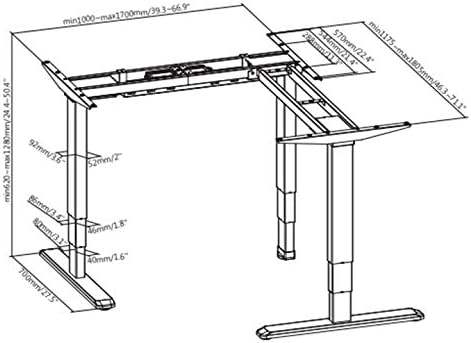
Figure 7.1: Detailed technical dimensions of the desk frame.
8. Gwarancja i wsparcie
VIVO DESK-V133E jest wyposażony w 3-letnia gwarancja producentaNiniejsza gwarancja obejmuje wady materiałowe i wykonawcze powstałe w wyniku normalnego użytkowania.
For technical assistance, troubleshooting, or warranty claims, please contact VIVO customer support. You can typically find contact information on the VIVO webstronie lub poprzez platformę zakupową.
VIVO is a US-based company providing sales and technical support. They offer a 30-day free return policy for refunds or replacements.


