
1. Wprowadzenie
The Vonyx VMM-F701 is a versatile 7-channel mixer designed for various audio applications, including live performances and studio recording. It features multiple input options, an integrated effect processor, USB playback, and +48V phantom power for condenser microphones. This manual provides essential information for the safe and effective use of your VMM-F701 mixer.
2. Instrukcje bezpieczeństwa
- Always read these instructions carefully before using the device. Keep this manual for future reference.
- Upewnij się, że zasilanie jest zgodne z objtage wskazany na urządzeniu.
- Nie wystawiaj urządzenia na deszcz lub wilgoć.
- Odłączaj przewód zasilający podczas burzy z piorunami lub jeśli nie używasz urządzenia przez dłuższy czas.
- To reduce the risk of electric shock, do not remove the cover. There are no user-serviceable parts inside. Refer all servicing to qualified service personnel.
3. Koniec produktuview
The Vonyx VMM-F701 mixer offers a comprehensive set of features for audio mixing. It includes 5 mono microphone/line inputs (XLR/6.3mm Jack combo), 1 stereo line input (6.3mm Jack), and an integrated USB player. Each channel provides Hi, Mid, and Low equalization controls, along with FX, Pan, and AUX adjustments. The mixer also features a built-in effect processor with delay and repeat functions, +48V phantom power for condenser microphones, a balanced stereo main output, and a headphone output.
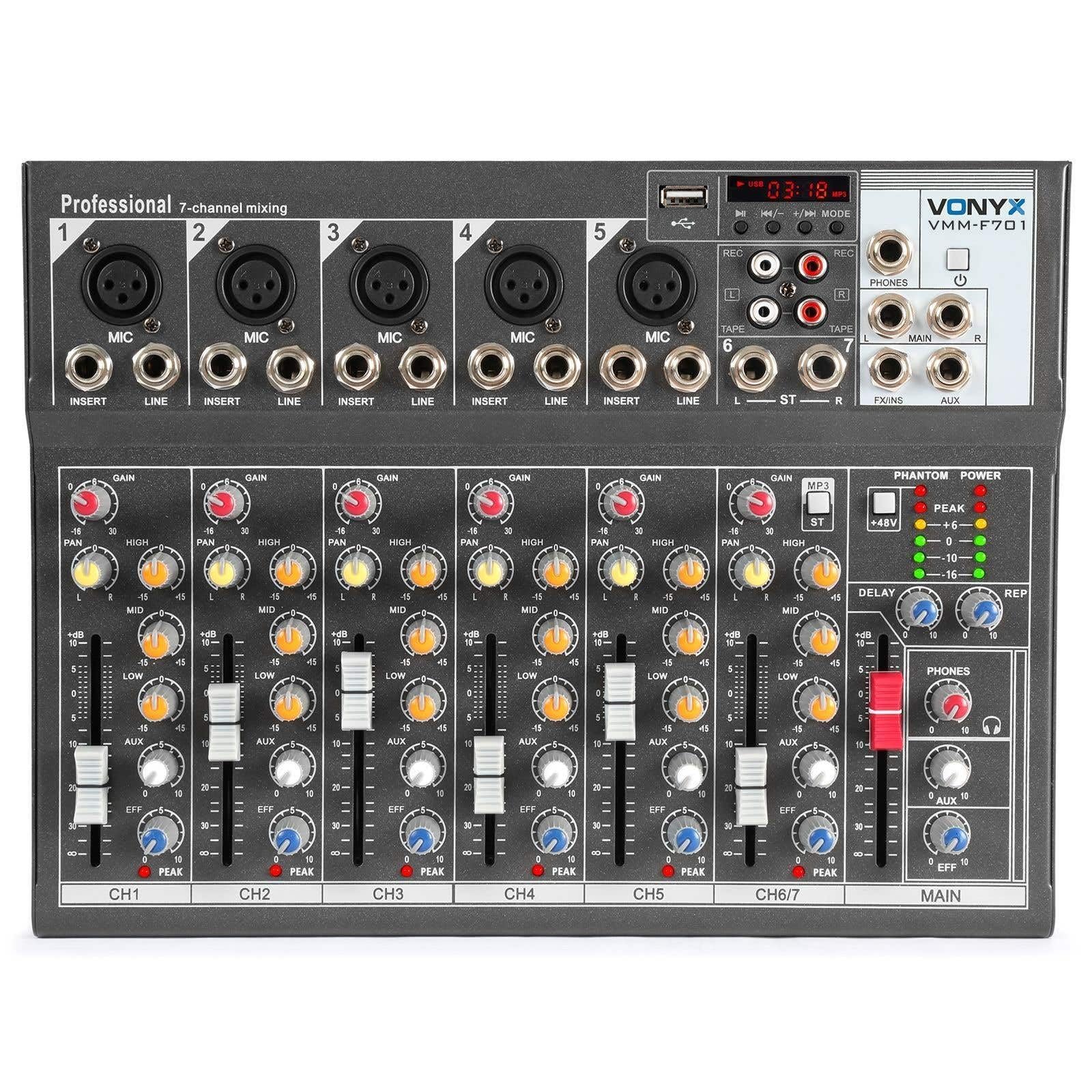
Ogólnie view of the Vonyx VMM-F701 7-channel mixer, showcasindzięki kompaktowej konstrukcji i układowi sterowania.

Z góry na dół view of the Vonyx VMM-F701 mixer, highlighting the input channels, faders, and equalization knobs.

Close-up of the USB input and media player controls on the Vonyx VMM-F701 mixer, with a USB drive inserted.

Rear panel of the Vonyx VMM-F701 mixer, showing the power input and USB port for external power.
4. Konfiguracja
- Podłączenie zasilania: Connect the mixer to a 230Vac/50Hz power source using the provided power cable. The mixer can also be powered via USB (5V/1A) for certain functions.
- Połączenia wejściowe:
- For microphones, use XLR or 6.3mm jack cables to connect to channels 1-5. Activate +48V phantom power for condenser microphones.
- For line-level instruments or devices, use 6.3mm jack cables to connect to channels 1-5 (line inputs) or the stereo line input (channels 6/7).
- Połączenia wyjściowe: Podłącz główne głośniki lub amplifier to the balanced stereo main output (6.3mm Jack).
- Słuchawki: Connect headphones to the dedicated headphone output for monitoring.

Szczegółowy view of the mains power input and a wiring diagram for microphone/line inputs on the Vonyx VMM-F701 mixer.
5. Instrukcja obsługi
- Gain Control: Adjust the input sensitivity for each channel using the GAIN knob.
- Korekcja (EQ): Use the HI, MID, and LOW knobs to adjust the treble, midrange, and bass frequencies for each channel.
- Kontrola panoramowania: Adjust the stereo positioning of each channel using the PAN knob.
- Wyślij FX: Use the FX knob to send a portion of the channel's signal to the internal effect processor.
- Wysyłanie AUX: Use the AUX knob to send a portion of the channel's signal to an external effect unit or monitor mix (via FX Send/Return).
- Suwaki kanałów: Dostosuj poziom głośności dla każdego kanału osobno.
- Główny suwak: Kontroluj ogólną głośność wyjściową miksera.
- Effect Processor: Adjust the DELAY and REP (Repeat) knobs to control the characteristics of the built-in delay effect.
- Odtwarzacz USB: Włóż dysk USB do portu USB, aby odtwarzać dźwięk files. Use the media player controls (play/pause, skip, mode) to navigate and control playback.
- Moc fantomowa: Press the +48V PHANTOM POWER button to supply power to condenser microphones. Ensure microphones are connected before activating.
6. Konserwacja
- Czyszczenie: Do czyszczenia powierzchni miksera używaj miękkiej, suchej ściereczki. Unikaj płynnych środków czyszczących i rozpuszczalników.
- Składowanie: Przechowywać mikser w chłodnym, suchym miejscu, z dala od bezpośredniego światła słonecznego i ekstremalnych temperatur.
- Wentylacja: Aby zapobiec przegrzaniu, należy zapewnić odpowiednią wentylację wokół miksera.
7. Rozwiązywanie Problemów
| Problem | Możliwa przyczyna | Rozwiązanie |
|---|---|---|
| Brak dźwięku | Power off; cables disconnected; faders down; incorrect input selection. | Check power connection; ensure all cables are securely connected; raise channel and main faders; verify correct input source. |
| Zniekształcony dźwięk | Wzmocnienie wejściowe jest za wysokie, poziom wyjściowy jest za wysoki, kabel jest uszkodzony. | Reduce GAIN knob; lower main fader; try a different cable. |
| Mikrofon nie działa | Phantom power off (for condenser mics); mic not connected; faulty mic. | Activate +48V PHANTOM POWER; check mic connection; test with another microphone. |
| Odtwarzacz USB nie działa | USB drive not recognized; unsupported file format. | Ensure USB drive is properly inserted; try a different USB drive; check file formats (e.g., MP3). |
8. Specyfikacje
| Funkcja | Specyfikacja |
|---|---|
| Numer modelu | VMM-F701 |
| Liczba kanałów | 7 |
| Zakres częstotliwości | 20 Hz - 20 kHz |
| THD (całkowite zniekształcenia harmoniczne) | <0.01% |
| Stosunek sygnału do szumu | >110dB |
| Poziom wyjściowy | ±1 V |
| Czułość wejścia liniowego | ±150mV |
| Czułość wejścia mikrofonu | ±1.5mV |
| Objętość połączeniatage | 230Vac / 50Hz (USB 5V/1A) |
| Wymiary (dł. x szer. x wys.) | 230 × 312 × 45 mm (9.06 × 12.28 × 1.77 cala) |
| Waga | 2.25 kg (4.96 funta) |
| Technologia łączności | USB |
| Wejście audio | XLR, 1/4 inch (6.3 mm) jack |
| Typ złącza wyjściowego | TRS 1/4" (balanced) |
9. Gwarancja i wsparcie
Gwarancja: This product comes with a 2-year warranty on spare parts. For warranty claims, please retain your proof of purchase.
Wsparcie: For technical assistance, troubleshooting, or service inquiries, please contact your local Vonyx dealer or visit the official Vonyx webwitryna zawierająca zasoby pomocy.