
1. Wprowadzenie
Thank you for choosing the SECULINK F6-N80 4K POE Security Camera. This manual provides essential information for the proper installation, operation, and maintenance of your camera. Please read this manual thoroughly before use and retain it for future reference.
The SECULINK F6-N80 is a high-performance 8MP (4K) POE-compatible IP camera designed for both indoor and outdoor surveillance. It features advanced capabilities such as color night vision, intelligent human and vehicle detection, and robust IP66 weatherproofing, ensuring reliable security monitoring.
2. Informacje dotyczące bezpieczeństwa
- Bezpieczeństwo elektryczne: Ensure all power connections comply with local electrical codes. Use only approved power adapters (DC 12V) or POE switches/NVRs that meet IEEE802.3af/at standards.
- Instalacja: Install the camera in a secure location where it cannot be easily tampered with. Ensure mounting surfaces are strong enough to support the camera's weight.
- Woda i wilgoć: While the camera is IP66 weatherproof, avoid submerging it in water or exposing it to high-pressure water jets.
- Temperatura: Operate the camera within its specified temperature range (e.g., -22°F to 140°F / -30°C to 60°C).
- Czyszczenie: Disconnect power before cleaning. Use a soft, dry cloth. Avoid harsh chemicals.
3. Zawartość opakowania
Prosimy o sprawdzenie zawartości przesyłki po jej otrzymaniu. Jeśli brakuje któregokolwiek z elementów lub jest on uszkodzony, prosimy o kontakt ze sprzedawcą.
- SECULINK F6-N80 4K POE Security Camera
- Zestaw śrub montażowych
- Wodoodporne złącze do kabla Ethernet
- Quick Start Guide / Instruction Manual (this document)
4. Koniec produktuview
The SECULINK F6-N80 camera is designed for robust surveillance with its 8MP resolution and POE capability. Its durable metal housing ensures longevity in various environments.

Figure 4.1: POE Functionality. This image shows a network video recorder (NVR) or switch with multiple POE ports connected to a security camera, illustrating how a single Ethernet cable provides both power and data.
Główne cechy:
- Rozdzielczość 8MP Super HD: Captures video at 3840 x 2160 pixels for clear, detailed images.
- POE (zasilanie przez Ethernet): Simplifies installation by delivering power and data through a single Ethernet cable (IEEE802.3af/at compatible).
- Odporność na warunki atmosferyczne IP66: Constructed with a solid aluminum body, ensuring reliable operation outdoors in various weather conditions.
- Zaawansowane widzenie w nocy: Features premium LEDs and a smart IR cut filter for clear visibility up to 30m, including advanced color night vision.
- Inteligentne wykrywanie: Supports human and vehicle motion detection to reduce false alarms.
- Wbudowany mikrofon: Do wejścia audio.
- Kompresja wideo H.265+: Optimizes bandwidth and storage efficiency for longer recording times.
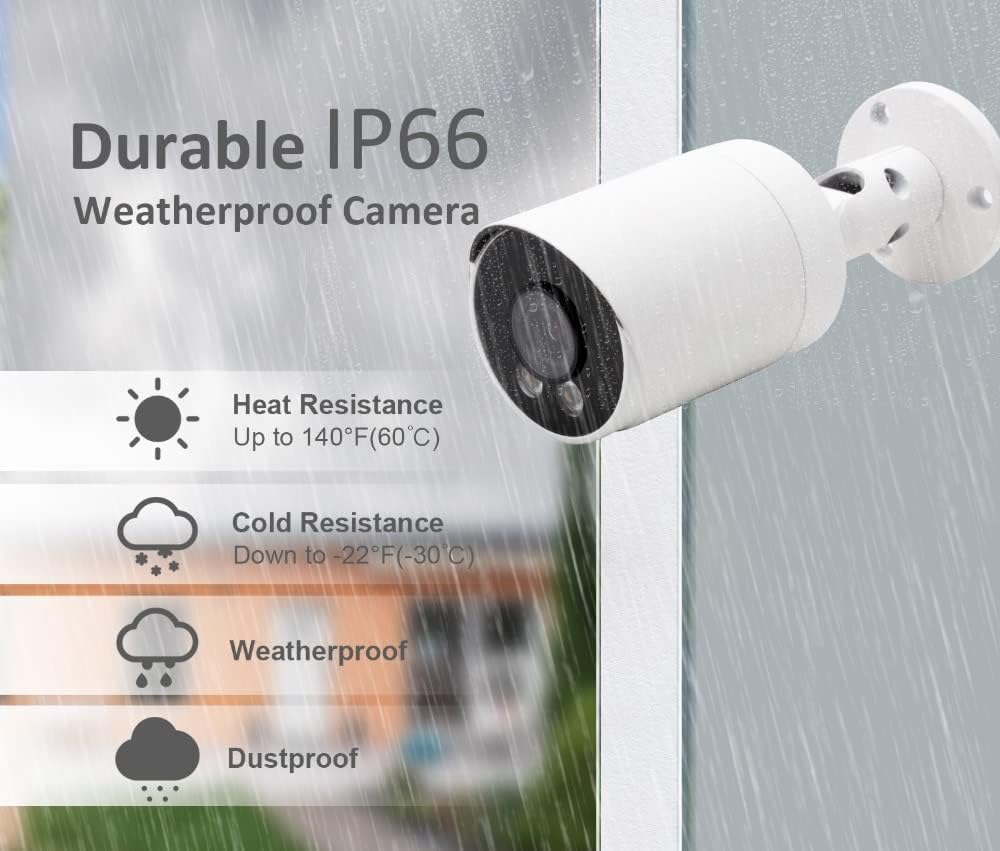
Figure 4.2: IP66 Weatherproof Rating. This image highlights the camera's durability against heat, cold, rain, and dust, making it suitable for outdoor installation.
5. Konfiguracja
5.1 Fizyczna instalacja
- Wybierz lokalizację: Select a suitable location for installation, ensuring a clear field of view and proximity to your POE network device. The camera is designed for wall mounting.
- Montowanie: Use the provided mounting screw kit to securely attach the camera to the desired surface. Drill pilot holes if necessary.
- Dostosuj kąt: Odkręć śruby regulacyjne na uchwycie kamery, aby ustawić żądaną wartość. viewkąt nachylenia. Po ustawieniu kąta dokręć śruby.
5.2 Połączenie POE
The camera supports Power over Ethernet (POE), simplifying wiring by combining power and data transmission into a single Ethernet cable.
- Podłącz kabel Ethernet: Connect one end of an Ethernet cable to the camera's RJ45 port. Use the waterproof connector for outdoor installations to protect the connection.
- Connect to POE Device: Connect the other end of the Ethernet cable to a POE port on your POE-enabled NVR (Network Video Recorder) or POE switch. Ensure the POE device supports IEEE802.3af/at standards.
- Alternative Power (Optional): If not using POE, connect a DC 12V power adapter (not included) to the camera's power input port.
5.3 Konfiguracja sieci
After physical connection, the camera will power on. You will need to configure it through your NVR or a dedicated mobile application/PC software.
- Połączenie NVR: If connected to an NVR, the camera should be automatically detected or can be added manually through the NVR's interface. Refer to your NVR's manual for specific instructions.
- Konfiguracja oprogramowania/aplikacji: For direct access or advanced settings, download the manufacturer's recommended software or mobile application. Follow the in-app instructions to add and configure your camera. This typically involves scanning a QR code or manually entering the camera's IP address.
6. Instrukcja obsługi
6.1 Vieww transmisji na żywo
Access the live video feed through your connected NVR, PC software, or mobile application. This allows real-time monitoring of the camera's view.
6.2 Wykrywanie ruchu
The camera features programmable motion detection, including intelligent human and vehicle detection, to minimize false alarms.

Figure 6.1: Motion Detection Workflow. This image illustrates how the camera transitions from standby to recording mode upon detecting motion and returns to standby when motion ceases.
- Konfiguracja: Access the camera settings via your NVR or application to configure motion detection zones, sensitivity levels, and detection types (human, vehicle, general motion).
- Alerty: Set up real-time alerts via email, push notifications to your smartphone, or an audible buzzer when motion is detected.
- Nagranie: Motion detection can trigger automatic recording, saving storage space by only recording relevant events.

Figure 6.2: Human and Vehicle Detection. This image shows the camera's ability to distinguish between human and vehicle movement, triggering specific alerts.

Figure 6.3: Intelligent Human Detection. This image demonstrates the camera's capability to accurately identify human activity while ignoring irrelevant movements like pets or shadows.
6.3 Widzenie nocne
Kamera zapewnia wyraźną widoczność w warunkach słabego oświetlenia i w całkowitej ciemności.

Figure 6.4: Clear Night Vision. This image compares a scene with floodlights on (color) and off (black and white), showcasing the camera's effective night vision.
- Filtr IR-Cut: Automatically switches between day and night mode for optimal image quality.
- Oświetlacze LED: Built-in LEDs provide infrared light for black and white night vision up to 30m.
- Kolorowe widzenie nocne: In certain low-light conditions, the camera can provide color images using its advanced sensor and premium LEDs.
6.4 Nagrywanie i odtwarzanie
The camera supports continuous recording, scheduled recording, and motion-triggered recording. Recordings are typically stored on an NVR or a compatible storage device.
- Kompresja H.265+: Utilizes advanced video compression to reduce file sizes without compromising video quality, extending storage capacity.
- Odtwarzanie nagranego dźwięku: Uzyskaj dostęp do nagranego pliku footage through your NVR or application.
6.5 wejście audio
The built-in microphone captures audio from the camera's vicinity, which can be recorded along with video footage.
7. Konserwacja
- Czyszczenie: Regularnie czyść obiektyw i obudowę aparatu miękką, miękką szmatką.amp Do usuwania kurzu i brudu należy używać ściereczki. Unikać środków czyszczących o działaniu ściernym.
- Aktualizacje oprogramowania układowego: Sprawdź producenta website periodically for firmware updates. Keeping your camera's firmware updated ensures optimal performance and security.
- Kontrola kabla: Periodically inspect all cables for wear or damage, especially for outdoor installations. Ensure waterproof connectors are sealed properly.
- Kontrole środowiskowe: Upewnij się, że temperatura i wilgotność otoczenia kamery mieszczą się w dopuszczalnych zakresach.
8. Rozwiązywanie Problemów
- Brak zasilania:
- Verify the POE switch/NVR is powered on and the Ethernet cable is securely connected to a POE port.
- If using a DC 12V adapter, ensure it is properly connected and the power outlet is functional.
- Brak transmisji wideo:
- Check network connectivity. Ensure the camera and NVR/PC are on the same network.
- Sprawdź, czy adres IP i ustawienia sieciowe kamery są prawidłowe.
- Restart the camera and the connected NVR/POE switch.
- Wykrywanie ruchu nie działa:
- Ensure motion detection is enabled in the camera's settings.
- Dostosuj poziomy czułości i strefy wykrywania.
- Check if alert notifications (email, push) are correctly configured and enabled.
- Słaba jakość obrazu:
- Wyczyść obiektyw aparatu.
- Upewnij się, że w polu widzenia kamery nie ma żadnych przeszkód. view.
- Check network bandwidth if experiencing lag or pixelation.
9. Specyfikacje
| Funkcja | Specyfikacja |
|---|---|
| Numer modelu | F6-N80 |
| Czujnik obrazu | 8MP CMOS |
| Maksymalna rozdzielczość | 3840 × 2160 (4K) |
| Szybkość klatek | 20 klatek na sekundę |
| Obiektyw | 2.8mm F1.6 |
| Viewing kąt | 90-100 stopni |
| Wizja nocna | IR-Cut, LED, up to 30m range, Color Night Vision |
| Wejście audio | Wbudowany mikrofon |
| Ocena odporności na warunki atmosferyczne | IP66 |
| Sieć Ethernetowa | RJ45 |
| Standard POE | 802.3af/802.3at, 48V |
| Zasilacz | POE or DC 12V (9 watts) |
| Tworzywo | Metal |
| Współczynnik kształtu | Kula |
| Metoda instalacji | Screw-in, Wall Mount |
| Wymiary (pakiet) | Wymiary 17.53 x 8.13 x 7.62 cm |
| Waga (produktu) | 386 gramów |
10. Gwarancja i wsparcie
For warranty information and technical support, please refer to the SECULINK official webOdwiedź witrynę lub skontaktuj się z autoryzowanym dealerem. Zachowaj paragon jako dowód zakupu.