
Ikan EVF50
Ikan EVF50 Monitor Cage with ViewFinder instrukcja obsługi
For DH5 and DH5e On-Camera Monitors
1. Wprowadzenie
The Ikan EVF50 transforms your DH5 or DH5e monitor into a 4K capable electronic viewfinder. This product includes a form-fitting aluminum cage that provides protection and additional mounting points. The integrated viewfinder features an adjustable diopter and a comfortable Ultrasuede eye cushion, designed to enhance your monitoring experience.
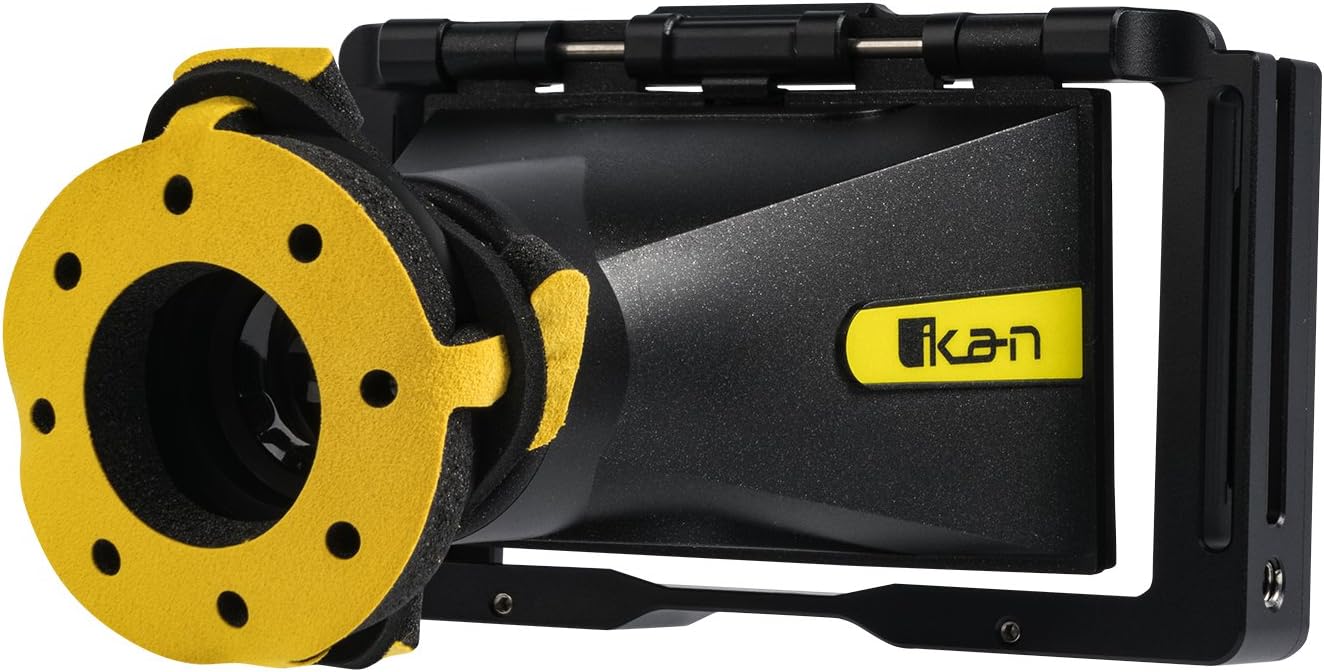
Figure 1: The Ikan EVF50 Monitor Cage with Viewznalazca.
2. Co znajduje się w pudełku
Sprawdź, czy w opakowaniu znajdują się wszystkie elementy:
- Bluestar Eye Cushion
- EVF50 Cage
- Widok z przodu Viewznalazca
- Narzędzie sześciokątne
3. Konfiguracja
Follow these steps to assemble and prepare your Ikan EVF50 Monitor Cage with Viewznalazca:
- Włóż monitor: Carefully slide your DH5 or DH5e monitor into the form-fitting EVF50 cage. Ensure it is seated securely within the cage's frame.

Rysunek 2: Strona view of the EVF50 cage, illustrating the monitor insertion slot.
- Dołącz Viewznalazca: Ten viewfinder component is designed to integrate with the cage. Align the viewfinder with the monitor's screen and secure it using the provided hardware and hex tool.

Rysunek 3: Góra view pokazując viewfinder attached to the cage.

Rysunek 4: Szczegóły viewfinder's hinge mechanism.

Figure 5: Using the hex tool for assembly.
- Install Eye Cushion: Place the Bluestar Ultrasuede eye cushion onto the viewfinder eyepiece for comfortable viewing.
- Podłącz kable: Utilize the cage's cable locks to manage and secure any necessary cables connected to your monitor, preventing accidental disconnections.

Rysunek 6: Tył view of the cage, highlighting cable management features.
- Montowanie: The cage features multiple 1/4-20 mounting points for attaching to camera rigs or other accessories.
4. Obsługa Viewznalazca
Once assembled, the EVF50 provides an enhanced viewing experience for your DH5/DH5e monitor:
- Viewing: Spójrz przez okular, aby view your monitor's display. The Ultrasuede eye cushion provides comfort during extended use.
- Regulacja dioptrii: Rotate the diopter adjustment ring on the viewfinder to achieve a sharp, clear image tailored to your vision.
- Funkcja podnoszenia: Ten viewfinder can be easily flipped up, allowing direct access to the monitor screen when the electronic viewfinder is not required.
5. Konserwacja
Proper maintenance ensures the longevity and optimal performance of your EVF50 Monitor Cage with Viewznalazca:
- Czyszczenie klatki: Wipe the aluminum cage with a soft, dry cloth to remove dust and fingerprints. Avoid abrasive cleaners.
- Czyszczenie Viewfinder Lens: Use a lens cleaning solution and a microfiber cloth specifically designed for optical surfaces. Gently wipe the lens to avoid scratches.
- Eye Cushion Care: The Ultrasuede eye cushion can be gently cleaned with a damp cloth and mild soap if necessary. Allow it to air dry completely before reattaching.
- Składowanie: When not in use, store the EVF50 in a clean, dry environment, preferably in a protective case, to prevent dust accumulation and physical damage.
6. Rozwiązywanie Problemów
Zapoznaj się z poniższymi typowymi problemami i rozwiązaniami:
- Monitor Does Not Fit Securely:
Ensure you are using a compatible Ikan DH5 or DH5e monitor. Verify that the monitor is inserted correctly and fully seated within the cage.
- Image Through Viewfinder is Blurry:
Adjust the diopter ring on the viewfinder until the image appears sharp and in focus for your eyesight.
- Cables Are Loose or Disconnecting:
Utilize the integrated cable locks on the cage to secure your monitor's cables, preventing accidental pulls or disconnections.
7. Specyfikacje
| Funkcja | Szczegół |
|---|---|
| Wymiary produktu | 8 x 4 x 7.25 cala |
| Waga przedmiotu | 1.14 funta |
| Numer modelu przedmiotu | Widok z przodu |
| Marka | Ikan |
| Producent | Ikan |
| Zgodność | Ikan DH5 or DH5e On-Camera Monitors |
| Punkty mocowania | Multiple 1/4-20 threads |
| Eye Cushion Material | Bluestar Ultrasuede |
8. Gwarancja i wsparcie
For warranty information, technical support, or service inquiries regarding your Ikan EVF50 Monitor Cage with Viewfinder, please contact Ikan customer support directly. Refer to the official Ikan webna tej stronie znajdziesz najnowsze dane kontaktowe i zasady gwarancji.
Zasoby internetowe: www.ikan.com
Ask a question about this manual
Ask about setup, troubleshooting, compatibility, parts, safety, or missing instructions. Manuals+ will review the question and use this page’s manual context to help answer it.