
1. Wprowadzenie
Thank you for choosing the Feelworld FW703 7-inch IPS On-Camera Field Monitor. This manual provides essential information for the proper setup, operation, and maintenance of your device. Please read this manual thoroughly before using the monitor to ensure optimal performance and to prevent damage.
2. Koniec produktuview
The Feelworld FW703 is a high-resolution 7-inch IPS monitor designed for professional camera and video camera applications. It offers a range of features to enhance your shooting experience.
Główne cechy:
- Wyświetlacz o wysokiej rozdzielczości: The FW703 features a Full HD 1920x1200 resolution, a 1200:1 contrast ratio, and a pixel density of 323 PPI, ensuring smooth and clear display of images and videos. With a brightness of 450cd/m², the screen is clearly visible. The 160° viewing angle provides consistent image quality from various perspectives.
- Rec.709 HD Color Standard: Reproduces colors naturally and beautifully. Utilizing ITU standards and HD video Rec.709 calibration technology, images appear sharp. Includes fine color adjustment functions.
- 3G-SDI/4K HDMI Connectivity: Supports 3G-SDI and 4K HDMI input and output. SDI input supports SD, HD, and 3G formats up to 1080p 60Hz. HDMI input supports formats up to 4K 2160p 30Hz, supporting almost all signal formats. Suitable for DSLR HDMI cameras and professional broadcast SDI signals. It can simultaneously display live images on multiple displays while maintaining original video quality.
- Multi-functional Professional Auxiliary Functions: Professional auxiliary functions assist users in accurately monitoring video shooting, creation, and playback. Features include: Brightness Histogram; Embedded Audio Monitoring; Peaking Focus Assist; False Color; Zebra Exposure; Camera Mode; Image Flip; Check Field; Anamorphic Mode (1.3x, 2.0x, 2.0x mag); Safe Area (80%, 85%, 90%, 93%, 96%, 2.35:1); Color Temperature Adjustment. Also includes 9 Grid for 4K, Image Magnification (4X, 9X, 16X), and Zoom (U/D, L/R).
- Thin, Lightweight, and Portable Design: Designed for portability and functionality, with a depth of 22mm and a weight of 320g, allowing for free use anywhere. Enjoy clear images regardless of location.
- Elastyczny zasilacz: Supports 12V/1.5A power adapter and can also be powered by compatible batteries (e.g., Sony NP-F series via F970 battery plate).
- Wszechstronne opcje montażu: Features a standard 1/4 inch screw hole for easy attachment to camera rigs, heads, or magic arms. Includes a 360° swivel mount.
- Niestandardowe klawisze skrótu: F1 and F2 custom shortcut function keys allow users to set functions according to personal habits.
- New UI Menu: Adopts a new UI menu for more convenient and quick operation of functions.

Image: Feelworld FW703 7-inch FHD Screen with key display specifications.

Image: IPS Ultra-wide Viewing Angle of the FW703 monitor.
3. Zawartość opakowania
Po otrzymaniu przesyłki sprawdź jej zawartość, aby upewnić się, że znajdują się w niej wszystkie elementy:
- Feelworld FW703 Monitor
- Mini kabel HDMI
- Kabel adaptera USB
- Parasol
- Uchwyt na gorącą stopkę
- Płyta akumulatora F970
- Instrukcja obsługi

Image: Package Contents of the FW703 Monitor.
4. Konfiguracja
4.1 Zasilanie monitora
The FW703 monitor can be powered in two ways:
- Zasilacz sieciowy: Connect a 12V/1.5A AC power adapter (not included) to the DC IN port on the monitor.
- Moc baterii: Attach a compatible Sony NP-F series battery (e.g., F970, F960, F950, F770, F750, F730, F570, F550, F530 series) to the F970 battery plate on the back of the monitor. Ensure the battery is securely locked into place.

Image: Flexible Power Supply options for the FW703 monitor.
4.2 Podłączanie do kamery
Connect your camera or video source to the monitor using either an HDMI or SDI cable.
- Połączenie HDMI: Use the provided Mini HDMI cable to connect your camera's HDMI output to the HDMI IN port on the FW703.
- Połączenie SDI: Connect your camera's SDI output to the SDI IN port on the FW703 using an SDI cable.
The monitor also features HDMI OUT and SDI OUT ports for looping through the signal to another display or device.

Image: 3G-SDI and 4K HDMI Input/Output Ports.
4.3 Montaż monitora
Use the included hot shoe mount to attach the monitor to your camera's hot shoe or a compatible rig. The monitor features a standard 1/4 inch screw hole on the bottom for versatile mounting options.
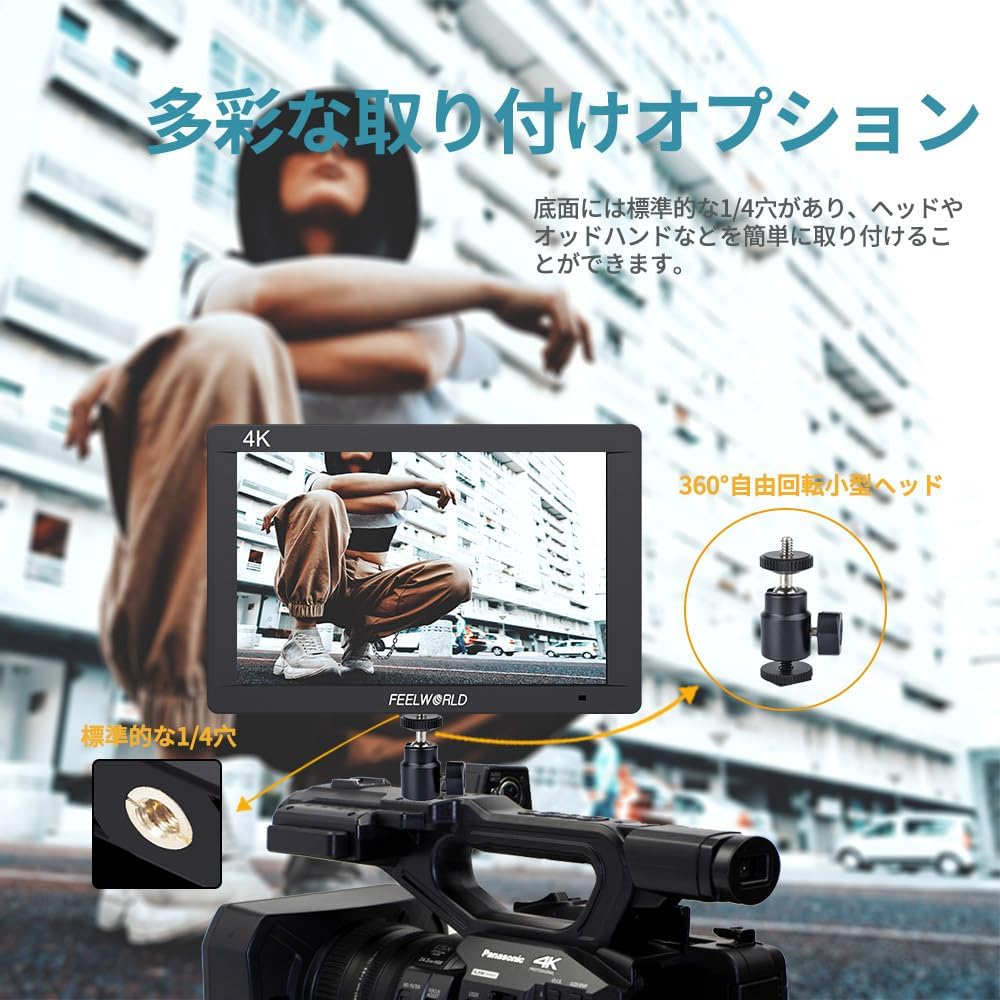
Image: Diverse Mounting Options for the FW703 monitor.
5. Instrukcja obsługi
5.1 Podstawowa obsługa
- Włączanie/wyłączanie: Naciśnij i przytrzymaj przycisk zasilania, aby włączyć lub wyłączyć monitor.
- Nawigacja po menu: Use the MENU button to access the main menu. Use the arrow buttons (or rotary dial, if present) to navigate through options and the SELECT button to confirm.
- Wybór wejścia: The monitor will automatically detect the input signal. If multiple inputs are connected, you may need to manually select the desired input from the menu.
5.2 Using Auxiliary Functions
The FW703 includes various professional auxiliary functions to assist with accurate monitoring. These can be accessed via the menu or assigned to the F1/F2 shortcut keys.

Image: Assist Shooting Functions available on the FW703.
- Asystent ostrości szczytowej: Highlights sharp edges in red, green, or blue to indicate in-focus areas.
- Fałszywy kolor: Displays exposure levels as a spectrum of colors, helping to identify overexposed or underexposed areas.
- Zebra Exposure: Overlays zebra stripes on areas exceeding a set exposure threshold.
- Histogram: Provides a graphical representation of the tonal distribution of the image.
- Wbudowany dźwięk: Displays audio levels on the screen.
- Tryb anamorficzny: Usuwa anamorficzne footage za właściwe viewing (1.3x, 2.0x, 2.0x mag options).
- Bezpieczna strefa: Displays guides for various aspect ratios and safe zones (80%, 85%, 90%, 93%, 96%, 2.35:1).
- Odwracanie obrazu: Odbija obraz w poziomie lub w pionie.
- Brzęczenie: Powiększa fragment obrazu w celu umożliwienia szczegółowej inspekcji.
5.3 Custom Shortcut Keys (F1, F2)
The F1 and F2 buttons can be customized to quickly access frequently used functions. To assign a function:
- Przejdź do menu głównego.
- Navigate to the 'Function Key Settings' or similar option.
- Select F1 or F2 and choose the desired function from the list.

Image: New UI Menu and Custom Shortcut Keys.
5.4 Ustawienia językowe
The monitor supports multiple languages, including Japanese. To change the language:
- Uzyskaj dostęp do menu głównego.
- Navigate to 'System Settings' or 'Language'.
- Wybierz preferowany język.
6. Konserwacja
Proper maintenance ensures the longevity and optimal performance of your Feelworld FW703 monitor.
- Czyszczenie: Use a soft, dry cloth to clean the monitor's exterior. For the screen, use a specialized screen cleaning solution and a microfiber cloth. Do not use abrasive cleaners or solvents.
- Składowanie: When not in use, store the monitor in a cool, dry place, away from direct sunlight and extreme temperatures. Use the included sunshade for protection during storage or transport.
- Pielęgnacja baterii: If using batteries, ensure they are charged regularly and stored properly. Remove batteries if the monitor will not be used for an extended period.
7. Rozwiązywanie Problemów
If you encounter issues with your FW703 monitor, refer to the following common troubleshooting steps:
| Problem | Możliwa przyczyna | Rozwiązanie |
|---|---|---|
| Brak obrazu na ekranie | No power; Incorrect input selected; Loose cable connection; Camera not outputting signal. | Check power connection/battery; Select correct input source; Ensure cables are securely connected; Verify camera's video output settings. |
| Obraz jest zniekształcony lub odbarwiony | Incorrect display settings; Faulty cable; Signal incompatibility. | Reset display settings to default; Try a different HDMI/SDI cable; Ensure camera output resolution/frame rate is supported by the monitor. |
| Monitor się nie włącza | No power; Dead battery. | Check AC adapter connection; Ensure battery is charged and properly installed. |
| Przyciski nie reagują | Tymczasowy błąd oprogramowania. | Wyłącz monitor, odczekaj kilka sekund, a następnie włącz go ponownie. |
Jeśli po wypróbowaniu tych rozwiązań problem nadal występuje, skontaktuj się z obsługą klienta.
8. Specyfikacje
| Funkcja | Szczegół |
|---|---|
| Numer modelu | FW703 |
| Rozmiar ekranu | 7 cali |
| Rezolucja | 1920x1200 |
| Współczynnik kontrastu | 1200:1 |
| Jasność | 450 cd/m² |
| Gęstość pikseli | 323 PPI |
| Viewing kąt | 160° (IPS) |
| Porty wejściowe | 1x 3G-SDI, 1x 4K HDMI |
| Porty wyjściowe | 1x 3G-SDI, 1x 4K HDMI |
| Moc wejściowa | Prąd stały 12 V/1.5 A |
| Kompatybilność baterii | Sony NP-F series (via F970 plate) |
| Wymiary (w opakowaniu) | Wymiary 22.6 x 16.2 x 8 cm |
| Waga (w opakowaniu) | 900 gramów |
| Inne funkcje | Anti-glare screen, Frame, Professional auxiliary functions |
9. Gwarancja i wsparcie
The Feelworld FW703 monitor comes with a roczna gwarancja od daty zakupu. Niniejsza gwarancja obejmuje wady produkcyjne i usterki powstałe podczas normalnego użytkowania.
For technical support, warranty claims, or service inquiries, please contact your retailer or Feelworld customer service. Keep your proof of purchase for warranty validation.