
1. Wprowadzenie
The Marshall MG10G is a compact 10-watt solid-state guitar amplifier designed for practice and home use. It features two channels (Clean and Overdrive), a Contour control for tone shaping, an auxiliary input for connecting external audio devices, and a headphone output for silent practice. This manual provides essential information for the safe and effective operation of your MG10G ampliyfikator.
2. Informacje dotyczące bezpieczeństwa
WARNING: SHOCK HAZARD. DO NOT OPEN. TO REDUCE THE RISK OF FIRE OR ELECTRIC SHOCK DO NOT REMOVE COVER. NO USER-SERVICEABLE PARTS INSIDE. REFER SERVICING TO QUALIFIED SERVICE PERSONNEL.
Zawsze upewnij się, że amplifier is connected to a grounded power outlet. Do not expose the amplifier to rain or moisture. Disconnect the power cord before cleaning or if the unit will be unused for extended periods. Ensure adequate ventilation around the ampliyfikator.
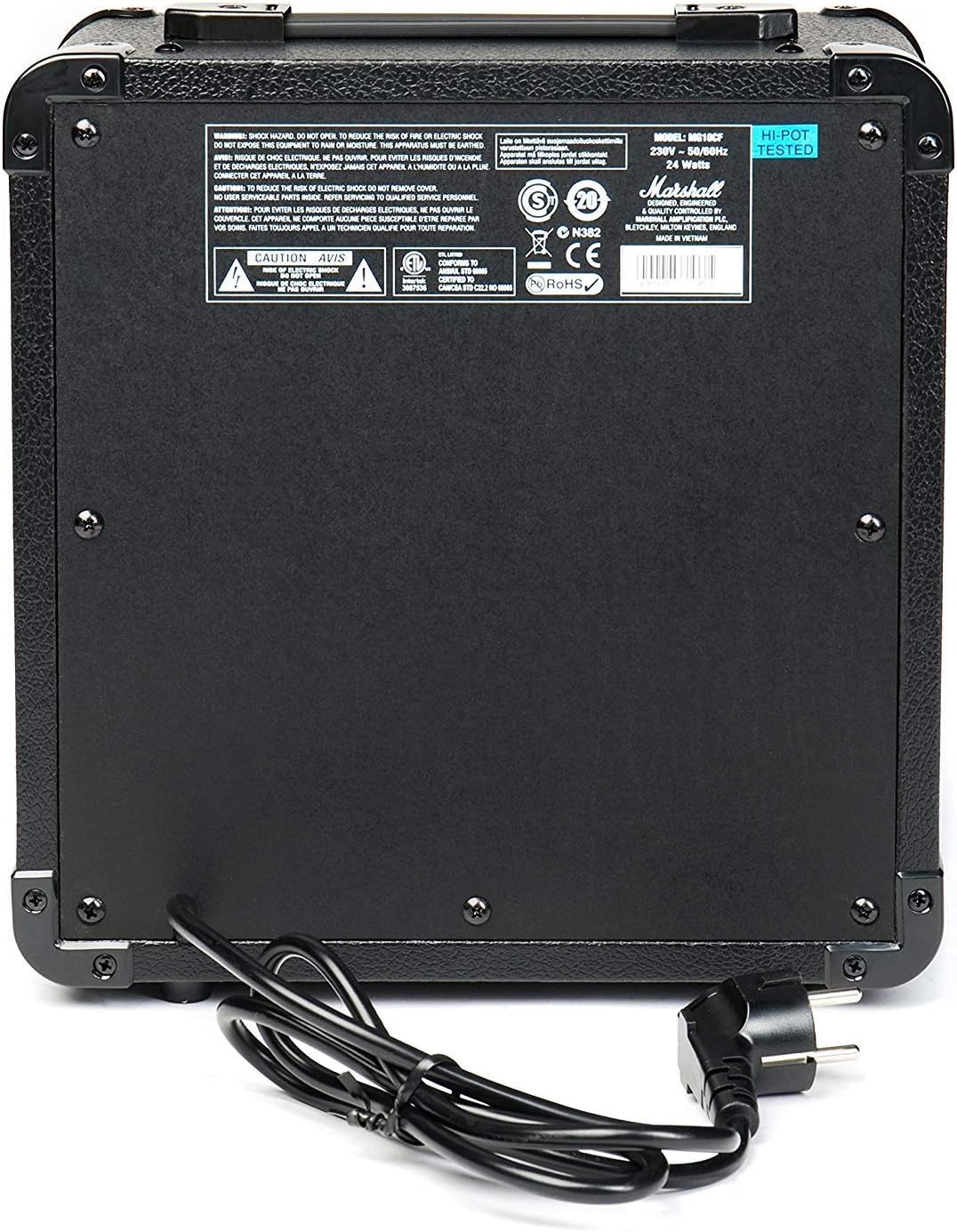
Figure 2.1: Rear panel of the MG10G amplifier, displaying safety warnings and power specifications.
3. Koniec produktuview
The MG10G amplifier features a straightforward control layout for ease of use. Familiarize yourself with the front panel controls and rear panel connections before operation.

Figure 3.1: Front panel of the MG10G ampliyfikator.
Elementy sterujące na panelu przednim:
- WEJŚCIE: 1/4" jack for connecting your electric guitar.
- CZYSTA OBJĘTOŚĆ: Controls the volume of the Clean channel.
- WYBÓR KANAŁU: Button to switch between Clean and Overdrive channels.
- WZROST NADDRĘGU: Adjusts the amount of distortion on the Overdrive channel.
- GŁOŚNOŚĆ OVERDRIVE: Controls the volume of the Overdrive channel.
- KONTUR: Shapes the mid-range frequencies of your tone. Turning it clockwise scoops the mids, while counter-clockwise adds mids.
- MP3/WEJŚCIE LINIOWE: 3.5mm jack for connecting external audio sources (e.g., MP3 player, phone).
- SŁUCHAWKI: 3.5mm jack for connecting headphones for silent practice. Connecting headphones mutes the main speaker.
- MOC: Włącznik/wyłącznik dla ampliyfikator.
Połączenia panelu tylnego:
- WEJŚCIE ZASILANIA: Connects the supplied power cable to a suitable mains power supply.
4. Konfiguracja
- Zapewnij amplifier's POWER switch is in the OFF position.
- Connect the power cable to the POWER INPUT on the rear panel of the amplifier and then to a grounded electrical outlet.
- Podłącz swoją gitarę elektryczną do WEJŚCIE gniazdo na panelu przednim za pomocą standardowego kabla instrumentalnego 1/4".
- If desired, connect an external audio device (e.g., MP3 player) to the MP3/LINE IN jack using a 3.5mm stereo cable.
- If desired, connect headphones to the SŁUCHAWKI Jack do ćwiczeń w ciszy.
- Włącz CZYSTA OBJĘTOŚĆ I OVERDRIVE GŁOŚNOŚĆ controls to their minimum settings (fully counter-clockwise).
- Przełącz ampLifiera MOC to the ON position. The power indicator light will illuminate.
5. Instrukcja obsługi
5.1 Clean Channel
To use the Clean channel, ensure the WYBÓR KANAŁU button is disengaged (out position). Adjust the CZYSTA OBJĘTOŚĆ control to achieve your desired output level. This channel provides a clear, un-distorted guitar tone.
5.2 Overdrive Channel
To engage the Overdrive channel, press the WYBÓR KANAŁU button (in position). Use the WZMOCNIENIE NADDRĘGU control to adjust the amount of distortion, from a subtle crunch to a heavier, saturated sound. The OVERDRIVE GŁOŚNOŚĆ control sets the output level for this channel.
5.3 Tone Shaping with Contour
Ten KONTUR control allows you to sculpt the mid-range frequencies of your tone. Experiment with this control to find your preferred sound:
- Obrócenie KONTUR clockwise will scoop the mid-range, often resulting in a more modern, aggressive tone.
- Obrócenie KONTUR counter-clockwise will boost the mid-range, providing a warmer, fuller sound that can help your guitar cut through a mix.
5.4 Using MP3/LINE IN
Podłącz zewnętrzne urządzenie audio do MP3/LINE IN jack. The volume of the external device is controlled by its own volume output. This feature allows you to play along with backing tracks or music.
5.5 Wyjście słuchawkowe
Podłącz słuchawki do SŁUCHAWKI jack for silent practice. The amplifier's main speaker will be muted automatically. Adjust the volume using the respective channel volume controls (Clean or Overdrive) or the volume control on your external audio device if using the MP3/LINE IN.
6. Konserwacja
- Czyszczenie: Odłącz amplifier from the power supply before cleaning. Use a soft, dry cloth to wipe down the exterior. Do not use abrasive cleaners or solvents.
- Składowanie: Przechowuj ampPrzechowywać w suchym i chłodnym miejscu, z dala od bezpośredniego światła słonecznego i ekstremalnych temperatur.
- Transport: Podczas transportu amplifier, upewnij się, że jest bezpiecznie zapakowany, aby zapobiec uszkodzeniom.
7. Rozwiązywanie Problemów
| Problem | Możliwa przyczyna | Rozwiązanie |
|---|---|---|
| Brak dźwięku z głośnika |
|
|
| Słaby lub zniekształcony dźwięk |
|
|
| Brak dźwięku ze słuchawek |
|
|
Jeśli po wypróbowaniu tych rozwiązań problem nadal występuje, skontaktuj się z wykwalifikowanym personelem serwisowym.
8. Specyfikacje

Figure 8.1: Dimensions of the MG10G ampliyfikator.
| Funkcja | Szczegół |
|---|---|
| Nazwa modelu | MG10G |
| AmpTyp lifier | Stan stały |
| Moc wyjściowa | 10 watów |
| Rozmiar głośnika | 6.5 cali (16.51 cm) |
| Kanały | 2 (Clean, Overdrive) |
| Sterownica | Clean Volume, Channel Select, Overdrive Gain, Overdrive Volume, Contour, Power |
| Wejścia | 1/4" Guitar Input, 3.5mm MP3/Line In |
| Wyjścia | Wyjście słuchawkowe 3.5 mm |
| Źródło zasilania | Electric Cable (230V~50Hz, 24 Watts) |
| Wymiary (gł. x szer. x wys.) | Wymiary: 31.5 cm x 19.8 cm x 40 cm |
| Waga przedmiotu | 5.13 kilograma |
| Tworzywo | Metal, Plastik |
| Kolor | Czarny |
| Kraj pochodzenia | Chiny |
9. Gwarancja i wsparcie
9.1 Informacje o gwarancji
This Marshall MG10G amplifier jest dostarczany z 1-letnia gwarancja producentaProsimy zachować dowód zakupu na wypadek roszczeń gwarancyjnych. Gwarancja obejmuje wady produkcyjne i usterki powstałe w wyniku normalnego użytkowania. Nie obejmuje uszkodzeń spowodowanych niewłaściwym użytkowaniem, wypadkami, nieautoryzowanymi modyfikacjami ani normalnym zużyciem.
9.2 Obsługa klienta
For technical assistance, service, or warranty inquiries, please contact your authorized Marshall dealer or visit the official Marshall Amplifikacja webwitryna zawierająca zasoby pomocy technicznej i informacje kontaktowe.