
Wstęp
Dziękujemy za zakupasing the Ridgeway QS-1037B Bluetooth Speaker. This manual provides important information regarding the setup, operation, maintenance, and troubleshooting of your new speaker. Please read this manual thoroughly before using the product to ensure proper function and to extend its lifespan.
The Ridgeway QS-1037B is a portable and powerful amplified speaker designed to enhance your audio experience with its robust sound, versatile connectivity, and dynamic LED lighting. It features a 10-inch subwoofer, Bluetooth connectivity, USB and SD card readers, FM radio, and a karaoke function with an included microphone.
Zawartość opakowania
Proszę sprawdzić, czy w paczce znajdują się następujące elementy:
- Ridgeway QS-1037B Bluetooth Speaker
- Zdalne sterowanie
- Mikrofon
- P2/P2 Audio Cable
- Internal Battery Charging Cable
- Instrukcja obsługi (ten dokument)
Produkt ponadview

Rysunek 1: Strona view of the Ridgeway QS-1037B Bluetooth Speaker, showcasing its robust design and side control panel.
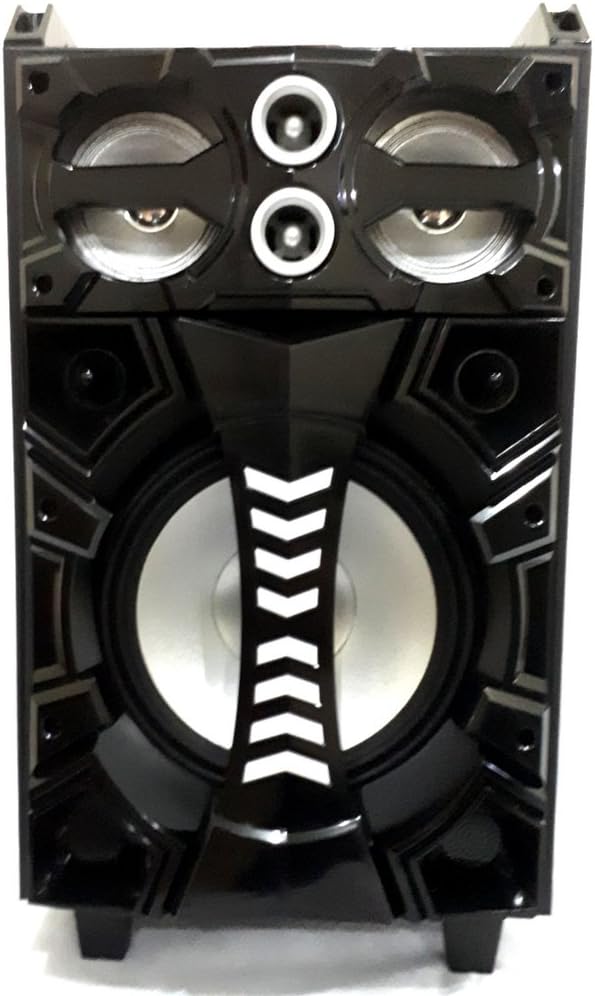
Rysunek 2: Przód view of the Ridgeway QS-1037B Bluetooth Speaker, highlighting the 10-inch subwoofer and dual tweeters.

Rysunek 3: Szczyt view of the speaker, showing the integrated LED globe for party lighting effects.

Rysunek 4: Przód view of the speaker with its dynamic LED lights illuminated, showcasing various color patterns.
Organizować coś
1. Ładowanie głośnika
Before first use, fully charge the speaker's internal battery. Connect the provided charging cable to the speaker's charging port and plug the other end into a suitable power outlet. The charging indicator light will show the charging status. A full charge typically takes approximately 3 hours.
2. Umieszczenie
Place the speaker on a stable, flat surface. It can be used as a table-mounted or floor-standing unit. Ensure there is adequate ventilation around the speaker and avoid placing it near heat sources or in direct sunlight.
3. Włączanie/wyłączanie zasilania
Locate the power switch on the speaker's control panel. Flip the switch to the "ON" position to power on the speaker. You will hear an audible prompt indicating it is ready for use. To power off, flip the switch to the "OFF" position.
Instrukcja obsługi
1. Tryb Bluetooth
- Power on the speaker. It will automatically enter Bluetooth pairing mode, indicated by a flashing LED or audible prompt.
- Na swoim urządzeniu mobilnym (smartfonie, tablecie itp.) włącz Bluetooth i wyszukaj dostępne urządzenia.
- Select "Ridgeway QS-1037B" (or similar name) from the list of devices.
- Once paired, the speaker will confirm with an audible sound, and the LED indicator will stop flashing.
- Teraz możesz odtwarzać dźwięk ze swojego urządzenia przez głośnik.
2. Odtwarzanie z USB/karty SD
- Insert a USB flash drive or SD card into the corresponding slot on the speaker's control panel.
- The speaker will automatically detect the media and begin playing audio files.
- Use the control buttons on the speaker or the remote control to navigate tracks (play/pause, next/previous).
3. Tryb radia FM
- Press the "Mode" button on the speaker or remote control until you hear the FM radio prompt.
- Press and hold the "Play/Pause" button to initiate an automatic station scan. The speaker will scan and save available FM stations.
- Use the "Next/Previous" buttons to switch between saved stations.
4. Funkcja karaoke
- Connect the provided microphone to the microphone input jack on the speaker.
- Głośność mikrofonu można regulować za pomocą specjalnego pokrętła na panelu sterowania.
- Play your desired music through Bluetooth, USB, or SD card, and sing along!
5. Sterowanie oświetleniem LED
The speaker features dynamic front LEDs and an LED globe. Use the dedicated LED control button on the speaker or remote control to cycle through different lighting modes or turn them off.
6. Korzystanie z pilota zdalnego sterowania
The included remote control allows for convenient operation from a distance. It provides control over power, mode selection, volume, track navigation, FM radio functions, and LED lighting.
Konserwacja
- Czyszczenie: Do czyszczenia obudowy głośnika należy używać miękkiej, suchej ściereczki. Nie należy używać środków ściernych, wosków ani rozpuszczalników.
- Składowanie: Jeśli głośnik nie będzie używany przez dłuższy czas, należy przechowywać go w chłodnym i suchym miejscu, z dala od bezpośredniego światła słonecznego i ekstremalnych temperatur.
- Pielęgnacja baterii: Aby przedłużyć żywotność baterii, unikaj częstego całkowitego rozładowywania. Ładuj głośnik regularnie, nawet jeśli nie jest używany regularnie.
- Obsługiwanie: The speaker is portable but should be handled with care. Use the integrated strap and wheels for easy transport. Avoid dropping or subjecting the speaker to strong impacts.
Rozwiązywanie problemów
| Problem | Możliwa przyczyna | Rozwiązanie |
|---|---|---|
| Brak zasilania | Bateria jest rozładowana; wyłącznik zasilania jest wyłączony. | Naładuj głośnik. Upewnij się, że włącznik zasilania jest w pozycji „ON”. |
| Brak dźwięku | Głośność jest zbyt niska; Wybrano niewłaściwy tryb; Urządzenie nie jest sparowane (Bluetooth). | Increase volume; Select the correct input mode (Bluetooth, USB, SD, FM); Re-pair Bluetooth device. |
| Bluetooth nie łączy się | Speaker is not in pairing mode; Device Bluetooth is off; Too far from speaker. | Upewnij się, że głośnik jest w trybie parowania; włącz Bluetooth w urządzeniu; zbliż urządzenie do głośnika (na odległość nie większą niż 10 metrów). |
| Karta USB/SD nie jest odtwarzana | Nieobsługiwane file format; Uszkodzony nośnik; Karta/napęd nie jest prawidłowo włożony. | Zapewnij dźwięk files are in a supported format (e.g., MP3); Try a different USB drive/SD card; Re-insert the media securely. |
| Mikrofon nie działa | Mikrofon nie jest podłączony; głośność mikrofonu jest zbyt niska. | Ensure microphone is securely plugged in; Increase microphone volume. |
Specyfikacje
| Model | QS-1037B |
| Typ głośnika | Amplified Subwoofer Speaker |
| Średnica subwoofera | 10 cali (25.4 cm) |
| PMPO Output Wattage | 2000 watów |
| Moc skuteczna | 120 watów |
| Łączność | Bluetooth, USB, SD Card, FM Radio, P2/P2 AUX |
| Cechy specjalne | Front LED Lights, LED Globe, Karaoke Function, Portable (Strap & Wheels) |
| Źródło zasilania | Wewnętrzny akumulator |
| Czas ładowania akumulatora | Około 3 godzin |
| Wymiary (gł. x szer. x wys.) | 32 cm x 34.5 cm x 61 cm (12.6 cala x 13.6 cala x 24 cala) |
| Waga | 10 kg (22 funta) |
| Kolor | Czarny |
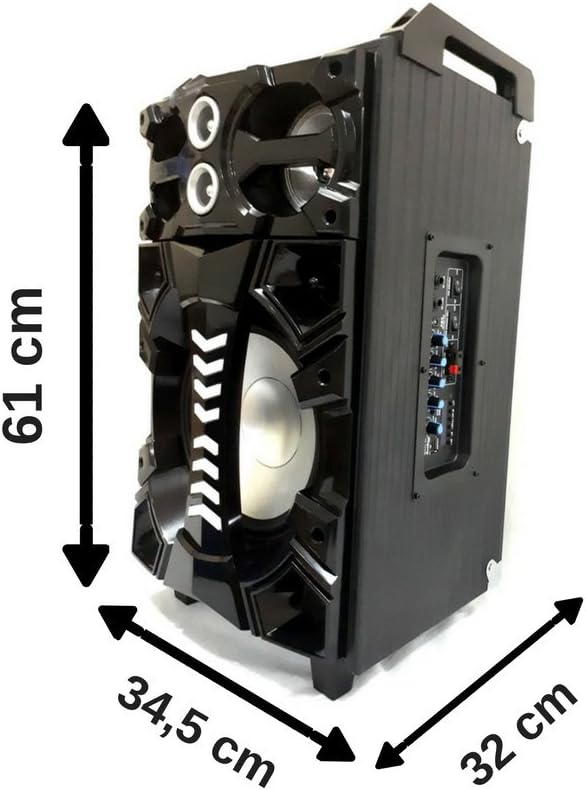
Rysunek 5: Dimensions of the Ridgeway QS-1037B speaker: 61 cm height, 34.5 cm width, and 32 cm depth.
Informacje o gwarancji
The Ridgeway QS-1037B Bluetooth Speaker comes with a 6-miesięczna gwarancja producenta od daty zakupu. Niniejsza gwarancja obejmuje wady produkcyjne i usterki powstałe w wyniku normalnego użytkowania. Nie obejmuje uszkodzeń spowodowanych niewłaściwym użytkowaniem, wypadkami, nieautoryzowanymi modyfikacjami ani normalnym zużyciem.
Please retain your proof of purchase for warranty claims. For warranty service, contact Ridgeway customer support.
Obsługa klienta
For technical assistance, troubleshooting beyond this manual, or warranty inquiries, please contact Ridgeway customer support through their official webstronę lub dane kontaktowe podane w dokumentacji zakupu.
For more information, visit the official Ridgeway webstrona: www.ridgeway.com (Note: This is a placeholder link as no specific support link was provided in the product data).