
1. Wprowadzenie
Thank you for choosing the Generic Rolton T50 Portable World Band Radio and MP3 Player. This device combines a multi-band radio (FM/MW/SW) with an MP3 player, supporting SD/TF cards for versatile audio entertainment. Its compact design and battery power make it ideal for portable use. Please read this manual carefully to ensure proper operation and to maximize your listening experience.
2. Informacje dotyczące bezpieczeństwa
- Nie wystawiaj urządzenia na działanie deszczu, wilgoci ani ekstremalnych temperatur.
- Unikaj upuszczania i narażania urządzenia na silne uderzenia.
- Nie rozmontowuj ani nie próbuj samodzielnie naprawiać urządzenia. Wszelkie prace serwisowe powierzaj wykwalifikowanemu personelowi.
- Trzymaj urządzenie z dala od silnych pól magnetycznych.
- Baterie należy utylizować zgodnie z lokalnymi przepisami.
- Czyść urządzenie miękką, suchą ściereczką. Nie używaj płynnych środków czyszczących.
3. Zawartość opakowania
Proszę sprawdzić, czy w paczce znajdują się następujące elementy:
- Rolton T50 Portable Radio and MP3 Player
- Kabel ładujący USB
- Instrukcja obsługi
Uwaga: poszczególne akcesoria mogą się różnić.
4. Koniec produktuview
Familiarize yourself with the various parts and controls of your Rolton T50 device.
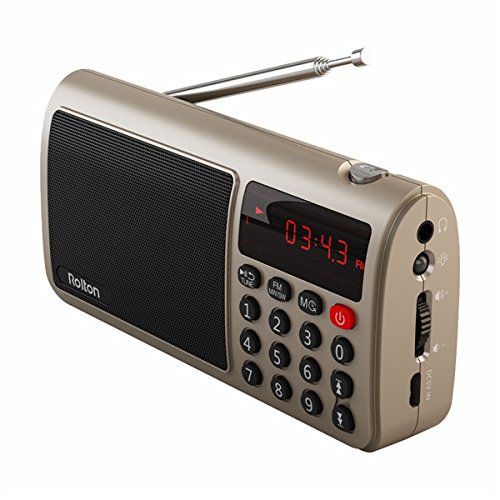
Rycina 1: Przód view of the Rolton T50 Portable Radio (Red variant). This image displays the main speaker grille, the digital time/frequency display, the numeric keypad for direct tuning, and the power button. The telescopic antenna is extended from the top right side.
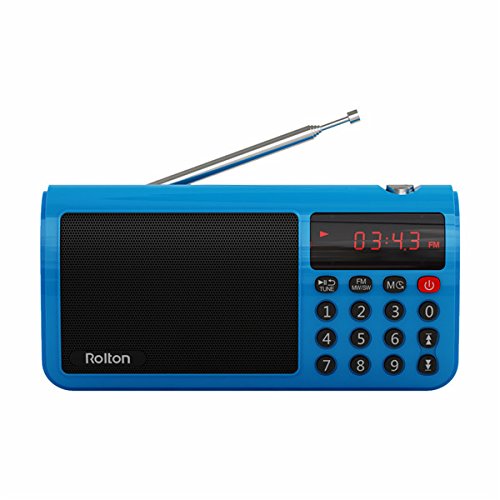
Rycina 2: Przód view of the Rolton T50 Portable Radio (Blue variant). Similar to the red model, this image highlights the speaker, digital display, and control buttons, including the numeric keypad and power button. The telescopic antenna is also visible.
Kluczowe komponenty:
- Kratka głośnika: Do wyjścia audio.
- Wyświetlacz cyfrowy: Shows time, frequency, and mode information.
- Klawiatura numeryczna (0-9): Do bezpośredniego wprowadzania częstotliwości lub wyboru utworu.
- Przycisk zasilania: Włącza/wyłącza urządzenie.
- Mode Button (FM/MW/SW/MS): Switches between radio bands and MP3 mode.
- Tune/Scan Buttons: For manual tuning or automatic station scanning.
- Regulacja głośności: Dostosowuje poziom wyjściowy dźwięku.
- Gniazdo słuchawkowe (3.5 mm): Do prywatnego słuchania.
- Wejście prądu stałego 5 V: Do ładowania wewnętrznego akumulatora.
- Gniazdo kart SD/TF: For inserting memory cards with MP3 files.
- Antena teleskopowa: Dla lepszego odbioru radia.
5. Konfiguracja
5.1. Ładowanie akumulatora
- Connect the small end of the provided USB charging cable to the DC 5V input port on the side of the radio.
- Podłącz większy koniec kabla USB do standardowego zasilacza USB (nie ma go w zestawie) lub do portu USB komputera.
- Podczas ładowania kontrolka ładowania (jeśli jest dostępna) będzie świecić (zazwyczaj na czerwono), a po pełnym naładowaniu zgaśnie lub zmieni kolor.
- Pełne ładowanie trwa zwykle 2-3 godziny.
5.2. Inserting an SD/TF Card
- Locate the SD/TF card slot on the side of the device.
- Insert a compatible SD or TF (MicroSD) card with the metal contacts facing downwards, gently pushing until it clicks into place.
- Aby wyjąć kartę, delikatnie wciśnij ją ponownie, aż wysunie się.
6. Instrukcja obsługi
6.1. Włączanie/wyłączanie zasilania
- Aby włączyć radio, naciśnij i przytrzymaj Moc przycisk.
- Aby wyłączyć radio, naciśnij i przytrzymaj Moc naciśnij przycisk ponownie.
6.2. Regulacja głośności
- Użyj Volume Dial/Buttons on the side of the device to increase or decrease the audio level.
6.3. Radio Mode (FM/MW/SW)
- Wybierz zespół: Naciśnij Tryb button repeatedly to cycle through FM, MW (AM), and SW (Shortwave) bands. The selected band will be displayed on the screen.
- Przedłuż antenę: For optimal FM and SW reception, fully extend the telescopic antenna. For MW (AM) reception, the internal antenna is typically sufficient, but adjusting the radio's orientation may improve signal.
- Automatyczne skanowanie: W trybie radia naciśnij i przytrzymaj Tune/Scan button (often labeled with arrows or 'SCAN') to automatically scan for and save available stations.
- Strojenie ręczne: Naciśnij krótko Tune/Scan przyciski umożliwiające precyzyjne dostrojenie częstotliwości krok po kroku.
- Bezpośrednie wejście częstotliwościowe: Use the numeric keypad to directly enter the desired frequency (e.g., for 98.7 FM, enter 9-8-7). Press the 'Tune' or 'Enter' button (if available) to confirm.
6.4. Tryb odtwarzacza MP3
- Wejdź w tryb MP3: If an SD/TF card is inserted, press the Tryb button until 'MP3' or 'CARD' is displayed. The device will automatically start playing the first track.
- Odtwórz/Pauza: Naciśnij Odtwórz/Pauza button (often combined with the power button or a dedicated button) to pause or resume playback.
- Następny / poprzedni utwór: Użyj Następny/Poprzedni track buttons (often combined with Tune/Scan buttons) to skip tracks.
- Bezpośredni wybór utworu: Use the numeric keypad to enter the track number and press 'Enter' (if available) to jump to that track.
6.5. Korzystanie ze słuchawek
- Plug any standard 3.5mm stereo headphones into the headphone jack on the side of the device for private listening. The external speaker will automatically mute.
7. Konserwacja
- Czyszczenie: Wipe the exterior of the radio with a soft, dry, lint-free cloth. Do not use abrasive cleaners, waxes, or solvents.
- Składowanie: Jeśli radio nie będzie używane przez dłuższy czas, należy je przechowywać w chłodnym i suchym miejscu, z dala od bezpośredniego światła słonecznego i ekstremalnych temperatur.
- Pielęgnacja baterii: Aby przedłużyć żywotność baterii, unikaj częstego całkowitego rozładowywania baterii. Regularnie ładuj urządzenie, nawet jeśli nie jest używane.
8. Rozwiązywanie Problemów
| Problem | Możliwa przyczyna | Rozwiązanie |
|---|---|---|
| Radio się nie włącza. | Bateria jest rozładowana. | Naładuj akumulator za pomocą dostarczonego kabla USB. |
| Brak dźwięku z głośnika. | Głośność jest zbyt niska lub wyciszona. Słuchawki są podłączone. | Zwiększ głośność. Odłącz słuchawki. |
| Słaby odbiór radia. | Antenna not extended. Weak signal area. | Całkowicie rozłóż antenę teleskopową. Spróbuj zmienić położenie radia. |
| MP3 filenie gra. | SD/TF card not inserted correctly or corrupted. Unsupported file format. | Reinsert the SD/TF card. Ensure files are in MP3 format. Try a different card. |
| Przyciski nie reagują. | Urządzenie zostało zawieszone. | Turn off the device and turn it back on. If possible, remove and reinsert the battery. |
9. Specyfikacje
- Marka: Ogólny
- Numer modelu: FFC-BG-1130644
- Technologia tunera: FM, MW (AM), SW
- Zakres częstotliwości: FM (up to 108 MHz), MW, SW (specific ranges may vary by model)
- Źródło zasilania: Zasilanie bateryjne (ładowalne)
- Interfejs sprzętowy: 3.5mm Audio Jack, USB Charging Port, SD/TF Card Slot
- Dodatek specjalny: Portable, MP3 Player
- GTIN: 764022219719
- ASIN: B077MHGW3W
10. Gwarancja i wsparcie
This product is covered by a standard manufacturer's warranty. Please refer to the warranty card included in your package for specific terms and conditions. For technical support or service inquiries, please contact your retailer or the manufacturer's customer service department.