
1. Wprowadzenie
The RAAYOO USB 3.5" External Floppy Disk Drive provides a convenient solution for accessing data stored on 3.5-inch floppy disks. This device allows you to read and write 1.44MB floppy disks, enabling the retrieval of old documents, photos, and other data on modern computers. It is designed for ease of use with plug-and-play functionality, requiring no external power supply.

Image 1.1: The RAAYOO USB Floppy Disk Drive helps retrieve and relive cherished memories from old floppy disks.
2. Koniec produktuview
The RAAYOO RYD001-BK is a portable, ultra-slim external floppy disk drive. It features a durable hard plastic casing and is designed for reliable performance.
Główne cechy:
- External USB Interface: Connects easily to your computer via USB.
- Read/Write Capability: Supports 3.5-inch 1.44MB floppy disks.
- USB 1.1/2.0 Compatible: Ensures broad compatibility with various USB ports.
- Podłącz i graj: No additional drivers are required for most operating systems.
- Zasilane przez USB: Pobiera energię bezpośrednio z portu USB, eliminując potrzebę stosowania zewnętrznego zasilacza.
- Przenośna konstrukcja: Super slim and lightweight for easy transport.
- Anti-interference Filter: Helps prevent external noise interference.
Składniki:
The drive includes an indicator light, a pop-up button for disk ejection, skid-proof soft pads for stability, and an integrated USB cable with an anti-interference filter.

Rysunek 2.1: Szczegółowy view of the RAAYOO Floppy Disk Drive's design and components.
3. Konfiguracja
Setting up your RAAYOO USB Floppy Disk Drive is a straightforward process due to its plug-and-play design.
Kroki instalacji:
- Ensure your computer is powered on and running a compatible operating system.
- Znajdź dostępny port USB na swoim komputerze.
- Connect the USB cable from the RAAYOO Floppy Disk Drive directly into the USB port on your computer. Avoid using unpowered USB hubs if possible, as they may not provide sufficient power.
- Your computer should automatically detect the device and install the necessary drivers. This process may take a few moments.
- Once the installation is complete, the drive will appear as a removable storage device in your computer's file odkrywca.
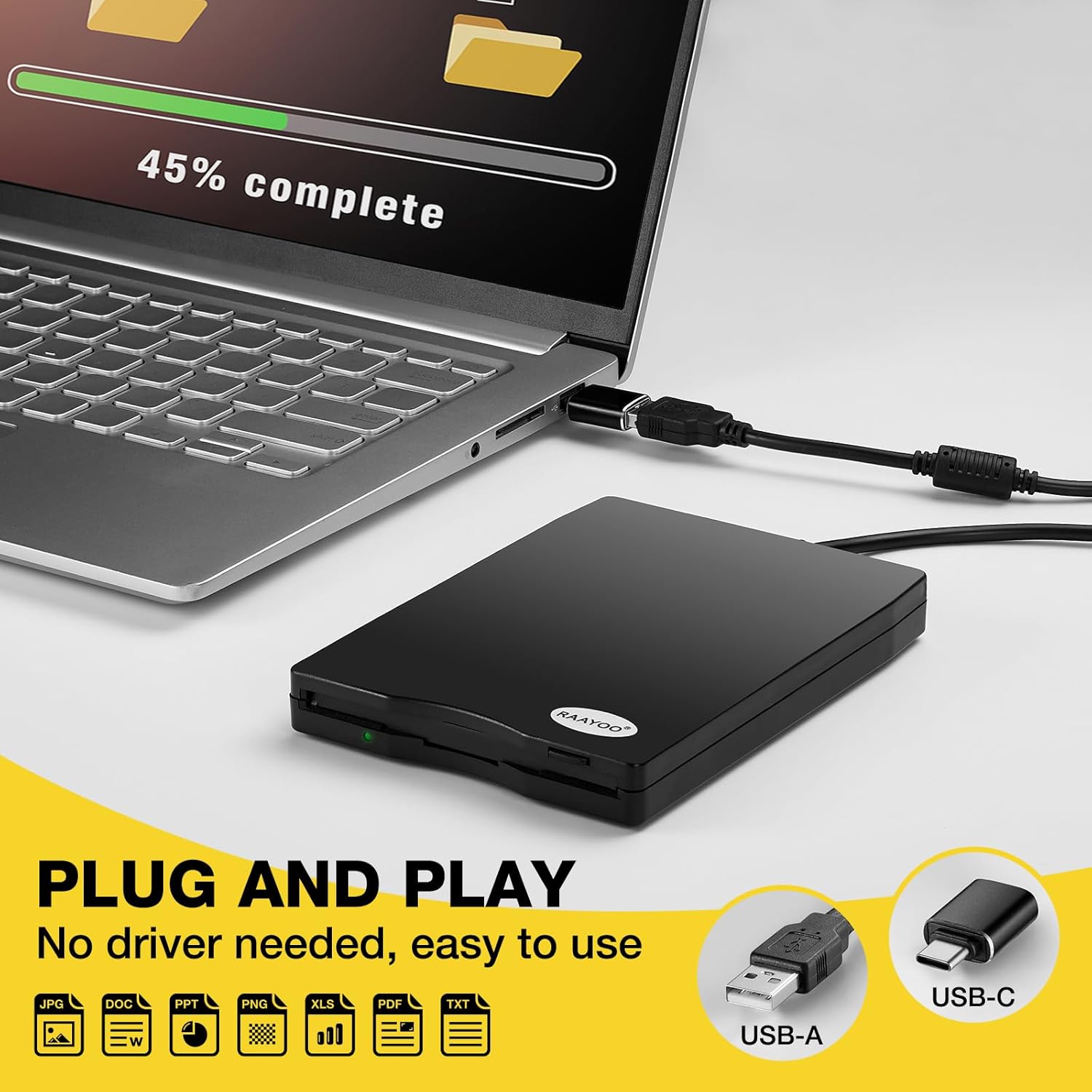
Image 3.1: The drive connects directly to a USB port for immediate use.
Zgodność systemu:
The RAAYOO RYD001-BK is compatible with various operating systems and devices:
- Systemy operacyjne: Windows 11, Windows 10, Windows 8, Windows 7, Windows Vista, Windows XP, Windows 2000, and Linux.
- Zgodne urządzenia: Laptops, notebooks, desktop PCs (e.g., Dell, Acer, Sony, HP, Lenovo).
- Niezgodne urządzenia: Please note that this item is not compatible with Mac OS, TVs, cars, tablets, phones, projectors, Chrome OS, CD/DVD/Blu-ray disk players, or PS4.

Obraz 3.2: Zgodnośćview for the RAAYOO Floppy Disk Drive.
4. Instrukcja obsługi
Once the drive is connected and recognized by your computer, you can begin accessing and managing your floppy disk data.
Inserting a Floppy Disk:
- Hold the 3.5-inch floppy disk with the metal shutter facing forward and the label side up.
- Gently insert the floppy disk into the drive slot until it clicks into place. Do not force the disk.
- The indicator light on the drive may illuminate, indicating activity.
Accessing and Transferring Data:
- Otwórz swój komputer File Explorer (Windows) or file manager (Linux).
- Locate the newly recognized drive, typically labeled as "Removable Disk" or similar.
- Double-click the drive icon to open and view the contents of the floppy disk.
- Teraz możesz kopiować files from the floppy disk to your computer or vice-versa, just like any other storage device.
Ejecting a Floppy Disk:
- Before ejecting, ensure no files are actively being read from or written to the disk.
- In File Explorer, right-click the drive icon and select "Eject" (Windows). Alternatively, click the physical pop-up button on the front of the drive.
- Carefully remove the floppy disk from the drive.

Image 4.1: The drive supports various functions for legacy data.
5. Konserwacja
Proper care and maintenance will ensure the longevity and reliable operation of your RAAYOO Floppy Disk Drive.
- Czyszczenie: Do czyszczenia zewnętrznej części napędu używaj miękkiej, suchej ściereczki. Unikaj stosowania płynnych środków czyszczących i materiałów ściernych.
- Składowanie: Store the drive in a cool, dry place away from direct sunlight, extreme temperatures, and excessive dust.
- Obsługiwanie: Handle the drive gently. Avoid dropping it or subjecting it to strong impacts.
- Floppy Disk Care: Always store floppy disks in protective sleeves or cases to prevent dust and damage to the magnetic media.
6. Rozwiązywanie Problemów
If you encounter issues with your floppy disk drive, consider the following troubleshooting steps:
- Napęd nie został rozpoznany:
- Ensure the USB cable is securely connected to both the drive and your computer.
- Spróbuj podłączyć dysk do innego portu USB w komputerze.
- Jeśli używasz koncentratora USB, spróbuj podłączyć dysk bezpośrednio do portu USB komputera.
- Uruchom ponownie komputer i spróbuj jeszcze raz.
- Cannot Read/Write Floppy Disk:
- Verify that the floppy disk is inserted correctly and fully into the drive.
- Check if the floppy disk is write-protected. Some disks have a small tab on the corner that can be slid to enable or disable write protection.
- Floppy Disk Condition: Floppy disks, especially older ones, are prone to damage and data corruption due to long-term storage. It is common for some disks to become unreadable over time. If a disk cannot be read, it may be permanently damaged.
- Format danych: Ensure the floppy disk is formatted correctly (e.g., FAT12 for 1.44MB disks).
- Try a Different Disk: Test with another known-good floppy disk to determine if the issue is with the drive or the disk itself.
- Old Software/Games Not Running:
- Older executable files or games designed for 16-bit or 32-bit operating systems may not run on modern 64-bit Windows versions. This is a software compatibility issue, not a drive malfunction.
- Accessing data files (documents, images) is generally possible if you have compatible software to open them.
7. Specyfikacje
| Funkcja | Szczegół |
|---|---|
| Numer modelu | RYD001-BK |
| Interfejs | USB 2.0 (kompatybilny z USB 1.1) |
| Obsługiwane media | 3.5-inch Floppy Disk (2HD / 2DD) |
| Pojemność danych | 1.44MB (formatted), 720KB (formatted) |
| Liczba cylindrów | 80 |
| Szybkość przesyłania danych USB | Full speed / 12 Mbps |
| Szybkość przesyłu danych | 250 Kbits (720KB) / 500 Kbits (1.44MB) |
| Prędkość obrotowa | 300 obr/min, 360 obr/min |
| Metoda nagrywania | MFM |
| Średni czas opóźnienia | 100 MSEC (1.44MB mode), 83.3 MSEC (720KB mode) |
| Zasilacz | USB Bus Power (500 mA or less) |
| Wymiary (dł. x szer. x wys.) | 13.97 x 10.16 x 1.65 cm (5.51 x 4.01 x 0.63 cala) |
| Waga | 281 gramów (0.62 funta) |
| Długość kabla USB | 2.03 stopy (ok. 62 cm) |
| Kolor | Czarny |

Image 7.1: The RAAYOO drive features a longer USB cable for convenience.
8. Gwarancja i wsparcie
For warranty information or technical support regarding your RAAYOO USB 3.5" External Floppy Disk Drive, please refer to the documentation included with your purchase or contact RAAYOO customer service directly through their official webwitrynę lub sprzedawcę, u którego zakupiono produkt.