
1. Koniecview
The Canon EOS C200 EF Cinema Camera is a professional-grade camera designed for high-quality video production. It features a Super 35mm CMOS sensor and Canon's Dual DIGIC DV 6 Image processors, capable of capturing up to 4K DCI resolution. The camera supports Canon Cinema RAW Light internally via a C Fast card slot and 4K UHD/HD MP4 video recording to two SD card slots. Its EF lens mount ensures compatibility with a wide range of Canon EF lenses.
Główne cechy obejmują:
- Super 35mm CMOS sensor with Dual Pixel CMOS AF technology.
- Dual DIGIC DV 6 processors for 4K DCI and UHD recording.
- Recording options: Canon RAW Light, MP4, and MP4 sub-recording.
- Integrated EVF and a removable 4-inch LCD monitor.
- Two XLR audio inputs for professional audio capture.
- Connectivity: SDI, HDMI, and Ethernet connectors.
2. Co znajduje się w pudełku
Po rozpakowaniu sprawdź, czy wszystkie elementy są obecne:
- Canon EOS C200 Camera Body
- Elektroniczny Viewwizjer (wizjer elektroniczny)
- 4-calowy monitor LCD
- Górny uchwyt
- Uchwyt do aparatu
- Zestaw baterii
- Ładowarka baterii
- Zasilacz
- Pasek na ramię

Rysunek 2.1: Widok z przodu view of the Canon EOS C200 EF Cinema Camera with attached components.
3. Konfiguracja
3.1 Mocowanie komponentów
- Attach the Top Handle: Secure the top handle to the camera body using the provided screws. This handle provides additional mounting points and facilitates carrying.
- Attach the LCD Monitor: Connect the 4-inch LCD monitor to the camera body via its dedicated cable and mounting arm. Ensure the connection is firm.
- Attach the Electronic Viewszukacz (EVF): Mount the EVF to its designated port on the camera body.
- Attach the Camera Grip: Secure the camera grip to the side of the camera body. This grip often includes controls for recording and menu navigation.

Figure 3.1: Canon EOS C200 with top handle and LCD monitor attached, showing various ports and controls.
3.2 Włączanie kamery
- Włóż baterię: Open the battery compartment and insert the provided battery pack, ensuring it clicks into place.
- Naładuj baterię: If the battery is low, use the battery charger and power adapter to charge it fully before first use.
3.3 Inserting Media Cards
- C Fast Card: Locate the C Fast card slot. Insert a compatible C Fast card for Cinema RAW Light recording.
- Karty SD: Locate the two SD card slots. Insert compatible SD cards (UHS Class 3 or higher recommended) for 4K UHD/HD MP4 video recording.
3.4 Mocowanie obiektywu
- Zdejmij pokrywkę korpusu aparatu i tylną pokrywkę obiektywu.
- Align the red index mark on the lens with the red index mark on the camera's EF mount.
- Obróć soczewkę zgodnie z ruchem wskazówek zegara, aż zablokuje się na swoim miejscu.
4. Obsługa aparatu
4.1 Włączanie/wyłączanie zasilania
Locate the power switch on the camera body. Toggle it to the 'ON' position to power on the camera. To power off, toggle it back to 'OFF'.
4.2 Podstawowe nagrywanie
- Select Recording Format: Navigate through the camera's menu using the joystick and buttons to select your desired recording format (e.g., Cinema RAW Light, 4K UHD MP4, HD MP4).
- Włóż media: Ensure appropriate media cards (C Fast for RAW, SD for MP4) are inserted.
- Centrum: Utilize the Dual Pixel CMOS AF for automatic focusing or manually adjust focus using the lens ring.
- Rozpocznij/zatrzymaj nagrywanie: Press the dedicated RECORD button on the camera body or the camera grip to start and stop recording.
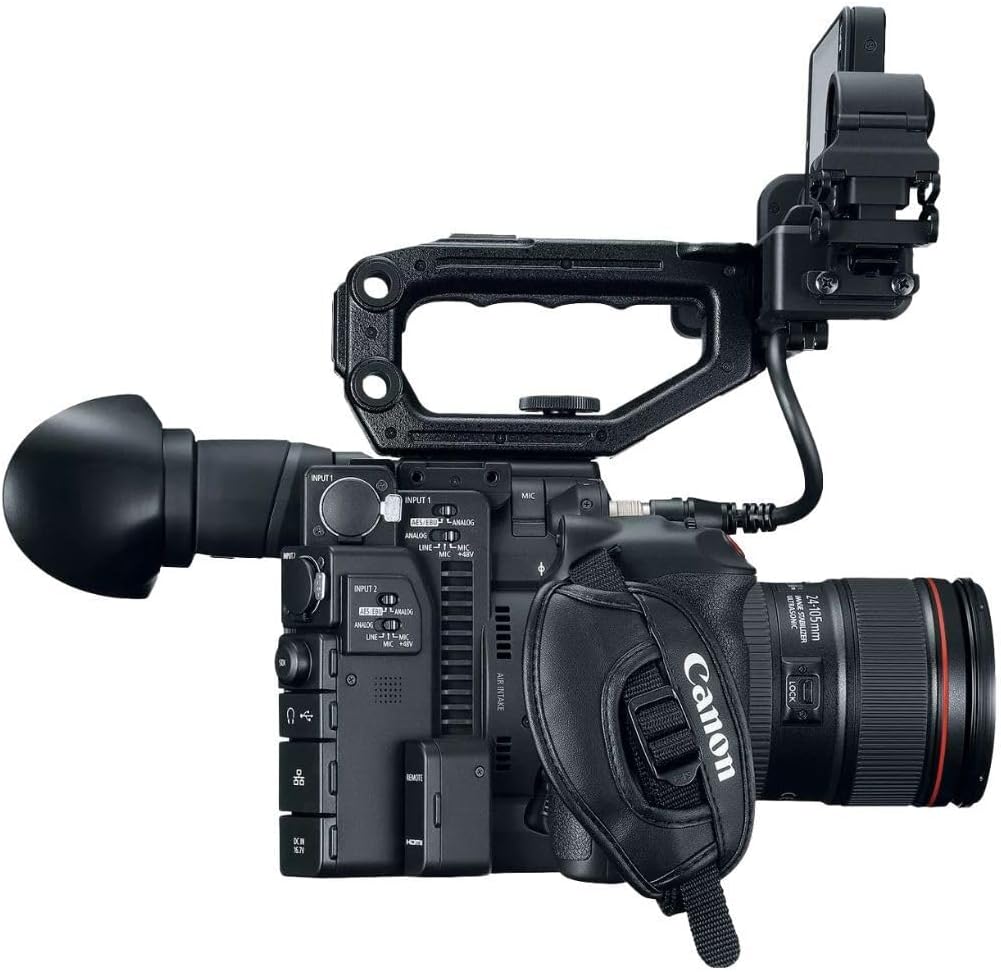
Rysunek 4.1: Strona view of the Canon EOS C200, highlighting control buttons and input/output ports.
4.3 wejście audio
The camera features two XLR audio inputs. Connect professional microphones or audio sources to these inputs. Adjust audio levels and settings via the camera's menu or dedicated audio controls.
4.4 Video Output and Control
The EOS C200 provides SDI and HDMI outputs for external monitoring. An Ethernet connector allows for remote control and network integration.

Rysunek 4.2: Tył view of the Canon EOS C200, showing the battery compartment, EVF, and LCD monitor.
5. Konserwacja
5.1 Czyszczenie
- Do czyszczenia korpusu aparatu należy używać miękkiej, niepozostawiającej włókien ściereczki.
- For the lens and sensor, use specialized cleaning kits and follow manufacturer guidelines to avoid damage.
- Keep the LCD monitor and EVF free from dust and smudges.
5.2 Przechowywanie
Store the camera in a dry, cool place, away from direct sunlight and extreme temperatures. Use a protective case when transporting the camera.
5.3 Pielęgnacja baterii
To prolong battery life, avoid fully discharging the battery frequently. Store batteries in a cool, dry place when not in use. Do not expose batteries to excessive heat.
6. Rozwiązywanie Problemów
This section addresses common issues you might encounter with your Canon EOS C200.
6.1 Recording Button/Joystick on Grip Not Responding
- Sprawdź połączenie: Ensure the camera grip is securely attached and its cable is properly connected to the camera body.
- Re-attach Grip: Disconnect and then firmly re-attach the grip. Sometimes, a simple re-connection can resolve communication issues.
- Camera Restart: Power off the camera, wait a few seconds, and then power it back on.
6.2 4K Footage File Sizes Are Too Large
- Media Capacity: 4K DCI Cinema RAW Light files are very large. Ensure you are using high-capacity C Fast cards.
- Rozwiązania magazynowe: Plan for adequate external storage (e.g., large hard drives, RAID systems) for offloading and archiving 4K footage.
- Format nagrywania: If storage is a critical concern, consider recording in 4K UHD MP4 to SD cards, which offers smaller file sizes compared to Cinema RAW Light, while still providing high quality.
6.3 Kamera się nie włącza
- Sprawdź baterię: Sprawdź, czy akumulator jest całkowicie naładowany i prawidłowo włożony.
- Zasilacz: If using AC power, verify the power adapter is securely connected to both the camera and a working power outlet.
6.4 No Image on LCD/EVF
- Sprawdź połączenia: Ensure the LCD monitor and EVF cables are securely connected to the camera.
- Ustawienia jasności: Verify that the brightness settings for the LCD/EVF are not set too low.
- Tryb wyświetlania: Check if the camera is in a mode that disables the display (e.g., external output only).
7. Specyfikacje
| Funkcja | Specyfikacja |
|---|---|
| Marka | Kanon |
| Numer modelu | #2215C002 |
| Technologia czujnika fotograficznego | CMOS |
| Rozdzielczość przechwytywania wideo | 4K |
| Maksymalna apertura | 1.2 stopnia |
| Typ pamięci flash | SD, C Fast |
| Format przechwytywania wideo | MPEG-4, Cinema RAW Light |
| Obsługiwany format audio | XLR, Dolby Digital/AC-3 |
| Rozmiar ekranu | 4 cali |
| Technologia łączności | HDMI, SDI, Ethernet |
| Rozmiar fotokomórki | Super 35 mm |
| Stabilizacja obrazu | Digital (No optical) |
| Waga przedmiotu | 6 funta (w przybliżeniu) |
| Typ fokusu | Auto Focus (Dual Pixel CMOS AF) |
| Maksymalna rozdzielczość wyświetlacza | 4K DCI |
| Kompatybilne urządzenia | Canon EF-mount lenses |
| Tryby fotografowania | Movie, Manual |
| Proporcje obrazu | 1.89:1, 16:9 |
| Ustawienia balansu bieli | Automatyczny |
| Typ kontroli ekspozycji | Podręcznik |
8. Gwarancja i wsparcie
8.1 Gwarancja producenta
The Canon EOS C200 EF Cinema Camera is covered by a manufacturer's warranty. Please refer to the warranty card included with your product for specific terms, conditions, and duration.
8.2 Obsługa klienta
For technical assistance, service, or further inquiries, please visit the official Canon support website or contact Canon customer service. Keep your product's serial number and proof of purchase readily available when seeking support.