
Wstęp
This manual provides comprehensive instructions for the Elitech BT-3 Digital Hygrometer Thermometer. This device is designed to accurately monitor both indoor and outdoor temperature, as well as indoor humidity levels, offering essential environmental data for various settings.
Cechy produktu
- Termometr cyfrowy: Monitors indoor and outdoor temperature in both Fahrenheit (℉) and Celsius (℃). The measuring range is -58℉ to +158℉.
- Humidity Monitor: Measures indoor relative humidity (RH) within a range of 20% to 99%RH.
- MAX & MIN Records: Automatically stores and displays the maximum and minimum recorded values for indoor/outdoor temperature and indoor humidity.
- Clock Function and Alarming Function: Features a switchable 12 or 24-hour clock display and a settable alarm time.
- Three Mounting Options: Designed for versatility with tabletop, wall-mountable, and magnet-mountable options, allowing convenient placement.
- Wskaźnik komfortu powietrza: Displays the comfort level (DRY/COMFORT/WET) based on current indoor humidity, providing a quick assessment of air conditions.
Układ urządzenia
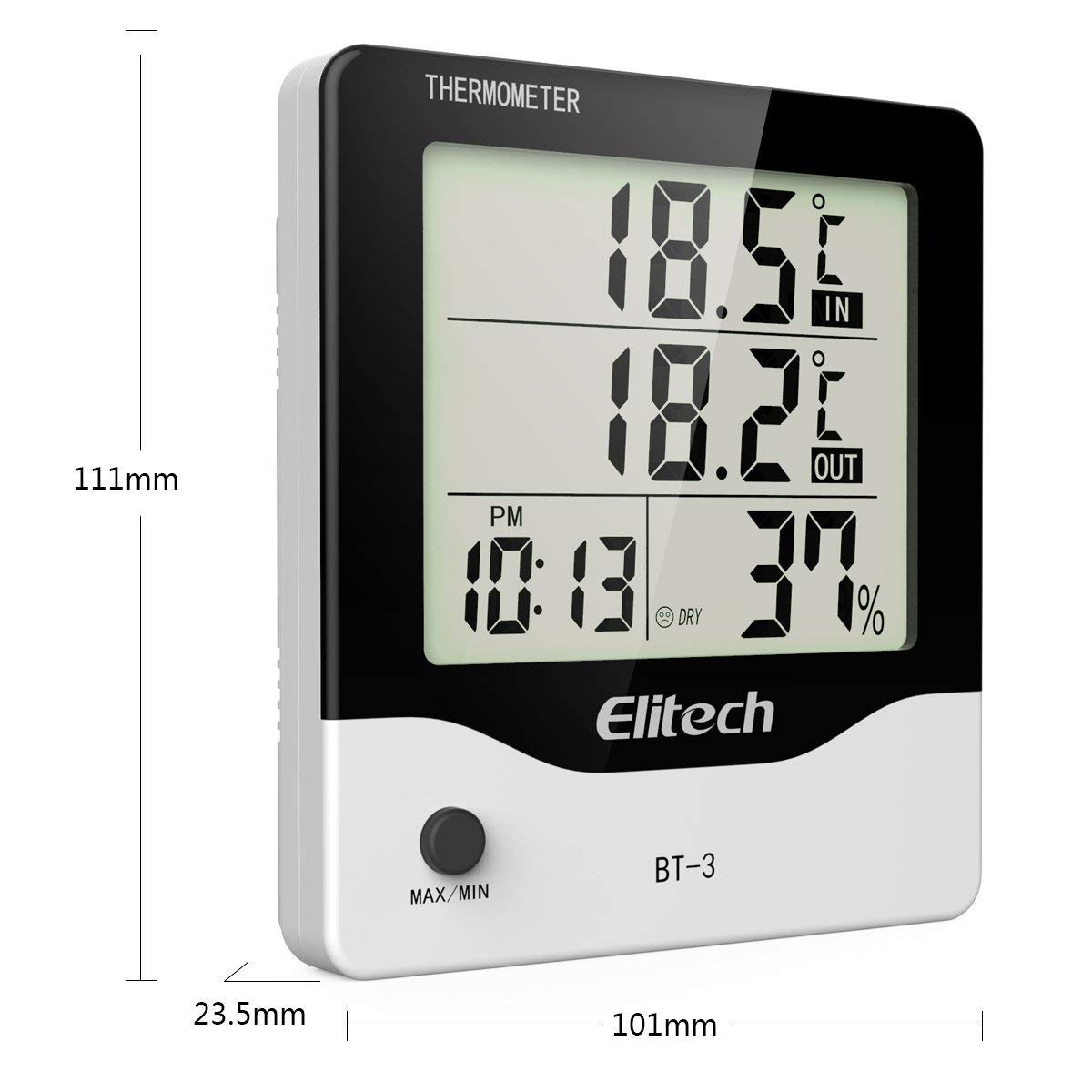
Rysunek 1: Przód view of the Elitech BT-3 unit, showing the LCD display with indoor/outdoor temperature, time, and humidity readings. Dimensions are indicated as 111mm height, 101mm width, and 23.5mm depth. A "MAX/MIN" button is visible at the bottom.

Rysunek 2: Tył view of the Elitech BT-3 unit, showing the battery compartment cover and control buttons: MODE, ADJ, CLEAR, RESET, and a ℃/℉ switch. A keyhole slot for wall mounting is also visible.

Rysunek 3: Tył view of the Elitech BT-3 unit, illustrating the foldable kickstand for tabletop use and the attached outdoor temperature probe with its long cable.

Rysunek 4: Z bliska view of the open battery compartment on the back of the Elitech BT-3 unit, showing the slot for a AAA battery (not included).
Organizować coś
Instalacja baterii
- Znajdź pokrywę komory baterii z tyłu urządzenia (patrz rysunek 2).
- Slide the cover off to open the compartment (refer to Figure 4).
- Insert one AAA battery, ensuring the correct polarity (+/-) is observed. Note: Battery is not included.
- Załóż z powrotem pokrywę komory baterii, przesuwając ją na miejsce.
Umieszczenie sondy
The outdoor temperature probe is connected to the main unit via a long cable. For accurate outdoor temperature readings, place the probe outside in a location that is protected from direct sunlight, rain, and other extreme weather conditions. Ensure the cable is routed safely and does not interfere with windows or doors.
Opcje montażu
The BT-3 offers flexible placement options:
- Blat stołu: Extend the foldable kickstand on the back of the unit (refer to Figure 3) to place it securely on any flat surface.
- Możliwość montażu na ścianie: Utilize the keyhole slot on the back of the unit (refer to Figure 2) to hang it on a screw or nail on a wall.
- Magnet-Mountable: The unit features built-in magnets, allowing it to be conveniently attached to metallic surfaces such as refrigerators or metal cabinets.
Instrukcja obsługi
Włączanie/wyłączanie zasilania
The unit powers on automatically once the battery is installed. There is no dedicated power button. To turn off, remove the battery.
Temperature Unit Selection (℃/℉)
On the back of the unit, locate the small switch labeled "℃/℉" (refer to Figure 2). Slide this switch to toggle between Celsius and Fahrenheit temperature displays.
Ustawienie czasu
- Naciśnij TRYB button (on the back) to cycle through display modes until the current time is shown.
- Naciśnij i przytrzymaj TRYB Naciskaj przycisk, aż cyfry godziny zaczną migać.
- Użyj PRZYMIOT button (on the back) to adjust the hour.
- Naciskać TRYB again to move to the minute digit, then use PRZYMIOT aby dostosować minuty.
- Kontynuuj naciskanie TRYB to set the 12-hour (AM/PM) or 24-hour format.
- Naciskać TRYB one last time to confirm settings and exit time setting mode.
Ustawianie alarmu
- Naciśnij TRYB button until the alarm time is displayed (often indicated by an alarm clock icon).
- Naciśnij i przytrzymaj TRYB button until the alarm hour digit flashes.
- Użyj PRZYMIOT przycisk, aby ustawić godzinę alarmu.
- Naciskać TRYB again to move to the alarm minute digit, then use PRZYMIOT aby dostosować minuty.
- Naciskać TRYB one last time to confirm and exit alarm setting mode.
- Aby aktywować lub dezaktywować alarm, naciśnij przycisk PRZYMIOT button when the alarm time is displayed. An alarm icon will appear or disappear on the screen to indicate its status.
Rejestry temperatury i wilgotności MAX/MIN
Naciśnij MAKS./MIN. button (on the front of the unit) to view the maximum and minimum recorded indoor/outdoor temperatures and indoor humidity values.
- Naciśnij MAKS./MIN. button repeatedly to cycle through the current readings, maximum readings, and minimum readings.
- Aby wyczyścić rekordy MAX/MIN, naciśnij i przytrzymaj JASNE button (on the back of the unit) while the MAX/MIN readings are displayed.
Wskaźnik komfortu powietrza
The display includes an indicator that categorizes the indoor air comfort level based on humidity:
- SUCHY: Indicates that the indoor humidity level is low.
- KOMFORT: Indicates that the indoor humidity level is within an optimal and comfortable range.
- MOKRY: Indicates that the indoor humidity level is high.
Konserwacja
- Czyszczenie: Clean the unit with a soft, dry cloth. Do not use abrasive cleaners, solvents, or immerse the unit in water.
- Wymiana baterii: Replace the AAA battery when the low battery indicator appears on the display to ensure continuous and accurate operation.
- Pielęgnacja sondy: Keep the outdoor probe clean and free from dirt, dust, and debris.
- Warunki środowiskowe: Avoid exposing the unit to extreme temperatures, direct sunlight, or excessively high humidity for prolonged periods, as this can affect accuracy and lifespan.
Rozwiązywanie problemów
Niedokładne odczyty
- Umiejscowienie sondy: Ensure the outdoor probe is correctly positioned and not exposed to direct sunlight, heat sources, or moisture, which can skew readings.
- Czas stabilizacji: Allow the unit sufficient time (up to 30 minutes) to stabilize and provide accurate readings after initial setup or if it has been moved to a new environment.
- Poziom naładowania baterii: Check the battery level and replace it with a fresh AAA battery if the indicator shows low power.
Wyświetlacz nie działa
- Sprawdzenie baterii: Verify that the battery is installed correctly with the proper polarity.
- Wymiana baterii: Wymień baterię na nową baterię AAA.
- Przywrócenie ustawień fabrycznych: If the display remains unresponsive, perform a factory reset by pressing the NASTAWIĆ button on the back of the unit. This may require a small pointed object like a paperclip.
Specyfikacje
| Specyfikacja | Szczegół |
|---|---|
| Numer modelu | BT-3 |
| Kolor | Biały |
| Marka | Elitarny |
| Waga przedmiotu | 0.16 kilograma (5.6 uncji) |
| Typ baterii | 1 C battery required (Alkaline) |
| Niższa ocena temperatury | 32 stopni Fahrenheita |
| Górna ocena temperatury | 122 stopni Fahrenheita |
| Typ montażu | Blat, montaż na ścianie |
| Tomtage | 1.5 wolty |
| Dokładność temperatury | 0.1℃ |
| Wymiary produktu | 4.25 x 5.82 x 1.1 cala |
Gwarancja i wsparcie
Elitech is committed to providing excellent customer service. The product comes with 24/7 US Technician Support available via email and phone.
For warranty claims, technical assistance, or any product-related inquiries, please contact Elitech customer service directly. Refer to the Elitech official webna stronie internetowej lub opakowaniu produktu, aby uzyskać najaktualniejsze dane kontaktowe.
Elitech Company Overview
Ten film przedstawia ogólny przeglądview of Elitech Technology Inc., its vision, and its range of HVAC/R tools and manufacturing capabilities. It is not specific to the BT-3 product operation but offers insight into the brand's commitment to innovation.
Wideo 1: Elitech AI HVAC/R Tools Create Green Future - An overview of Elitech's technology and manufacturing.