
ARGOM TECH A00251
Instrukcja obsługi myszy do gier bojowych ARGOM TECH
Wzór: A00251
Produkt ponadview
The ARGOM TECH Combat Gaming Mouse is designed for an enhanced gaming experience, featuring a robust structure, ergonomic design, and dynamic lighting. It offers precise control and comfort for extended use.
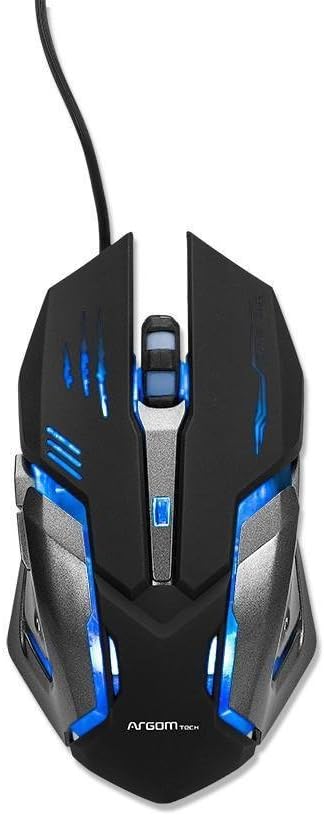
Rysunek 1: Góra view of the Combat Gaming Mouse, highlighting its illuminated design and USB connection.
Główne cechy:
- Robust structure and ergonomic design for gamers. Background rainbow changing light.
- Plug & Play compatible with most Operating Systems.
- DPI switch (1000/1200/1600/2400 DPI) for adjustable sensitivity.
- Built-in weighted Iron Plate for enhanced stability.
- 1.5m extra long and durable braided USB cable.
Przewodnik po konfiguracji
- Rozpakuj mysz: Carefully remove the Combat Gaming Mouse from its packaging.
- Połącz z komputerem: Znajdź wolny port USB w komputerze. Włóż wtyczkę USB myszy mocno do portu USB.
- Instalacja sterownika (Plug & Play): The mouse is designed for Plug & Play functionality. Your operating system (Windows, macOS, Linux, etc.) should automatically detect and install the necessary drivers. This process typically takes a few seconds.
- Sprawdź funkcjonalność: Once connected, the mouse's rainbow lights should illuminate, indicating it is powered on. Move the mouse to confirm cursor movement on your screen.
No additional software installation is required for basic functionality.
Instrukcja obsługi
Regulacja DPI:
The Combat Gaming Mouse features a dedicated DPI switch button, usually located behind the scroll wheel. Pressing this button allows you to cycle through different sensitivity settings:
- 1000 DPI (domyślna)
- 1200 DPI
- 1600 DPI
- 2400 DPI
Adjusting the DPI allows you to change the cursor speed to suit your preference for different tasks, from precise aiming in games to fast navigation on the desktop.
Efekty świetlne:
The mouse features a background rainbow changing light effect, which activates automatically upon connection. This provides an aesthetic enhancement to your gaming setup.
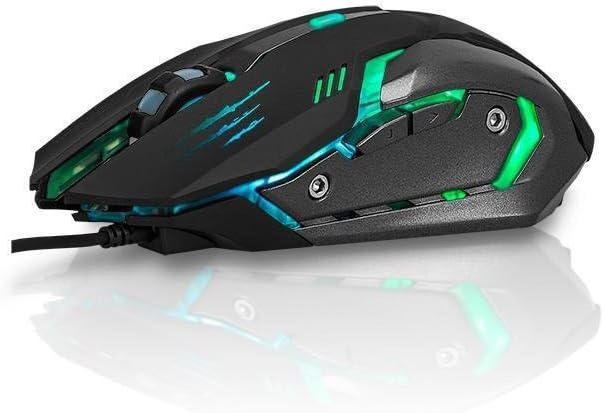
Rysunek 2: Strona view of the Combat Gaming Mouse, illustrating its ergonomic design and dynamic lighting.
Konserwacja
To ensure the longevity and optimal performance of your Combat Gaming Mouse, follow these simple maintenance guidelines:
- Czyszczenie: Do przecierania powierzchni myszy użyj miękkiej, suchej i niepozostawiającej włókien ściereczki. W przypadku uporczywych zabrudzeń delikatnie przetrzyj powierzchnię.ampNamocz ściereczkę wodą lub delikatnym środkiem czyszczącym, a następnie natychmiast wytrzyj do sucha. Unikaj stosowania silnych środków chemicznych i materiałów ściernych.
- Pielęgnacja czujnika: Keep the optical sensor on the underside of the mouse clean and free from dust or debris. A cotton swab can be used gently if needed.
- Zarządzanie kablami: Aby zapobiec uszkodzeniom kabla USB, należy unikać jego ostrego zginania i nadmiernego ciągnięcia.
- Składowanie: Jeśli mysz nie będzie używana przez dłuższy czas, należy przechowywać ją w czystym i suchym miejscu, chroniąc ją przed ekstremalnymi temperaturami.
Rozwiązywanie problemów
| Problem | Możliwa przyczyna | Rozwiązanie |
|---|---|---|
| Mysz nie reaguje / Kursor się nie porusza. |
|
|
| Światła są wyłączone. |
|
|
| Cursor movement is erratic. |
|
|
Specyfikacje
| Funkcja | Szczegół |
|---|---|
| Numer modelu | A00251 |
| Marka | ARGOM TECH |
| Technologia łączności | USB (przewodowy) |
| Technologia wykrywania ruchu | Optyczny |
| Ustawienia DPI | 1000 / 1200 / 1600 / 2400 DPI |
| Długość kabla | 1.5 metra (pleciony) |
| Kolor | Czarny |
| Wymiary produktu (dł. x szer. x wys.) | 7.48 x 2.36 x 5.51 cala |
| Waga przedmiotu | 0.011 ounces (approx. 0.34 lbs as per feature bullets) |
| Funkcja specjalna | Ergonomic Design, Built-in Weighted Iron Plate, Rainbow Changing Light |
| Zgodność | Most Operating Systems (Plug & Play) |
Gwarancja i wsparcie
Informacje o gwarancji:
Specific warranty terms and conditions for the ARGOM TECH Combat Gaming Mouse are typically provided with your purchase documentation or can be found on the official ARGOM TECH webStrona. Zachowaj dowód zakupu na wypadek roszczeń gwarancyjnych.
Obsługa klienta:
For further assistance, technical support, or inquiries regarding your ARGOM TECH Combat Gaming Mouse, please visit the official ARGOM TECH website or contact their customer service department through the channels provided on their site. Always refer to the manufacturer's official resources for the most accurate and up-to-date support information.
Oficjalne filmy produktowe
W podanych danych nie znaleziono żadnych oficjalnych filmów sprzedawcy dotyczących tego produktu.
Ask a question about this manual
Ask about setup, troubleshooting, compatibility, parts, safety, or missing instructions. Manuals+ will review the question and use this page’s manual context to help answer it.