
Wstęp
This manual provides essential instructions for the safe and effective use of your Sky Viper Drone Battery USB Charger. Please read this manual thoroughly before operating the charger to ensure proper function and longevity of your drone batteries.

Image: A set of two black USB chargers for Sky Viper drone batteries, each with a USB-A plug on one end and a small two-pin connector on the other, connected by a black cable.
Organizować coś
Follow these steps to prepare your USB charger for use:
- Rozpakować: Carefully remove the USB charger from its packaging.
- Sprawdzać: Sprawdź ładowarkę pod kątem widocznych uszkodzeń. Nie używaj jej, jeśli jest uszkodzona.
- Źródło zasilania: Connect the USB-A plug of the charger to a compatible USB power source (e.g., computer USB port, USB wall adapter, power bank). Ensure the power source provides a stable 5V output.
- Kontrolka: Once connected to a power source, the charger's indicator light (if present) may illuminate, indicating it is ready for use.
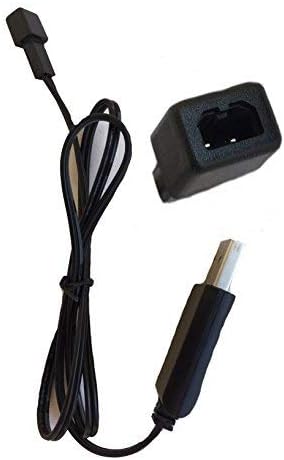
Image: A single black USB charger shown from the side, highlighting the USB-A connector and the small drone battery connector.
Video: This video demonstrates the Sky Viper USB charger, showing its components and how it can be handled. It highlights the USB-A connector and the drone battery connector.
Instrukcja obsługi
To charge your Sky Viper drone battery:
- Podłącz akumulator: Carefully align the two-pin connector of the charger with the corresponding port on your Sky Viper drone battery. Gently push to ensure a secure connection. Do not force the connection.
- Wskaźnik ładowania: The charger's indicator light will typically change color or state to indicate that charging is in progress. Refer to your specific drone battery's manual for details on its charging status indicators.
- Czas ładowania: Charging times may vary depending on the battery's capacity and its current charge level. Avoid overcharging. Disconnect the battery once fully charged.
- Odłączyć: Once charging is complete, carefully disconnect the battery from the charger, then disconnect the charger from the USB power source.
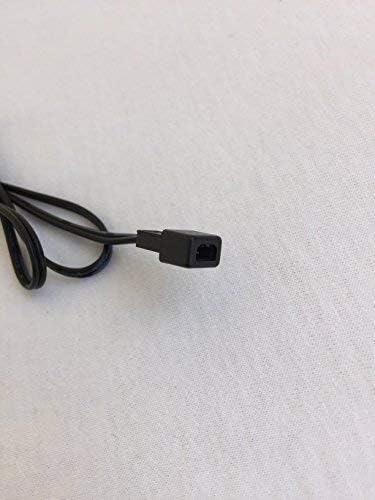
Obraz: Zbliżenie view of the small two-pin connector on the charger cable, which connects to the drone battery.

Image: The USB charger is displayed alongside a Sky Viper drone, illustrating the product's intended use and compatibility.
Konserwacja
Aby zapewnić długą żywotność i prawidłowe działanie ładowarki:
- Czyszczenie: Wipe the charger with a dry, soft cloth. Do not use liquid cleaners or solvents.
- Składowanie: Przechowuj ładowarkę w chłodnym, suchym miejscu, z dala od bezpośredniego światła słonecznego i ekstremalnych temperatur.
- Obsługiwanie: Avoid bending or twisting the cable excessively. Do not pull on the cable to disconnect it; always grasp the plug.
- Kontrola: Okresowo sprawdzaj, czy kabel i złącza nie wykazują śladów zużycia lub uszkodzeń.
Rozwiązywanie problemów
| Problem | Możliwa przyczyna | Rozwiązanie |
|---|---|---|
| Kontrolka ładowarki nie świeci. | No power from USB source, faulty USB port, or damaged charger. | Try a different USB power source or port. Ensure the USB plug is fully inserted. If the issue persists, the charger may be faulty. |
| Akumulator nie ładuje się. | Loose battery connection, incompatible battery, or battery fault. | Ensure the battery connector is securely attached to the charger. Verify the battery is compatible with this charger. Test with a different battery if available. |
| Powolne ładowanie. | Low power USB source. | Use a USB power source with higher output (e.g., a wall adapter instead of a computer port). |
Specyfikacje
- Marka: Sky Viper
- Numer modelu: 00
- Wejście Voltage: 240 wolty
- Objętość wyjściatage: 3.7 wolty
- Kolor: Czarny
- Waga przedmiotu: 0.352 uncji
- Wymiary opakowania: 3.74 x 2.28 x 0.51 cala
- Kod UPC: 798896225866
- Data pierwszej dostępności: 16 września 2017 r.
Note: The "Input Voltage: 240 Volts" specification likely refers to the AC input for a compatible wall adapter, as USB power sources typically provide 5V DC. The charger itself is designed to accept 5V DC from a USB port.
Gwarancja i wsparcie
For warranty information and customer support, please refer to the official Sky Viper website or contact the retailer where the product was purchased. Specific warranty terms and support contact details are not provided in this manual.