Wstęp
Thank you for choosing the Altec Lansing ALP-L2200PK Lightning Series Speaker. This powerful Bluetooth speaker is designed for both indoor and outdoor use, featuring a robust audio system, dynamic party lights, and a built-in media player. This manual provides essential information for setting up, operating, maintaining, and troubleshooting your speaker to ensure optimal performance and longevity.

Rycina 1: Przód view of the ALP-L2200PK speaker, showcasing the main woofer and integrated party lights.
Cechy produktu
- Ultra Portable Design: Equipped with a built-in trolley handle and wheels for easy transport.
- Wysoka moc wyjściowa: Features 2,200 watts peak power with a 15-inch high excursion woofer and a 3.5-inch horn tweeter.
- Wszechstronna łączność: Supports Bluetooth streaming with a range of up to 100 feet, USB and SD card media playback, FM radio, XLR, RCA, and AUX inputs.
- Dynamic Party Lights: User-controlled multi-color light show with 5 built-in modes to enhance your audio experience.
- Parowanie stereo: Ability to wirelessly pair with a second Lightning speaker for an immersive stereo sound experience.
- Dołączone akcesoria: Comes with a microphone and speaker stand.
Przewodnik po konfiguracji
1. Rozpakowywanie
Carefully remove the speaker and all accessories from the packaging. Retain the packaging for future transport or storage.
2. Umieszczenie fizyczne
- Place the speaker on a stable, flat surface. For optimal sound dispersion, consider using the included speaker stand.
- Aby zapobiec przegrzaniu, należy zapewnić odpowiednią wentylację wokół głośnika.
- The speaker is designed for both indoor and outdoor use, but it is not waterproof. Avoid exposure to rain or excessive moisture.
3. Podłączenie zasilania
Connect the power cable to the AC input on the rear panel of the speaker and then to a standard electrical outlet.
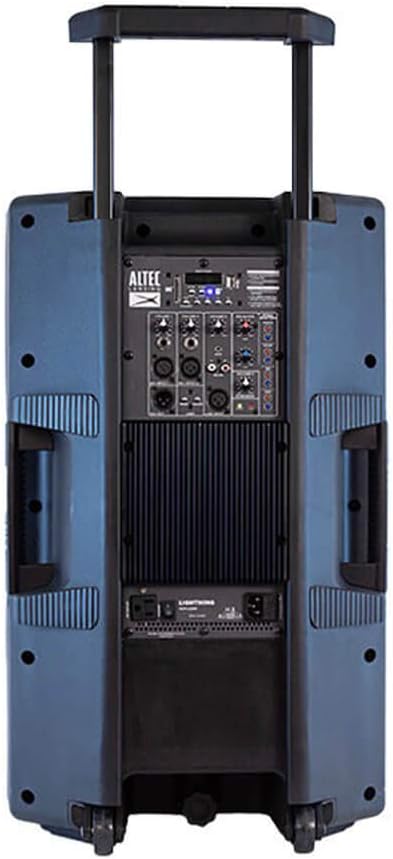
Figure 2: Rear panel of the ALP-L2200PK, illustrating the various input and output connections.
4. Pierwsze włączenie zasilania
Locate the power switch on the rear panel and turn the speaker ON. The display will illuminate, indicating the speaker is ready for operation.
Instrukcja obsługi
1. Parowanie Bluetooth
- Ensure the speaker is powered on and in Bluetooth mode (usually indicated on the display).
- Na swoim urządzeniu mobilnym (smartfonie, tablecie, laptopie) włącz Bluetooth i wyszukaj dostępne urządzenia.
- Select "ALP-L2200PK" from the list of devices. Once connected, a confirmation sound may play.
2. Media Player (USB/SD Card)
Włóż dysk USB lub kartę SD zawierającą dźwięk files into the respective slot on the control panel. The speaker will automatically detect the media and begin playback. Use the control panel buttons to navigate tracks and adjust volume.
3.Radio FM
Switch to FM radio mode using the mode button on the control panel. Use the tuning controls to scan for and select radio stations.
4. Wired Audio Inputs (XLR, RCA, AUX)
- Wejście XLR: For professional audio equipment like microphones or mixers.
- Wejście RCA: For connecting devices with RCA outputs (e.g., DVD players, older audio equipment).
- Wejście AUX: For connecting devices with a 3.5mm audio jack (e.g., smartphones, MP3 players).
Connect your audio source to the appropriate input on the rear panel. Select the corresponding input mode on the speaker's control panel.
5. Stereo Pairing (BT-LINK)
To create a wireless stereo pair with another Altec Lansing Lightning Series speaker (e.g., GSP-L2200PK), ensure both speakers are powered on and in Bluetooth mode. Follow the BT-LINK instructions provided with your second speaker to establish the connection. Once paired, audio will play in stereo across both units.
6. Party Lights Control
Use the dedicated light control buttons on the speaker's panel to cycle through the 5 built-in light modes, adjust colors, or turn the lights off. The lights can pulse with the beat of the music or maintain a steady glow.
7. Użycie mikrofonu
Connect the included microphone to the designated microphone input on the rear panel. Adjust the microphone volume using the dedicated control.
Konserwacja
- Czyszczenie: Do czyszczenia zewnętrznej części głośnika należy używać miękkiej, suchej ściereczki. Nie należy używać środków czyszczących o właściwościach ściernych, wosków ani rozpuszczalników.
- Składowanie: Jeśli głośnik nie będzie używany przez dłuższy czas, należy przechowywać go w chłodnym i suchym miejscu, z dala od bezpośredniego światła słonecznego i ekstremalnych temperatur.
- Wentylacja: Aby zapobiec przegrzaniu, należy upewnić się, że otwory wentylacyjne głośnika nie są zablokowane podczas jego działania.
- Przewód zasilający: Regularnie sprawdzaj przewód zasilający pod kątem uszkodzeń. W przypadku uszkodzenia, zaprzestań użytkowania i skontaktuj się z obsługą klienta.
Rozwiązywanie problemów
| Problem | Możliwa przyczyna | Rozwiązanie |
|---|---|---|
| Brak zasilania | Power cable not connected; Power switch off; Blown fuse; Power outlet issue. | Ensure power cable is securely connected. Turn power switch ON. Check the fuse (refer to specifications for type). Test the power outlet with another device. |
| Brak dźwięku | Volume too low; Incorrect input mode selected; Audio source issue; Damaged speaker component. | Increase master volume and input volume. Select the correct input mode (Bluetooth, AUX, USB, etc.). Verify audio source is playing. If only tweeter works and subwoofer does not, contact customer support. |
| Błąd parowania Bluetooth | Speaker not in pairing mode; Device too far; Interference; Device's Bluetooth off. | Ensure speaker is in Bluetooth pairing mode. Move device closer to speaker. Avoid strong electromagnetic interference. Turn Bluetooth on/off on your device. |
| Światła imprezowe nie działają | Lights turned off; Mode selected does not show lights. | Press the light control button to cycle through modes or turn lights on. |
| Przegrzanie głośnika | Blocked ventilation; Prolonged high volume use. | Ensure vents are clear. Reduce volume and allow speaker to cool down. If issue persists, discontinue use and contact customer support. |
Specyfikacje

Figure 3: Dimensions of the ALP-L2200PK speaker.
| Funkcja | Szczegół |
|---|---|
| Nazwa modelu | ALP-L2200PK |
| Marka | Altec Lansing |
| Typ głośnika | Woofer (15 Inches), Horn Tweeter (3.5 Inches) |
| Maksymalna moc wyjściowa | 2200 watów |
| Technologia łączności | Bluetooth, USB, SD Card, XLR, RCA, AUX |
| Zasięg Bluetooth | Do 100 stóp |
| Tryb wyjścia audio | Stereo (with BT-LINK pairing) |
| Wymiary (dł. x szer. x wys.) | 36 cm (gł.) x 43 cm (szer.) x 71 cm (wys.) (14.17 cm (gł.) x 16.93 cm (szer.) x 27.95 cm (wys.) |
| Waga przedmiotu | 20 kg (44.09 funta) |
| Tworzywo | ABS |
| Kolor | Blue (referring to woofer color) |
| Zawarte komponenty | Speaker, Microphone, Speaker Stand |
| Zalecane zastosowanie | Wewnątrz, Na zewnątrz |
| Wodoodporny | NIE |
Gwarancja i wsparcie
For detailed warranty information, please refer to the warranty card included with your product or visit the official Altec Lansing webstrona.
If you encounter any issues not covered in the troubleshooting section or require further assistance, please contact Altec Lansing customer support. Contact details can typically be found on the product packaging or the official brand webstrona.
Oficjalny Altec Lansing Webstrona: https://alteclansing.com/