
Wstęp
The Beats Studio3 Wireless headphones, featuring the Apple W1 chip, redefine your listening experience with seamless connectivity and advanced audio technology. Designed for all-day comfort and superior sound, these headphones offer Active Noise Cancelling (Pure ANC) to block external distractions, ensuring a premium audio experience. With extended battery life and Fast Fuel charging, your music is always ready when you are. Compatible with both iOS and Android devices, the Beats Studio3 provides versatile and high-performance audio.
Co jest w pudełku
- Beats Studio3 Wireless headphones
- Etui transportowe
- 3.5mm RemoteTalk cable
- Universal USB charging cable
- Szybki przewodnik
- Karta gwarancyjna

Image: Beats Studio3 Wireless Headphones, carrying case, RemoteTalk cable, and USB charging cable.
Produkt ponadview
Główne cechy
- High-performance wireless noise cancelling headphones.
- Kompatybilny z urządzeniami iOS i Android.
- Pure Adaptive Noise Cancelling (Pure ANC) actively blocks external noise.
- Real-time Audio calibration preserves a premium listening experience.
- Up to 22 hours of battery life with noise cancelling on, and up to 40 hours with noise cancelling off.
- Apple's W1 chip and Class 1 Bluetooth technology ensure extended range and fewer drop-outs.
- Fast Fuel: A 10-minute charge provides 3 hours of playback when battery is low.
- Multifunction on-ear controls and microphone for calls, music control, and Siri activation.
- Ergonomic pivoting ear cups and advanced venting for comfort.
Elementy sterujące i wskaźniki
The Beats Studio3 headphones feature intuitive on-ear controls for managing audio playback, volume, and phone calls. The main 'b' button on the ear cup allows for play/pause, track skipping, and call management. Volume controls are integrated around this button. A power button with LED indicators for battery life is located on the bottom of one ear cup.

Obraz: Bok view of the Beats Studio3 headphones, highlighting the main control button.
Organizować coś
Ładowanie słuchawek
Connect the universal USB charging cable to the Micro USB port on the headphone and to a power source. The LED fuel gauge lights will indicate the charging status. For quick power, use Fast Fuel technology: a 10-minute charge provides 3 hours of playback.
Parowanie z urządzeniami
- Włączanie: Press and hold the power button on the right ear cup for 1 second to turn on the headphones. The LED fuel gauge lights will illuminate.
- iOS Devices (Apple W1 Chip): Hold the Beats Studio3 headphones near your unlocked iOS device. Follow the on-screen prompts to connect. Once paired, the headphones will automatically connect to other Apple devices signed into your iCloud account.
- Android and Other Bluetooth Devices: Press and hold the power button for 5 seconds until the LED fuel gauge lights flash, indicating pairing mode. Go to your device's Bluetooth settings and select "Beats Studio3" from the list of available devices.

Image: Close-up of the Beats Studio3 ear cup, showing the power button and battery indicator lights.
Instrukcja obsługi
Active Noise Cancelling (Pure ANC)
Pure ANC is automatically enabled when you power on the Beats Studio3 headphones, continuously calibrating audio to block external noise. To turn Pure ANC off for low power mode (extending battery life up to 40 hours), double-press the power button. Double-press again to re-enable Pure ANC.
Odtwarzanie muzyki i głośność
- Odtwórz/Pauza: Naciśnij przycisk „b” jeden raz.
- Przejdź do przodu: Naciśnij przycisk „b” dwa razy.
- Przejdź do tyłu: Naciśnij przycisk „b” trzy razy.
- Zwiększenie głośności: Press the top part of the ring around the 'b' button.
- Ściszanie: Press the bottom part of the ring around the 'b' button.
Rozmowy telefoniczne
- Odbieranie/kończenie połączeń: Naciśnij przycisk „b” jeden raz.
- Odrzuć połączenie: Naciśnij i przytrzymaj przycisk „b” przez 2 sekundy.
- Przełączanie między połączeniami: Press the 'b' button once to switch between two active calls.
Aktywuj Asystenta głosowego (Siri/Asystent Google)
Press and hold the 'b' button for 2 seconds to activate your device's voice assistant.
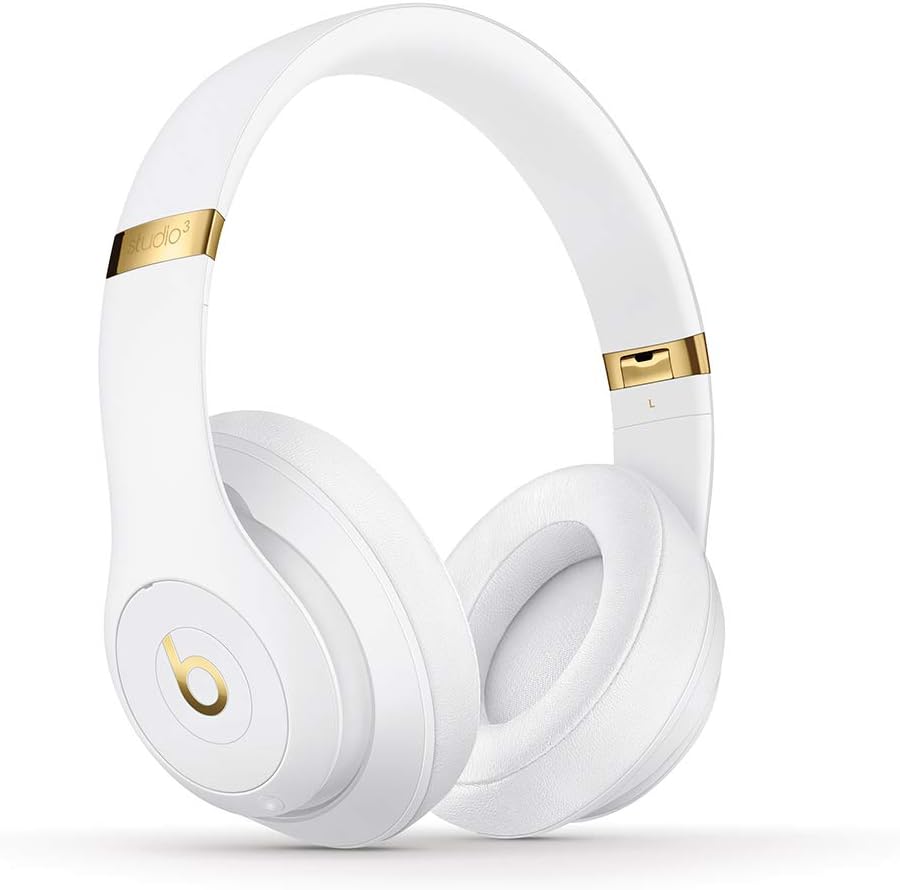
Obraz: Przód view of the Beats Studio3 Wireless Headphones.
Konserwacja
- Czyszczenie: Do czyszczenia słuchawek używaj miękkiej, suchej i niepozostawiającej włókien ściereczki. Nie używaj środków czyszczących o właściwościach ściernych ani rozpuszczalników.
- Składowanie: When not in use, store the headphones in their provided carrying case to protect them from dust and damage. The headphones fold easily for compact storage.
- Pielęgnacja baterii: Aby przedłużyć żywotność baterii, unikaj częstego całkowitego rozładowywania słuchawek. Ładuj je regularnie, nawet jeśli nie są używane regularnie.

Image: Beats Studio3 headphones folded, demonstrating their compact storage capability.
Rozwiązywanie problemów
| Problem | Możliwe rozwiązanie |
|---|---|
| Słuchawki nie włączają się. | Upewnij się, że słuchawki są naładowane. Podłącz je do źródła zasilania za pomocą kabla USB. |
| Nie można sparować z urządzeniem. | Make sure Bluetooth is enabled on your device. Place headphones in pairing mode (hold power button for 5 seconds until LEDs flash). Ensure headphones are not already connected to another device. Try restarting both devices. |
| Brak dźwięku lub słaba jakość dźwięku. | Check volume levels on both headphones and your device. Ensure headphones are properly paired. If using the RemoteTalk cable, ensure it is fully inserted into both the headphones and your device. |
| Aktywna redukcja szumów nie działa. | Ensure Pure ANC is enabled (double-press power button). Check for any obstructions around the microphones. |
Specyfikacje
- Nazwa modelu: Beats Studio3 - White (Previous Model)
- Numer modelu przedmiotu: MQ572LL/A
- Technologia łączności: Bluetooth (Class 1 Wireless)
- Kontrola hałasu: Active Noise Cancellation (Pure ANC)
- Czas pracy baterii: Up to 22 hours (with ANC), Up to 40 hours (without ANC)
- Charging Time (Fast Fuel): 10-minutowe ładowanie wystarcza na 3 godzin odtwarzania
- Gniazdo słuchawkowe: USB 2.0 (for charging), 3.5mm (for RemoteTalk cable)
- Współczynnik kształtu: Na uchu / Na uchu
- Waga przedmiotu: 9.17 uncji / 260 g
- Wymiary produktu: 6.3 x 4.7 x 8.9 cala
- Producent: Apple Computer (Direct)
- Kod UPC: 190198447128
Gwarancja i wsparcie
For detailed warranty information and customer support, please refer to the Warranty Card included in your product packaging or visit the official Beats webwitrynę. Dodatkowe informacje o produkcie i pomocy technicznej można znaleźć również na stronie Beats Store on Amazon.