
Wstęp
Dziękujemy za zakupasing the Max Power MPD125L Karaoke DJ Speaker System. This portable 12-inch speaker system is designed to deliver powerful sound and vibrant LED lighting for your entertainment needs. It features a built-in rechargeable battery, multiple connectivity options including USB, SD, AM/FM radio, and Bluetooth, along with a strong amplifier zapewniający wciągające wrażenia dźwiękowe.
Please read this manual thoroughly before operating the device to ensure proper use, optimal performance, and to prevent damage.
Informacje dotyczące bezpieczeństwa
- Aby uniknąć pożaru lub porażenia prądem, nie wystawiaj urządzenia na działanie deszczu i wilgoci.
- Nie otwierać casing. Wewnątrz nie ma żadnych części, które mogłyby być naprawiane przez użytkownika. Wszelkie prace serwisowe należy zlecać wykwalifikowanemu personelowi.
- Aby zapobiec jego upadkowi, należy ustawić urządzenie na stabilnej, płaskiej powierzchni.
- Trzymaj urządzenie z dala od bezpośredniego światła słonecznego, źródeł ciepła i nadmiernej ilości kurzu.
- Zapewnij odpowiednią wentylację. Nie blokuj otworów wentylacyjnych.
- Używaj wyłącznie zasilacza dostarczonego wraz z urządzeniem.
- Odłącz urządzenie od zasilania podczas burzy z piorunami lub gdy nie jest używane przez dłuższy czas.
- Unikaj umieszczania ciężkich przedmiotów na przewodzie zasilającym.
- Nie wkładaj żadnych przedmiotów do otworów urządzenia.
Zawartość opakowania
Sprawdź, czy wszystkie przedmioty są obecne i w dobrym stanie:
- Max Power MPD125L Karaoke DJ Speaker System
- Mikrofon bezprzewodowy
- Bezprzewodowy pilot zdalnego sterowania
- Zasilacz/kabel ładujący
- Instrukcja obsługi (ten dokument)
Cechy produktu
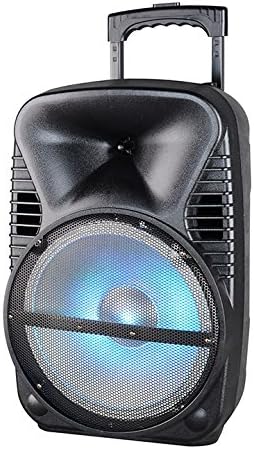
Obraz: Przód view of the Max Power MPD125L Karaoke DJ Speaker System. It is a black, portable speaker with a retractable handle on top and wheels at the bottom. The front features a large speaker grille with blue LED lights illuminating the woofer, indicating its active state.
- Przenośna konstrukcja: 12-inch speaker with built-in retractable handle and wheels for easy transport.
- Potężny dźwięk: 4000W peak power output for loud and clear sound with good bass.
- Wbudowany akumulator: Provides up to 4 hours of continuous playback. (Battery size: 12V/2.6A)
- LED Dance Lights: Integrated LED lights that flash, transforming any room into a disco club.
- Wiele opcji łączności:
- Bluetooth: Wireless streaming from compatible devices (laptops, smartphones).
- Gniazdo USB: Do odtwarzania dźwięku files z dysków USB.
- Slot SD: Do odtwarzania dźwięku filez kart SD.
- Radio AM/FM: Wbudowany tuner do odbioru audycji radiowych.
- Funkcjonalność karaoke: Includes a wireless microphone for karaoke sessions.
- Full-Function Wireless Remote Control: Do wygodnej obsługi z odległości.
- Impedancja: 4 omy.
- Pasmo przenoszenia: 40 Hz - 20 kHz.
Organizować coś
1. Ładowanie głośnika
- Locate the DC input port on the speaker (usually on the rear panel).
- Connect the supplied power adapter to the DC input port.
- Podłącz zasilacz do standardowego gniazdka elektrycznego.
- The charging indicator light (if present) will illuminate, typically red, during charging and turn green when fully charged.
- Allow approximately 4-6 hours for a full charge before first use. The speaker can be used while charging.
2. Konfiguracja mikrofonu bezprzewodowego
- Insert appropriate batteries (not included, usually AA) into the wireless microphone.
- Włącz mikrofon. Powinien automatycznie sparować się z głośnikiem.
- Adjust the microphone volume knob on the speaker's control panel to your desired level.
3. Konfiguracja pilota
- Insert appropriate batteries (not included, usually AAA) into the wireless remote control.
- Point the remote control towards the speaker's IR receiver (usually on the front panel or near the controls) to operate.
Instrukcja obsługi
1. Włączanie/wyłączanie zasilania
Locate the Power switch (usually a rocker switch) on the speaker's control panel. Flip it to the "ON" position to power on the speaker. Flip it to "OFF" to power off.
2. Wybór trybu
Press the "MODE" button on the control panel or remote control to cycle through available input modes: Bluetooth, USB, SD, FM Radio, AM Radio, AUX (if available).
3. Parowanie Bluetooth
- Turn on the speaker and select Bluetooth mode. The speaker will typically announce "Bluetooth Mode" or display "BT" and enter pairing mode (indicated by a flashing Bluetooth indicator).
- Włącz Bluetooth na swoim smartfonie, tablecie lub laptopie i wyszukaj nowe urządzenia.
- Select "MPD125L" (or similar name) from the list of available devices.
- Once paired, the speaker will confirm with an audible tone or a solid Bluetooth indicator light. You can now play audio wirelessly.
4. Odtwarzanie z USB/SD
- Insert a USB flash drive or SD card (pre-loaded with MP3 or compatible audio files) do odpowiedniego gniazda.
- The speaker should automatically switch to USB/SD mode and begin playing the first track. If not, press the "MODE" button to select USB or SD mode.
- Use the Play/Pause, Next Track, and Previous Track buttons on the control panel or remote to navigate.
5. Obsługa radia AM/FM
- Select FM or AM radio mode using the "MODE" button.
- Press and hold the Play/Pause button (often labeled "SCAN") to automatically scan and save available radio stations.
- Use the Next Track and Previous Track buttons to switch between saved stations.
- Extend the telescopic antenna (if present) for better reception.
6. Funkcja karaoke
Ensure the wireless microphone is powered on and paired. Play your desired music through any input mode (Bluetooth, USB, etc.). Speak or sing into the microphone. Adjust the microphone volume and echo effects (if available) using the dedicated knobs on the control panel.
7. LED Dance Lights
The LED lights typically activate automatically when the speaker is powered on. There may be a dedicated button (e.g., "LIGHT" or "LED") on the control panel or remote to toggle them on/off or change patterns.
8. Regulacja głośności
Adjust the master volume using the main volume knob on the speaker's control panel or the volume buttons on the remote control.
Konserwacja
- Czyszczenie: Use a soft, dry cloth to wipe the exterior of the speaker. Do not use liquid cleaners or abrasive chemicals.
- Składowanie: Jeśli głośnik nie będzie używany przez dłuższy czas, należy przechowywać go w chłodnym i suchym miejscu, z dala od bezpośredniego światła słonecznego i ekstremalnych temperatur.
- Pielęgnacja baterii: To prolong battery life, avoid fully discharging the battery frequently. Recharge the battery at least once every 3 months if not in regular use.
- Wentylacja: Ensure the speaker's ventilation openings are clear of dust and debris to prevent overheating.
Rozwiązywanie problemów
| Problem | Możliwa przyczyna | Rozwiązanie |
|---|---|---|
| Głośnik nie włącza się. | Bateria jest rozładowana. Kabel zasilający nie jest prawidłowo podłączony. | Connect the speaker to a power outlet and allow it to charge. Ensure the power cable is securely plugged into both the speaker and the outlet. |
| Brak dźwięku z głośnika. | Głośność jest zbyt niska. Wybrano niewłaściwy tryb wprowadzania. Device not properly connected (Bluetooth/USB/SD). | Zwiększ głośność główną. Press the "MODE" button to select the correct input. Re-pair Bluetooth device, re-insert USB/SD, or check AUX cable connection. |
| Urządzenie Bluetooth nie chce się sparować. | Głośnik nie jest w trybie parowania. Urządzenie znajduje się zbyt daleko od głośnika. Bluetooth w urządzeniu jest wyłączony. | Ensure speaker is in Bluetooth mode and indicator is flashing. Zbliż urządzenie do głośnika (na odległość nie większą niż 10 metrów). Włącz Bluetooth w swoim urządzeniu. |
| Mikrofon nie działa. | Microphone is off or batteries are dead. Głośność mikrofonu jest zbyt niska. | Turn on the microphone and replace batteries if necessary. Increase the microphone volume knob on the speaker. |
| Odbiór radia jest słaby. | Słaby sygnał. Antena nie jest wysunięta. | Przenieś głośnik w miejsce, gdzie sygnał jest lepszy. Całkowicie wysuń antenę teleskopową. |
Specyfikacje
| Numer modelu | MPD125L |
| Marka | Maksymalna moc |
| Maksymalna moc wyjściowa | 4000 watów |
| Impedancja | 4 omy |
| Odpowiedź częstotliwościowa | 40 Hz - 20 kHz |
| Rozmiar baterii | 12V / 2.6A |
| Żywotność baterii | Do 4 godzin |
| Wymiary produktu (dł. x szer. x wys.) | 33.02 x 38.1 x 58.42 cm (13 x 15 x 23 cala) |
| Waga produktu | 15.88 kg (35 funta) |
| Kompatybilne urządzenia | Laptopa, smartfona |
| Typ złącza | USB |
| UPC | 703510623201 |
Gwarancja i wsparcie
Aby uzyskać informacje o gwarancji i pomocy technicznej, zapoznaj się z dokumentacją dołączoną do produktu lub skontaktuj się ze sprzedawcą. Zachowaj dowód zakupu na wypadek roszczeń gwarancyjnych.
For further assistance or inquiries, please visit the official MAX POWER webstronie lub skontaktuj się z działem obsługi klienta.