
Sky-Watcher S30200
Sky-Watcher AZ-EQ5 Telescope Mount User Manual
Kompleksowy przewodnik po konfiguracji, obsłudze i konserwacji
1. Wprowadzenie
The Sky-Watcher AZ-EQ5 is a highly versatile and innovative telescope mount designed for both visual observation and astrophotography. This hybrid mount offers the flexibility to operate in Alt-Azimuth (Alt-Az), Equatorial (EQ), or dual-Optical Tube Assembly (OTA) modes, making it suitable for a wide range of astronomical pursuits. This manual provides detailed instructions for the proper setup, operation, and maintenance of your AZ-EQ5 mount to ensure optimal performance and longevity.
2. Koniec produktuview
The AZ-EQ5 mount incorporates advanced features to enhance your observing and imaging experience:
- Dual-Encoder Motor System (Freedom-Find™): This patented system allows for manual movement of the mount without losing alignment, providing unparalleled flexibility during observation.
- SynScan™ Hand Controller: A user-friendly interface with a database of over 42,000 celestial objects, enabling automatic GoTo slewing and precise tracking. It also supports computer control via a USB connection.
- Belt-Driven Stepper Motors: Ensures whisper-quiet operation, minimal backlash, smoother tracking, and reduced periodic error, which is crucial for long-exposure astrophotography.
- Built-in PEC Training: For astrophotographers, the SynScan hand controller includes a feature to train out periodic error, leading to more accurate guiding and pinpoint stars in images.
- DSLR Interface (SNAP Port): Equipped with a DSLR interface and an intervalometer timer, allowing for automated camera control and exposure sequencing for astrophotography. It can control two cameras simultaneously.
- Pier Extension: A sturdy pier extension elevates the mount head, providing ample clearance for the counterweight bar and enabling polar alignment at virtually any latitude.
- Ładowność: Designed to handle a payload capacity of up to 30 pounds, accommodating a wide range of optical tubes.

Figure 2.1: The Sky-Watcher AZ-EQ5 mount with its SynScan hand controller, highlighting the integrated control system.

Figure 2.2: Detail of the belt-driven stepper motors on the AZ-EQ5, illustrating the design for quiet and precise operation.

Figure 2.3: The dual SNAP ports for connecting DSLR cameras, enabling automated astrophotography.
3. Co znajduje się w pudełku
Your Sky-Watcher AZ-EQ5 mount is shipped in two separate boxes. Please verify that all components are present upon receipt:
- Zawartość pudełka 1:
- Zamontuj głowę
- SynScan hand controller
- Kabel kontrolera
- Update cable
- Kabel zasilający
- Two Canon EOS trigger cables (Nikon and Sony cables available separately)
- Secondary saddle plate
- Instrukcja obsługi
- Counterweight bar extension
- Zawartość pudełka 2:
- Pier tripod
- Two 7.5lb counterweights
- A polar finderscope is also included to assist with setup.
4. Konfiguracja
Follow these steps to assemble and prepare your AZ-EQ5 mount for use:
- Montaż statywu:
Unfold the pier tripod legs and secure them. Ensure the tripod is placed on a stable, level surface. The pier extension provides necessary clearance for polar alignment.
- Mocowanie głowicy:
Carefully attach the mount head to the pier tripod. Secure it firmly using the provided locking mechanisms.
- Montaż przeciwwagi:
Slide the counterweights onto the counterweight shaft. If needed, use the counterweight bar extension. Position the counterweights to balance your optical tube assembly (OTA).

Figure 4.1: The retractable counterweight shaft for convenient storage and transport.
- Optical Tube Assembly (OTA) Mounting:
Attach your telescope's optical tube to the mount's saddle plate. Ensure it is securely fastened. If using dual-OTA mode, attach the second OTA to the secondary saddle plate.

Figure 4.2: The AZ-EQ5 mount supporting a telescope, demonstrating its payload capacity.
- Hand Controller Connection:
Connect the SynScan hand controller to the mount using the provided cable. Ensure a secure connection.
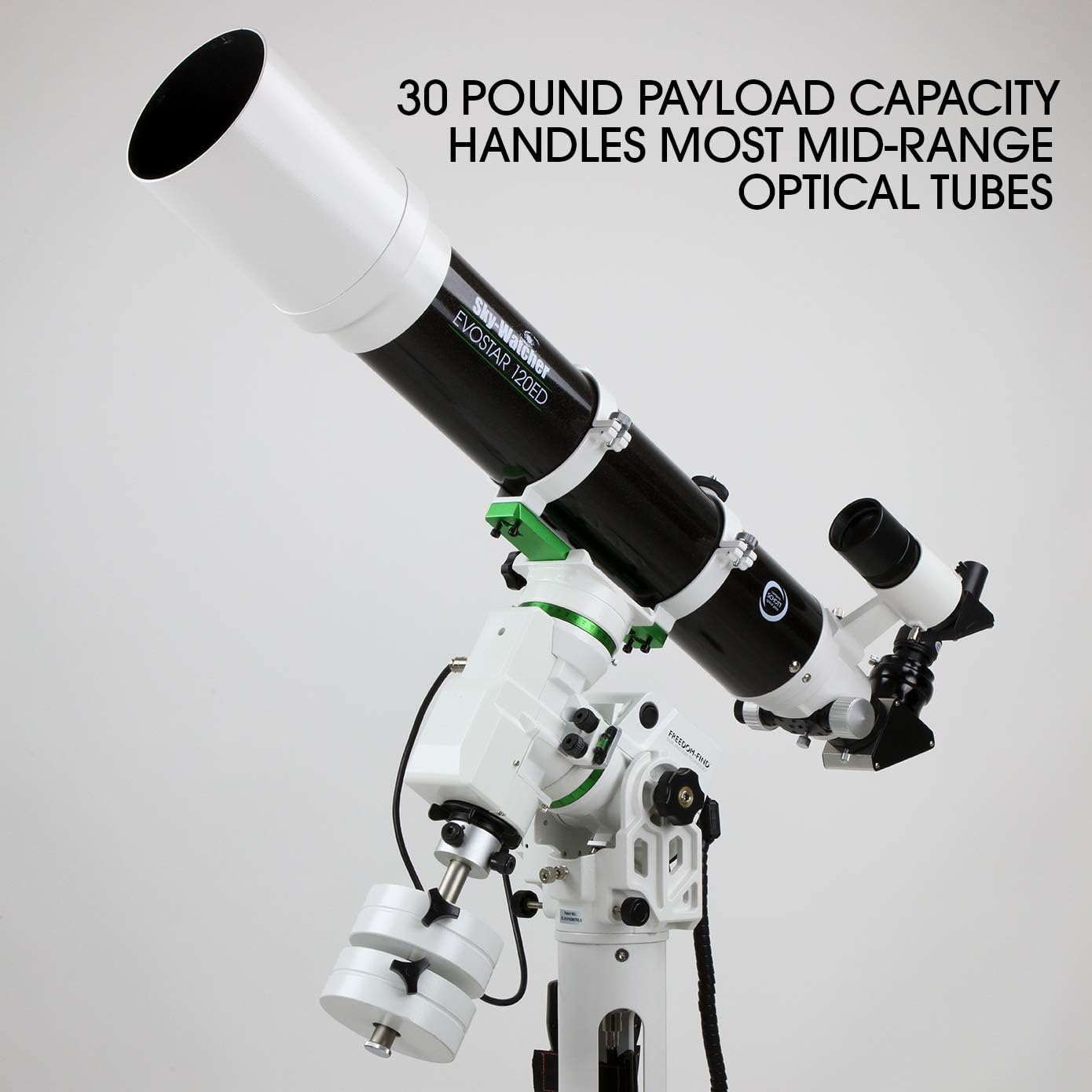
Figure 4.3: The SynScan hand controller, featuring a 2-line LCD display and red backlit illuminated keypad for night use.
- Podłączenie zasilania:
Connect the power cable to the mount and a suitable 12V power source.
- Wyrównanie biegunowe:
For accurate tracking in Equatorial mode, perform polar alignment using the included polar finderscope. The pier extension facilitates alignment at various latitudes. For Alt-Az mode, precise leveling is important.
- DSLR Camera Connection (Optional):
If using a DSLR for astrophotography, connect it to the mount's SNAP port using the appropriate trigger cable. The mount supports two cameras simultaneously.
5. Instrukcja obsługi
Operating the Sky-Watcher AZ-EQ5 mount is intuitive with the SynScan hand controller.
5.1. SynScan Hand Controller Operation
- Włączanie: Turn on the mount. The hand controller will display the initial setup menu.
- Date, Time, and Location: Enter the correct date, time, and your geographical coordinates. This information is crucial for accurate GoTo functionality.
- Alignment Procedure: Select your desired alignment method (e.g., 1-star, 2-star, 3-star alignment for EQ mode, or Brightest Star/Two-Star Alignment for Alt-Az mode). Follow the on-screen prompts to center the alignment stars.
- Object Selection and GoTo: Navigate through the extensive 42,000+ object database using the arrow keys. Once an object is selected, press ENTER to initiate the GoTo function. The mount will automatically slew to the target.
- Śledzenie: After a successful GoTo, the mount will automatically begin tracking the object to keep it centered in your eyepiece or camera field of view.
- Freedom-Find™ Manual Movement: You can manually move the telescope by hand without losing the mount's alignment. The dual encoders will keep track of the mount's position. After manual movement, the mount will resume tracking.
5.2. Astrophotography Features
- PEC Training: To minimize periodic error for long-exposure astrophotography, access the PEC training function in the SynScan menu. Follow the instructions to record and apply the PEC correction.
- DSLR Camera Control: Use the SNAP port and the SynScan hand controller's built-in intervalometer to program exposure length, number of exposures, and delay times. The controller can trigger your DSLR camera automatically. Up to 8 different exposure combinations can be set.
5.3. Sterowanie komputerowe
The AZ-EQ5 mount features a built-in USB port for computer control. This allows you to control the mount using popular astronomy software such as SkyX, Stellarium, and Starry Nights. You may need to install appropriate ASCOM drivers and specific software versions (e.g., Stellarium Qt5 for ASCOM compatibility).
6. Konserwacja
Proper maintenance ensures the longevity and optimal performance of your Sky-Watcher AZ-EQ5 mount.
- Czyszczenie: Keep the mount clean and free from dust and debris. Use a soft, dry cloth for cleaning. Avoid using harsh chemicals or abrasive materials.
- Składowanie: When not in use, store the mount in a dry, dust-free environment. It is recommended to disassemble the mount into its main components for long-term storage or transport.
- Zarządzanie kablami: Aby zapobiec uszkodzeniom, należy zadbać o to, aby wszystkie kable były starannie poprowadzone i nie były naprężone.
- Aktualizacje oprogramowania układowego: Okresowo sprawdzaj Sky-Watcher website for firmware updates for your SynScan hand controller. Updates can improve performance and add new features. The mount has a built-in USB port for firmware updates.
- Mechanical Checks: Occasionally inspect all mechanical connections and fasteners to ensure they are secure. While the mount is designed for smooth operation, if you experience any unusual stiffness or binding in the axes, it is advisable to consult the manufacturer's support.
7. Rozwiązywanie Problemów
This section addresses common issues you might encounter with your AZ-EQ5 mount.
- Mount Not Responding / Motors Not Moving:
- Ensure all power and control cables are securely connected.
- Verify the power supply is providing the correct voltage (12V) and sufficient current.
- Check the hand controller display for any error messages.
- Inaccurate GoTo / Tracking Issues:
- Confirm that the correct date, time, and location (latitude/longitude) are entered into the hand controller.
- Re-perform the alignment procedure with care, ensuring alignment stars are accurately centered.
- For Equatorial mode, verify precise polar alignment using the polar finderscope.
- For Alt-Az mode, ensure the tripod and mount head are perfectly level. The mount's built-in bubble level should be cross-referenced with an external level for maximum accuracy.
- Ensure the mount is properly balanced with your optical tube assembly and counterweights.
- Computer Control Disconnects / Software Issues:
- Ensure the correct ASCOM drivers for Sky-Watcher mounts are installed on your computer.
- Verify that your astronomy software is compatible and correctly configured to communicate with the mount (e.g., using the appropriate COM port).
- Some software, like Stellarium, may require specific versions (e.g., Qt5) for ASCOM compatibility.
- Check the USB connection cable for damage or loose connections.
- Mechanical Stiffness / Jerky Movement:
- While the belt-driven system minimizes backlash, if you experience persistent stiffness or jerky motion, ensure no components are overtightened.
- If the issue persists, it is recommended to contact Sky-Watcher customer support for further assistance.
If you encounter issues not covered here or require further assistance, please contact Sky-Watcher customer support.
8. Specyfikacje
Key specifications for the Sky-Watcher AZ-EQ5 mount (Model S30200):

Figure 8.1: Visual representation of the Sky-Watcher AZ-EQ5 mount specifications.
| Funkcja | Szczegół |
|---|---|
| Typ mocowania | Alt-AZ/EQ Hybrid |
| GoTo Capability | Tak |
| Ładowność | 30 funtów (13.6 kg) |
| Mount Height (Min) | 41 cali |
| Mount Height (Max) | 48.7 cali |
| Waga głowicy montażowej | 16.9 funtów (7.7 kg) |
| Waga statywu | 13.4 funtów (6.1 kg) |
| Fully Assembled Weight (w/ weights) | 43.8 funtów (19.9 kg) |
| Średnica nogi statywu | 1.75 cali |
| Mounting Saddle Type | Vixen (V) |
| Typ zasilania | 12 V |
| Sprzęgło | Poślizg |
| Zakres polarny | Optional (Included) |
| Latitude Range (degrees) | 0-90 |
| Baza danych obiektów | 42,900+ |
| Kontroler | Hand Controller (SynScan) |
| Wi-Fi | Optional WiFi dongle |
| Polar Align Assist | Tak |
| Auto Guide | Tak |
| Permanent Periodic Correction (PEC) | Tak |
| Pointing Accuracy (RMS) | 5 arc minutes |
| Podwójne enkodery | Yes (Freedom-Find™) |
| DSLR Interface | Yes (Dual SNAP ports) |
| Included Weights | Two 7.5lb counterweights |
| Typ silnika | Krokowy |
| Układ napędowy | Pasek |
| Wymiary produktu | 18 x 18 x 13 cala |
| Waga przedmiotu | 33 funta |
| ASIN | B0758MXFZ8 |
| Numer modelu przedmiotu | S30200 |
| Data pierwszej dostępności | 22 września 2017 r. |
| Producent | Obserwator nieba |
| Kolor | Biały |
| Współczynnik kształtu | Statyw |
| Kompatybilne urządzenia | DSLR Cameras, Telescopes, Optical Tube Assemblies |
| Typ montażu | Blat stołu |
9. Gwarancja i wsparcie
The Sky-Watcher AZ-EQ5 mount is manufactured by Sky-Watcher. For specific warranty information, please refer to the warranty card included with your product or visit the official Sky-Watcher webstrona.
For technical support, service, or inquiries regarding parts and accessories, please contact Sky-Watcher customer service. Ensure you have your model number (S30200) and purchase details available when contacting support.
Regular firmware updates are released to enhance performance and add features. These can be downloaded from the Sky-Watcher website and installed via the mount's USB port.