
DoHonest S36
Instrukcja obsługi systemu cyfrowej kamery cofania DoHonest HD 1080P S36
Model: S36
1. Wprowadzenie
This manual provides detailed instructions for the installation, operation, and maintenance of your DoHonest HD 1080P Digital Wireless Backup Camera System S36. This system is designed to enhance visibility and safety for various vehicles, including trucks, cars, campers, trailers, and RVs, offering both continuous monitoring and reverse assistance.
The system features a 1080P HD camera and a 5-inch TFT monitor, utilizing a digital wireless signal for reliable transmission up to 320 feet. Please read this manual thoroughly before installation and use to ensure proper function and longevity of the product.

Image: DoHonest HD 1080P Digital Wireless Backup Camera System S36, showing the 5-inch monitor displaying a truck towing a trailer, and the camera unit.
2. Zawartość opakowania
Sprawdź, czy w przesyłce znajdują się wszystkie elementy wymienione poniżej:
- 5-inch TFT Monitor
- Jednostka kamery
- Monitor Sunshade
- Mocowanie do przedniej szyby
- Mocowanie za pomocą uchwytu U
- Antennas (for monitor and camera)
- Zasilacz do zapalniczki
- Power Cord for Camera
- Installation Kits (screws, cable ties, etc.)

Image: Visual representation of the package contents, including the monitor, sunshade, camera, mounts, antennas, power adapters, and installation hardware.
3. Konfiguracja i instalacja
3.1 Instalacja kamery
The camera can be installed using two primary methods:
- Ogólna instalacja: Connect the camera's power wire to your vehicle's reverse light, running light, or tail light. Ensure the ground wire is securely connected to the vehicle's chassis. This method provides power to the camera when the selected light is active.
- Furrion Pre-wired System: If your RV or trailer is pre-wired for a Furrion camera, use the included Furrion adapter plate and pigtail wire for a direct plug-and-play installation.

Image: Illustration of camera installation methods, including general wiring to vehicle lights and specific steps for Furrion pre-wired systems.

Image: A recreational vehicle with the DoHonest camera system, highlighting its compatibility with existing Furrion pre-wired setups.
3.2 Instalacja monitora
The monitor can be mounted on your dashboard or windshield using the provided mounts. Choose a location that offers clear visibility without obstructing your view drogi.
- Attach the chosen mount (windshield suction cup or U-bracket for dashboard) to the monitor.
- Secure the monitor in your desired location.
- Connect the monitor to your vehicle's 12V power outlet using the cigarette lighter power adapter.

Image: A visual guide demonstrating the three-step installation process: installing the camera, installing the monitor, and turning on the monitor.
3.3 Pierwsze uruchomienie i parowanie
Once both the camera and monitor are powered, the system should automatically pair and display the camera feed. If no image appears, ensure all connections are secure and both units are powered. The digital wireless connection is designed for automatic pairing.
4. Instrukcja obsługi
4.1 Elementy sterujące monitora
The monitor features several buttons for system control:
- OK: Potwierdza wybory w menu.
- CH (kanał): Switches between multiple camera views if additional cameras are connected.
- MENU: Accesses the system settings, including image adjustments, recording options, and guide line settings.
- MOC: Włącza lub wyłącza monitor.

Image: The DoHonest S36 monitor displaying its touch-sensitive control buttons and highlighting features like dual antennas, wide view, and image flip.
4.2 Multiple Camera Support
The system supports up to four cameras, allowing for various viewkonfiguracje:
- Pełny ekran: Wyświetla pojedynczą kamerę view.
- Podzielony ekran: Displays two camera views jednocześnie.
- Quad Screen: Displays four camera views jednocześnie.
- H-Screen: A specific split-screen layout.
Additional cameras (license plate, side, or RV cameras) are sold separately.

Image: An illustration demonstrating the monitor's capability to display multiple camera feeds in full, split, quad, or H-screen modes, with optional camera types shown.

Image: An RV equipped with multiple cameras (rear, side, front, hitch) demonstrating the system's expandability.
4.3 Guide Lines
The monitor allows you to customize parking guide lines for precise maneuvering:
- Włącz/Wyłącz: Enable or disable the guide lines through the menu.
- Dostosuj szerokość: Zmień poziome rozmieszczenie linii pomocniczych.
- Dostosuj wysokość: Change the vertical position of the guide lines.
- Przesuń w lewo/prawo: Shift the entire guide line display horizontally.

Image: The monitor screen showing how to adjust the width, height, and position of the parking guide lines.

Image: A sequence of monitor displays illustrating the process of turning guide lines on/off and adjusting their width, left/right position, and up/down position.
4.4 Nagrywanie i odtwarzanie wideo
The monitor supports video recording to an SD card (up to 128GB, not included) and local playback. This feature allows you to record your journeys or specific events for later review.

Image: The monitor screen showing video playback, with a horse trailer in the background, indicating the recording feature's utility.
4.5 Image Adjustment and Flip
Adjust the monitor's brightness and contrast settings via the menu to optimize image clarity for different lighting conditions. The system also offers image flip options:
- Normalna
- Lustro
- Inverted Front Image
- Inverted Mirror Image

Image: A grid showing the four image display options: Normal, Mirror, Inverted Front Image, and Inverted Mirror Image, demonstrating how the camera feed can be adjusted.
5. Konserwacja
5.1 Czyszczenie
To maintain optimal performance and image clarity:
- Gently wipe the monitor screen and camera lens with a soft, lint-free, damp płótno.
- Avoid using abrasive cleaners, solvents, or harsh chemicals, as these can damage the surfaces.
- Ensure the camera lens is free from dirt, mud, or water droplets before use.
5.2 Odporność na warunki atmosferyczne i trwałość
The DoHonest S36 camera is designed for durability and performance in various environmental conditions:
- Stopień wodoodporności IP69: The camera is sealed to withstand high-pressure water jets and immersion, making it suitable for all weather conditions.
- Odporność na temperaturę: The system is built with metal materials that provide resistance to extreme temperatures, operating effectively from -22°F to 149°F (-30°C to 65°C).
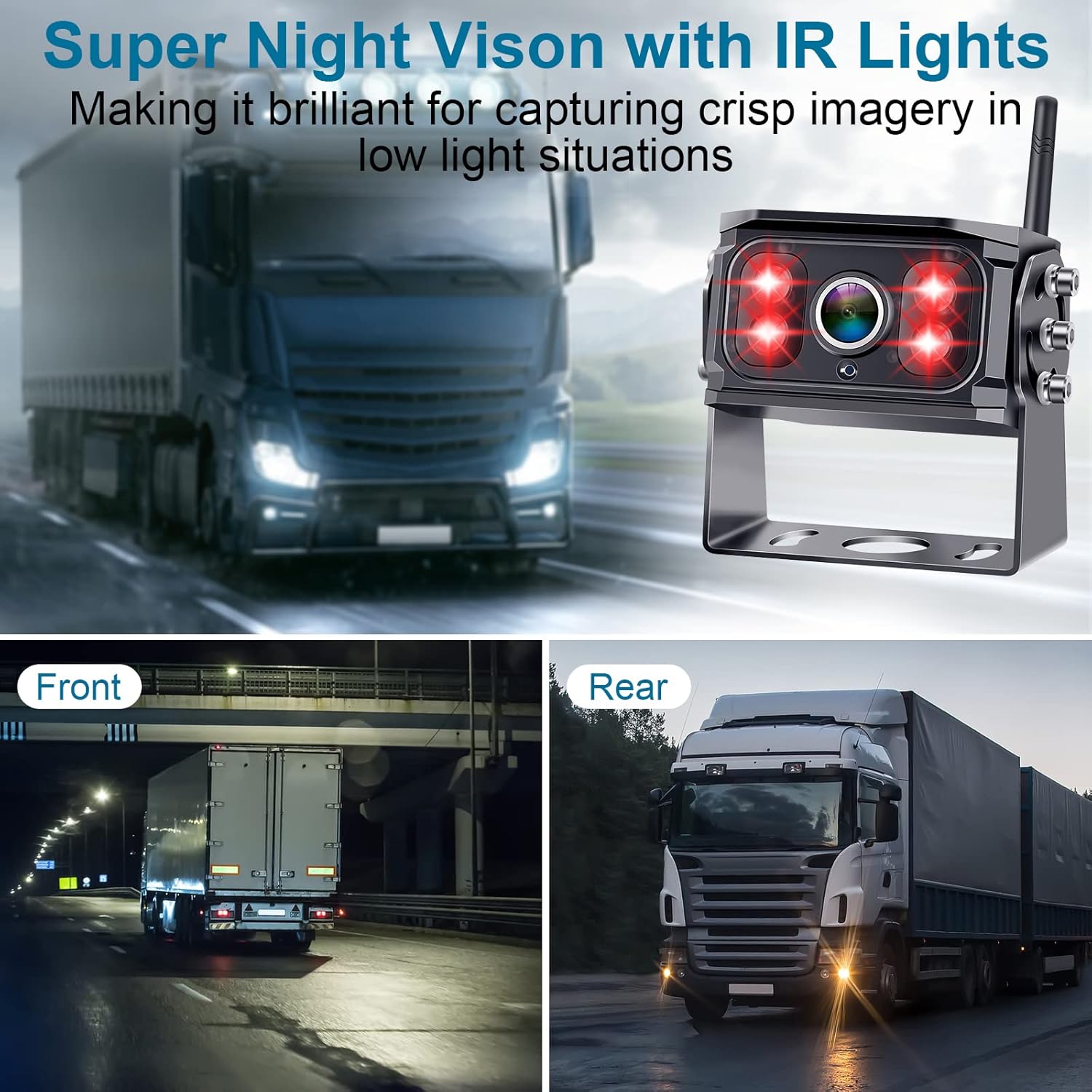
Image: The camera unit highlighting its infrared (IR) lights for enhanced night vision, showing clear imagery in low-light conditions.

Image: The camera system depicted in various weather scenarios (rain, snow, hot sun), illustrating its IP69 waterproof rating and temperature resistance.
6. Rozwiązywanie Problemów
If you encounter issues with your DoHonest S36 system, refer to the following common problems and solutions:
| Problem | Możliwa przyczyna | Rozwiązanie |
|---|---|---|
| Brak sygnału / Czarny ekran | Loose power connection, camera not powered, signal interference, out of range. | Check all power connections for both monitor and camera. Ensure camera is receiving power. Verify antennas are securely attached. Reduce distance between camera and monitor. Avoid large metal obstructions. |
| Unclear or distorted image | Dirty camera lens, incorrect monitor settings, signal interference. | Clean the camera lens. Adjust monitor brightness and contrast settings. Check for sources of electromagnetic interference. |
| Guide lines not appearing or incorrect | Guide lines disabled in settings, incorrect adjustment. | Access the monitor menu to enable guide lines. Adjust their width, height, and position as needed. |
| Problemy z nagrywaniem | SD card not inserted, full, or corrupted. | Ensure SD card is correctly inserted. Format the SD card (this will erase all data). Replace with a new SD card if corrupted. |
Jeśli po wypróbowaniu tych rozwiązań problem nadal występuje, skontaktuj się z obsługą klienta, aby uzyskać dalszą pomoc.
7. Specyfikacje
| Funkcja | Szczegół |
|---|---|
| Numer modelu | S36 |
| Marka | Uczciwy |
| Rozmiar ekranu | 5 cali |
| Rezolucja | Rozdzielczość 1080P HD |
| Technologia czujnika optycznego | CMOS |
| Rozmiar czujnika optycznego | 1/3 cala |
| Typ soczewki | Szeroki kąt |
| Kąt rzeczywisty View | 150 stopni |
| Typ złącza | Bezprzewodowy |
| Typ instalacji | Montaż na desce rozdzielczej, montaż powierzchniowy |
| Tomtage | 12 V, 35 V |
| Stopień wodoodporności | IP69 |
| Temperatura pracy | -22°F do 149°F (-30°C do 65°C) |
| Maksymalna obsługa kart SD | 128 GB |
| Waga przedmiotu | 1.98 funta |
| Wymiary opakowania | 12.2 x 6.18 x 3.23 cala |
8. Gwarancja i wsparcie
8.1 Informacje o gwarancji
The DoHonest HD 1080P Digital Wireless Backup Camera System S36 comes with a 3-letnia gwarancja. This warranty covers manufacturing defects and ensures the product meets its specified performance standards under normal use. Please retain your proof of purchase for warranty claims.
Image: The DoHonest monitor displaying a '3 Year Warranty' badge, indicating the product's coverage.
8.2 Obsługa klienta
For technical assistance, troubleshooting beyond this manual, or warranty claims, please refer to the contact information provided with your product packaging or visit the official DoHonest website. Our customer support team is available to help you with any questions or concerns.
Ask a question about this manual
Ask about setup, troubleshooting, compatibility, parts, safety, or missing instructions. Manuals+ will review the question and use this page’s manual context to help answer it.