
1. Wprowadzenie
The Pryme SPM-2083 is a 2-wire surveillance earpiece designed for discreet and dependable communication with Motorola TRBO and APX Series radios. This kit provides a low-profile solution for users requiring clear audio reception and transmission while maintaining a covert appearance. It features an acoustic tube earphone, a slim-line microphone, and a belt-mounted Push-to-Talk (PTT) junction box.
Zawartość pudełka:
- SPM-2083 2-Wire Earpiece Assembly
- Akustyczna słuchawka douszna
- Hand-held Microphone/PTT Unit
- Belt-Clip PTT/Junction Box
2. Funkcje produktu
- 2-Wire Surveillance Kit: Designed for covert communication.
- Acoustic Tube Earphone: Provides clear receive audio and is easily concealable.
- Hand-held Microphone/PTT: Integrated microphone and Push-to-Talk button for convenient communication.
- Belt-Clip PTT/Junction Box: Allows for discreet PTT activation and cable management.
- TWIST CONNECT Acoustic Tube: Enables easy replacement and hygiene for multiple users.
- Trwała konstrukcja: Features heavy-duty microphone cable with a strong polyurethane jacket and reinforced strain relief.
- High-Impact Housings: Microphone and junction box housings are made of high-impact polycarbonate for extended field life.
- Concealable Design: Can be worn discreetly under clothing.
3. Zgodność
The Pryme SPM-2083 earpiece is compatible with various Motorola TRBO and APX Series radios. Refer to the detailed compatibility chart below to ensure your radio model is supported.

Image 1: Compatibility chart detailing Motorola radio models (e.g., APX1000, XPR6300) and their corresponding connector types (e.g., X83 (M11), Multi-Pin). This chart helps users identify if their radio is compatible with the SPM-2083 earpiece.
Compatible Motorola Radio Models include:
- APX Series: APX1000, APX4000, APX6000, APX7000
- XPR Series: XPR6100, XPR6300, XPR6350, XPR6500, XPR6550, XPR6580, XPR7550, XPR7580
- DP Series: DP3400
- And other models as listed in the compatibility chart.
4. Konfiguracja i instalacja
- Połącz się z radiem: Locate the accessory port on your compatible Motorola radio. Align the earpiece connector with the radio's port and firmly insert it until it clicks into place.
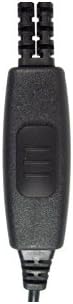
Image 2: The multi-pin connector of the SPM-2083, designed to securely attach to Motorola TRBO and APX series radios.
- Attach Acoustic Tube: If not already attached, gently twist the acoustic tube assembly onto the earphone transducer until secure. Ensure a snug fit for optimal audio.
- Pozycja słuchawki: Place the acoustic tube earphone into your ear. Adjust for comfort and clear audio.
- Ukryte okablowanie: Route the earpiece wires discreetly under your clothing. The slim design allows the microphone cable to be dropped down a shirt sleeve or clipped to a lapel.
- Secure Microphone/PTT: Position the hand-held microphone/PTT unit where it is easily accessible for speaking and transmitting. It can be clipped to a collar or lapel.
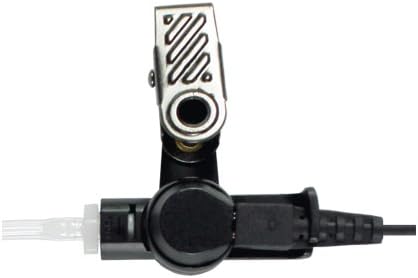
Image 3: The microphone and PTT unit, featuring a robust clip for secure placement on clothing.
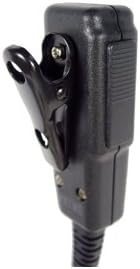
Obraz 4: Profesjonalizm bocznyfile of the microphone and PTT unit, showing its ergonomic shape and clip for discreet wear.
- Attach Belt-Clip PTT/Junction Box: Clip the belt-mounted PTT junction box to your belt or another convenient location. This unit provides an additional PTT button for covert communication.

Image 5: The belt-clip PTT junction box, which allows for discreet PTT activation and cable management.
5. Instrukcja obsługi
- Odbieranie dźwięku: Ensure the earpiece is properly seated in your ear. Audio from the radio will be transmitted directly through the acoustic tube.
- Transmitting (Push-to-Talk):
- To speak, press and hold either the PTT button on the hand-held microphone unit or the PTT button on the belt-clip junction box.
- Mów wyraźnie do mikrofonu.
- Po zakończeniu mówienia zwolnij przycisk PTT, aby powrócić do trybu odbioru.
- Regulacja głośności: Adjust the volume directly on your Motorola radio. The earpiece does not have independent volume control.
6. Konserwacja
- Czyszczenie tuby akustycznej: Regularly clean the acoustic tube with a mild disinfectant wipe. For thorough cleaning or if the tube becomes discolored, it can be detached and replaced.
- Replacing Acoustic Tube: The TWIST CONNECT design allows for easy removal and replacement of the acoustic tube assembly. Twist the tube counter-clockwise to remove and clockwise to attach a new one.
- Opieka ogólna: Avoid exposing the earpiece to extreme temperatures, moisture, or harsh chemicals. Store in a clean, dry place when not in use.
- Kontrola kabla: Periodically inspect the cable for any signs of wear, cuts, or damage.
7. Rozwiązywanie Problemów
| Problem | Możliwa przyczyna | Rozwiązanie |
|---|---|---|
| Brak dźwięku w słuchawce |
|
|
| Mikrofon nie nadaje |
|
|
| Słaba jakość dźwięku |
|
|
8. Specyfikacje
- Model: SPM-2083
- Typ: 2-Wire Surveillance Kit
- Typ słuchawek: Rurka akustyczna
- Typ mikrofonu: Slim-line, integrated with PTT
- PTT: Dual PTT (Hand-held and Belt-Clip Junction Box)
- Materiał kabla: Heavy-duty polyurethane jacket
- Materiał obudowy: Poliwęglan wysokoudarowy
- Zgodność: Motorola TRBO & APX Series Radios (refer to compatibility chart)
9. Gwarancja i wsparcie
For warranty information, technical support, or to inquire about replacement parts, please contact PRYME customer service directly. Refer to the product packaging or the PRYME official webna naszej stronie znajdziesz najnowsze dane kontaktowe.
Note: This manual provides general instructions. Specific radio models may have unique settings or features. Always refer to your radio's user manual for detailed operation.