
Wstęp
The TKSTAR TK915 is a versatile and robust GPS tracker designed for real-time location tracking of vehicles and for personal security. It features a strong magnetic base for easy attachment, a waterproof design for durability, and a long-lasting battery for extended standby time. This manual provides detailed instructions for setting up, operating, maintaining, and troubleshooting your TK915 GPS tracker.
Produkt ponadview
Zawartość opakowania
- 1 x TKSTAR GPS Tracker TK915
- 1 x kabel ładujący USB
- 1 x Torba do przechowywania
- 1 x Instrukcja obsługi
Komponenty urządzenia

This image illustrates the key components of the TKSTAR TK915 GPS Tracker, including the strong magnetic base, silicone plug covering ports, USB charging port, SIM card slot, indicator light, and the induction sensor for anti-removal detection.
Główne cechy
- Śledzenie w czasie rzeczywistym: Utilizes GPS/AGPS dual-mode positioning for accuracy up to 5 meters.
- Długi czas gotowości: Up to 120 days standby with a 10000 mAh lithium battery.
- Mocowanie magnetyczne: Strong magnets allow for easy, no-installation mounting on any iron surface.
- Wodoodporna konstrukcja: Unique waterproof construction ensures functionality in various weather conditions.
- Alarm geo-ogrodzenia: Set predefined safe zones and receive alerts when the device enters or exits these areas.
- Alarm przekroczenia prędkości: Receive notifications if the tracked vehicle exceeds a preset speed limit.
- Alarm niskiego poboru mocy: Alerts when the battery level drops below 20%, prompting timely recharging.
- Alarm czujnika wibracji: Sends an SMS alert if the vehicle or luggage is illegally moved.
- Anti-removal Alarm: Notifies you if the tracker is removed from its attached surface.
- Odtwarzanie trasy historycznej: Review past travel routes of the device at any time.
Wymiary

This image displays the TKSTAR TK915 GPS Tracker, highlighting its compact dimensions of 112mm length, 78mm width, and 28mm thickness.
Organizować coś
1. Instalacja karty SIM
- Sprawdź, czy urządzenie jest wyłączone.
- Carefully open the silicone plug covering the SIM card slot.
- Wstaw 2G GSM SIM card (850/900/1800/1900 MHz) into the slot. The SIM card is not included and must be purchased separately. Note: 3G and 4G SIM cards are not supported.
- Close the silicone plug securely to maintain waterproofing.
2. Ładowanie początkowe
- Connect the provided USB cable to the tracker's USB port and a 5V-1A wall charger (input 110-220V).
- Charge the device fully before first use. The indicator light will show charging status.
3. Włączanie/wyłączanie zasilania
- To power on, press and hold the power button until the indicator lights activate.
- Aby wyłączyć urządzenie, naciśnij i przytrzymaj przycisk zasilania, aż kontrolki zgasną.
4. APN Setup for Online Tracking
To enable online tracking via the web platform or mobile application, GPRS must be enabled on the SIM card and the Access Point Name (APN) must be configured. Refer to your SIM card provider for the correct APN settings. Instructions for setting the APN are typically found in the full user manual or provided by the TKSTAR support platform.
Instrukcja obsługi
1. Śledzenie w czasie rzeczywistym
- Śledzenie SMS-ów: To get the device's location, call the SIM card number inserted in the tracker or send an SMS message to it. The device will reply with an SMS containing a Google Maps link showing its current position.
- Online Platform/App Tracking: After setting up the APN, log in to the TKSTAR web platform or mobile application using your device ID and password to view lokalizacja w czasie rzeczywistym, historyczne trasy i zarządzanie ustawieniami.
2. Geo-fence Setting

This image depicts the Geo-fence feature, showing a map with a defined safe zone. The TKSTAR TK915 can alert the user if the tracked vehicle enters or exits this designated geographical area.
The Geo-fence feature allows you to define a virtual boundary. If the tracker moves into or out of this boundary, an alarm will be triggered. This setting is typically configured through the online tracking platform or mobile application.
3. Alarm przekroczenia prędkości
This image illustrates the overspeed alarm function. A smartphone displays 'speed alarm' messages, indicating that the TKSTAR TK915 has detected the tracked vehicle exceeding a preset speed limit.
You can set a maximum speed limit for the tracker. If the device exceeds this speed, it will send an alarm notification (e.g., SMS or app notification) to the designated administrator number. This alarm typically functions only in continuous positioning mode.
4. Alarm niskiej mocy
When the battery power of the TK915 drops below 20%, the device will send a low power alarm notification, reminding you to recharge the battery promptly.
5. Vibration Sensor Alarm
If the device detects significant vibration, indicating potential unauthorized movement of the vehicle or asset it is attached to, it will send an SMS alert to your phone.
6. Anti-removal Alarm

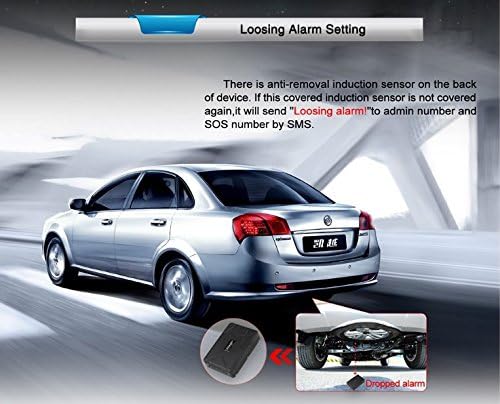
This image demonstrates the anti-removal alarm feature of the TKSTAR TK915. The tracker, shown magnetically attached underneath a car, will send an SMS alert if its induction sensor is uncovered, indicating unauthorized removal.
The TK915 is equipped with an induction sensor. If the device is removed from its magnetic attachment point, it will send an alert (e.g., "Loosing alarm") to the administrator number and any configured SOS numbers via SMS.
7. Odtwarzanie trasy historycznej
Access the online tracking platform or mobile application to review the historical routes taken by the TK915 tracker over a specified period.
Konserwacja
Ładowanie
To ensure optimal performance and battery life, charge the TK915 using the provided USB cable and a compatible 5V-1A charger. Recharge the device when the low power alarm is triggered.
Czyszczenie
Wipe the device with a soft, dry cloth. Avoid using harsh chemicals or abrasive cleaners. Ensure the silicone plug for the SIM card and USB port is always securely closed to maintain its waterproof integrity.

This image highlights the waterproof design of the TKSTAR TK915 GPS Tracker, showing water splashing around the device, suitable for outdoor use.
Rozwiązywanie problemów
- Urządzenie się nie włącza: Upewnij się, że bateria jest naładowana. Podłącz ją do źródła zasilania i spróbuj ponownie.
- Brak sygnału GPS: Upewnij się, że urządzenie znajduje się w otwartej przestrzeni z czystym view nieba. Sygnały GPS mogą być zakłócane przez budynki, tunele lub gęstą roślinność.
- No SMS reply: Check if the SIM card has sufficient credit and is active. Verify that the SIM card is a 2G GSM card and correctly inserted.
- Online tracking not working: Confirm that GPRS is enabled on the SIM card and the APN settings are correctly configured. Check your internet connection.
- Czas pracy baterii krótszy niż oczekiwano: Ensure the device is fully charged. Frequent tracking updates or poor network signal can consume more power.
Bardziej szczegółowe instrukcje rozwiązywania problemów znajdziesz w szczegółowej instrukcji obsługi dołączonej do produktu lub skontaktuj się z działem obsługi klienta.
Dane techniczne
| Numer modelu | TK915 |
| Wymiary | 10 x 9 x 2 cm (około 112 mm x 78 mm x 28 mm) |
| Masa netto | 300 gramów |
| Kolor | Czarny |
| Sieć | GSM / GPRS (2G, 850/900/1800/1900 MHz) |
| Dokładność GPS | 5 metrów |
| Wejście ładowarki ściennej | 110-220 V |
| Wyjście ładowarki ściennej | 5 V-1 A |
| Bateria | Rechargeable 3.7 V 10000 mAh Lithium battery |
| Czas czuwania | Do 120 dni |
| Cechy specjalne | Waterproof, Strong Magnet, Anti-removal Alarm |
Informacje dotyczące bezpieczeństwa
- Nie należy podejmować prób demontażu ani modyfikacji urządzenia. Może to spowodować unieważnienie gwarancji i uszkodzenie.
- Use only the specified charger and accessories.
- Trzymaj urządzenie z dala od ekstremalnych temperatur, bezpośredniego światła słonecznego i otwartego ognia.
- Ensure the SIM card slot is properly sealed to maintain waterproofing.
- Dispose of the device and battery according to local regulations.
Gwarancja i wsparcie
For any questions, technical assistance, or warranty inquiries, please refer to the contact information provided with your purchase or reach out to TKSTAR customer support. If you need assistance, please write to us.