
MIFA A1-BK
Instrukcja obsługi przenośnego głośnika Bluetooth MIFA A1
Model: A1-BK
Wstęp
Welcome to the MIFA A1 Portable Bluetooth Speaker user manual. This guide provides detailed instructions for setting up, operating, maintaining, and troubleshooting your new speaker. The MIFA A1 is designed for portability and durability, featuring IP56 dustproof and water-resistant capabilities, a 12-hour playtime, and enhanced sound.

The MIFA A1 Portable Bluetooth Speaker.
Zawartość opakowania
Proszę sprawdzić, czy w paczce znajdują się następujące elementy:
- 1 × A1 Bluetooth Speaker
- 1 × kabel Micro USB
- 1 × 3.5 mm Audio Cable
- 1 × odpinany pasek
- 1 × Instrukcja obsługi

The MIFA A1 package contents.
Produkt ponadview
Komponenty i elementy sterujące głośników
Familiarize yourself with the speaker's layout and functions:
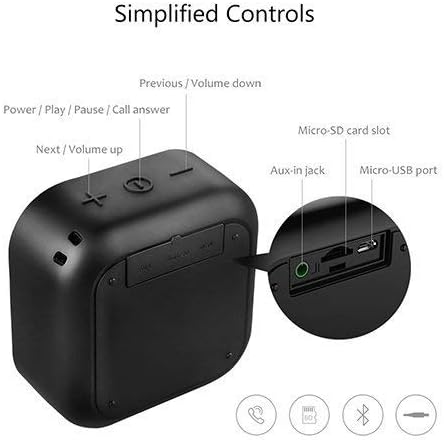
Nadview of MIFA A1 controls and ports.
- Power / Play / Pause / Call Answer Button: Steruje zasilaniem, odtwarzaniem muzyki i zarządzaniem połączeniami.
- Next / Volume Up Button (+): Zwiększa głośność i przechodzi do następnego utworu.
- Previous / Volume Down Button (-): Decreases volume and goes to the previous track.
- Gniazdo karty Micro-SD: For playing music directly from a Micro-SD card.
- Gniazdo wejściowe AUX: Do przewodowego połączenia audio przy użyciu kabla audio 3.5 mm.
- Port micro-USB: Do ładowania głośnika.
Główne cechy
- Superior Loud Sound: 5W driver & Class-G double charge pump audio power amplifier delivers high-quality DSP 3D stereo sound & enhanced bass; supports TWS, allowing you to enjoy true wireless stereo (right + left channels) by connecting two A1 speakers.
- IP56 Dust-Proof & Water-Resistant: Features woven fabric housing; great looking while shock-resistant; allows outlasting all of your adventures.
- Długa żywotność baterii: Built-in 1200 mAh rechargeable lithium polymer battery plays up to 12 hours at 70% volume on a full charge; recharge in just 3 hours with the included Micro USB cable.
- Technologia Bluetooth 4.2: Easy to pair with any Bluetooth-enabled device; auto-reconnects to the last-used device within up to 33 feet; 3.5mm AUX and Micro-SD capability offers more audio options; built-in microphone for hands-free calls.
- Superprzenośny: Mini size for take-anywhere convenience; slips into a bag or a coat pocket easily; offers a strap to hang from a backpack; 3.3 × 1.8 × 3.4 in; 6.2 oz.
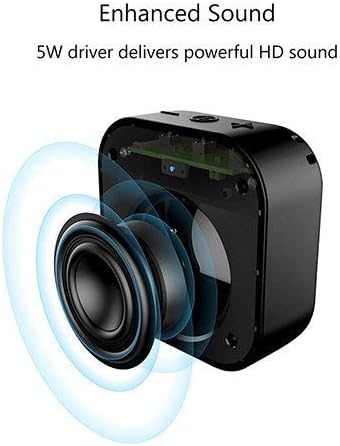
The 5W driver delivers powerful HD sound.
Organizować coś
Ładowanie głośnika
The MIFA A1 speaker comes with a built-in 1200 mAh rechargeable lithium polymer battery.
- Connect the Micro USB cable to the speaker's Micro-USB port and the other end to a USB power adapter (not included) or a computer's USB port.
- Zaświeci się kontrolka ładowania.
- Pełne naładowanie trwa około 3 godzin.
- Once fully charged, the speaker provides up to 12 hours of playtime at 70% volume.

Enjoy up to 12 hours of playtime.
Włączanie/wyłączanie
- Aby włączyć urządzenie, naciśnij i przytrzymaj przycisk zasilania, aż usłyszysz sygnał dźwiękowy.
- Aby wyłączyć głośnik, naciśnij i przytrzymaj przycisk zasilania, aż głośnik się wyłączy.
Działanie
Parowanie Bluetooth
- Sprawdź, czy głośnik jest włączony i czy znajduje się w trybie parowania Bluetooth (co sygnalizuje migająca dioda LED).
- Na swoim urządzeniu (smartfonie, tablecie, laptopie) włącz Bluetooth i wyszukaj dostępne urządzenia.
- Wybierz „MIFA A1” z listy urządzeń.
- Po sparowaniu głośnik wyda dźwięk potwierdzający, a wskaźnik LED zacznie świecić światłem ciągłym.
- The speaker will automatically reconnect to the last-used device within a range of up to 33 feet (10 meters).
Odtwarzanie dźwięku
Tryb Bluetooth
Po pomyślnym sparowaniu dźwięk z podłączonego urządzenia będzie odtwarzany przez głośnik.
- Press the Power button to Play/Pause music.
- Press the '+' button to increase volume. Press and hold '+' to skip to the next track.
- Press the '-' button to decrease volume. Press and hold '-' to go to the previous track.
Tryb wejścia AUX
Use the included 3.5mm audio cable to connect the speaker to any device with a 3.5mm audio output. The speaker will automatically switch to AUX mode.
Micro-SD Card Playback
Insert a Micro-SD card (up to 32GB, not included) loaded with audio files into the Micro-SD card slot. The speaker will automatically begin playing music from the card.
Rozmowy bez użycia rąk
Po połączeniu przez Bluetooth wbudowany mikrofon umożliwia prowadzenie rozmów telefonicznych w trybie głośnomówiącym.
- Press the Power button to answer an incoming call.
- Press the Power button again to end a call.
- Naciśnij i przytrzymaj przycisk zasilania, aby odrzucić połączenie przychodzące.
True Wireless Stereo (TWS) Pairing (for two A1 speakers)
If you have two MIFA A1 speakers, you can pair them together for a true wireless stereo experience (left and right channels).
- Upewnij się, że oba głośniki są wyłączone.
- Włącz oba głośniki.
- On one speaker (this will be the master), double-press the Power button. It will search for the other speaker.
- Once connected, both speakers will provide an audible confirmation, and the master speaker's LED will flash slowly, while the slave speaker's LED will be solid.
- Połącz swoje urządzenie przez Bluetooth z głośnikiem głównym.
- Dźwięk będzie teraz odtwarzany w stereo przez oba głośniki.
Konserwacja
Czyszczenie
Do czyszczenia głośnika należy używać miękkiej,amp płótno. Nie używaj ostrych środków chemicznych ani ściernych środków czyszczących.
Odporność na wodę i kurz (IP56)
The MIFA A1 is IP56 rated, meaning it is protected against dust ingress and powerful water jets.
While it can withstand splashes and rain, it is nie designed to be submerged in water. Ensure all port covers are securely closed before exposing the speaker to water or dust.
This video demonstrates the MIFA A1's robust IP56 rating, showcasing its ability to withstand exposure to wet mud and water jets without affecting performance. It highlights the speaker's durability for outdoor and adventurous use.

The MIFA A1 speaker is built with an IP56 dust-proof and water-resistant fabric and TPU housing.
Rozwiązywanie problemów
Typowe problemy i rozwiązania
| Problem | Rozwiązanie |
|---|---|
| Głośnik się nie włącza | Upewnij się, że bateria jest naładowana. Podłącz ją do źródła zasilania za pomocą kabla micro USB. |
| Nie można sparować przez Bluetooth | Ensure the speaker is in pairing mode. Check if Bluetooth is enabled on your device. Move the speaker closer to your device. Disconnect from other Bluetooth devices. |
| Brak dźwięku | Check volume levels on both the speaker and your connected device. Ensure the correct input mode (Bluetooth, AUX, Micro-SD) is selected. |
| Słaba jakość dźwięku / Zniekształcenia | Move the speaker closer to your device to improve Bluetooth signal. Reduce volume if distortion occurs at maximum levels. Ensure the speaker is on a stable surface. |
| Parowanie TWS nie powiodło się | Ensure both speakers are MIFA A1 models. Power off both speakers and try the TWS pairing process again. |
Specyfikacje
Szczegóły techniczne
| Funkcja | Szczegół |
|---|---|
| Nazwa modelu | A1 |
| Maksymalna moc wyjściowa głośnika | 5 watów |
| Technologia łączności | Bluetooth 4.2 |
| Technologia komunikacji bezprzewodowej | Bluetooth |
| Zasięg Bluetooth | 10 metrów (33 stopy) |
| Żywotność baterii | 12 godzin (przy 70% głośności) |
| Pojemność baterii | 1200 mAh |
| Czas ładowania | 3 godzin |
| Poziom wodoodporności | IP56 (Dustproof & Water-Resistant) |
| Wymiary produktu | 3.4" gł. x 3.3" szer. x 1.8" wys. |
| Waga przedmiotu | 6.2 uncji (175 grama) |
| Tworzywo | Plastic, Metal, Fabric |
| Zawarte komponenty | 1 × A1 Bluetooth Speaker, 1 × Micro USB Cable, 1 × 3.5 mm Audio Cable, 1 × Detachable Strap, 1 × User Manual |
Gwarancja i wsparcie
Informacje o gwarancji
Please refer to the warranty card included with your purchase for detailed warranty terms and conditions.
Obsługa klienta
For further assistance or support, please visit the official MIFA website or contact MIFA customer service.
You can also refer to the official user manual PDF for more details: Pobierz instrukcję obsługi (PDF)
Ask a question about this manual
Ask about setup, troubleshooting, compatibility, parts, safety, or missing instructions. Manuals+ will review the question and use this page’s manual context to help answer it.