
1. Wprowadzenie
This manual provides comprehensive instructions for the installation, operation, maintenance, and troubleshooting of your JideTech HD 1080P PTZ Outdoor POE Security IP Dome Camera, model Hi2162-PTZ3X. This camera is designed for outdoor surveillance, offering 1080p video resolution, 4X optical zoom, and Pan/Tilt/Zoom capabilities. Please read this manual thoroughly before using the product to ensure proper setup and functionality.
2. Co znajduje się w pudełku
Sprawdź, czy w opakowaniu znajdują się wszystkie komponenty:
- 1 x JideTech HD 1080P PTZ Outdoor POE Security IP Dome Camera
- 1 x Screw Pack for mounting
- 1 x Power Supply (12V)
- 1 x Cat5 Cable
- 1 x Instrukcja obsługi

Figure 2.1: Contents of the JideTech PTZ Dome Camera package.
3. Główne cechy
- 2.5" Metal Pan-Tilt-Zoom IP Camera: Offers a Pan Range of 0°~355° (120°/s speed) and Tilt Range of 0°~90° (45°/s speed). Features 128 presets for customized viewkąty.
- 4-krotny zoom optyczny: Remotely control 4x optical zoom from PC or phone for detailed surveillance.
- HD 1080p Video Resolution: Captures video at 1920(H)×1080(V) at 15 frames per second with a 2.8-12mm lens.
- Kompresja wideo H.264/H.265: Efficient video encoding for storage and streaming.
- IR Night Vision: Provides clear night vision up to 65 feet (20 meters).
- Inteligentne alerty o ruchu: Real-time email alerts and snapshots upon motion detection.
- Szeroka kompatybilność: Supports IE and Chrome (with plugin), iSpy, Milestone, VLC, Blue Iris, Hikvision, XM, Amcrest NVRs, and RTSP protocol.
- Zasilanie przez Ethernet (PoE): Simplifies installation by delivering power and data through a single Cat5/6 cable (requires a separate PoE injector or switch, not included).
Wideo 3.1: Ponadview of the JideTech HD 1080P PTZ Outdoor POE Security IP Dome Camera features.
4. Konfiguracja
4.1 Fizyczna instalacja
The camera is designed for ceiling or wall mounting. Follow these steps for secure installation:
- Krok 1: Rotate the camera base to align with the arrow and remove it from the main body.
- Krok 2: Place the base on your desired mounting surface (ceiling or wall) and mark the locations for drilling.
- Krok 3: Drill holes at the marked positions and insert the expansion screws.
- Krok 4: Insert the camera's tail line through the base, then secure the base to the expansion screws.
- Krok 5: Align the three rounds on the bottom of the PTZ camera with the corresponding slots on the base, then turn left to lock it securely.

Figure 4.1: Physical installation steps for the dome camera.
4.2 Zasilanie i połączenie sieciowe
This camera supports Power over Ethernet (PoE) for simplified installation. A single Cat5/6 Ethernet cable can provide both power and data connectivity.
- Connect one end of a Cat5/6 Ethernet cable to the camera's Ethernet port.
- Connect the other end of the Ethernet cable to a PoE switch or a PoE injector (802.3af standard recommended). Ensure your PoE device provides sufficient power.
- Alternatively, if PoE is not used, connect the provided 12V power adapter to the camera's power input and plug it into a power outlet. Then connect the Ethernet cable to a standard router or network switch.
Upon initial power-up, the camera will perform a self-test, including pan and tilt movements.
4.3 Software Setup and Initial Access
To access and configure your camera, you will typically use a web browser or a dedicated mobile application.
- Discover Camera IP: Use the IP Search tool to confirm the camera's current IP address.
- Web Dostęp przez przeglądarkę: Otwórz web browser (Internet Explorer is often recommended for full functionality due to ActiveX plugins; for Chrome/Firefox, an IE Tab plugin may be required). Enter the camera's IP address into the address bar. Log in using the default credentials (usually found in the manual or on the camera sticker). It is highly recommended to change the default password immediately for security.
- Mobile App Access: Download the recommended mobile application (e.g., 'Hisee SE' or other specified app in your manual) from the App Store or Google Play. Follow the in-app instructions to add your camera, typically by scanning a QR code or manually entering the camera's ID/IP address.
- Oprogramowanie innych firm: The camera is compatible with various third-party software and NVRs such as iSpy, Milestone, VLC, Blue Iris, Hikvision, XM, and Amcrest. Refer to the documentation of your chosen software/NVR for integration instructions. The camera supports ONVIF and RTSP protocols.
5. Obsługa aparatu
5.1 Sterowanie obrotem, pochyleniem i powiększeniem (PTZ)
The camera offers extensive Pan, Tilt, and Zoom capabilities, controllable via the web interfejs lub aplikacja mobilna.
- Chleb: Rotate the camera horizontally across a 355° range.
- Przechylenie: Adjust the camera vertically across a 90° range.
- Brzęczenie: Utilize the 4X optical zoom to magnify distant objects without losing image clarity. The camera features auto-focus to maintain sharpness during zoom operations.
- Ustawienia wstępne: Configure up to 128 preset positions for quick navigation to frequently monitored areas.
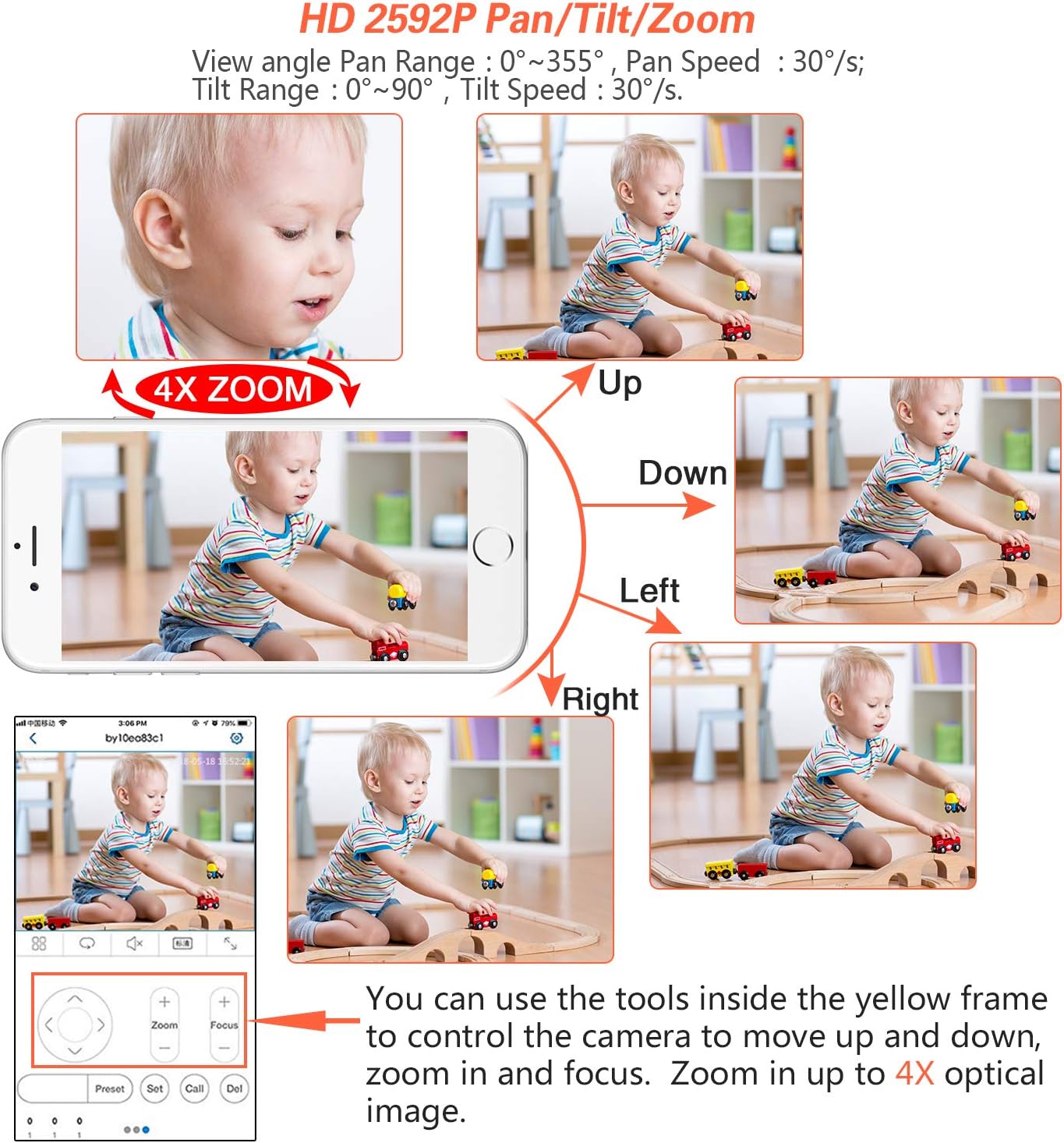
Figure 5.1: Controlling Pan, Tilt, and Zoom functions via a mobile device.
5.2 Detekcja ruchu i alerty
Kamera może wykrywać ruch w swoim polu widzenia view and trigger alerts.
- Konfiguracja: Uzyskaj dostęp do kamery web interface or mobile app to configure motion detection zones and sensitivity.
- Alerty: Set up email alerts with snapshots or push notifications to your mobile device when motion is detected.

Figure 5.2: Motion detection and alert system.
5.3 Nagrywanie wideo
This camera does not include an SD card slot for onboard storage. Video recording can be managed through compatible Network Video Recorders (NVRs) or PC/smartphone applications.
- Integracja NVR: Connect the camera to a compatible NVR (e.g., Hikvision, XM, Amcrest) using its ONVIF or RTSP capabilities for continuous or event-based recording.
- Software Recording: Use third-party software like Blue Iris or iSpy on a dedicated computer to record video streams from the camera.
5.4 Widzenie nocne
The camera is equipped with infrared (IR) LEDs to provide clear surveillance in low-light or complete darkness, with a range of up to 65 feet.
- The camera automatically switches between day (color) and night (black and white IR) modes based on ambient light conditions.
- Ensure there are no obstructions directly in front of the camera's dome that could cause IR reflection, which might degrade night vision image quality.

Rysunek 5.3: Porównanie widzenia dziennego i nocnego.
6. Konserwacja
Regularna konserwacja zapewnia optymalną wydajność i trwałość kamery bezpieczeństwa.
- Czyszczenie: Periodically clean the camera's dome with a soft, damp szmatką, aby usunąć kurz, brud lub plamy wodne, które mogą blokować view. Unikaj środków czyszczących o działaniu ściernym.
- Kontrola kabla: Check all cable connections (Ethernet, power) for wear, damage, or loose connections, especially in outdoor environments.
- Aktualizacje oprogramowania układowego: Check the JideTech support website or contact customer service for available firmware updates. Updates can improve performance, add features, or fix bugs.
- Kontrole środowiskowe: Ensure the camera's mounting remains secure and that no new obstructions (e.g., growing foliage) block its field of view.
7. Rozwiązywanie Problemów
This section addresses common issues you might encounter with your JideTech PTZ Dome Camera.
| Problem | Możliwe rozwiązanie |
|---|---|
| Camera not powering on or connecting via PoE. |
|
| Nie można uzyskać dostępu do kamery przez web przeglądarka. |
|
| Obraz jest rozmazany lub nieostry. |
|
| Poor night vision quality or IR reflection. |
|
| Mobile app not connecting or showing video. |
|
8. Specyfikacje
| Funkcja | Szczegół |
|---|---|
| Numer modelu | Hi2162-PTZ3X |
| Rozdzielczość wideo | 1080p (1920x1080) at 15 fps |
| Zoom optyczny | 4x |
| Pan Range | 0°~355° |
| Zakres pochylenia | 0°~90° |
| Zakres noktowizora | 65 feet (IR) |
| Łączność | Wired Ethernet, PoE (802.3af) |
| Kompresja wideo | H.264/H.265 |
| Stopień wodoodporności | IP66 |
| Źródło zasilania | PoE lub 12 V DC |
| Tworzywo | Aluminium |
| Wymiary | 4.33 x 4.33 x 3.91 cala |
| Waga | 1.2 funtów |
| Kompatybilne urządzenia | Windows PC, iOS/Android devices |
| Obsługiwane protokoły | RTSP, ONVIF |
9. Gwarancja i wsparcie
- Gwarancja: JideTech provides a 1-year warranty service for this product.
- Wsparcie techniczne: Lifetime technical support is available. If you require assistance with setup, operation, or encounter any issues, please contact JideTech customer service.
- Kontakt z pomocą techniczną: You can reach JideTech support via Amazon email or find contact information within the product manual. When contacting support, please include your order number to facilitate assistance.
- Note on Apps: Some cameras may use the 'Hisee SE' app. Please refer to your specific manual for the correct application.