
Thomson WHP5327
Instrukcja obsługi bezprzewodowych słuchawek telewizyjnych Thomson WHP5327
Model: WHP5327
Wstęp
This manual provides comprehensive instructions for the setup, operation, and maintenance of your Thomson WHP5327 Wireless TV Headphones. Designed for comfortable, high-quality audio listening from various sources like TVs, Hi-Fi systems, smartphones, tablets, and laptops, these over-ear headphones offer a wireless range of up to 20 meters and come with a convenient charging station.
Informacje dotyczące bezpieczeństwa
Przed użyciem produktu należy uważnie przeczytać wszystkie instrukcje bezpieczeństwa. Zachowaj tę instrukcję do wykorzystania w przyszłości.
- Do not expose the headphones or charging station to extreme temperatures, humidity, or direct sunlight.
- Unikaj upuszczania i narażania urządzenia na silne uderzenia.
- Nie należy podejmować prób demontażu ani modyfikacji produktu. Spowoduje to unieważnienie gwarancji.
- Używaj wyłącznie dostarczonego zasilacza i kabli.
- Prolonged listening at high volume levels can cause hearing damage. Adjust volume to a comfortable level.
- Przechowywać w miejscu niedostępnym dla dzieci.
Zawartość opakowania
Sprawdź, czy w opakowaniu znajdują się wszystkie elementy:
- 1x Thomson WHP5327 Wireless TV Headphones
- 1x Charging Station / Transmitter
- 1x Zasilacz
- 2x Rechargeable Batteries (AA)
- 3x Audio Cables (e.g., 3.5mm Jack, RCA)
- 2x Audio Adapters (e.g., 6.3mm adapter)
- 1x Instrukcja obsługi
Produkt ponadview
Zapoznaj się z elementami swojego systemu słuchawek bezprzewodowych.
Słuchawki

Obraz: Bok view of the Thomson WHP5327 headphones, highlighting the integrated volume control and power button on the earcup.
- Regulowany pałąk: Dla wygodnego dopasowania.
- Wyściełane nauszniki: Provide comfort during extended listening sessions.
- Regulacja głośności: Integrated on the earcup for easy adjustment.
- Przycisk/wskaźnik zasilania: Włączanie/wyłączanie słuchawek i wyświetlanie ich statusu.
- Ładowanie styków: Located on the bottom of the headband for charging on the station.
- Gniazdo audio 3.5 mm: For optional wired connection to devices (cable may be required).
Charging Station / Transmitter
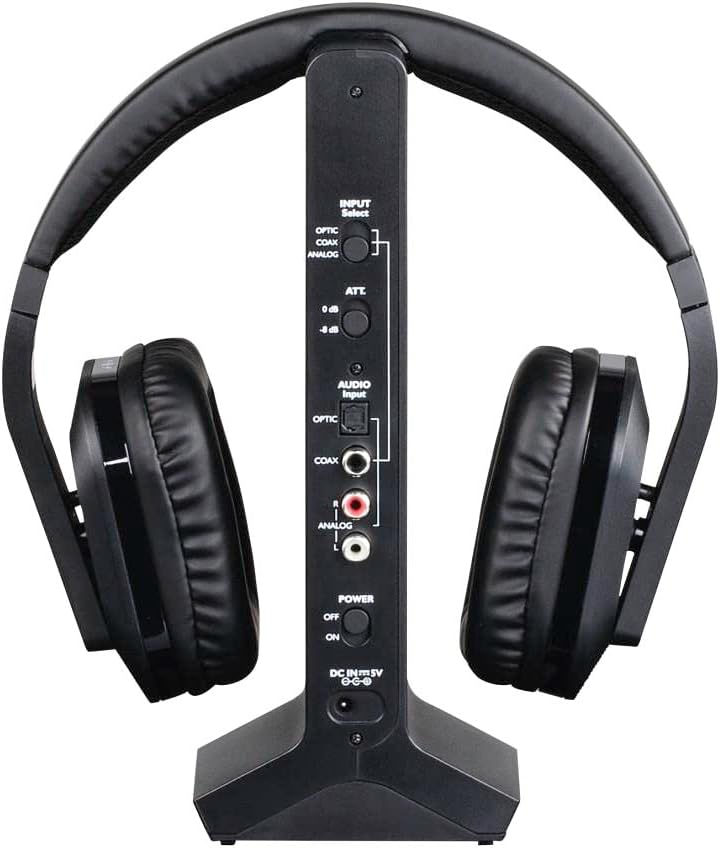
Obraz: Tył view of the Thomson WHP5327 charging station, displaying the various audio input ports (Optical, Coaxial, Analog) and power connection.
- Headphone Cradle: For storing and charging the headphones.
- Wskaźnik ładowania: Kontrolka wskazująca stan ładowania.
- Wskaźnik zasilania: Light indicating the station is powered on.
- Przełącznik wyboru wejścia: To choose between Optical, Coaxial, or Analog audio inputs.
- Audio Input Ports: Optical, Coaxial, and Analog (RCA) inputs for connecting to audio sources.
- Power Input (DC IN 5V): Do podłączenia zasilacza.
- Przycisk zasilania: To turn the charging station on/off.
Organizować coś
1. Ładowanie słuchawek
- Insert the provided rechargeable AA batteries into the headphone earcups, ensuring correct polarity.
- Connect the power adapter to the "DC IN 5V" port on the charging station and plug it into a wall outlet. The Power indicator on the station will light up.
- Place the headphones onto the charging station. Ensure the charging contacts align. The "CHARGE" indicator on the station will light up, indicating charging is in progress.
- Allow approximately 8 hours for the initial full charge. Subsequent charges may take less time.

Image: The Thomson WHP5327 headphones resting on their charging station, ready for use or charging.
2. Connecting the Charging Station to an Audio Source
The charging station acts as the transmitter. Choose the appropriate connection method for your audio source (TV, Hi-Fi, etc.).
- Optical Digital Audio (Recommended for TVs):
Connect an optical audio cable (not always included, check package contents) from your TV's "Optical Out" or "Digital Audio Out (Optical)" port to the "OPTIC" input on the charging station. Set the "INPUT Select" switch on the station to "OPTIC".
- Współosiowy sygnał audio cyfrowy:
Connect a coaxial audio cable from your audio source's "Coaxial Out" port to the "COAX" input on the charging station. Set the "INPUT Select" switch on the station to "COAX".
- Analog Audio (RCA or 3.5mm Jack):
Use the provided RCA audio cable to connect your audio source's "Audio Out" (red and white RCA jacks) to the "ANALOG" RCA inputs on the charging station. If your source has a 3.5mm headphone jack, use the provided 3.5mm to RCA adapter cable. Set the "INPUT Select" switch on the station to "ANALOG".
Ensure the power switch on the charging station is set to "ON" after connecting the audio source.
Instrukcja obsługi
Włączanie/wyłączanie
- To turn on the headphones, press and hold the Power button on the earcup until the indicator light illuminates.
- To turn off the headphones, press and hold the Power button again until the indicator light turns off.
Kontrola głośności
Adjust the listening volume using the integrated volume control dial/buttons located on the earcup of the headphones.

Image: A person comfortably wearing the Thomson WHP5327 headphones while watching television, demonstrating typical usage.
Automatyczne wyłączanie
The transmitter and headphones feature an automatic shut-off function. If no audio signal is detected for approximately 5 minutes, both the transmitter and headphones will automatically power down to conserve battery life.
Zasięg bezprzewodowej
The Thomson WHP5327 headphones offer a wireless range of up to 20 meters (approximately 65 feet) from the charging station/transmitter. Optimal range may vary depending on environmental factors such as walls, obstacles, and interference from other wireless devices.

Image: A diagram illustrating the wireless range between the headphones and the base unit, indicating a typical operational distance of 10-15 meters.
Połączenie przewodowe (opcjonalnie)
While primarily designed for wireless use, the WHP5327 headphones can also be used with a wired connection. Connect a 3.5mm audio cable (not always included) from your audio source (e.g., smartphone, tablet, laptop) to the 3.5mm audio jack on the headphone earcup. This allows for direct audio playback without the need for the charging station/transmitter.

Image: A person using the Thomson WHP5327 headphones connected via a cable to a smartphone, demonstrating the optional wired listening mode.
Konserwacja
- Czyszczenie: Use a soft, dry cloth to clean the headphones and charging station. Do not use liquid cleaners or abrasive materials.
- Wymiana baterii: The headphones use rechargeable AA batteries. If the battery life significantly decreases, replace them with new rechargeable AA batteries of the same type and capacity. Ensure correct polarity when inserting.
- Składowanie: When not in use, store the headphones on the charging station to keep them charged and ready. If storing for an extended period, ensure batteries are fully charged and store in a cool, dry place.
Rozwiązywanie problemów
| Problem | Możliwa przyczyna | Rozwiązanie |
|---|---|---|
| Brak dźwięku w słuchawkach. | Headphones not turned on or not charged. Transmitter not powered or not connected to audio source. Incorrect input selected on transmitter. Głośność źródła dźwięku jest zbyt niska lub wyciszona. | Ensure headphones are charged and turned on. Check power connection to transmitter and ensure it's ON. Verify audio cable connection from source to transmitter. Select correct input (Optical, Coaxial, Analog) on transmitter. Increase volume on audio source and headphones. |
| Dźwięk jest zniekształcony lub przerywany. | Poza zakresem. Zakłócenia ze strony innych urządzeń bezprzewodowych. Niski poziom baterii w słuchawkach. | Podejdź bliżej nadajnika. Odsuń nadajnik od innych urządzeń elektronicznych (routerów Wi-Fi, telefonów bezprzewodowych). Recharge headphones. |
| Słuchawki się nie ładują. | Headphones not properly seated on charging station. Stacja ładowania nie jest zasilana. Wadliwe baterie. | Ensure headphones are correctly placed on the station, making good contact. Check power adapter connection and wall outlet. Wymień baterie, jeśli nie trzymają już ładunku. |
| Automatic shut-off occurs too quickly. | No audio signal or very low audio signal from source. | Increase the volume output from your audio source (e.g., TV). |
Specyfikacje
| Funkcja | Szczegół |
|---|---|
| Model | WHP5327 |
| Typ | Over-Ear, Circum-Aural, Wireless |
| Kolor | Czarny |
| Tworzywo | Plastikowy |
| Przenoszenie | Częstotliwość radiowa (RF) |
| Częstotliwość nośna | 2400MHz |
| Odpowiedź częstotliwościowa | 20 Hz - 22 kHz |
| Impedancja | 24 omów |
| Wrażliwość | 120dB |
| Stosunek sygnału do szumu | 80dB |
| Distortion Rate (max.) | 1% |
| Zasięg bezprzewodowej | Do 20 m (65 stóp) |
| Battery Life (average volume) | Do 8 godzin |
| Źródło zasilania | 2x AA Rechargeable Batteries (included) |
| Wejścia audio (nadajnik) | Optical, Coaxial, Analog (RCA) |
| Waga | 1.44 funta (ok. 0.65 kg) |
Gwarancja i wsparcie
Thomson products are designed and manufactured to the highest quality standards. This product is covered by a limited warranty against defects in materials and workmanship. For detailed warranty terms and conditions, please refer to the warranty card included in your package or visit the official Thomson webstrona.
For technical support, troubleshooting assistance, or spare parts inquiries, please contact Thomson customer service. Contact information can typically be found on the product packaging or the official Thomson support webstrona.
Proszę zachować dowód zakupu na potrzeby roszczeń gwarancyjnych.
Ask a question about this manual
Ask about setup, troubleshooting, compatibility, parts, safety, or missing instructions. Manuals+ will review the question and use this page’s manual context to help answer it.