
Wstęp
This manual provides comprehensive instructions for the setup, operation, maintenance, and troubleshooting of your Mediacom 2020B1-B2 Universal On Demand TV/Cable Remote Control. Please read this guide thoroughly to ensure proper use and to maximize the functionality of your remote.
Organizować coś
1. Instalacja baterii
Do pilota potrzebne są dwie baterie AAA (w zestawie). Aby je zainstalować, wykonaj następujące czynności:
- Znajdź pokrywę komory baterii z tyłu pilota.
- Naciśnij zakładkę i przesuń pokrywę.
- Włóż dwie baterie AAA, upewniając się, że bieguny dodatni (+) i ujemny (-) są prawidłowo ustawione względem oznaczeń wewnątrz komory.
- Wsuń pokrywę baterii z powrotem na miejsce, aż zaskoczy.

Obraz: Tył view of the Mediacom 2020B1-B2 remote control, showing the battery compartment and quick setup instructions.
2. Quick Setup / Programming
To program your remote control to operate your TV or cable box, use the quick setup method:
- Press and Hold SETUP: Locate the 'SETUP' button on your remote. Press and hold this button until the LED indicator light on the remote blinks twice.
- Enter 3-Digit Code: Refer to your device's manual for the appropriate 3-digit programming code for your TV or cable box. Enter this code using the number buttons on the remote.
- Funkcjonalność testu: After entering the code, press the 'CH+' or 'CH-' button to test if the remote is controlling your device. If the device responds, the programming was successful. If not, repeat the steps with a different code from your device's manual, if available.
Instrukcja obsługi
The Mediacom 2020B1-B2 remote control features a standard layout for easy navigation of your TV and cable services. Below are the primary functions of key buttons:
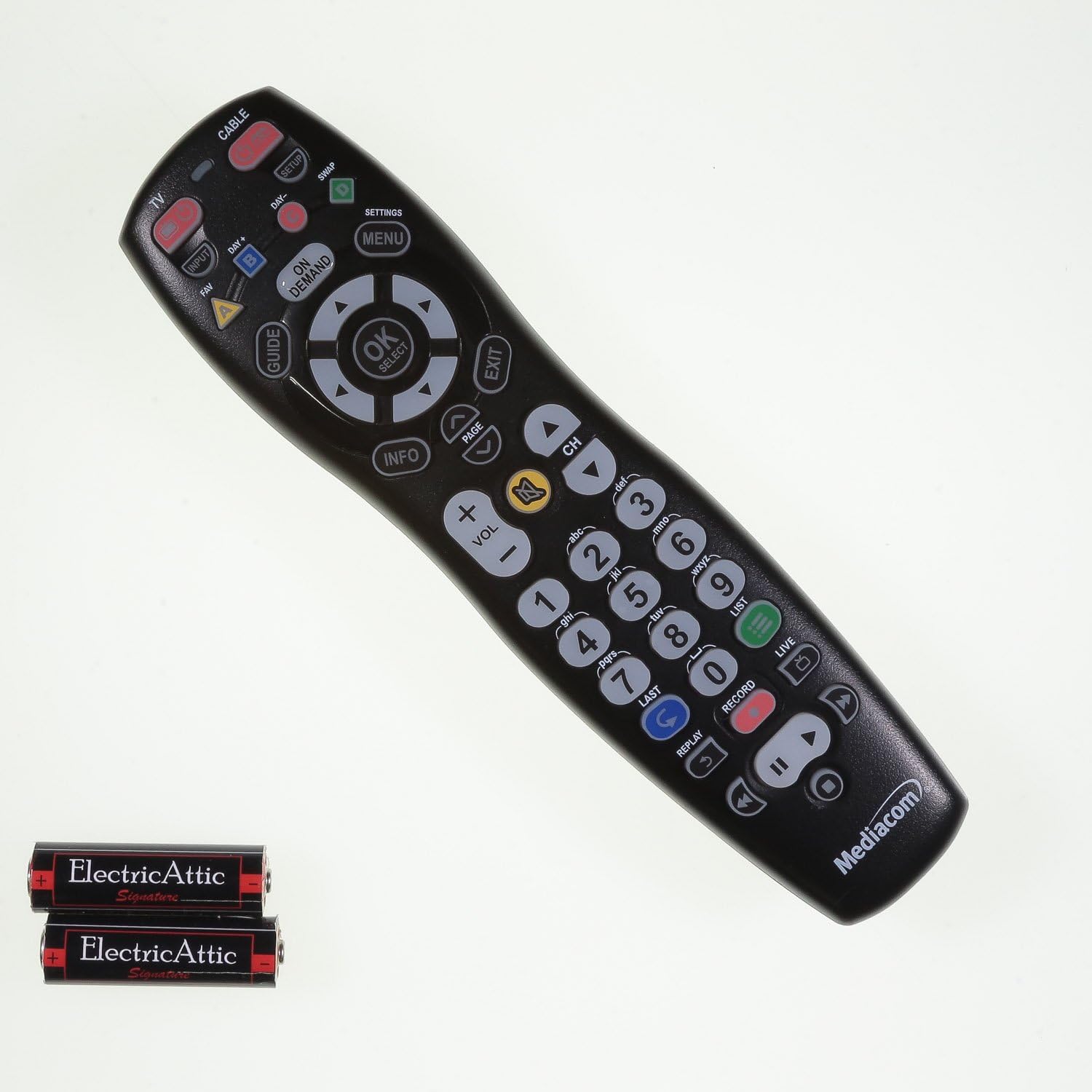
Obraz: Przód view of the Mediacom 2020B1-B2 remote control, displaying all operational buttons.
- MOC: Turns your TV or cable box on/off.
- TV / CABLE: Toggles control between TV and cable box functions.
- PRZEWODNIK: Wyświetla przewodnik po programach.
- MENU / SETTINGS: Accesses the device's main menu or settings.
- OK / SELECT: Potwierdza wybory w menu.
- Strzałki nawigacyjne (góra, dół, lewo, prawo): Umożliwia poruszanie się po menu i przewodnikach po programach.
- GŁOŚNOŚĆ +/-: Dostosowuje poziom głośności.
- CO +/-: Zmienia kanały w górę lub w dół.
- Klawiatura numeryczna (0-9): Bezpośrednie wprowadzanie numerów kanałów.
- INFORMACJE: Wyświetla informacje o bieżącym programie.
- NA ŻĄDANIE: Accesses On Demand content.
- Playback Controls (PLAY, PAUSE, STOP, REW, FWD, RECORD): Steruje funkcjami odtwarzania multimediów.
Konserwacja
Wymiana baterii
Replace batteries when the remote's LED indicator light fails to illuminate or blinks weakly, or when the remote becomes unresponsive. Always replace both batteries simultaneously with new AAA batteries.
Czyszczenie
Do czyszczenia pilota użyj miękkiej, suchej ściereczki. W przypadku uporczywych zabrudzeń delikatnie przetrzyjampen the cloth with water. Avoid using harsh chemicals or abrasive cleaners, as these can damage the remote's surface or internal components.
Rozwiązywanie problemów
- Pilot nie odpowiada: Check battery orientation and ensure batteries are fresh. Reprogram the remote if necessary.
- Niektóre przyciski nie działają: Ensure the remote is in the correct mode (TV or CABLE). Clean around the unresponsive button to remove any debris.
- LED indicator not blinking: This usually indicates dead or incorrectly installed batteries. Replace batteries and check their orientation.
- Remote not controlling device after programming: Try alternative 3-digit codes for your device. Ensure there are no obstructions between the remote and the device's infrared sensor.
Specyfikacje
- Numer modelu: 2020B1-B2
- Technologia łączności: Podczerwony
- Zgodne urządzenia: Television, Cable Box
- Źródło zasilania: 2 baterie AAA
- Kolor: Czarny
- Waga przedmiotu: Około 6 uncji
- Wymiary opakowania: Około 9.84 x 2.48 x 1.26 cala
- Dodatek specjalny: Uniwersalny
Wsparcie
For additional support, programming codes, or further assistance with your Mediacom 2020B1-B2 Universal Remote Control, please visit the official support webstrona: