
Wstęp
This manual provides detailed instructions for the safe installation, operation, and maintenance of your Hampton Bay 4336509073 Low-Voltage 120-Watt Landscape Transformer. Please read all instructions carefully before beginning installation and retain this manual for future reference.
Informacje dotyczące bezpieczeństwa
- OSTRZEŻENIE: Risk of electric shock. Install the transformer at least 1 foot (0.3 meters) from a pool, spa, or fountain.
- Do not immerse the transformer in water. Ensure it is installed in a location where it will not be submerged.
- Always disconnect power at the circuit breaker before servicing or installing the transformer.
- This transformer is intended for outdoor use with low-voltagWyłącznie systemy oświetlenia krajobrazowego.
- Aby zapobiec zwarciom, należy upewnić się, że wszystkie połączenia są solidne i właściwie zaizolowane.
- Do not overload the transformer. The total wattage of connected fixtures must not exceed 120 watts.
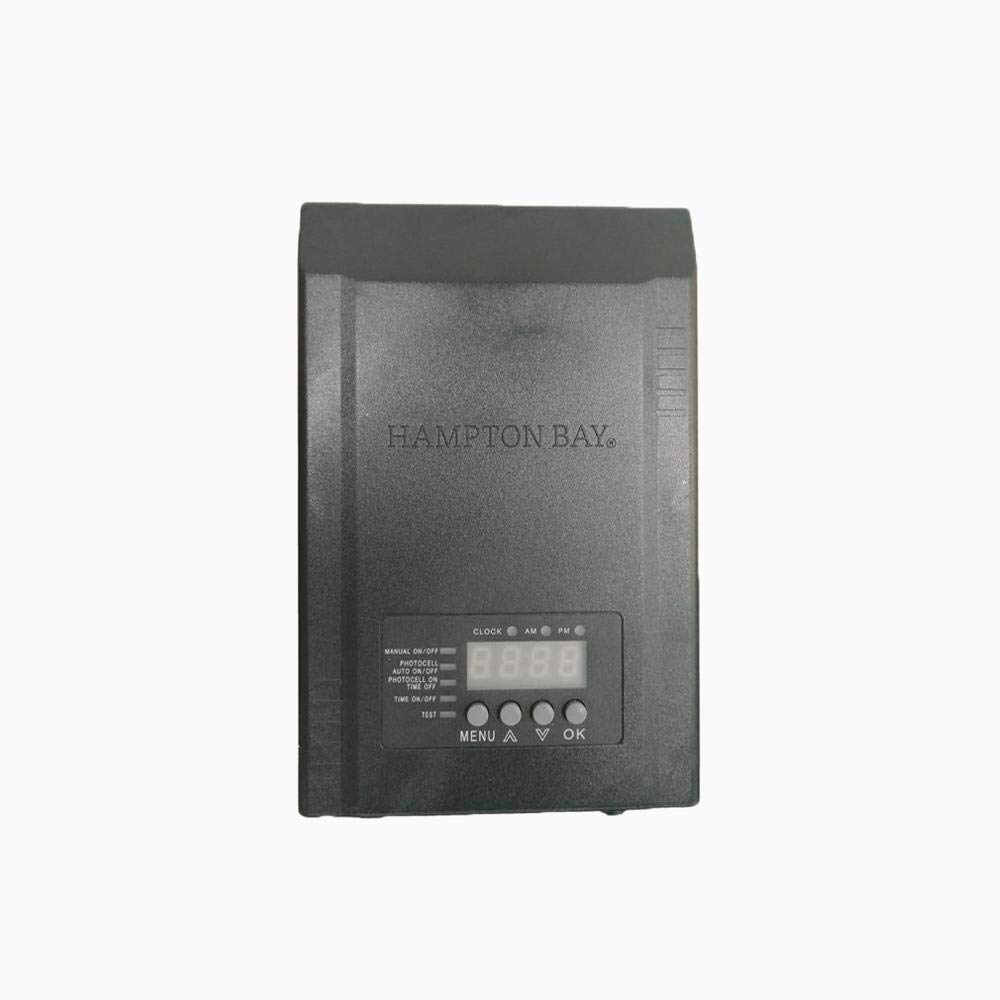
Przód i bok view of the Hampton Bay 4336509073 low-voltage landscape transformer, showing the control panel and warning labels, including a 'Do Not Immerse in Water' symbol.
Zawartość opakowania
Przed rozpoczęciem instalacji sprawdź, czy wszystkie komponenty są obecne:
- Hampton Bay 4336509073 Low-Voltage 120-Watt Landscape Transformer Unit
- Photocell Sensor with Cable
- Sprzęt montażowy (śruby, kotwy)
- Instrukcja obsługi (ten dokument)

A coiled low-voltage cable with a photocell sensor on one end and a two-prong connector on the other, used for automatic light control.
Organizować coś
- Wybierz lokalizację: Select a suitable outdoor location for the transformer. It should be close to a GFCI (Ground Fault Circuit Interrupter) protected outdoor electrical outlet and within reach of your low-voltage lighting cables. Ensure the location is protected from direct water spray and is not prone to flooding.
- Zamontuj transformator: Use the provided mounting hardware to securely attach the transformer to a wall or sturdy post. Ensure it is mounted vertically with the low-voltage terminals facing downwards.
- Connect Low-Voltage Kable: Route your low-voltage landscape lighting cables to the transformer. Strip approximately 1/2 inch of insulation from the ends of the low-voltage cables. Connect the cables to the low-voltage terminals on the transformer, ensuring a secure connection. Refer to the wiring diagram in the manual for specific terminal connections.
- Install Photocell Sensor: Plug the photocell sensor cable into the designated port on the transformer. Position the photocell sensor in a location where it will receive natural daylight and is not obstructed by artificial light sources at night. This ensures accurate dusk-to-dawn operation.
- Podłącz do zasilania: Plug the transformer's power cord into a GFCI-protected 120V outdoor electrical outlet. The transformer display should illuminate.
Instrukcja obsługi
The transformer features a digital display and control buttons for various operating modes.

Szczegółowy view of the transformer's digital display and control buttons (MENU, A, V, OK), along with indicators for various operating modes like Manual On/Off, Photocell, and Time On/Off.
Panel sterowania nadview:
- Wyświetlacz: Shows current time and programming settings.
- Wskaźniki: LEDs next to 'MANUAL ON/OFF', 'PHOTOCELL AUTO ON/OFF', 'PHOTOCELL ON TIME OFF', 'TIME ON/OFF' indicate the active operating mode.
- Przycisk MENU: Enters programming mode and cycles through settings.
- A (Up) Button: Zwiększa wartości lub przechodzi w górę w opcjach menu.
- V (Down) Button: Zmniejsza wartości lub przesuwa opcje menu w dół.
- Przycisk OK: Confirms selections and exits programming mode.
- Przycisk TESTU: Activates a short test cycle for connected lights.
Ustawianie zegara:
- Naciśnij MENU button until 'CLOCK' is displayed or the 'CLOCK' indicator flashes.
- Użyj A I V buttons to set the current hour. Press OK aby potwierdzić.
- Użyj A I V buttons to set the current minute. Press OK aby potwierdzić.
- Zegar jest teraz ustawiony.
Tryby pracy:
- MANUAL ON/OFF: Naciśnij MENU button until the 'MANUAL ON/OFF' indicator is lit. Use the OK button to toggle the lights ON or OFF manually.
- PHOTOCELL AUTO ON/OFF (Dusk-to-Dawn): Naciśnij MENU button until the 'PHOTOCELL AUTO ON/OFF' indicator is lit. The transformer will automatically turn lights ON at dusk and OFF at dawn based on the photocell sensor.
- PHOTOCELL ON TIME OFF: Naciśnij MENU button until the 'PHOTOCELL ON TIME OFF' indicator is lit. Use the A I V buttons to set the desired duration (e.g., 4H for 4 hours). Lights will turn ON at dusk and turn OFF after the set duration.
- TIME ON/OFF: Naciśnij MENU button until the 'TIME ON/OFF' indicator is lit. Use the A I V buttons to set specific ON and OFF times. Press OK aby potwierdzić każde ustawienie.
Konserwacja
- Czyszczenie: Periodically wipe the transformer's exterior with a damp Ściereczką usuń brud i zanieczyszczenia. Nie używaj środków czyszczących ani rozpuszczalników o działaniu ściernym.
- Czujnik fotokomórki: Ensure the photocell sensor remains clean and free from obstructions (e.g., leaves, dirt) to maintain accurate operation.
- Znajomości: Annually inspect all low-voltage cable connections for corrosion or looseness. Tighten as necessary.
- Kontrola kabla: Sprawdź niską głośnośćtage cables for any damage, cuts, or exposed wiring. Repair or replace damaged cables immediately.
Rozwiązywanie problemów
| Problem | Możliwa przyczyna | Rozwiązanie |
|---|---|---|
| Światła nie włączają się. | Brak zasilania transformatora. | Check the GFCI outlet and circuit breaker. Ensure the transformer is plugged in. |
| Lights turn on at wrong time. | Incorrect clock setting or photocell obstruction. | Reset the clock. Clear any obstructions from the photocell sensor. Verify operating mode. |
| Some lights are dim or off. | Loose connections or faulty bulbs. | Check all low-voltage cable connections. Replace any burnt-out bulbs. |
| Transformer display is off. | No power or internal fault. | Sprawdź zasilanie. Jeśli zasilanie jest obecne, a wyświetlacz pozostaje wyłączony, skontaktuj się z obsługą klienta. |
Specyfikacje
- Numer modelu: 4336509073
- Źródło zasilania: Elektryczny przewodowy
- Objętość wyjściatage: 12 Volts (Low-Voltage)
- Maksymalna moctage: 120 watów
- Waga przedmiotu: 5.14 funta
- Wymiary produktu: 10 x 12 x 14 cala
- Producent: Dom Depot
Informacje o gwarancji
Specific warranty information for the Hampton Bay 4336509073 Low-Voltage 120-Watt Landscape Transformer is not available in this document. Please refer to the product packaging or contact Hampton Bay customer support for detailed warranty terms and conditions.
Obsługa klienta
For technical assistance, troubleshooting, or replacement parts, please contact Hampton Bay customer support. Refer to the contact information provided on the product packaging or the official Hampton zatoki webstrona.