
Unknown Yu- TLXgo-2201
Wireless Bluetooth Headset User Manual
Model: Yu- TLXgo-2201 | Brand: Unknown
Wstęp
Dziękujemy za zakupasing the Wireless Bluetooth Headset. This manual provides essential information for the proper use, setup, and maintenance of your new headset. Please read it thoroughly before use to ensure optimal performance and longevity of the product.
Zawartość opakowania
Sprawdź, czy w przesyłce znajdują się wszystkie elementy wymienione poniżej:
- Wireless Bluetooth Headset (2 units)
- Kabel ładujący USB (2 sztuki)
- Instrukcja obsługi

Image: Contents of the headset package, showing one black headset and a white USB charging cable.
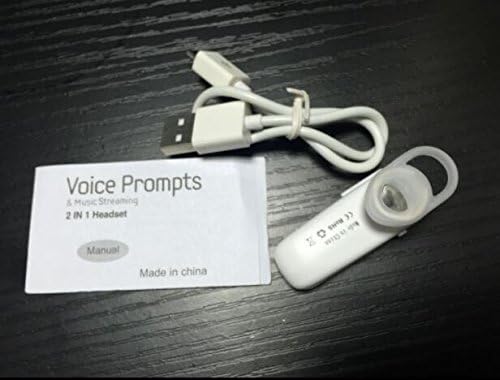
Image: Contents of the headset package, showing one white headset, a white USB charging cable, and the printed user manual.
Produkt ponadview
The Wireless Bluetooth Headset is designed for convenience and portability, ideal for sports, driving, and daily use. It features a super mini design and supports voice prompts and music streaming.

Obraz: Przód view of the product packaging, displaying the black wireless Bluetooth headset inside its clear plastic casing.
Specyfikacje
| Funkcja | Opis |
|---|---|
| Wersja Bluetooth | V3.0 + EDR |
| Wsparcie Profiles | Headset, Handsfree, A2DP |
| Talk Time/Playing Time | Do 5 godzin |
| Czas czuwania | Do 80 godzin |
| Źródło zasilania | Wbudowany akumulator litowo-jonowy |
| Technologia łączności | Bezprzewodowy |
| Współczynnik kształtu | W uchu |
| Waga przedmiotu | 15.8 uncji (na 2 jednostek) |
| Wymiary opakowania | 1.97 x 1.57 x 1.18 cala |
| Numer modelu | Yu- TLXgo-2201 |

Image: Back of the product packaging, displaying a list of product specifications including Bluetooth version, talk time, and power source.
Organizować coś
Ładowanie zestawu słuchawkowego
- Podłącz mniejszy koniec kabla ładującego USB do portu ładowania w zestawie słuchawkowym.
- Podłącz większy koniec kabla ładującego USB do źródła zasilania USB (np. portu USB komputera, zasilacza ściennego USB).
- The indicator light on the headset will illuminate during charging. It will change color or turn off once fully charged.
- Pełne naładowanie trwa zazwyczaj około 1–2 godzin.
Parowanie z urządzeniem Bluetooth
- Ensure the headset is fully charged before initial pairing.
- With the headset turned off, press and hold the Multi-function Button (MFB) for approximately 5-7 seconds until the indicator light flashes red and blue alternately. This indicates the headset is in pairing mode.
- Na urządzeniu z włączoną funkcją Bluetooth (smartfonie, tablecie itp.) przejdź do ustawień Bluetooth i upewnij się, że funkcja Bluetooth jest włączona.
- Szukaj available devices. The headset should appear in the list, typically named "MBT2013" or similar.
- Select the headset from the list to connect. If prompted for a password, enter "0000" (four zeros).
- Once successfully paired, the indicator light will stop flashing and may show a steady blue light, and you may hear a voice prompt confirming the connection.
- The headset will automatically connect to the last paired device when turned on, if the device's Bluetooth is active and within range.
Instrukcja obsługi
Włączanie/wyłączanie zasilania
- Włączanie: Press and hold the Multi-function Button (MFB) for about 3 seconds until the blue indicator light flashes and you hear a voice prompt.
- Wyłączone: Press and hold the MFB for about 3-4 seconds until the red indicator light flashes and you hear a voice prompt.
Zarządzanie połączeniami
- Odbierz połączenie: Naciśnij MFB jeden raz.
- Zakończ połączenie: Naciśnij przycisk MFB jeden raz podczas połączenia.
- Odrzuć połączenie: Press and hold the MFB for about 2 seconds during an incoming call.
- Ponowne wybieranie ostatniego numeru: Naciśnij dwukrotnie przycisk MFB, gdy nie prowadzisz rozmowy.
Odtwarzanie muzyki
- Odtwórz/Pauza: Press the MFB once during music playback.
Note: Volume control may be managed directly from your connected device.
Konserwacja
- Czyszczenie: Do czyszczenia zestawu słuchawkowego używaj miękkiej, suchej ściereczki. Nie używaj silnych środków chemicznych ani materiałów ściernych.
- Składowanie: Przechowuj zestaw słuchawkowy w chłodnym, suchym miejscu, z dala od bezpośredniego światła słonecznego i ekstremalnych temperatur.
- Pielęgnacja baterii: Aby przedłużyć żywotność baterii, ładuj zestaw słuchawkowy regularnie, nawet jeśli nie jest często używany. Unikaj całkowitego rozładowywania baterii przez dłuższy czas.
- Wodoodporność: Ten zestaw słuchawkowy nie jest wodoodporny. Unikaj narażenia na działanie wody i nadmiernej wilgoci.
Rozwiązywanie problemów
- Zestaw słuchawkowy nie włącza się:
- Upewnij się, że zestaw słuchawkowy jest w pełni naładowany. Podłącz go do źródła zasilania i spróbuj ponownie.
- Nie można sparować z urządzeniem:
- Ensure the headset is in pairing mode (red and blue lights flashing alternately). Make sure Bluetooth is enabled on your device and it is within range (typically 10 meters). Try restarting both the headset and your device.
- Brak dźwięku lub słaba jakość dźwięku:
- Check the volume levels on both the headset and your connected device. Ensure the headset is properly connected to your device. Move closer to your device to avoid interference.
- Headset disconnects frequently:
- Ensure the headset is within range of your device. Check for potential interference from other wireless devices. Try re-pairing the headset.
Informacje dotyczące bezpieczeństwa
- Do not disassemble, repair, or modify the headset. This may cause fire, electronic breakdown, or complete damage to the product.
- Keep the headset away from extreme temperatures, humidity, and corrosive substances.
- Unikaj upuszczania zestawu słuchawkowego i narażania go na silne uderzenia.
- Do not expose the headset to open flames or dispose of it in fire.
- Produkt i baterię należy utylizować zgodnie z lokalnymi przepisami.
Gwarancja i wsparcie
Aby uzyskać informacje dotyczące gwarancji lub pomocy technicznej, skorzystaj z danych kontaktowych podanych przez sprzedawcę lub oficjalnego przedstawiciela producenta. webStrona. Zachowaj dowód zakupu na wypadek roszczeń gwarancyjnych.