
Wstęp
Thank you for choosing the MIUFLY EH15-64GB Body Camera. This device is designed for reliable full-HD video recording in various indoor and outdoor environments, offering advanced features such as GPS tracking, night vision, and password protection. Please read this manual thoroughly to ensure proper operation and maintenance of your body camera.
Zawartość opakowania
Sprawdź, czy w przesyłce znajdują się wszystkie elementy wymienione poniżej:
- MIUFLY EH15-64GB Body Camera
- Kabel USB
- Stacja ładująca
- Universal Metal Clip
- Epaulet Clip
- Instrukcja obsługi
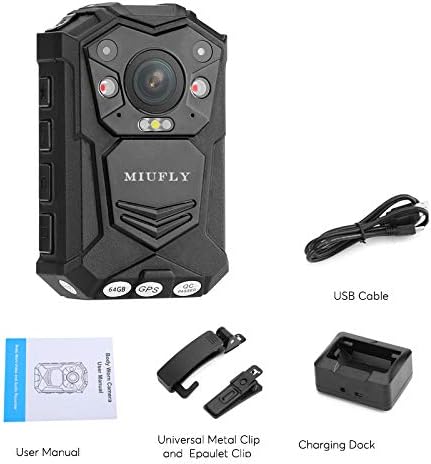
Organizować coś
1. Ładowanie początkowe
Before first use, fully charge the body camera. Connect the USB cable to the charging dock and then to a power source. Place the camera into the charging dock. The charging indicator will show the charging status.

2. Mocowanie klipsa
The camera comes with a universal metal clip and an epaulet clip. Select the appropriate clip for your intended use. The universal metal clip allows for 360-degree rotation for flexible mounting options on belts, pockets, or shoulder straps.

Instrukcja obsługi
1. Włączanie/wyłączanie zasilania
Press and hold the Power button to turn the camera on or off. The 2-inch LCD screen will activate upon power-on.
2. Nagrywanie wideo
To start video recording, press the dedicated video record button. Press it again to stop. The camera supports 1296p video capture resolution.
3. Nagrywanie dźwięku
To record audio only, press the dedicated audio record button. Press it again to stop.
4. Robienie zdjęć
Press the dedicated photo button to capture still images. The camera supports various photo resolutions up to 32M.
5 Aktywacja widzenia nocnego
The camera features infrared night vision. This can be set to manual, auto, or off via the camera settings. In manual mode, press the night vision button to activate or deactivate.
6. Funkcjonalność GPS
Wbudowany GPS pozwala view the movement track on a compatible GPS player. This feature can be toggled on or off in the settings.
7. Ochrona hasłem
For enhanced security, you can set a password for the camera to prevent unauthorized access to recorded files. This setting is configurable in the camera menu.
8. Car DV Mode and Loop Recording
The camera supports Car DV Mode for use as a dashcam, and loop recording to continuously record by overwriting the oldest files when memory is full. These modes can be enabled in the settings.
9. Detekcja ruchu
Activate motion detection in the settings to automatically start recording when movement is sensed, conserving battery and storage space.
Konserwacja
1. Czyszczenie
Use a soft, dry cloth to clean the camera body and lens. Avoid using harsh chemicals or abrasive materials that could damage the device.
2. Przechowywanie
Przechowuj aparat w chłodnym, suchym miejscu, z dala od bezpośredniego światła słonecznego i ekstremalnych temperatur. Przed długotrwałym przechowywaniem upewnij się, że bateria jest częściowo naładowana, aby zachować jej sprawność.
3. Aktualizacje oprogramowania sprzętowego
Periodically check the MIUFLY official website for any available firmware updates to ensure optimal performance and access to new features. Follow the instructions provided with the update carefully.
Rozwiązywanie problemów
Kamera nie włącza się
- Ensure the battery is fully charged. Connect to the charging dock and verify the charging indicator.
- If the camera vibrates uncontrollably or makes unusual noises, this may indicate a hardware issue. Disconnect from power and contact customer support.
Problemy z nagrywaniem
- Video/Audio Quality: Ensure the lens is clean and free from obstructions. Check the selected resolution settings in the camera menu.
- Missing Footage: Verify that recording was properly initiated and stopped. Check storage capacity (64GB built-in).
- Zakłócenia dźwięku: If using in a vehicle with a power connection, some interference may occur. Test recording in different environments.
File Transfer/Deletion
- Connect the camera to a computer via USB. The camera should be recognized as an external hard drive.
- Files can be deleted directly from the camera via the menu options.
Specyfikacje
| Funkcja | Szczegół |
|---|---|
| Numer modelu | EH15-64GB |
| Rozdzielczość przechwytywania wideo | 1296p |
| Rozmiar ekranu | 2 cali |
| Pamięć wewnętrzna | 64GB (Flash Memory Type: Micro SD) |
| Bateria | 3200mAh Lithium Polymer (up to 10 hours recording) |
| Wymiary | 3.66 x 1.18 x 2.17 cala |
| Waga przedmiotu | 6.5 uncji |
| Technologia czujnika fotograficznego | CMOS |
| Format przechwytywania wideo | MP4 |
| Obsługiwany format audio | WAV |
| Technologia łączności | Przewodowy |
Informacje o gwarancji
The MIUFLY EH15-64GB Body Camera comes with a standard manufacturer's warranty. Please refer to the product packaging or the official MIUFLY webSzczegółowe warunki gwarancji znajdziesz na stronie. Zachowaj dowód zakupu na wypadek roszczeń gwarancyjnych.
Obsługa klienta
If you encounter any issues or have questions regarding your MIUFLY EH15-64GB Body Camera that are not covered in this manual, please contact MIUFLY customer support through the official website or your retailer. Provide your model number and a detailed description of the issue for efficient assistance.