
BLS T01L
Instrukcja obsługi lampy szafkowej LED BLS T01L
Model: T01L
1. Wprowadzenie
The BLS T01L LED Closet Light is a versatile, motion-sensing lighting solution designed for various indoor applications. It features 20 super bright LEDs, offering 180 lumens of soft white light. This light can be powered by 3 AA batteries for wireless operation or via a 5V USB DC input for constant lighting. Its adjustable light beam and motion sensor provide customizable illumination and detection.

Image 1.1: The BLS T01L LED Closet Light, a 14-inch white light bar with a central motion sensor.
2. Co znajduje się w pudełku
Po otwarciu opakowania należy sprawdzić, czy znajdują się w nim wszystkie elementy:
- 1 x BLS Under Cabinet Light (Model T01L)
- 1 x kabel prądu stałego
- 2 x taśmy klejące 3M
- 1 x Instrukcja obsługi (ten dokument)

Image 2.1: The BLS T01L LED Closet Light shown with its packaging, DC cable, and mounting accessories.
3. Specyfikacje
| Nazwa modelu | T01L |
| Marka | BLS |
| Typ źródła światła | Dioda LED (20 diod LED) |
| Jasność | 180 lumenów |
| Temperatura barwowa | 6000 Kelwinów (zimna biel) |
| Cotage | 2 watów |
| Źródło zasilania | 3 x AA Batteries (not included) or 5V USB DC Input |
| Wymiary produktu | 14.7" dł. x 2.6" szer. x 1.1" wys. |
| Waga przedmiotu | 7.8 uncji (220 grama) |
| Cechy specjalne | Cordless, Motion Activated, Adjustable Angle, Adjustable Motion Sensor Sensitivity |
| Metoda kontroli | Slide Switch (Auto/On/Off) |
| Typ instalacji | Screws or 3M Adhesive Tape |
| Zastosowanie wewnątrz/na zewnątrz | Wnętrz |
4. Konfiguracja i instalacja
Follow these steps to set up your BLS T01L LED Closet Light:
4.1. Włączanie urządzenia
The light can be powered by 3 AA batteries or a 5V USB DC input.
- Montaż baterii:
- Locate the battery compartment on the back of the light.
- Gently push to open the center part of the battery compartment cover.
- Insert three AA batteries (not included). One battery slides into the hole on the left, the second into the hole on the right, and the third goes into the open center between the first two. Ensure correct polarity (+/-).
- Dokładnie zamknij pokrywę komory baterii.
- USB DC Power:
- Connect the provided DC cable to the light's DC input port.
- Plug the other end of the DC cable into a 5V USB power source (e.g., USB wall adapter, power bank).
- Notatka: If using USB DC power, it is recommended to remove the AA batteries to prevent potential issues or unnecessary battery drain.

Image 4.1: Diagram illustrating the 14-inch length of the light and its power options: 3 AA batteries or USB cable.
4.2. Montaż światła
The BLS T01L offers multiple installation options:
- Montaż klejony: Peel the backing from the 3M adhesive tapes and firmly press the light onto a clean, dry surface.
- Montaż śrubowy: Use the provided screws to secure the light to the desired surface. This method offers a more permanent installation.
The light can be mounted either horizontally or vertically, depending on your application needs.

Image 4.2: Diagram showing horizontal and vertical installation options using screws or 3M adhesive stickers.
5. Instrukcja obsługi
5.1. Wybór trybu
The light features a slide switch with three modes:
- Tryb automatyczny: The light will automatically turn on when motion is detected within 10 feet in a dark environment. It will remain on for 20 seconds after motion ceases. The built-in light sensor ensures it only activates when ambient light is low (e.g., at night).
- Tryb włączony: Światło będzie włączone nieprzerwanie, niezależnie od ruchu lub warunków oświetleniowych otoczenia.
- Tryb wyłączony: Światło pozostanie wyłączone.
5.2. Adjusting Motion Sensor Sensitivity
The motion sensor can be adjusted to modify its detection sensitivity and range:
- The motion sensor module is designed to swivel. Gently rotate the sensor to adjust its detection angle.
- This allows you to fine-tune the area where motion is detected, preventing unwanted activations.
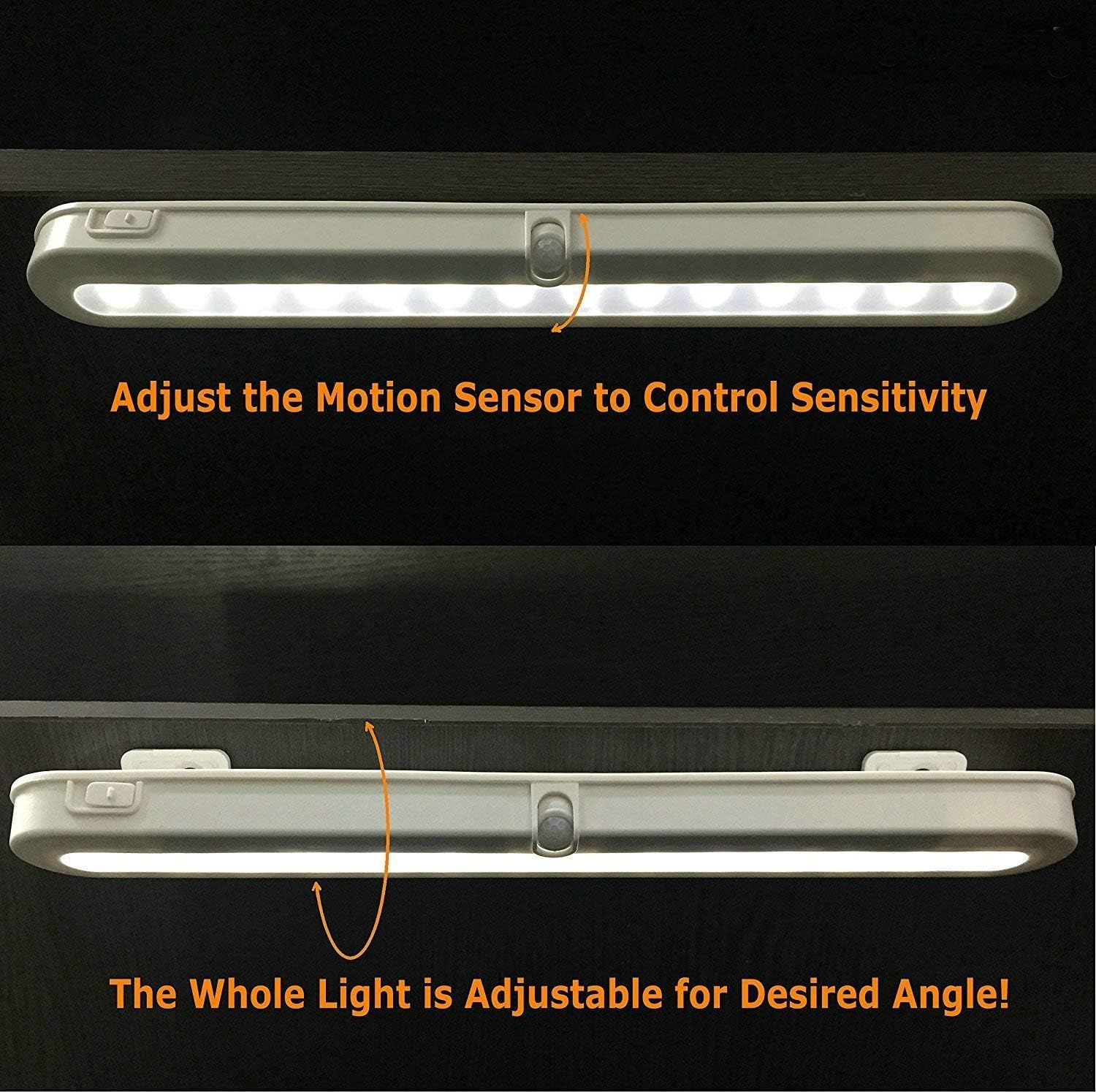
Image 5.1: Illustration of how to adjust the motion sensor to control sensitivity.
5.3. Adjusting Light Beam Angle
The entire light fixture can be adjusted to direct the light beam as desired:
- The light is mounted on a bracket that allows it to swivel.
- Gently pivot the light to achieve the desired illumination angle (e.g., 90°, 120°, 180°).

Obraz 5.2: Examples of adjustable light beam angles (90°, 120°, 180°) for optimal illumination.
6. Konserwacja
6.1. Wymiana baterii
When the light output diminishes or the motion sensor becomes less responsive, it may be time to replace the batteries.
- Otwórz pokrywę komory baterii zgodnie z opisem w rozdziale 4.1.
- Wyjmij stare baterie AA.
- Włóż trzy nowe baterie AA, zwracając uwagę na prawidłową biegunowość.
- Zamknij pokrywę komory baterii.
Notatka: For optimal performance and to avoid frequent battery changes, consider using high-quality alkaline or rechargeable AA batteries. If using the USB DC power option, remove the AA batteries.
6.2. Czyszczenie
To maintain the appearance and functionality of your light:
- Ensure the light is in the OFF position or disconnected from power before cleaning.
- Wytrzyj powierzchnię miękką, suchą szmatką.
- Do not use abrasive cleaners, solvents, or harsh chemicals, as these may damage the finish or electronic components.
7. Rozwiązywanie Problemów
If you encounter issues with your BLS T01L LED Closet Light, refer to the following common problems and solutions:
| Problem | Możliwa przyczyna | Rozwiązanie |
|---|---|---|
| Światło się nie włącza. |
|
|
| Light turns on too frequently or not enough (in AUTO mode). |
|
|
| Krótki czas pracy baterii. |
|
|
| Światło jest słabe. |
|
|
8. Informacje o gwarancji
The BLS T01L LED Closet Light comes with an extended warranty. For specific details regarding warranty coverage, terms, and conditions, please refer to the warranty card included with your product or contact BLS customer support.
9. Obsługa klienta
If you have any questions, require technical assistance, or need further support, please contact BLS customer service through the following channels:
- E-mail: Refer to your product packaging or the official BLS webstrona zawierająca aktualny adres e-mail kontaktowy.
- Webstrona: Visit the official BLS webStrona z odpowiedziami na często zadawane pytania i zasobami pomocy.
- Sklep Amazon: Możesz również odwiedzić BLS Store on Amazon aby uzyskać informacje o produkcie i możliwości kontaktu ze sprzedawcą.
Ask a question about this manual
Ask about setup, troubleshooting, compatibility, parts, safety, or missing instructions. Manuals+ will review the question and use this page’s manual context to help answer it.