
Uncaged Ergonomics RUb
Instrukcja obsługi
Uncaged Ergonomics Dual Motor Electric Standing Desk Frame
Model: RUb
Wstęp
Thank you for choosing the Uncaged Ergonomics Dual Motor Electric Standing Desk Frame. This premium adjustable desk frame is designed to enhance your workspace by allowing seamless transitions between sitting and standing positions, promoting a healthier and more productive work environment. This manual provides detailed instructions for assembly, operation, maintenance, and troubleshooting to ensure optimal performance and longevity of your desk frame.

Image: The Uncaged Ergonomics Dual Motor Electric Standing Desk Frame with its control panel, showcasing the robust design and intuitive interface.
Informacje dotyczące bezpieczeństwa
Please read all safety instructions carefully before assembly and operation to prevent injury or damage to the product.
- Limit wagowy: Do not exceed the maximum weight capacity of 113 kg (250 lbs) on the desk frame. Overloading can cause damage and pose a safety risk.
- Technologia antykolizyjna: The desk frame is equipped with anti-collision technology. This feature helps prevent the desk from lowering onto an object by stopping movement if an obstruction is detected. However, always ensure the path is clear during height adjustments.
- Bezpieczeństwo elektryczne:
- Ensure the power cord is properly connected to a grounded outlet.
- Do not operate the desk with a damaged power cord or plug.
- Trzymaj płyny z dala od elementów elektrycznych.
- Odłącz zasilanie przed czyszczeniem lub konserwacją.
- Dzieci i zwierzęta: Aby zapobiec wypadkom, trzymaj dzieci i zwierzęta domowe z dala od biurka podczas pracy.
- Montaż: Upewnij się, że wszystkie elementy są solidnie zamocowane zgodnie z instrukcją montażu. Luźne części mogą prowadzić do niestabilności.

Image: Illustration of the anti-collision safety feature, showing how the desk stops if an obstruction is detected during movement.
Zawartość opakowania
Przed rozpoczęciem montażu należy sprawdzić, czy wszystkie elementy są kompletne i nieuszkodzone. W przypadku braku lub uszkodzenia jakiejkolwiek części prosimy o kontakt z obsługą klienta.
- 1 x Electric Desk Frame (includes legs, crossbar, and feet)
- 1 x Control Panel with LED Display
- 1 x zasilacz i kabel
- Sprzęt montażowy (śruby, śruby, podkładki)
- Allen Wrench (for assembly)
- Opaski do zarządzania kablami
- Rubber Spacers (for tabletop mounting)
- Instrukcja obsługi (ten dokument)
Instrukcja montażu (konfiguracja)
Follow these steps to assemble your Uncaged Ergonomics Electric Standing Desk Frame. It is recommended to have a second person assist with assembly, especially when handling larger components or the tabletop.
- Rozpakuj komponenty: Carefully remove all parts from the packaging. The packaging is designed to protect the components during transit.
- Przymocuj stopy do nóg: Securely attach the feet to the bottom of each desk leg using the provided screws.
- Połącz poprzeczkę: Connect the adjustable crossbar between the two desk legs. Ensure the crossbar is extended to the desired width for your tabletop.
- Montaż skrzynki sterowniczej: Attach the control box to the designated area on the frame, typically under the crossbar, using the provided hardware.
- Podłącz silniki i panel sterowania: Podłącz kable silnika z każdej nóżki do skrzynki sterowniczej. Podłącz kabel panelu sterowania do skrzynki sterowniczej.
- Przygotuj blat stołu: Place your chosen tabletop upside down on a soft, protected surface. Position the assembled desk frame onto the tabletop, ensuring it is centered and aligned.
- Mount Tabletop: Use the provided screws and rubber spacers to securely attach the desk frame to the tabletop. Pre-drilling pilot holes in the tabletop may be necessary depending on its material.
- Zarządzanie kablami: Use the included cable ties to neatly route and secure all cables, preventing them from dangling or getting caught during height adjustments.
- Włączanie: Carefully flip the desk upright. Plug the power cable into the control box and then into a grounded electrical outlet.
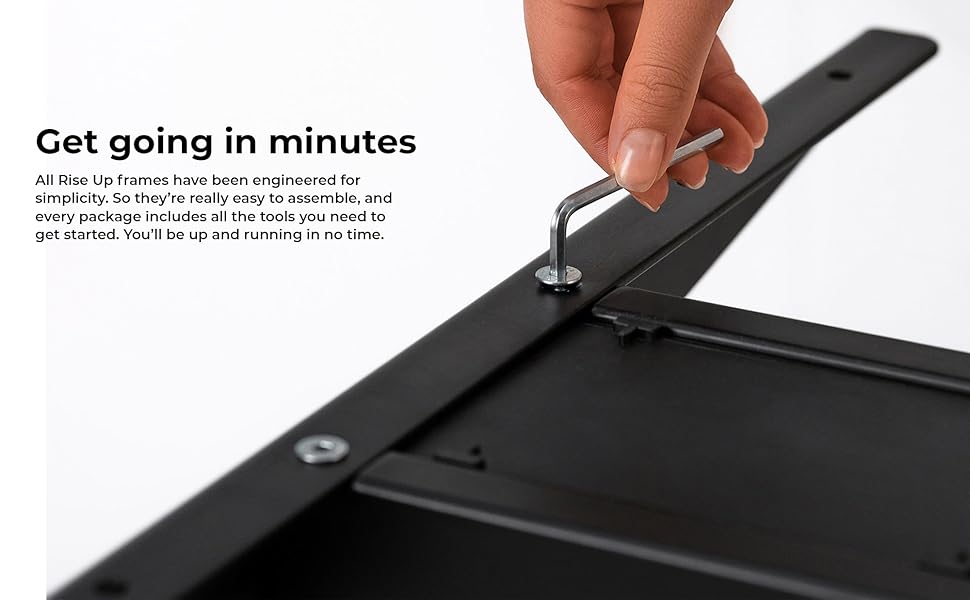
Obraz: Zbliżenie view of an assembly step, showing the use of an Allen wrench to secure a component of the desk frame.
Instrukcja obsługi
The control panel allows for easy and precise height adjustments, along with convenient memory settings.
Panel sterowania nadview
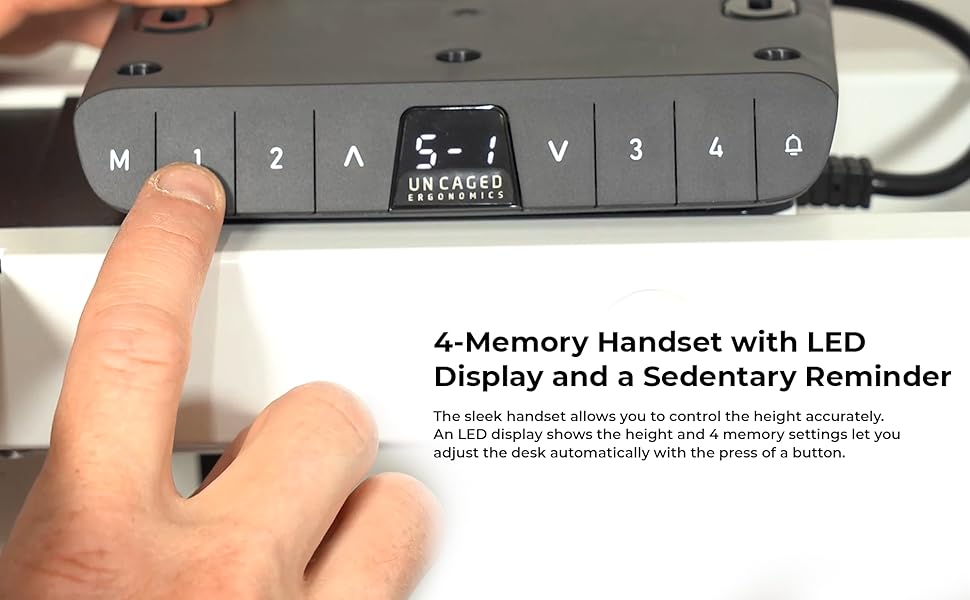
Image: The desk's control panel featuring an LED display for height readings and buttons for manual adjustment and memory presets.
- Przyciski góra/dół (▲ / ▼): Press and hold the Up or Down arrow buttons to manually adjust the desk height. Release the button to stop at the desired height. The LED display will show the current height.
- Memory Settings (1, 2, 3, 4): The desk frame features four programmable memory presets for quick height adjustments.
- Dostosuj wysokość biurka do swoich potrzeb za pomocą przycisków Góra/Dół.
- Press the "M" button. The LED display will show "S-".
- Within 3 seconds, press the desired memory button (1, 2, 3, or 4). The display will show "S-1", "S-2", etc., indicating the height has been saved.
- Aby przywołać zapisaną wysokość, wystarczy nacisnąć odpowiedni przycisk pamięci (1, 2, 3 lub 4). Biurko automatycznie ustawi się w zapisanej pozycji.
- Funkcja zapobiegająca kolizjom: During height adjustment, if the desk encounters an obstruction, it will automatically stop and reverse slightly to prevent damage.

Image: A user comfortably working at the desk in a standing position, demonstrating the ergonomic benefits of height adjustability.
Cechy
The Uncaged Ergonomics Electric Standing Desk Frame is engineered with advanced features for superior performance and user experience.
- System podwójnego silnika: Equipped with two powerful motors for fast, smooth, and quiet height adjustments. Each motor is located in a leg, ensuring synchronized movement and stability.
- Szeroki zakres regulacji wysokości: Seamlessly adjust the desk height from 66 cm (26.1 inches) to 131 cm (51.6 inches), accommodating a wide range of user heights and preferences.
- Adjustable Width Frame: The frame's width can be adjusted from 107 cm (42.3 inches) to 152 cm (71 inches), allowing compatibility with various tabletop sizes.
- 3-Stage Lifting Columns: Trzy-stage leg design provides a greater height range and increased stability, even at maximum extension.
- Technologia antykolizyjna: Advanced sensors detect obstructions during movement, automatically stopping and reversing the desk to prevent damage.
- 4 ustawień pamięci: Save your preferred sitting and standing heights for quick, one-touch adjustments.
- LED Height Display: The integrated LED display on the control panel shows the precise current height of the desk.
- Solidna konstrukcja: Made from high-strength, powder-coated steel for exceptional durability and a sleek finish.
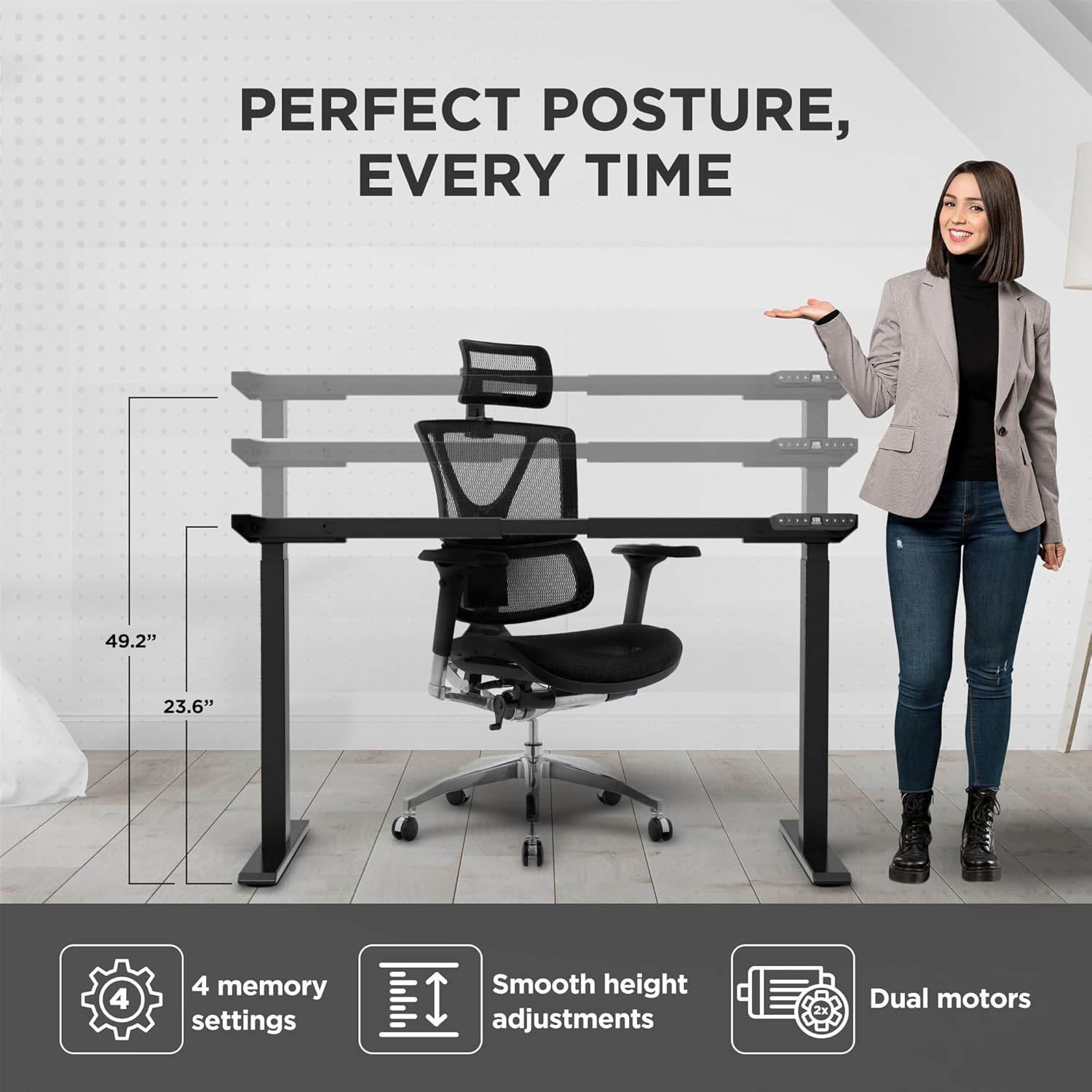
Image: Visual representation of the desk frame's adjustable height and key features, including 4 memory settings, smooth adjustments, and dual motors.

Image: Two individuals, one standing and one sitting, illustrating the wide range of height adjustability offered by the desk frame.
Specyfikacje
| Numer modelu | RUb |
| Marka | Ergonomia bez klatki |
| Kolor | Czarny |
| Zakres regulacji wysokości | 66 - 131 cm (26.1 - 51.6 cala) |
| Zakres regulacji szerokości | 107 - 152 cm (42.3 - 71 cala) |
| Maksymalna nośność | 113 kg (250 funta) |
| Tworzywo | Stal o wysokiej wytrzymałości |
| Skończyć | Malowane proszkowo |
| Silniki | Podwójne silniki |
| Noga Stages | 3-Stage |
| Ustawienia pamięci | 4 |
| Cechy specjalne | Anti-collision technology, LED height display |
| Wymiary produktu (po złożeniu) | 69.85 x 152.4 x 131.06 cm (27.5 x 60 x 51.6 cala) |
| Waga przedmiotu | 22.68 kg (50 funta) |

Image: The desk frame illustrating its compatibility with various tabletop sizes, ranging from 42.3 to 71 inches in width.
Konserwacja
Regular maintenance will help ensure the long-term performance and appearance of your desk frame.
- Czyszczenie: Przetrzyj ramę biurka miękką szmatką.amp szmatką. Unikaj stosowania silnych środków chemicznych lub ściernych środków czyszczących, ponieważ mogą one uszkodzić wykończenie.
- Sprawdź połączenia: Okresowo sprawdzaj dokręcenie wszystkich śrub i nakrętek. W razie potrzeby dokręć je ponownie.
- Zarządzanie kablami: Ensure cables remain neatly organized and are not pinched or tangled, which could affect movement or cause damage.
- Pielęgnacja silnika: The dual motors are designed for durability and require no special lubrication. Avoid exposing them to excessive dust or moisture.
Rozwiązywanie problemów
If you encounter any issues with your desk frame, refer to the common problems and solutions below. If the problem persists, please contact customer support.
| Problem | Możliwa przyczyna | Rozwiązanie |
|---|---|---|
| Biurko nie porusza się i nie reaguje na polecenia. | Power cable disconnected; control box not properly connected; system error. |
|
| Biurko porusza się nierównomiernie lub wydaje nietypowe dźwięki. | Nierównomierne obciążenie, luźne połączenia, przeszkoda. |
|
| Memory settings are not saving or recalling correctly. | Incorrect saving procedure; temporary system glitch. |
|
| Anti-collision feature triggers too often or not at all. | Sensitivity setting; physical obstruction. |
|
Gwarancja i wsparcie
Uncaged Ergonomics is committed to providing high-quality products built for durability and longevity. Our desk frames are designed to meet commercial-grade standards, reflecting over a decade of proven experience in manufacturing ergonomic solutions.
While specific warranty details may vary by region or purchase point, Uncaged Ergonomics stands behind the quality of its products. For any questions, technical assistance, or support needs, please contact Uncaged Ergonomics customer service. Our team is dedicated to ensuring your satisfaction and assisting with any issues you may encounter.
Please visit the official Uncaged Ergonomics website or refer to your purchase documentation for the most up-to-date warranty information and contact details.
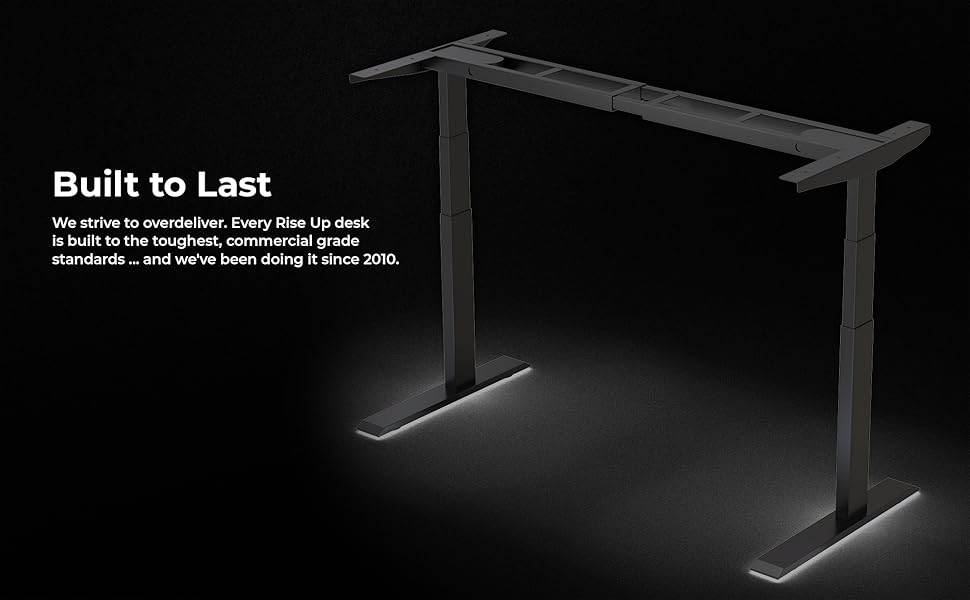
Image: The desk frame illuminated, emphasizing its robust construction and the brand's commitment to building products that are "Built to Last" since 2010.
Ask a question about this manual
Ask about setup, troubleshooting, compatibility, parts, safety, or missing instructions. Manuals+ will review the question and use this page’s manual context to help answer it.