
DOBE TI-465
Instrukcja obsługi bezprzewodowego kontrolera gier DOBE TI-465
Model: TI-465
1. Wprowadzenie
This manual provides comprehensive instructions for the DOBE TI-465 Wireless Gamepad Controller. This device is designed to enhance your gaming experience on various platforms, including Android smartphones, tablets, and PCs. It features wireless Bluetooth connectivity, a built-in rechargeable battery, and a telescopic holder for mobile devices. Please read this manual thoroughly before use to ensure proper operation and maintenance.
2. Informacje dotyczące bezpieczeństwa
- Nie wystawiaj urządzenia na działanie ekstremalnych temperatur, bezpośredniego światła słonecznego i wysokiej wilgotności.
- Unikaj upuszczania i narażania urządzenia na silne uderzenia.
- Trzymaj urządzenie z dala od wody i innych płynów.
- Nie należy podejmować prób demontażu ani modyfikacji urządzenia. Spowoduje to unieważnienie gwarancji i może spowodować uszkodzenia.
- Używaj tylko określonej pojemności ładowaniatage (DC 5V) to prevent damage to the battery and device.
- Przechowywać w miejscu niedostępnym dla dzieci.
3. Zawartość opakowania
Proszę sprawdzić zawartość opakowania po otwarciu. Jeśli brakuje któregokolwiek elementu lub jest on uszkodzony, prosimy o kontakt ze sprzedawcą.
- DOBE TI-465 Wireless Gamepad Controller
- Kabel ładujący USB
- Instrukcja obsługi (ten dokument)
4. Koniec produktuview
The DOBE TI-465 is a versatile wireless gamepad designed for comfortable and precise control across various gaming platforms. It features a standard controller layout with dual analog sticks, a D-pad, action buttons, and shoulder buttons. A built-in telescopic holder allows for direct attachment of smartphones.

Obraz 4.1: Przód view of the DOBE TI-465 Wireless Gamepad Controller with all buttons labeled. This image illustrates the layout of the Cross function button (D-pad), Left Analog Stick, Right Analog Stick, HOME button, SELECT button, START button, L1/L2 Shoulder Buttons, R1/R2 Shoulder Buttons, X emission button, Y emission button, B emission button, and A emission button.
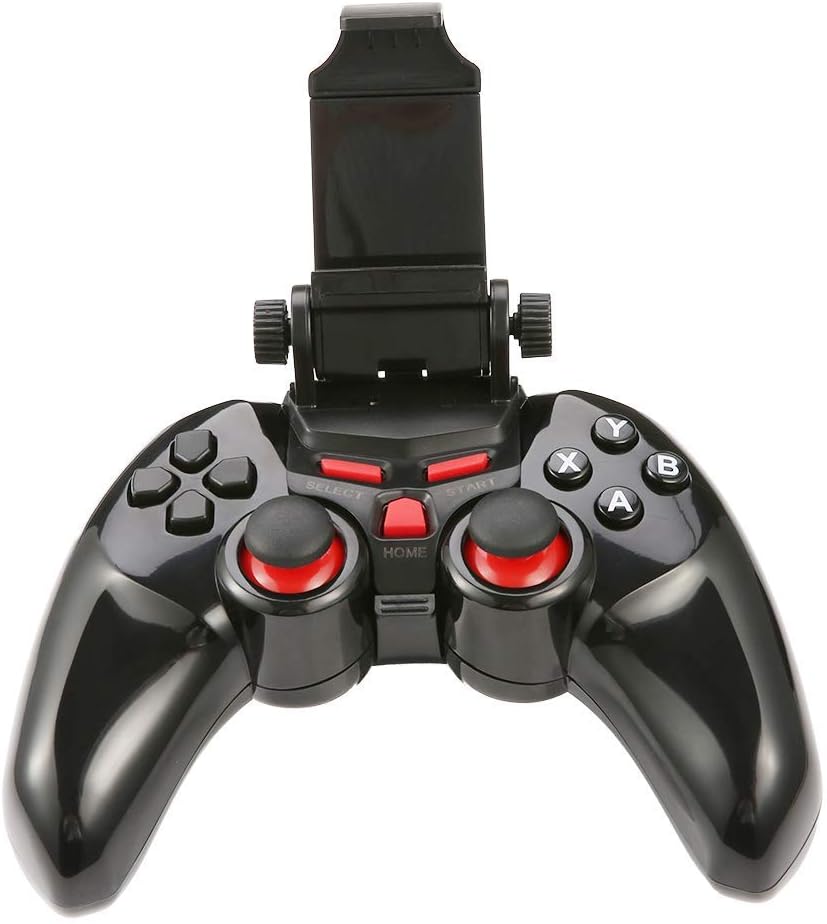
Obraz 4.2: The DOBE TI-465 Gamepad Controller with its integrated telescopic smartphone holder extended upwards, ready to securely hold a mobile device.
4.1 Układ przycisków
- Przycisk wielofunkcyjny (D-pad): Wejście kierunkowe.
- Lewy/prawy drążek analogowy: 360-degree movement control.
- Przyciski A/B/X/Y: Przyciski akcji.
- L1/L2/R1/R2 Shoulder Buttons: Additional action inputs.
- Przycisk WYBIERZ: Game-specific function.
- Przycisk Start: Game-specific function, often for pausing or menu access.
- Przycisk DOMOWY: Returns to the main menu or exits the game.
5. Konfiguracja
5.1 Ładowanie Kontrolera
Before initial use, fully charge the controller.
- Connect the small end of the USB charging cable to the charging port on the controller.
- Podłącz większy koniec kabla ładującego USB do źródła zasilania USB (np. portu USB komputera, zasilacza ściennego USB).
- Zaświeci się kontrolka ładowania. Po pełnym naładowaniu (około 2 godzin) kontrolka zmieni kolor lub zgaśnie.
- Pełne naładowanie umożliwia około 20 godzin ciągłego użytkowania.
5.2 parowanie Bluetooth
The DOBE TI-465 uses Bluetooth 3.0 for wireless connection. Ensure your device's Bluetooth is enabled.
5.2.1 Pairing with Android Devices (Smartphones/Tablets/Android TV)
- Upewnij się, że kontroler jest wyłączony.
- Naciśnij i przytrzymaj DOM button until the indicator light starts flashing rapidly, indicating pairing mode.
- Na urządzeniu z systemem Android przejdź do Ustawienia > Bluetooth.
- Scan for available devices. The controller should appear as "TI-465" or similar.
- Select "TI-465" to pair. The indicator light on the controller will become solid once connected.
5.2.2 Pairing with PC (Windows XP/7/8)
- Upewnij się, że kontroler jest wyłączony.
- Naciśnij i przytrzymaj DOM button until the indicator light starts flashing rapidly.
- Na swoim komputerze przejdź do Ustawienia Bluetooth i innych urządzeń.
- Trzask Dodaj Bluetooth lub inne urządzenie > Bluetooth.
- Select "TI-465" from the list of available devices.
- Follow any on-screen prompts to complete the pairing. The indicator light on the controller will become solid once connected.
5.3 Installing a Smartphone
The integrated telescopic holder supports smartphones up to 6 inches in size.
- Gently pull the top part of the holder upwards to extend it.
- Carefully place your smartphone into the holder, ensuring it is securely gripped by both the top and bottom clamps.
- Dostosuj kąt tak, aby był optymalny viewing.

Obraz 5.1: The DOBE TI-465 Gamepad Controller with a smartphone securely mounted in its telescopic holder, demonstrating its use for mobile gaming.
5.4 Game Hall Application
For optimal compatibility and access to a wide range of games, it is recommended to download a compatible game hall application.
- Scan the QR code provided in the original product manual (not included here) to download the recommended game hall APP (e.g., Chicken Simulator, Grape Game Hall).
- Install the application on your Android device.
- Launch the game hall APP and download games compatible with external controllers.
- Ensure your controller is connected via Bluetooth before launching games from the application.
6. Obsługa kontrolera
6.1 Włączanie/wyłączanie zasilania
- Włączanie: Naciśnij DOM button. The indicator light will flash and then become solid if connected to a previously paired device.
- Wyłączone: Naciśnij i przytrzymaj DOM button for approximately 5 seconds until the indicator light turns off. The controller will also automatically enter power-saving mode if idle for an extended period without a connection.
6.2 Zgodność z grą
The DOBE TI-465 is compatible with Android 3.2 and above systems, including various Android smartphones (e.g., Samsung Galaxy S9/S9+, S10/S10+, HUAWEI Mate 20/P30, OPPO R17, VIVO NEX X23 X27pro), Android TV BOX, Android TV, and PC (Win XP/7/8). It supports simulator games and iTunes compatible controller games.

Obraz 6.1: A user operating the DOBE TI-465 Gamepad Controller while connected to a television, demonstrating its use for TV gaming.
6.3 Tryb oszczędzania energii
The controller is designed with user-friendly software to enter a power-saving mode automatically when not connected or idle for a period. To reactivate, press the DOM przycisk.
7. Konserwacja
7.1 Czyszczenie
- Przetrzyj kontroler miękką, suchą ściereczką.
- Nie należy używać środków czyszczących o działaniu ściernym, rozpuszczalników ani silnych środków chemicznych, gdyż mogą one uszkodzić powierzchnię.
- Unikaj dostania się wilgoci do otworów.
7.2 Pielęgnacja baterii
- Aby przedłużyć żywotność baterii, należy unikać częstego całkowitego rozładowywania baterii.
- Charge the controller regularly, even if not in use for extended periods (e.g., once every 3 months).
- Store the controller in a cool, dry place.
8. Rozwiązywanie Problemów
| Problem | Możliwa przyczyna | Rozwiązanie |
|---|---|---|
| Kontroler nie włącza się. | Bateria jest rozładowana. | Naładuj kontroler do pełna. |
| Nie można nawiązać połączenia przez Bluetooth. | Kontroler nie jest w trybie parowania. Bluetooth w urządzeniu jest wyłączony. Ingerencja. | Ensure controller is in pairing mode (flashing light). Włącz Bluetooth w swoim urządzeniu. Move closer to the device; avoid other wireless devices. |
| Controller connects but does not respond in game. | Game not compatible. Game hall app not used. | Verify game compatibility. Use the recommended game hall app for supported titles. |
| Krótki czas pracy baterii. | Akumulator nie jest w pełni naładowany. Starzejąca się bateria. | Ensure controller is fully charged before use. If battery life significantly degrades, consider contacting support. |
9. Specyfikacje
| Funkcja | Szczegół |
|---|---|
| Model | TI-465 |
| Łączność | Bluetooth 3.0 |
| Zasięg bezprzewodowej | 6-8 meters (19.68-26.24 ft) |
| Objętość roboczatage | Prąd stały 3.7 V |
| Prąd roboczy | 38mA |
| Prąd spoczynkowy | <2uA |
| Wejście ładowania Voltage | Prąd stały 5 V |
| Prąd ładowania | <500 mA |
| Pojemność baterii | 400 mAh |
| Czas pracy | Około 20 godzin |
| Czas ładowania | Około 2 godzin |
| Telescopic Holder Support | Up to 6-inch mobile phone |
| Kompatybilny system operacyjny | Android 3.2+, Windows XP/7/8 |
| Wymiary (w przybliżeniu) | 155mm (6.1 inch) x 105mm (4.1 inch) x 70mm (2.7 inch) (folded) |
| Numer modelu przedmiotu | 611864732190 |

Obraz 9.1: The DOBE TI-465 Gamepad Controller with its telescopic holder extended, showing approximate dimensions: 155mm (6.1 inches) width, 105mm (4.1 inches) height (controller body), and 70mm (2.7 inches) height (extended holder).
10. Gwarancja i wsparcie
Aby uzyskać informacje o gwarancji i pomocy technicznej, zapoznaj się z dokumentacją dołączoną do produktu lub skontaktuj się ze sprzedawcą. Zachowaj dowód zakupu na wypadek roszczeń gwarancyjnych.
Ask a question about this manual
Ask about setup, troubleshooting, compatibility, parts, safety, or missing instructions. Manuals+ will review the question and use this page’s manual context to help answer it.