
AudioCodes UC405HDEG
Instrukcja obsługi telefonu IP AudioCodes 405HD
Model: UC405HDEG
Wstęp
This manual provides comprehensive instructions for the setup, operation, maintenance, and troubleshooting of your AudioCodes 405HD IP Phone. Please read this manual carefully before using the device to ensure proper functionality and to avoid potential issues.
The AudioCodes 405HD is a cost-effective IP phone designed for Voice over IP (VoIP) communication, offering essential features for business and office environments.
Zawartość opakowania
Before proceeding with the setup, verify that all components are present in the package. The standard package for the AudioCodes 405HD IP Phone typically includes:
- AudioCodes 405HD IP Phone Base Unit
- Słuchawka
- Przewód słuchawki
- Kabel Ethernet
- Stojak na biurko
Note: A power adapter is typically not included with this model. The phone is designed to be powered via Power over Ethernet (PoE) or a compatible external power supply (sold separately).
Organizować coś
1. Połączenia fizyczne
Follow these steps to connect your AudioCodes 405HD IP Phone:
- Zamontuj podstawkę na biurko: Align the tabs on the desk stand with the slots on the back of the phone base unit and slide it into place until it clicks securely.
- Podłącz słuchawkę: Plug one end of the coiled handset cord into the handset and the other end into the port labeled with a handset icon on the side of the phone base unit.
- Połącz się z siecią (PoE): If using Power over Ethernet, connect one end of the Ethernet cable to the LAN port on the back of the phone and the other end to a PoE-enabled network switch or router. The phone will power on automatically.
- Connect to Network (Non-PoE with Power Adapter): If not using PoE, connect one end of the Ethernet cable to the LAN port on the back of the phone and the other end to your network switch or router. Then, connect a compatible external power adapter (not included) to the power port on the back of the phone and plug it into a power outlet.
- Połącz z komputerem (opcjonalnie): Jeżeli chcesz połączyć się z komputerem za pomocą telefonu, podłącz kabel Ethernet z komputera do portu PC z tyłu telefonu.
2. Pierwsze uruchomienie
Once connected to power and network, the phone will begin its boot-up sequence. This process may take a few minutes as the phone obtains an IP address and registers with your VoIP service provider. The display will show progress messages. Upon successful boot-up, the display will show the current date, time, and line status.
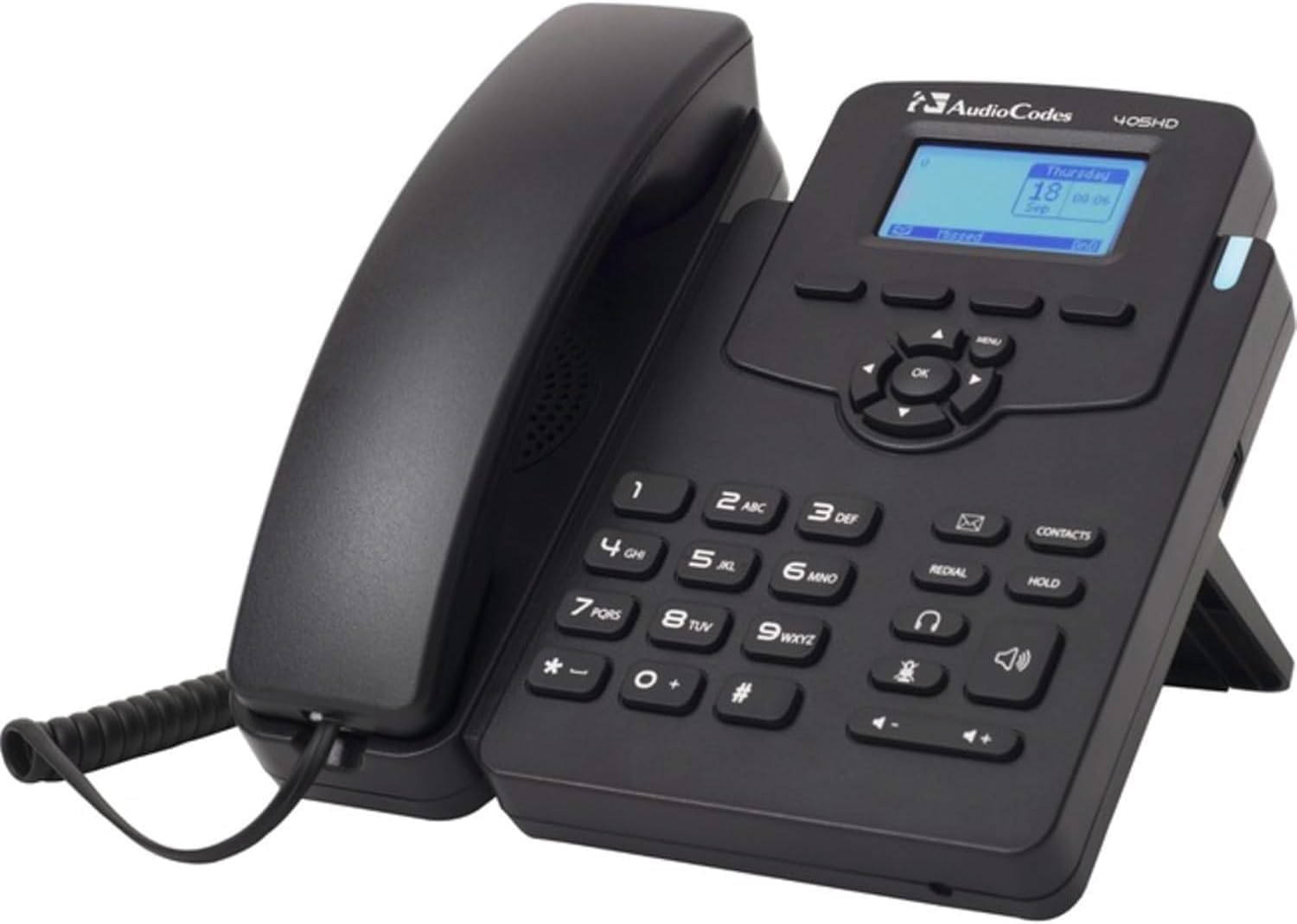
This image displays the AudioCodes 405HD IP Phone, a black corded VoIP phone. The handset is cradled on the left side of the base unit. The base features a numeric keypad, function buttons for redial, hold, contacts, speakerphone, and headset, and a central navigation cluster with an 'OK' button. A small blue-backlit LCD screen shows 'Thursday 18 Sep 00:06'. The phone is designed to stand upright with a built-in kickstand.
Instrukcja obsługi
Podstawowe funkcje wywołania
- Nawiązywanie połączenia:
- Podnieś słuchawkę lub naciśnij Głośnik przycisk.
- Wybierz żądany numer telefonu za pomocą klawiatury.
- Naciśnij Cyferblat soft key (if displayed) or wait for the call to connect automatically.
- Odbieranie połączenia:
- Gdy zadzwoni telefon, podnieś słuchawkę lub naciśnij Głośnik przycisk.
- Alternatywnie naciśnij Odpowiedź soft key (if displayed).
- Zakończenie połączenia:
- Odłóż słuchawkę na miejsce.
- Jeśli używasz głośnika lub zestawu słuchawkowego, naciśnij Zakończ połączenie klawisz funkcyjny lub Głośnik naciśnij przycisk ponownie.
Klawiatura i nawigacja
- Klawiatura numeryczna (0-9, *, #): Służy do wybierania numerów i wprowadzania tekstu.
- Klaster nawigacyjny (góra, dół, lewo, prawo, OK): Used to navigate menus and confirm selections on the display.
- Przycisk menu: Accesses the phone's main menu for settings and features.
- Przycisk ponownego wybierania: Wybiera ostatnio wybierany numer.
- Przytrzymaj przycisk: Wstrzymuje aktywne połączenie.
- Contacts Button: Accesses the phone's contact directory.
- Przycisk głośnomówiący: Włącza/wyłącza tryb głośnomówiący.
- Przycisk zestawu słuchawkowego: Toggles headset mode on/off (if a headset is connected).
- Przyciski głośności (+/-): Umożliwia regulację głośności słuchawki, głośnika lub dzwonka.
Konserwacja
Proper maintenance ensures the longevity and optimal performance of your AudioCodes 405HD IP Phone.
- Czyszczenie:
- Przed czyszczeniem odłącz telefon od zasilania.
- Użyj miękkiego, lekko damp, ściereczka niepozostawiająca włókien do wycierania powierzchni telefonu.
- Do not use harsh chemicals, abrasive cleaners, or aerosol sprays directly on the phone.
- Unikaj dostania się wilgoci do otworów.
- Opieka ogólna:
- Trzymaj telefon z dala od bezpośredniego światła słonecznego, źródeł ciepła i nadmiernej wilgoci.
- Avoid dropping the phone or subjecting it to strong vibrations.
- Zapewnij odpowiednią wentylację wokół urządzenia.
Rozwiązywanie problemów
This section addresses common issues you might encounter with your AudioCodes 405HD IP Phone.
| Problem | Możliwa przyczyna | Rozwiązanie |
|---|---|---|
| Telefon się nie włącza. | No power from PoE switch or power adapter. Defective power adapter or phone unit. |
|
| Brak sygnału wybierania. | Phone not registered with VoIP service. Network connectivity issue. |
|
| Nie można wykonywać ani odbierać połączeń. | No dial tone (see above). Incorrect dialing procedure. Service provider issue. |
|
| Wyświetlacz jest pusty lub nieczytelny. | No power. Display settings. |
|
Specyfikacje
| Funkcja | Szczegół |
|---|---|
| Marka | Kody audio |
| Numer modelu | UC405HDEG |
| Waga przedmiotu | 2.08 funta |
| Kolor | Czarny |
| Typ telefonu | Sznurowy |
| Źródło zasilania | Corded Electric (requires external adapter or PoE) |
| Typ dialera | Pojedyncza klawiatura |
| Typ systemu odbierającego | Cyfrowy |
| Kompatybilne urządzenia | VoIP services, multi-line systems |
| Możliwość prowadzenia rozmów konferencyjnych | Podstawowy |
| Operacja wieloliniowa | Operacja wieloliniowa |
Gwarancja i wsparcie
Information regarding product warranty and technical support for the AudioCodes 405HD IP Phone is typically provided by the original reseller or your VoIP service provider. Please refer to your purchase documentation or contact your vendor for specific details on warranty coverage and support options.
Ask a question about this manual
Ask about setup, troubleshooting, compatibility, parts, safety, or missing instructions. Manuals+ will review the question and use this page’s manual context to help answer it.