
Comix CS-3302
Instrukcja obsługi kalkulatora biurkowego Comix CS-3302 12-cyfrowego
Model: CS-3302 (P/N: 11821063)
Brand: Comix
1. Wprowadzenie
This user manual provides comprehensive instructions for the Comix CS-3302 12-Digit Desktop Calculator. Please read this manual thoroughly before using the calculator to ensure proper operation and to maximize its lifespan. This calculator is designed for general office and school use, featuring a large LCD display, dual power source, and various calculation functions.
2. Informacje dotyczące bezpieczeństwa
- Do not expose the calculator to extreme temperatures, direct sunlight, or high humidity.
- Unikaj upuszczania kalkulatora i narażania go na silne uderzenia.
- Do not attempt to disassemble or modify the calculator. This will void the warranty.
- Use a soft, dry cloth for cleaning. Do not use liquid cleaners or abrasive materials.
- Przechowywać w miejscu niedostępnym dla małych dzieci.
3. Koniec produktuview

Rysunek 3.1: Przód view of the Comix CS-3302 Desktop Calculator, showing the large LCD display and full keypad.
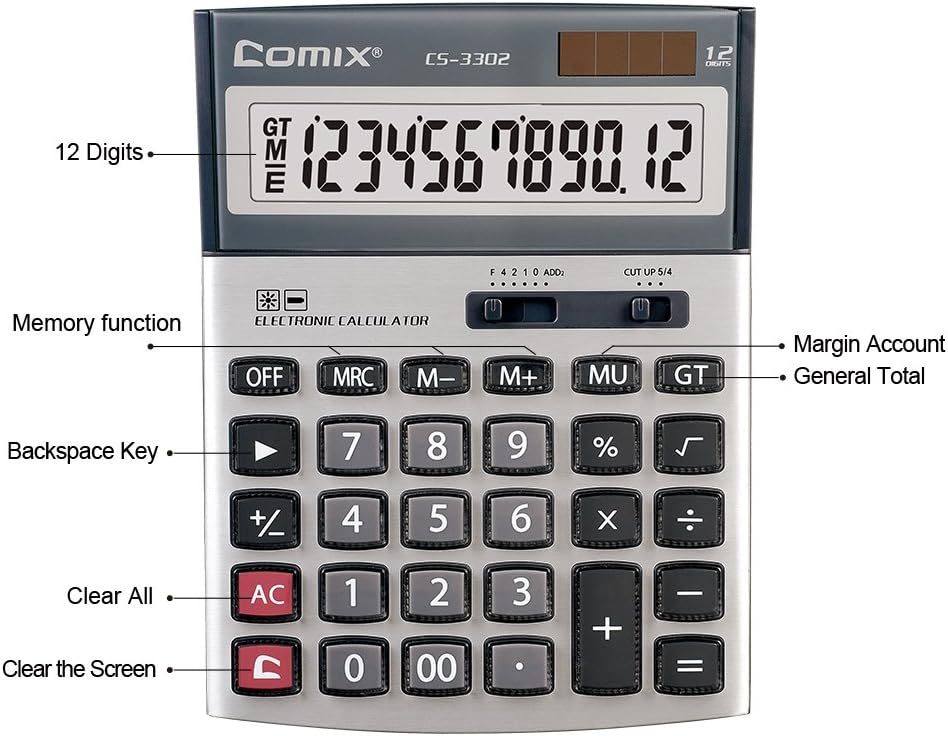
Rysunek 3.2: Key functions and display features of the Comix CS-3302 Calculator, including 12 digits display, memory functions, and clear keys.

Rysunek 3.3: Dimensions of the Comix CS-3302 Calculator, showing its compact and ergonomic design.

Rysunek 3.4: Kątowy view of the Comix CS-3302 Calculator, highlighting its sleek profile i układ klawiszy.

Rysunek 3.5: Strona profile of the Comix CS-3302 Calculator, showing its slim design.

Rysunek 3.6: Retail packaging of the Comix CS-3302 Calculator, highlighting key features like 12 digits, dual power, and acrylic keys.
4. Konfiguracja
4.1 Źródło zasilania
The Comix CS-3302 calculator operates on a dual power system: solar and battery. The solar panel provides power in well-lit environments, while a single AA battery (not included) serves as an auxiliary power source for low-light conditions or when solar power is insufficient.
- Montaż baterii: Locate the battery compartment on the back of the calculator. Open the cover and insert one AA battery, ensuring correct polarity (+/-). Close the battery compartment cover securely.
- Pierwsze włączenie: The calculator should power on automatically when sufficient light is available or with the battery installed. If not, press the WŁ./AC przycisk.
5. Instrukcja obsługi
5.1 Podstawowe operacje
- Dodatek (+): Wprowadź pierwszą liczbę, naciśnij +, wprowadź drugą liczbę, a następnie naciśnij =.
- Odejmowanie (-): Wprowadź pierwszą liczbę, naciśnij -, wprowadź drugą liczbę, a następnie naciśnij =.
- Mnożenie (×): Wprowadź pierwszą liczbę, naciśnij ×, wprowadź drugą liczbę, a następnie naciśnij =.
- Podział (÷): Wprowadź pierwszą liczbę, naciśnij ÷, wprowadź drugą liczbę, a następnie naciśnij =.
- Procenttagmi (%): Wprowadź numer, naciśnij × (Lub ÷), enter the percentagwartość e, a następnie naciśnij %. Na przykładampnp. aby obliczyć 10% z 200, wprowadź 200 × 10 %.
- Pierwiastek kwadratowy (√): Wprowadź numer, a następnie naciśnij √.
5.2 Funkcje specjalne
- OFF: Powers off the calculator.
- AC (wszystko jasne): Clears all entries and memory, resetting the calculator to its initial state.
- C (Czyste wejście): Clears the last entered number or the current display value without affecting previous calculations or memory.
- Klawisz Backspace (►): Usuwa ostatnią wprowadzoną cyfrę.
- M+ (Pamięć Plus): Dodaje wyświetloną wartość do pamięci.
- M- (Pamięć Minus): Odejmuje wyświetloną wartość od zawartości pamięci.
- MRC (przywołanie/kasowanie pamięci): Naciśnij raz, aby przywołać wartość z pamięci. Naciśnij dwa razy, aby wyczyścić pamięć.
- MU (Mark Up / Margin Account): Used for profit margin calculations. Enter cost, press MU, enter selling price, then press = to get the profit margin.
- GT (suma całkowita): Accumulates the results of all calculations. Pressing GT displays the grand total.
- +/- (Zmiana znaku): Zmienia znak wyświetlanej liczby (dodatniej na ujemną lub ujemnej na dodatnią).
5.3 Decimal and Rounding Settings
The calculator features two slide switches at the top for controlling decimal places and rounding:
- Decimal Selector (F 4 2 1 0 ADD2):
- F (Floating Decimal): Wyświetla wszystkie dostępne miejsca dziesiętne.
- 4, 2, 1, 0: Sets the number of decimal places to 4, 2, 1, or 0 respectively.
- ADD2 (Add Mode): Automatically adds two decimal places to all results, useful for currency calculations.
- Rounding Selector (CUT UP 5/4):
- CUT (Cut Off): Truncates the number, discarding all digits beyond the set decimal places.
- UP (Round Up): Rounds up the last digit if there are any non-zero digits beyond the set decimal places.
- 5/4 (Round Half Up): Rounds up if the first discarded digit is 5 or greater, otherwise rounds down.
6. Konserwacja
- Czyszczenie: Wipe the calculator surface with a soft, dry cloth. For stubborn dirt, slightly dampen the cloth with water, but ensure no liquid enters the calculator. Do not use chemical cleaners.
- Składowanie: When not in use for extended periods, store the calculator in a cool, dry place away from direct sunlight and extreme temperatures.
- Wymiana baterii: If the display becomes dim or unresponsive in low light, replace the AA battery. Ensure the calculator is off before replacing the battery.
7. Rozwiązywanie Problemów
| Problem | Możliwa przyczyna | Rozwiązanie |
|---|---|---|
| Wyświetlacz jest pusty lub przyciemniony. | Niewystarczające oświetlenie do zasilania energią słoneczną lub niski poziom naładowania akumulatora. | Move to a brighter area or replace the AA battery. |
| Nieprawidłowe wyniki obliczeń. | Incorrect input, incorrect decimal/rounding settings, or memory interference. | Naciskać AC to clear all and restart. Check decimal and rounding switch positions. Ensure correct key presses. |
| Klawisze nie reagują. | Calculator frozen or physical damage. | Spróbuj nacisnąć WYŁĄCZONY Następnie WŁ./AC. If problem persists, remove and reinsert battery. If still unresponsive, contact support. |
8. Specyfikacje
| Marka | Komiksy |
| Numer modelu | CS-3302 (P/N: 11821063) |
| Wyświetlacz | 12-cyfrowy wyświetlacz LCD |
| Źródło zasilania | Dual Power (Solar & 1x AA Battery - not included) |
| Tworzywo | Akryl, Metal |
| Wymiary (dł. x szer. x wys.) | Około 23.6 x 15.7 x 4.3 cm (9.3 x 6.2 x 1.7 cala) |
| Waga | Około 322 g (0.71 funta) |
| Temperatura pracy | -25 ℃ to +60 ℃ (-13 ℉ to +140 ℉) |
| UPC | 842064102524 |
9. Gwarancja i wsparcie
Comix products are designed for quality and durability. This product comes with a 3-letnia gwarancja od daty zakupu, obejmując wady materiałowe i wykonawcze wynikające z normalnego użytkowania.
For warranty claims, technical support, or any inquiries regarding your Comix CS-3302 calculator, please contact Comix customer service through their official website or the retailer where the product was purchased. Please have your proof of purchase and the product model number ready when contacting support.
For more information, visit the official Comix webstrona: www.comix.com
Powiązane dokumenty - CS-3302
 |
Instrukcja obsługi bezprzewodowego systemu mikrofonowego Hollyland LARK M1 Kompleksowa instrukcja obsługi bezprzewodowego systemu mikrofonowego Hollyland LARK M1, szczegółowo opisująca jego funkcje, konfigurację, obsługę, specyfikacje i wytyczne bezpieczeństwa. |
 |
TRP VISTAR wyświetla komunikat TRP VISTAR 使用者手冊提供了 VISTAR系列自行車零件的安裝,操作和維護指南,包括變速器,煞車,飛輪,BB和曲柄組等組件的詳細說明。 |
 |
Instrukcja obsługi kalkulatora naukowego CATIGA CS-229 Instrukcja obsługi kalkulatora naukowego CATIGA CS-229 obejmuje ogólny opis, obliczenia ręczne, funkcje naukowe, funkcje graficzne, obliczenia statystyczne, regresję, całkowanie, liczby zespolone i wymianę baterii. |
 |
TRP VISTAR 使用者手冊:自行車零件安裝與操作指南 詳細的使用者手冊,涵蓋 TRP VISTAR系列自行車零件(包括變速器,煞車、飛輪、曲柄組等)的安裝、設定、維護和操作說明。提供專業騎行者與自行車維修技師的完整指南。 |
 |
Suplement do instrukcji serwisowej nadajnika-odbiornika UHF FM Kenwood TK-3302 (wersje K2, K3, M2) Dodatek do instrukcji serwisowej do nadajnika-odbiornika UHF FM Kenwood TK-3302, obejmujący wersje K2, K3 i M2. Zawiera szczegółowe informacje na temat konfiguracji systemu, regulacji, demontażu, opisu obwodów, listy części i rozkładu. views, pakowanie, procedury regulacji, płytki PC, schematy schematyczne, schematy blokowe, schematy poziomów i specyfikacje. |
 |
Instrukcja obsługi kalkulatora naukowego CATIGA CS-121 Kompleksowa instrukcja obsługi kalkulatora naukowego CATIGA CS-121, obejmująca ogólny opis, obliczenia ręczne, funkcje graficzne, wymianę baterii oraz analizę statystyczną/regresyjną. |